Table of Contents
Whether a business needs a web application or a website is a hot debate. Now, every business needs “presence on the web”. There’s no arguing that. 93-94% of B2B buyers and around 78% of b2c customers rely on online sources, at more than one stage of their buying journey.
For some businesses, that means a simple website. But other businesses might need a web-accessible application, instead of a simple website. What’s the difference between the two? This blog discusses that in detail.
What Is a Web Application?
A web application is software that runs in a browser. Its purpose is not just to display preset content but also to let users accomplish tasks.
Those tasks change the state of the system for that user or for other users. Gmail, Google Docs, Figma, Trello, Shopify, LinkedIn, and your bank’s online portal are all web applications. The content you see when you log in is generated specifically for you, on the spot, based on your data.
From a user’s perspective, here’s what a Web App is, in a nutshell:
- Dynamic and personalized
- Displays content and allows users to interact with the elements
- Accessible via Browser
- Heavier than websites (up to 5mb/page)
What Is a Website?
A website is a collection of pages that display content. The content is written in advance by whoever owns the site, and every visitor sees the same thing. A company homepage, a portfolio, a blog, a news publication, a documentation portal: all of these are websites. Their job is to publish information and make it accessible via the web. Forbes, Hudasoft.com, and Clutch.com are all examples of websites.
In a nutshell, a website, when viewed from a user’s perspective, is:
- Static and non-personal
- Displays Content
- Accessible via Browser
- Light (ideally under 2 mbs/page) and faster to load
A Comparative Overview of Web Application vs Website
| Feature | Website | Web Application |
| Primary Purpose | To inform; focuses on displaying static content (portfolios, news, company info). | To perform; focuses on helping users achieve goals (tasks, calculations, social interaction). |
| Interactivity | Low. Limited to reading and simple form submissions (e.g., a “Contact Us” form). | High. Actions change the system state (creating items, sending messages, making purchases). |
| Personalization | None. The same URL delivers the same content to every visitor. | Dynamic. The server constructs unique responses based on the logged-in user’s data. |
| Data Persistence | Minimal. Does not typically store user-specific data or history. | Critical. Every action is saved in a database so the user can return to their work later. |
| Authentication | Optional. Rarely requires a login as there is no private data to protect. | Essential. Identity is the foundation for privacy, permissions, and custom data. |
| Scalability | Simpler. Uses “caching” to serve identical pre-built pages to millions of users. | Complex. Requires load balancers and database replication to handle unique queries. |
| Tech Architecture | Simple; can be just HTML/CSS files on a basic server. | Complex; requires a Frontend, Backend, and Database working in sync. |
| Integrations | Rare; might use a simple third-party widget for emails or payments. | Frequent; uses APIs to connect with calendars, payment processors, and messaging tools. |
| Security | Focuses on encryption (HTTPS) and preventing basic script injection. | Requires rigorous measures: data encryption at rest, session management, and sanitization. |
| Development | Lower cost/complexity; can be built in days using a CMS or simple theme. | High cost/complexity; requires multiple engineers and ongoing infrastructure maintenance. |
| Hosting | Inexpensive; often hosted on a CDN to deliver files from the nearest data center. | Variable cost; usually hosted on Cloud Platforms (AWS/Azure) with active monitoring. |
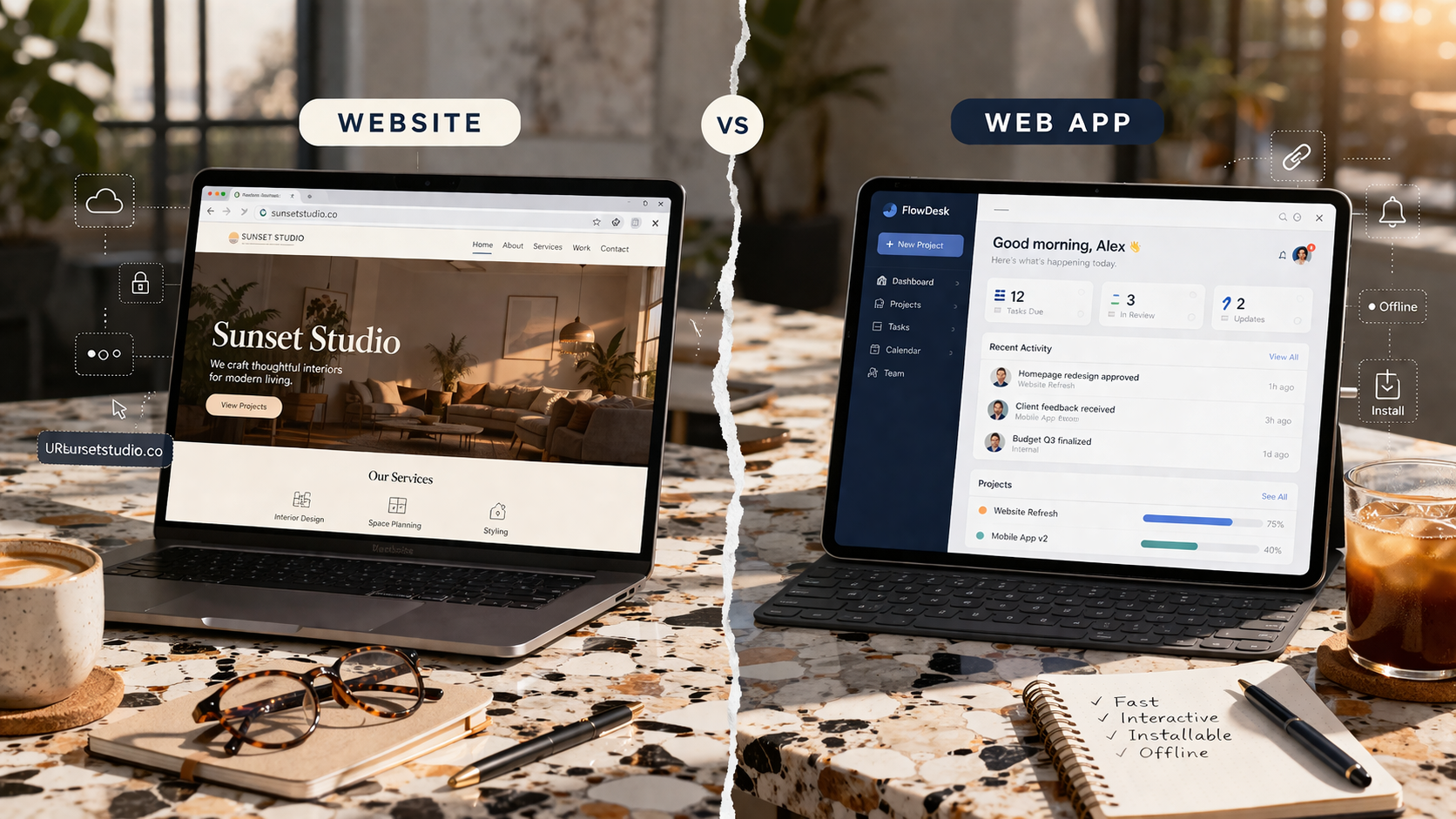
Web App vs. Website Demonstrated Through Visual Examples

The image clarifies the difference. A website informs through words and allows simple actions like visiting another page from the menu or requesting a call. A web app gives users multiple choices of action, from logging in to playing/pausing a particular track, adding multiple tracks in que, or creating a custom playlist.
10 Major Differences Between a Website and a Web Application
The major similarity between the web application and a website is that both are accessible via the web. Everything else is different. Here’s the detailed breakdown of the differences between websites and web applications.
1. Interactivity
The most observable difference between a website and a web app is the level and depth of interaction each allows.
How does a website allow users to interact?
On a website, visitors read and occasionally submit a form. The server receives the form submission and, typically, sends an email to the site owner. That is the full extent of what a visitor can do.
How do users interact with a web app?
In a web app, users take actions that change the system in persistent ways. They create to-do items that are stored and retrievable. They send messages that appear in another user’s inbox. They add products to a cart and complete a purchase that generates an order record. They configure account settings that affect how the app behaves for them going forward. Every action has a consequence that is saved in a database. When the user returns tomorrow, everything they did yesterday is still there, because the database retained it.
2. Personalization
Another easily distinguishable factor between a website and a web application is how personalized the experience a user gets with each.
Website (low personalization)
A website presents the same content to all visitors. Two people loading the same URL receive the same page, because there is only one version of that page.
Web App (High Personalization)
A web app constructs a different response for each logged-in user. When you open Spotify, the server identifies you by your login credentials, queries the database for your playlists and listening history, generates recommendations based on that data, and sends all of it back to your browser. Another user opening the same URL triggers the same process but receives completely different content, because the server queries their data, not yours. The URL is the same. The response is different because the user is different.
3. Functionality
The functionalities that a website and a web application are capable of differ greatly. A website serves basics, whereas a web app has room for complex functions.
Website’s functionality
Websites display information. A company describes its services. A journalist publishes an article. A photographer shows a portfolio. The information is fixed; it does not change in response to what the visitor does.
Web App’s functionality
Web apps help users achieve goals that require computation and data storage. A project management app lets a team track tasks across weeks and assignees, maintaining a shared record of who did what and what remains to be done. An accounting app calculates tax liability based on the income and expense data the user has entered. A design tool lets multiple users edit the same file simultaneously, coordinating their changes in real time. This kind of functionality requires a database to persist data, a backend to process it, and often a mechanism for pushing updates from the server to the browser without the user having to reload the page.
4. Scalability
The level to which a website can be scaled is limited compared to a web application.
A website’s scalability
A website serves the same content to one visitor or a million. Scaling it is mostly a question of server capacity: can the server deliver pages quickly enough when many people visit at once? A common solution is caching, which means pre-generating pages and storing them so the server can send them out without rebuilding them for each request. Because the content is identical for all visitors, this works straightforwardly.
A web application’s scalability potential
Web apps scale differently because each user’s experience is personalized and therefore cannot be cached in the same way. The database has to handle thousands of simultaneous queries, each requesting different data. The backend logic runs once per user action, meaning a burst of user activity translates directly into a burst of server-side processing. A web app like Zillow processes search queries, filters listings by dozens of criteria, updates prices, and assembles different result sets for thousands of users at the same time. Handling that reliably requires a more sophisticated infrastructure: load balancers that distribute incoming requests across multiple server instances, database replication that maintains copies of the data so no single point of failure takes the system down, and caching strategies that are more selective because the data is user-specific.
Web apps can also be extended to mobile devices in a way that websites cannot. Because the application logic lives on the backend server rather than in the HTML pages, the same backend can power a browser-based interface and a native mobile app simultaneously. The Airbnb mobile app and the Airbnb website connect to the same server, the same database, and the same business logic. Only the interface layer differs.
5. Authentication and User Identity
Most websites do not require a login because they have no reason to know who you are. The content is the same regardless.
Web apps are built around the concept of a user identity. Without knowing who you are, the application cannot show you your data rather than someone else’s, enforce any concept of privacy, apply permissions (some users can see certain data, others cannot), or associate a subscription or payment with your account. Authentication is not a feature added later; it is the architectural foundation on which everything else depends.
In practice, authentication works like this: when you create an account, the server takes your password, runs it through a cryptographic hashing function, and stores the resulting hash in the database. A hash is a fixed-length string of characters generated by an algorithm that cannot be reversed, meaning the original password cannot be derived from the stored hash. When you log in, the server hashes the password you submit and compares it to the stored hash. If they match, the login succeeds. The server then issues a session token or a signed cookie, which is a piece of data sent to your browser that proves you are authenticated. Your browser sends this token with every subsequent request, and the server checks its validity before responding. This is how the server knows, on every request, which user it is talking to.
More sensitive applications add multi-factor authentication, which requires a second proof of identity, such as a code sent to your phone, and role-based access control, which defines what different categories of users are permitted to see and do. A regular employee using a company’s internal tool, for instance, should not be able to access payroll data that only an administrator can see.
6. Technical Architecture
Technical architecture is another aspect that differentiates a simple website from a web application.
A Website’s Simple Architecture
A website’s technical stack can be as simple as HTML files on a server. The server receives a request for a URL, finds the file, and sends it back.
A Web App’s Layered Architecture
A web app requires at a minimum three distinct layers working together.
- The frontend is the code that runs in the user’s browser and handles the interface: what the user sees and how they interact with it. It manages the application’s state: what the user has done, what data has already been fetched, what should currently be visible, and how the interface should respond when the user takes an action while data is still loading.
- The backend is the code that runs on a server and handles business logic: what the application does in response to user actions. It handles requests from many users simultaneously without one user’s data appearing in another user’s response, which requires careful handling of how data is queried and returned.
- The database is where data is persistently stored, covering user accounts, created content, transaction records, and settings. The database must be structured so that even as the data grows to millions of records, queries for a specific user’s data remain fast.
These three layers communicate continuously. The frontend sends a request to the backend (for example, “load this user’s tasks”), the backend queries the database, the database returns the data, the backend processes it, and the result flows back to the browser.
7. Third-Party Integrations
A basic website might embed a payment processor if it sells products, or use an email tool to collect newsletter subscribers. These are exceptions to the norm.
Web apps are frequently designed to communicate with many external services simultaneously. A customer relationship management tool integrates with an email provider to send outreach, a calendar system to schedule meetings, a telephony service to log phone calls, and a billing platform to manage invoices. An e-commerce platform integrates with payment processors to charge customers, shipping carriers to generate labels and track packages, inventory systems to update stock levels, and fraud detection services to flag suspicious orders. These integrations work through APIs, which stand for Application Programming Interfaces. An API is a defined interface through which one software system can send requests to another and receive structured data in return. When your project management tool sends you a Slack notification, it is because the project management tool’s backend made an API call to Slack’s servers, passing along the message content.
The more integrations a web app depends on, the more external dependencies exist that can change their behavior, update their API, experience downtime, or change their pricing. Managing these dependencies is a real and ongoing part of maintaining a web app.
8. Security
Security protocols also differ for websites and web applications.
A website’s security essentials
A website’s primary security concerns are keeping the server software up to date, using HTTPS (which encrypts the connection between the browser and the server so that data in transit cannot be intercepted), and protecting against attacks that try to inject malicious content into pages through a technique called Cross-Site Scripting (XSS).
Security standards for a web application
A web app’s security requirements are more extensive because it stores and processes sensitive data. A banking app stores account numbers and transaction history. A health platform stores medical records. An e-commerce site processes payment card information. The consequences of a breach are more serious, which means the security measures must be more rigorous.
Data Encryption and Session Management
Web app security requires encrypting sensitive data both in storage and in transit. This ensures that even if a database is stolen, the information remains unreadable.
Sessions must also be strictly controlled. Login tokens should expire automatically after periods of inactivity and must be invalidated immediately upon logout to prevent unauthorized reuse.
Input Validation and Sanitization
All user-submitted data must be validated and sanitized. The server verifies that form inputs conform to expected formats and strips out any executable code.
This process is critical for preventing SQL injection, where attackers attempt to manipulate database queries. It also blocks Cross-Site Scripting (XSS) attacks, which involve injecting malicious code into content viewed by other users.
Authorization and Monitoring
Authorization checks must be enforced on every individual request, not just during the initial login. This ensures that users are restricted to accessing or modifying only their own data.
Finally, comprehensive access logs should be maintained. These logs allow teams to detect, track, and investigate unusual activity or potential security breaches.
9. Development Complexity and Cost
Websites are low-cost, faster, and significantly simpler to build compared to web apps.
Developing a Website
A straightforward website can be built by one person in days or weeks using a CMS, a pre-built theme, and a hosting plan costing a few dollars per month. The ongoing maintenance is mostly content updates and occasional software version upgrades.
A custom website can be built for as low as $1000 in the US. Other than custom, businesses also have options to use no-code website builders such as Wix.com, with plans starting from $29.
Developing a Web Application
A web app requires work across multiple disciplines: frontend development to build the interface, backend development to write the business logic, database design to structure how data is stored and queried, authentication to manage user identity, security review to identify vulnerabilities, and infrastructure management to keep the servers running reliably. This work typically takes multiple developers months to complete. The ongoing cost includes server infrastructure, monitoring systems that alert the team when something fails, and continued development as new requirements are identified.
For web applications, the cost in the US averages between $20,000 and $50,000, with competitive options that offer quality web apps for as low as $15,000.
10. Deployment and Hosting
A website is typically hosted on a simple web server or a CDN (Content Delivery Network). A CDN stores copies of the site’s pages in data centers located around the world. When a visitor requests the page, they receive it from the data center closest to them, which reduces loading time. The hosting is inexpensive, and the setup is straightforward.
A web app requires more infrastructure. The backend server must be running continuously, ready to respond to requests at any hour. The database must be backed up on a regular schedule so that data can be recovered if something goes wrong. If the number of users grows, the server infrastructure must scale to match. Monitoring systems must watch for errors and performance degradation so the team can respond before users are significantly affected. Most web apps today are deployed on cloud platforms like AWS, Google Cloud, or Azure. These platforms provide servers, databases, networking, and monitoring tools as configurable services, removing the need to manage physical hardware. Using them effectively still requires expertise, and costs increase with usage.
The Progressive Spectrum of Website to Web App
The website and web app distinction is not a binary choice. Real products often exist somewhere between the two ends, and the boundary shifts depending on what features are added.
A blog is clearly a website. Add a comment system with user accounts and upvoting, and it starts acquiring web app characteristics: the server now needs to know who is logged in, store their comments, and associate votes with specific users.
Turn a static website dynamic by adding a paid subscription that unlocks different content for paying members, a newsletter management tool that tracks open rates per subscriber, and author dashboards showing how many people read each article, and the product is now entering into web app territory, even though it still looks and feels like a blog from the outside.
Like the overlap between a website and a web app, there is an overlap between a web app and a progressive Web App. PWAs are applications that are capable of using the device’s native functionalities (camera, microphone, etc.), which regular web apps don’t use. But there is a grey area between where it’s justified to call an app both a PWA and a simple web app.
This distinction isn’t merely theoretical. Understanding this spectrum matters for two reasons. First, it affects how you architect and build the product from the beginning. A simple website does not need an authentication infrastructure or a complex backend. If you build it as a simple website and later add web app features, you are retrofitting a structure that was not designed for them, which tends to create compounding technical problems.
Second, it affects ongoing maintenance and cost. Every web app feature you add (user accounts, stored data, external integrations) becomes a component that can fail, requires monitoring, and needs updating when the systems it depends on change.
A web app runs inside a browser and is constrained by what browsers are permitted to do. Hybrid approaches exist: React Native is a framework that lets developers write code in JavaScript that compiles into a native app for both iOS and Android, often sharing logic with a web app.
When Is Building a Simple Website Enough?
Build a website when your goal is to communicate. If you need to explain who you are, what you offer, how to reach you, and why someone should trust you, a website accomplishes this well and at relatively low cost.
Brand and marketing presence.
A company that sells through a sales team rather than through a self-serve product needs a website to give potential customers the information they need before a sales conversation. A well-designed site that loads quickly and ranks in search results serves this purpose. No user accounts, no stored data, no backend logic required.
Documentation or informational resource.
Technical documentation, a knowledge base, or an instructional site presents information that does not vary by user. A website is the appropriate tool, and modern static site generators make it easy to maintain large documentation sites without a complex backend.
Blog or publication.
Content publishing is the foundational use case for the web. Even large publications with millions of readers are fundamentally websites. The content is authored by editors and read by visitors. The experience is the same for all readers, apart from a subscription paywall on some sites.
The common thread across all of these: the experience is defined by the publisher, not shaped by the user.
When Should You Opt for a Web App Instead of a Website?
Build a web app when users need to accomplish tasks that require storing, retrieving, or processing their own data.
Your product requires different user accounts and personalized data
If different users need to see different content (their own files, their own orders, their own messages), you need a web app. The moment you introduce user accounts with data specific to each user, you need authentication, a database, and a backend capable of querying and returning the right data for the right person.
Your product requires specialized tools
If you are building something that helps people do work, whether that is managing projects, tracking finances, designing assets, or writing collaboratively, you are building a web app. The user interacts with the tool to produce an output, and that output must be stored somewhere so the user can return to it.
Your product is a marketplace or a platform
Airbnb, Etsy, and Upwork connect multiple parties who each have their own accounts, data, and transaction histories. Managing multiple user roles (buyers and sellers, hosts and guests, freelancers and clients) and the relationships and permissions between them requires a web app architecture with careful database design.
Your product involves transactions
If money moves through the product through purchases, subscriptions, or payouts, you need a web app. Payment processing requires user accounts to associate with orders, order history stored in a database, and backend logic to communicate securely with payment providers and handle success and failure states.
Your product needs social features
Messaging, following, commenting, and content sharing all require a web app backend. When one user’s action (posting a comment, sending a message) needs to appear in another user’s interface, the server has to manage the relationship between those users, store the content, enforce permissions, and deliver notifications.
Platforms(low-code) You Can Use to Build Websites and Web Apps
The landscape of web development in 2026 has shifted significantly toward “vibe coding” (natural language prompts) and modular architectures. Whether you’re a founder building a SaaS or an enterprise developer automating internal workflows, the choice of platform now depends heavily on where you want to “own” your code.
These platforms are the “industry standards” for building everything from marketing sites to complex, data-driven web applications.
Webflow
Webflow is a professional design tool that translates visual layouts into clean, production-ready HTML, CSS, and JavaScript. It provides granular control over typography and layout, making it the preferred choice for high-performance marketing sites that require precise aesthetic customization and SEO optimization.
Wix
Wix is an accessible website builder that uses a drag-and-drop interface and AI-assisted design to simplify site creation for small businesses. Through its specialized Wix Studio tier, it offers advanced responsive design tools and integrated business modules for e-commerce, scheduling, and client management.
Glide
Glide is a data-centric platform that converts spreadsheets from Google Sheets, Airtable, or Excel into functional web applications. It focuses on speed and utility, making it ideal for internal business tools like inventory systems and employee directories, where the data structure dictates the interface.
Apart from these popular website builders, there are tools specifically designed to build web apps with minimal coding. Examples include Bubble, Retool, Appsmith, Microsoft Power Apps, Appsmith and Superblocks.
The Limitations of Low-Code for Web Apps
While the “speed to market” is unmatched, low-code comes with “ceilings” that every developer eventually hits.
- Vendor Lock-in: This is the #1 risk. On platforms like Bubble or Power Apps, you cannot “download” your code and move it to a different host. If the platform raises prices or goes down, your app goes with it.
- The “Performance Ceiling”: Low-code platforms add “abstraction layers” that make development easy but execution heavy. For apps with millions of concurrent users or complex real-time data processing, low-code can become sluggish and expensive to scale.
- Limited Customization (The 90/10 Rule): You can build 90% of your app in two days, but the final 10% (requiring a specific, unique animation or a niche third-party integration) might be impossible because the platform doesn’t support that specific “block.”
- Security & Shadow IT: When “citizen developers” (non-IT staff) build apps, they often overlook data governance, leading to security vulnerabilities or “leaky” databases that IT isn’t even aware exist.
- Debugging Complexity: When something breaks in the “black box” of a low-code platform’s backend, you are dependent on their support team rather than being able to fix the source code yourself.
The Solution: Custom Web Application Development
To bypass the limitations of low-code platforms for web apps, businesses can choose to partner with a specialized web application development company like Hudasoft.
We build web applications designed to accomplish business goals that are not possible with a simple website. Goals like scalability needs, complex integrations, or role-based customization.
What makes us stand apart is our transparency (with clear deadlines, detailed progress reports), close coordination with the client, and experience building web apps for several industries, and 20+ active deployments across the US, including BrownCoach (edtech) and StatBoard (sports).
How Should a Business Decide Between a Website and a Web App?
To decide whether its a simple website you need or a web application, go over this simplified checklist of factors to consider:
| Decision Factor | Choose a Website, if; | Choose a Website, if |
| Personalization | Uniform content. Every visitor sees the same information (e.g., a landing page or blog). | User-specific data. Content changes based on preferences, profile, or history. |
| Data Persistence | Minimal to none. Users browse and leave; no personal data is stored long-term. | High. Users create, store, and modify data that remains saved after the session ends. |
| User Interaction | One-way. The user consumes content provided by the owner. | Multi-way. Users interact with each other; one person’s actions affect another’s experience. |
| Primary Purpose | To Inform. Designed for reading, viewing, and general information gathering. | To Accomplish. Designed as a tool to complete specific tasks or workflows. |
| Infrastructure | Simple. Can often be built with no-code tools or CMS (like WordPress). | Complex. Requires a database and a backend to manage logic and security. |
| Constraints | Cost-Effective. Lower budget and faster timeline; ideal for simple needs. | Higher Investment. Requires more time and budget to handle growth and complexity. |
One trap worth naming explicitly: building with a website platform and then trying to add web app functionality on top of it. It is technically possible to add a login page to a WordPress site using plugins, for instance. But the underlying architecture was not designed for complex user-specific data or business logic, and scaling or securing it as requirements grow becomes progressively harder. If the product roadmap includes web app features, the better approach is to design for them from the start, even if the first version is simple. Retrofitting is almost always more expensive than building correctly from the beginning.
Final Words
Both websites and web apps have their value. A website publishes content and serves as a central digital hub for marketing and branding, ideal for businesses looking to build authority and familiarity with their audience through exposure.
A web app, on the other hand, lets businesses interact with their audience more deeply. A web application responds to each user differently, processes their input, stores their data, and returns something different from what any other user would receive.
From a development perspective, web apps require more architectural planning, more rigorous security, more infrastructure, and more ongoing maintenance, whereas a website can be built on simple frontend frameworks.
For businesses, the decision of web app v website comes down to this simple fact: if the goal is to communicate (to tell people who you are, what you do, how to reach you), a website is the right tool. If the goal is to let users do something (to track, create, transact, or collaborate), it is a web app, and it should be designed and built as one from the beginning.
Leave a Reply