Table of Contents
Ever feel like building an app is a bit like trying to assemble a 1,000-piece puzzle without the picture on the box? You have a brilliant idea, but the gap between “brainstorm” and “App Store” feels like a giant, confusing void.
If you’ve ever worried about wasting time on features nobody wants or blowing your budget before the app even launches, you aren’t alone. The truth is, a great app isn’t just about cool code; it’s about a rock-solid application development process that keeps everything on track.
Let’s go through the blog to see how you can turn your vision into a reality without the headaches.
Planning and Requirement Analysis
Before a single line of code is written, you need a game plan. This is the “look before you leap” phase, where you define exactly what success looks like. Skipping this is like starting a road trip without a map; you’ll burn fuel and get nowhere fast.
- Understanding Project Goals: What is the “big win” here? Whether it’s automating a manual task or launching the next big social platform, you need a clear “Why” to keep the team focused.
- Identifying Target Users: Who are you building this for? A Gen Z gamer has very different needs than a corporate accountant. Knowing your audience helps you build features they actually care about.
- Requirement Gathering: This is where we get specific. We look at functional requirements (what the app does, like “users can log in”) and non-functional requirements (how it performs, like “the page must load in under 2 seconds”).
- Feasibility Study: Can we actually do this? We check the technical side (do we have the right tools?), the financial side (does the budget fit?), and the operational side (will people actually use it once it’s built?).

The Complete Application Development Process
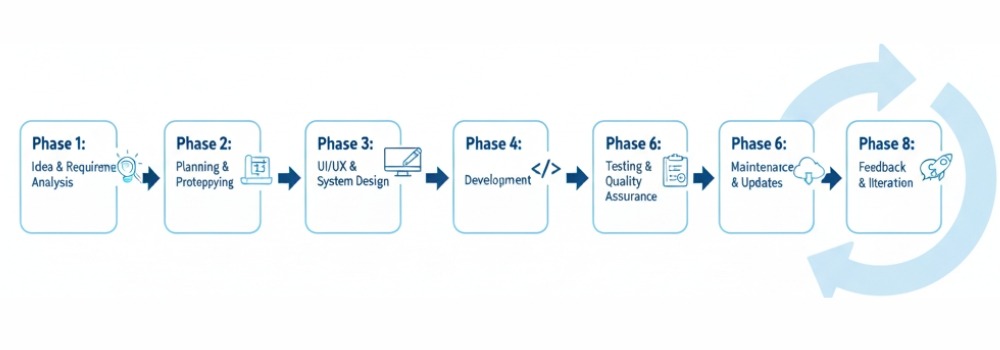
Building an app is a journey. To get from a “lightbulb moment” to a polished product in the hands of users, you need a clear path. Let’s break down the application development lifecycle process into eight simple, manageable phases.
Phase 1: Idea & Requirement Analysis
Every great app starts with a question: What problem are we solving? In this stage, you dig deep into the process of application development by defining your goals. You’ll identify your target users and gather “functional requirements” (what the app does) and “non-functional requirements” (how it performs). Finally, a feasibility study ensures the project is technically and financially doable.
Phase 2: Planning & Prototyping
Now, we build the skeleton. This is where you map out the application development process flow. You’ll create a basic roadmap and a low-fidelity prototype, a rough sketch of the app to make sure the logic holds up before investing in expensive coding.
Phase 3: UI/UX & System Design
This is where the app gets its “soul.” UI (User Interface) is how it looks, while UX (User Experience) is how it feels. Designers create high-fidelity mockups and the system architecture, ensuring the app is intuitive, beautiful, and ready for the cloud application development process if you’re hosting it online.
Phase 4: Development
It’s time to bring the designs to life. Developers write the actual code that powers your features. If you want to ensure this stage is handled by pros who know the latest tech stacks, you can check out these application development services to get the job done right.
Phase 5: Testing & Quality Assurance
Before the world sees your app, you have to try to break it. Quality Assurance (QA) teams run tests to find bugs, check security, and ensure the app doesn’t crash when thousands of people use it at once.
Phase 6: Deployment
Launch day! This is the moment your app moves from a private server to the public. Whether it’s hitting the Apple App Store, Google Play, or a live web URL, deployment is the official “birth” of your software.
Phase 7: Maintenance & Updates
A successful app is never truly “finished.” Technology changes, and so do user needs. This phase involves fixing any post-launch bugs, updating the app to work with new phone software, and keeping the security tight.
Phase 8: Feedback & Iteration
What do your users think? By looking at reviews and data, you learn what’s working and what isn’t. This feedback fuels the next round of the application development process, allowing you to add new features and keep your audience coming back for more.
Different Types of Application Development
Not all apps are created equal. Depending on where your users spend their time, whether they are on their phones, at a desk, or working in a massive data center,r the application development process changes to fit the platform.
Here is a quick look at the most common types of development:
Web Application Development
These apps live in your web browser (like Chrome or Safari). You don’t need to download anything; you just type in a URL and go. Think of tools like Gmail or Canva. They are great because they work on almost any device with an internet connection.
Mobile Application Development
This is all about smartphones and tablets. Whether it’s an iPhone (iOS) or an Android device, these apps are built to take advantage of phone features like the camera, GPS, and push notifications. If you want to stay in your customer’s pocket, this is the way to go. Custom Mobile App Development allows businesses to create apps tailored to their specific needs and features, ensuring a unique user experience.
Desktop Application Development
While web apps are popular, some software needs the raw power of a computer. Desktop apps are installed directly on Windows, macOS, or Linux. They are perfect for heavy-duty tasks like video editing (Adobe Premiere) or high-end gaming.
Enterprise Application Development
These are the “heavy lifters” of the business world. Enterprise apps are designed for big organizations to handle complex tasks like payroll, supply chain management, or internal communication (like Slack or Salesforce).
The application development lifecycle process for these is usually much more intense because security is a top priority.
Cloud-Based Application Development
Instead of sitting on one server, these apps live in the “cloud” (like AWS or Azure). A cloud application development process allows the app to be incredibly fast and scale up instantly. If a million people suddenly join your app, the cloud makes sure it doesn’t crash.
Main Application Development Methodologies
Choosing a methodology is like picking a strategy for a game. It dictates how your team moves, how you handle changes, and how fast you cross the finish line. Each one changes the application development process flow to suit different project needs.
1. Waterfall (The Traditional Way)
Think of this like a literal waterfall: the water only flows down. You finish one phase completely before moving to the next. It’s simple and disciplined, but it’s tough to go back if you realize you made a mistake in the planning stage.
- Best for: Projects with a fixed budget and very clear, unchanging requirements.
2. Iterative (The “Draft” Method)
Instead of trying to build the whole thing at once, you build a small version, review it, and then add more. Each “iteration” makes the app better. It’s great for getting a version of the app into users’ hands quickly to see what they think.
- Best for: Large projects where you need to show progress fast.
3. V-Model (The Verification Way)
The V-Model is like Waterfall’s more careful sibling. For every development stage, there is a corresponding testing stage. It forms a “V” shape because you plan your tests at the same time you plan your features.
- Best for: Mission-critical apps (like medical or flight software) where errors aren’t an option.
4. Agile (The Flexible Way)
Agile is the most popular choice for modern teams. It breaks the project into small “sprints” (usually 2-4 weeks). It’s all about collaboration and being able to change direction quickly if the market shifts. It makes the process of application development feel fast and responsive.
- Best for: Startups and projects where requirements might change as you go.
5. Spiral (The Risk-Managed Way)
Imagine a spiral that gets bigger with every loop. Each loop involves planning, risk analysis, engineering, and evaluation. It’s specifically designed to catch high-risk problems early before they become expensive disasters.
- Best for: Very large, expensive, or high-risk projects.
Security and Compliance: Keeping Your App (and Users) Safe
Ever wonder what happens to all that data users trust you with? One small leak is all it takes to lose a customer’s trust forever.
That’s why security shouldn’t be an afterthought. It needs to be part of your application development process from day one.
Data Security
How do you keep hackers out? It’s all about layers. You need to protect Data at Rest (the stuff stored on your servers) and Data in Transit (the info moving between the user and your app).
Using strong encryption is like putting your users’ info in a high-tech vault that only you have the key to.
Regulatory Compliance (GDPR, HIPAA, etc.)
Did you know that where your users live changes how you have to build your app? Depending on your industry, you’ll need to follow specific sets of rules:
- GDPR: The gold standard for privacy if you have users in Europe.
- HIPAA: A must-have for any app handling healthcare data in the U.S.
- PCI DSS: What you need to follow if you plan on taking credit card payments.
Following these isn’t just about avoiding big fines; it’s about showing your users you respect their privacy.
Secure Coding Practices
Think of this as “defensive driving” for programmers. Instead of just writing code that works, developers write code that resists attacks.
This includes things like Input Validation (making sure a user doesn’t type something malicious into a form) and regular security audits during the application development lifecycle process.
Choosing the Right Application Development Partner in the UAE
Finding the right team to build your app in the UAE is about more than just finding someone who can code. You need a partner who understands the local landscape, from the high expectations of users in Dubai to the specific regulatory requirements of the region.
When vetting potential partners, look for these three essentials:
- Expertise in Modern Tech: Ensure they are masters of the latest stack, including Java, .NET, React, and AI. A partner that stays ahead of trends will build an app that doesn’t feel outdated by next year.
- Local Market Knowledge: The UAE is a unique hub for innovation. A team that understands local user behavior and compliance standards (like the UAE Data Law) will save you months of rework.
- Proven Portfolio: Don’t just take their word for it; look at their past wins. Check for testimonials from local businesses and see if they have experience in your specific industry.
One standout name in the region is Hudasoft, an expert software house that combines deep technical mastery in AI and cloud-native engineering with a strong presence in the UAE market, helping businesses turn complex requirements into high-performing digital products.
Conclusion
Wrapping up, a solid application development process is the secret sauce that turns a messy idea into a polished, high-performing app. By following a structured workflow from the first brainstorming session to post-launch updates, you reduce risks, keep your budget under control, and ensure your users actually get what they need.
As we look ahead, the process of application development is only getting more exciting with trends like AI-driven coding, low-code approach platforms, and cross-platform tools making it faster than ever to innovate. Stick to the plan, pick the right partners, and you’ll be well on your way to digital success.
FAQS
What are the main phases of the application development lifecycle?
The application development lifecycle process usually includes eight key stages: Idea & Analysis, Planning, Design (UI/UX), Development, Testing, Deployment, Maintenance, and Feedback. Following these steps ensures your project stays on track and meets user needs.
What tools are best for managing the app development process?
For a smooth application development process flow, most teams use project management tools like Jira, Trello, or Asana. For version control and collaboration, GitHub or GitLab are industry standards, while Figma is the go-to for designing prototypes.
What are common mistakes in app development?
The biggest pitfalls include skipping the discovery phase, ignoring user feedback, and failing to test the app on different devices. Many people also underestimate the importance of the cloud application development process, leading to apps that crash when they try to scale.
What does an application developer do?
An application developer is the architect and builder of the digital world. They translate requirements into code, build the front-end (what you see) and back-end (the logic), fix bugs, and ensure the process of application development results in a secure, functional product.
Leave a Reply