HACK LINKS - TO BUY WRITE IN TELEGRAM - @TomasAnderson777 Hacked Links Hacked Links Hacked Links Hacked Links Hacked Links Hacked Links cryptocurrency exchange vapeshop discount code vapewholesale affiliate link geek bar pulse x betorspin plataforma betorspin login na betorspin hi88 new88 789bet 777PUB Даркнет alibaba66 1xbet 1xbet plinko Tigrinho Interwin

Category: Hudasoft EN-AE

  • Top 10 Real Estate Apps in 2026

    Top 10 Real Estate Apps in 2026

    More than 58% of property management companies worldwide now use digital software solutions, with over 62% of all deployments running on cloud-based platforms as of 2026. For buyers, sellers, investors, and agents, that shift has produced a generation of top real estate apps that handle everything from property search and mortgage calculation to lease management and portfolio monitoring in a single interface.

    Choosing the right app depends on your role and what problem you need to solve. A residential buyer needs different tools than a commercial investor or a property manager overseeing 200 units. This guide covers 10 platforms built for different segments of the market, what each one does well, and where its limits are.

    At Hudasoft, we build custom real estate platforms for agencies, brokers, and property investors. The perspective in this guide reflects that experience.

    Quick Comparison of The 10 Best Real Estate Apps in 2026

    Use the table below to compare each top real estate app based on what it actually does best.

    AppBest ForPricingPlatformKey Strength2026 Update
    ZillowBuyers and sellers browsing residential listingsFreeiOS, Android, WebLargest listing database in the U.S., Zestimate AVMDoubling down on housing super app strategy, integrating search, financing, and touring
    RedfinBuyers wanting real-time MLS data and lower commissionsFree to use, 1% to 1.5% seller commissioniOS, Android, WebReal-time MLS sync, lower agent fees than traditional brokeragesNow receives Compass private exclusives and coming soon listings not visible on Zillow
    QaryaOwned by Zillow Group, hyperlocal data remains the strongest featureCustom pricing, built by HudasoftiOS, AndroidCentralized resident management, utilities tracking, payments, and service requests in one platformProperty developers and community operators need unified resident management
    TruliaBuyers focused on neighborhood lifestyle and safetyFreeiOS, Android, WebCrime data, school ratings, and resident reviews by neighborhoodBuilding-specific search filters unique to the New York City market
    StreetEasyNYC renters and buyersFreeiOS, Android, WebFree to request an offer, variable service feeDominant in NYC with 180 million annual visits
    OpendoorSellers wanting instant cash offers without listingFree to request offer, variable service feeiOS, Android, WebInstant cash offer and fully digital closingOpendoor Checkout now live in 40 states with mortgage preapproval and digital closing tools
    CompassAgents managing listings and client pipelinesOpendoor Checkout is now live in 40 states with mortgage preapproval and digital closing toolsiOS, Android, WebAI-powered agent tools and deal pipeline trackingBuyers want search and financing in one app
    RoofstockRemote single-family rental investorsFree to browse, 0.5% buyer feeiOS, Android, WebVetted turnkey rental properties with income data pre-loadedGrowing rapidly among non-local investors
    Realtor.comBuyers and renters wanting MLS-accurate listingsFree for consumers, RealPro Select for agentsiOS, Android, WebMLS-direct listing feeds licensed by NAR, highest data accuracy among public portalsLaunched Realtor.com+ in January 2026 in partnership with MLS organizations, driving 3.4x the visit share of Homes.com
    Custom BuildBusinesses needing proprietary real estate platformsProject-based, starting $50,000+iOS, Android, WebBuilt around your data model and workflowRight choice when no off-the-shelf app fits your operation
    Real Estate Was Never Meant to Be Manual

    1. Zillow

    Best For: Residential buyers, sellers, and renters searching the U.S. market

    Pricing: Free for consumers. Agents pay for Premier Agent placement on a cost-per-lead basis.

    Platform: iOS, Android, Web

    Zillow is the largest real estate marketplace in the U.S. by traffic. In Q4 2025, Zillow reported 221 million average monthly unique users and 2.1 billion visits, with full-year 2025 revenue reaching $2.6 billion, up 16% year over year. Its platform covers property search, Zestimate valuations, 3D home tours, mortgage calculators, and agent matching in one interface.

    In 2026, Zillow is focused on integrating search, financing, and touring into a single workflow. The Listing Access Standards policy, introduced in late 2025, means some Compass private exclusives no longer appear on Zillow.

    Limitation: Buyers relying only on Zillow may miss over 500,000 Compass listings now syndicated to Redfin. For full market coverage, using both platforms is advisable in competitive markets.

    Who Should Skip It: Commercial investors and property managers. Zillow is built for residential use only.

    2. Redfin

    Best For: Buyers wanting real-time MLS data and sellers looking for lower commission rates than traditional brokerages

    Pricing: Free for buyers. Sellers pay 1% to 1.5% commission, compared to the traditional 2.5% to 3% brokerage rate.

    Platform: iOS, Android, Web

    Redfin attracts approximately 46 million monthly users and generates around $1.03 billion in trailing twelve-month revenue as of early 2026. Its core advantage is real-time MLS integration that surfaces listings faster than most competing platforms, paired with built-in mortgage tools and instant tour scheduling.

    In February 2026, Compass announced a partnership with Redfin and Rocket Companies, syndicating over 500,000 private exclusives and coming soon listings to Redfin. This gives Redfin users access to inventory that does not appear on Zillow, which is a meaningful shift in the residential search landscape.

    Limitation: Redfin agents handle more clients per agent than traditional brokerages, which means service levels can vary. Coverage is strongest in major U.S. metros and thins in rural and secondary markets.

    Who Should Skip It: Commercial real estate professionals and investors needing portfolio-level analytics. Redfin is a residential search and brokerage platform.

    3. Qarya

    Best For: Property developers and community operators managing residential communities who need rent collection, maintenance, resident communication, and utilities tracking in one platform

    Pricing: Custom pricing. Contact Hudasoft to discuss your project requirements.

    Platform: iOS, Android

    Qarya is a smart community management platform built by Hudasoft for residential community operators. Property managers running operations across spreadsheets, WhatsApp groups, and manual end-of-month reports get a unified dashboard covering every operational dimension of community management.

    The platform covers recurring invoices, real-time payment tracking, STC Pay and Mada integration, maintenance ticketing with photo and video uploads, automated assignment and escalation, resident announcements, and NLP-driven request classification. It is built on Flutter for iOS and Android with bilingual Arabic and English support, and reporting through Power BI.

    Limitation: Qarya is a custom-built platform, not an off-the-shelf app available on public app stores. It requires a development engagement with Hudasoft and is built around your specific community management workflow.

    Who Should Skip It: Individual landlords managing a small number of units who need a lightweight self-serve tool. Qarya is designed for operators managing residential communities at scale.

    4. Trulia

    Best For: Residential buyers researching neighborhood quality, safety, and lifestyle before committing to a property search

    Pricing: Free for consumers. Agents pay for featured listings from $30 per month for one listing up to $200 per month for ten listings.

    Platform: iOS, Android, Web

    Trulia is the third most visited real estate website in the U.S., owned by Zillow Group since its acquisition in 2015. The platform attracts approximately 19 to 21 million monthly visits. Its focus is neighborhood context rather than listing volume, covering crime maps, school ratings, commute times, resident reviews, and nearby amenities alongside standard property listings.

    The Neighborhoods feature lets buyers explore areas through photos, resident-submitted reviews, and color-coded crime and price data. This makes Trulia useful for buyers relocating to an unfamiliar city who need to evaluate areas before shortlisting specific properties.

    Limitation: Trulia does not directly provide MLS listings, and listings can sometimes be outdated, with users reporting already-sold properties still appearing as available. Its listing database is smaller than Zillow’s and Redfin’s.

    Who Should Skip It: Buyers who already know the neighborhood they want and need the most current listing data. Zillow or Redfin will serve them better for that specific need.

    5. StreetEasy

    Best For: NYC renters and buyers searching for apartments, condos, and co-ops across the five boroughs

    Pricing: Free for consumers. Agents can access the new Agent Advantage program launched in April 2026, with Pro and Signature tiers covering priority search placement, performance analytics, customizable comps reports, and predictive analytics. Pricing for agent tiers is not publicly listed.

    Platform: iOS, Android, Web

    StreetEasy is a Zillow brand built specifically for the New York City market, covering rentals and sales across Manhattan, Brooklyn, Queens, the Bronx, and Staten Island. Its search filters are built around NYC-specific criteria that national platforms do not support, including building-level searches, doorman availability, walk-up preferences, floor level, and co-op board approval requirements.

    The platform publishes monthly NYC market reports covering median asking rents, days on market, and inventory levels by neighborhood, which buyers and renters use to time their searches and negotiate effectively.

    Limitation: StreetEasy is exclusively NYC-focused. It has no coverage outside the five boroughs. Buyers and renters in any other U.S. market will find no useful data here.

    Who Should Skip It: Anyone searching for real estate outside New York City. For agent-specific tools beyond listing search, our guide on apps for real estate agents covers platforms built for agent productivity nationwide.

    6. Opendoor

    Best For: Home sellers who prioritize speed and certainty over maximum sale price and want to avoid the traditional listing process

    Pricing: Free to request an offer. Opendoor charges a 5% service fee plus typical closing costs of 0.5% to 1%, and deducts repair costs the company determines are necessary before resale.

    Platform: iOS, Android, Web

    Opendoor is the largest iBuyer in the U.S., purchasing 8,241 homes in 2025 under new CEO Kaz Nejatian, who has named increasing acquisition volume and improving resale turnaround as the company’s 2026 priorities. The platform generates a cash offer within minutes, allows sellers to choose their closing date, and handles the transaction digitally without showings or negotiations.

    Opendoor Checkout is now live in 40 states, with mortgage preapproval, buyer protections, and digital closing tools embedded in the platform. The company controls an estimated 67% of the U.S. iBuyer market.

    Limitation: Research on 409 Opendoor transactions found the company typically pays about 7.8% below market value at resale, equal to roughly $39,000 less on a $500,000 home. Sellers gain speed and certainty but generally net less than they would through a traditional listing.

    Who Should Skip It: Sellers not in a time-sensitive situation. If maximizing sale price is the priority, a traditional agent or MLS listing will produce better financial outcomes in most markets.

    7. Compass

    Best For: Residential real estate agents managing listings, client pipelines, and transactions through a single platform

    Pricing: Compass is not a consumer-facing app. Agents join Compass as a brokerage and access the platform as part of their affiliation. Commission splits vary by market and agent agreement.

    Platform: iOS, Android, Web

    Compass reported record full-year 2025 revenue of $7.0 billion, up 23.1% year over year, with 21,190 principal agents on the platform and a 96.8% quarterly agent retention rate in Q4 2025. Its platform covers the full agent workflow from first client contact to closing in a single login, covering listings, client communication, deal pipeline, predictive analytics, and title and escrow integration.

    Compass One, launched in early 2025, is an all-in-one client dashboard used by agents with approximately 370,000 clients in 2025, giving buyers and sellers real-time transaction visibility. The February 2026 partnership with Redfin and Rocket gives Compass agents access to Redfin’s 2 billion annual visits and an expected 1.2 million leads.

    Limitation: Compass is only accessible to agents affiliated with the brokerage. Buyers and sellers cannot use the platform directly. Independent agents or those at other brokerages have no access to Compass tools.

    Who Should Skip It: Buyers, sellers, and investors searching for properties. Compass is a brokerage platform for affiliated agents only.

    8. Roofstock

    Best For: Remote single-family rental investors who want to buy tenant-occupied properties outside their home market without needing to visit in person

    Pricing: Free to browse. Roofstock charges buyers a marketplace fee of 0.5% of the contract price or $500, whichever is greater, and sellers a listing fee of 3% of the sale price.

    Platform: iOS, Android, Web

    Roofstock has facilitated more than $4 billion in investment transactions since its founding in 2015, operating as the leading digital platform for the $4 trillion single-family rental sector. Properties on the platform are independently certified and typically come with tenants already in place, which means investors start collecting rental income from day one.

    In January 2026, Roofstock completed the sale of nearly 1,700 single-family rental properties in a strategic portfolio transaction and launched a short-term rental management division through an investment in Casago in May 2025. Each listing includes rental income data, cap rate projections, neighborhood ratings, and property management options. Investors who want deeper portfolio tracking alongside acquisition data will find purpose-built real estate data analytics software more suited for that layer of analysis.

    9. Realtor.com

    Best For: Buyers and renters wanting MLS-accurate listings with editorial market context, agent matching, and new construction search in one platform

    Pricing: Free for consumers. Agents pay for RealPro Select, a premium marketing subscription for brokerages covering enhanced listing exposure, lead tools, and digital marketing services.

    Platform: iOS, Android, Web

    Realtor.com reported revenue of $143 million in Q2 of fiscal year 2026, a 10% year-over-year increase, driven by premium offerings and audience share gains. Operated by Move, Inc., a News Corp subsidiary, and licensed by the National Association of Realtors, Realtor.com draws its listings directly from MLS feeds, which makes its data among the most accurate available on any public portal.

    According to Comscore data cited by Realtor.com CEO Damian Eales, the platform drove 3.4 times the visit share of Homes.com and 2.3 times that of Redfin, while closing more than half the visit share gap with Zillow over the past 18 months. In January 2026, Realtor.com launched Realtor.com+, built in partnership with MLS organizations to strengthen data accuracy, agent attribution, and AI-driven member tools.

    Limitation: Average monthly unique users declined 6.5% year-over-year to 72 million in a recent quarter, and lead volume also fell 9% for fiscal year 2025, indicating the platform is reaching fewer users despite growing revenue per lead. It covers residential properties only with no commercial data.

    Who Should Skip It: Commercial investors, property managers, and anyone needing portfolio-level analytics or off-market deal sourcing. Realtor.com is a consumer-facing residential search platform.

    10. Custom Real Estate Platform

    Best For: Real estate agencies, brokers, property developers, and investors whose workflows do not fit any off-the-shelf app

    Pricing: Project-based. Custom real estate platforms built by Hudasoft start at $50,000 and scale based on scope, integrations, and ongoing maintenance requirements.

    Platform: iOS, Android, Web

    Off-the-shelf apps serve the broadest possible user base. When your portfolio covers multiple asset classes, your data sits across disconnected systems, or your reporting logic is proprietary, no amount of configuration fixes that mismatch.

    A custom platform is built around how your team works. Property data, financial modeling, CRM, and operational reporting sit in one place, structured around your data model rather than a vendor’s.

    Teams deciding whether to build or buy should first audit what existing tools can cover. A real estate CRM for small teams is a practical starting point before committing to a custom build.

    Limitation: Custom development requires more upfront investment than activating a SaaS subscription. It is the right answer when your workflow is genuinely unique, not when an existing tool needs better configuration.

    Who Should Skip It: Individual landlords, solo agents, and small teams whose needs are well served by any of the nine platforms above.

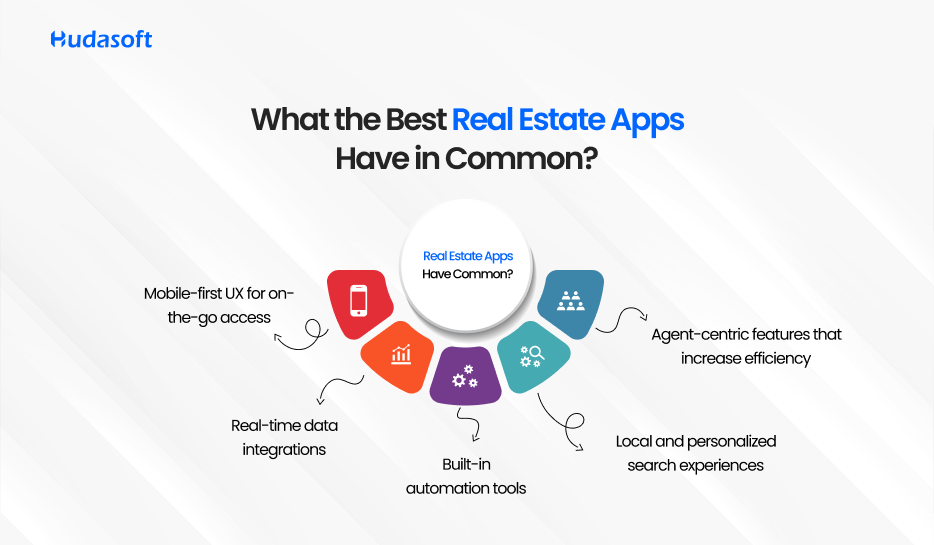
    What the Best Real Estate Apps Have in Common

    The top real estate apps on this list serve different users and solve different problems. A few patterns hold across all of them.
    What the Best Real Estate Apps Have in Common

    Data Accuracy Matters More Than Feature Count

    Zillow, Redfin, and Realtor.com all invested heavily in MLS data quality before adding features. Platforms with inaccurate or stale listings lose users fast, regardless of how well the rest of the product works.

    Mobile Is the Product, Not a Feature

    Every platform on this list generates more traffic from mobile than from desktop. Apps built desktop-first and ported to mobile consistently underperform against those built mobile-first from the start.

    Automation Reduces Friction at the Point of Decision

    Opendoor removed showings. Roofstock removed in-person visits. Compass removed multi-tool switching for agents. Each platform identified the highest-friction step in its users’ workflow and automated it.

    Integration With Adjacent Services Drives Retention

    Rocket embedded mortgage into Redfin. Compass added title and escrow. Roofstock added property management. Standalone search tools lose users at the point of transaction. Platforms that handle what comes next keep them.

    If your business needs a platform built around a specific workflow rather than adapted from an existing one, the process starts with how to build a real estate app before moving to development.

    Final Thoughts

    The top real estate apps on this list each solve a specific problem for a specific user. Zillow and Realtor.com serve residential search. Redfin and Compass serve buyers and agents with integrated workflows. Opendoor serves sellers who prioritize speed. Roofstock serves remote investors. Qarya and custom builds serve operators whose requirements no public app covers.

    The right choice is the one that fits your actual workflow, not the platform with the most features or the biggest brand. A tool that solves the wrong problem wastes budget and creates workarounds that slow your team down.

    If none of the platforms above fit what your business needs, the Hudasoft team can help you scope what a purpose-built solution would involve.
    Build Your Real Estate Platform with Hudasoft

    Frequently Asked Questions About The Top Real Estate Apps

    What are the top real estate apps for buyers in 2026?

    Zillow and Realtor.com are the two strongest options for residential buyers in 2026. Zillow covers 118 million properties with daily-updated Zestimate valuations, demand heat maps, and agent matching. Realtor.com pulls listings directly from MLS feeds, which makes its data more accurate for active listings. Redfin Powered by Rocket adds integrated mortgage preapproval and lower agent commissions for buyers who want search and financing in one platform.

    Which real estate app has the most accurate listings?

    Realtor.com has the most accurate residential listings among public portals because it pulls data directly from MLS feeds and is licensed by the National Association of Realtors. Zillow’s Zestimate has a median error rate of 1.74% for on-market homes but rises to 7.20% for off-market properties. For commercial listings, CREXi and Reonomy draw from proprietary transaction databases and public records, giving them stronger accuracy for commercial asset types than any residential portal.

    What is the best real estate app for investors?

    The answer depends on the investment type. For single-family rental investors, Roofstock provides vetted tenant-occupied properties with income data, cap rate projections, and property management options built in. For short-term rental investors, Mashvisor covers Airbnb occupancy rates and ADR by neighborhood. For commercial investors sourcing off-market deals, Reonomy provides ownership data and debt history across 50 million-plus commercial properties.

    Is Zillow or Redfin better?

    They serve different needs. Zillow has the largest residential database in the U.S. with 118 million properties and is stronger for browsing, Zestimate valuations, and neighborhood research. Redfin Powered by Rocket is stronger for buyers who want lower agent commissions, real-time MLS data, and integrated mortgage financing. In 2026, Redfin will also have access to Compass private exclusives not visible on Zillow, which matters in competitive markets. Most buyers benefit from using both rather than relying on one.

    What real estate app do most realtors use?

    Compass is the platform built specifically for agents, covering listings, client pipelines, deal tracking, predictive analytics, and title and escrow in one login. It reported 21,190 principal agents with a 96.8% quarterly retention rate in Q4 2025. However, Compass is only available to agents affiliated with the brokerage.

    What is the best free real estate app?

    Zillow, Redfin, Realtor.com, Trulia, and Redfin Data Center are all free for consumers. Among these, Zillow offers the broadest residential coverage, and Realtor.com offers the most MLS-accurate listings. Redfin Data Center is the strongest free resource for market trend data, publishing weekly updates on median prices, inventory levels, and days on market across 100-plus U.S. metros at no cost.

    Which platforms provide the most comprehensive real estate listing analytics?

    Zillow leads on residential listing analytics volume, covering 118 million properties with pricing history, demand heat maps, and days on market data. Realtor.com leads on MLS data accuracy for active listings. For commercial listing analytics, CREXi consolidates 153 million-plus property records and 84 million-plus sales comps. For investors needing off-market listing intelligence that MLS-connected platforms miss, PropStream adds distress signals, ownership data, and equity filters that no public portal provides.

    When does building a custom real estate app make more sense than using an existing platform?

    A custom platform makes sense when your workflow does not map onto any existing app’s data architecture. Specific signals include managing data across multiple asset classes that no single platform covers, running operations across disconnected tools that require manual reconciliation, or needing analytics embedded in your own client-facing product. Custom development through Hudasoft starts at $50,000 and scales based on scope and integrations. The decision point is whether the cost of workarounds in existing tools exceeds the build cost within 18 to 24 months.


  • What Are the Best Android Automotive Apps for Businesses in 2026?

    What Are the Best Android Automotive Apps for Businesses in 2026?

    The global automotive app market was valued at $6.2 billion in 2025 and is projected to reach $14.8 billion by 2030, according to Grand View Research’s 2025 Automotive App Market Report

    Android, being a major platform globally and in the US, is a target for most apps built for the automotive industry.  These apps majorly cover four business-critical functions: dealer management, vehicle diagnostics, fleet tracking, and digital car retail. Automotive mobile app adoption among fleet operators and dealerships has accelerated sharply since 2023, driven by the shift from desktop-only DMS platforms to mobile-first operations tools.

    This guide covers the best Android automotive apps across 4 categories used most by automotive businesses in 2026. For each category, it lists the leading off-the-shelf options, compares them on pricing model, key strength, and primary limitation, and identifies where a custom-built alternative outperforms them.

    Businesses evaluating whether to adopt an existing platform or commission a custom Android automotive app will find the comparison data they need in each section below.

    How Are Android Apps Changing Operations Across the Automotive Industry?

    Automotive Android apps now cover 4 core operational functions in automotive businesses: dealer management, vehicle diagnostics, fleet tracking, and digital retail. Vehicle mobile application development has expanded from basic GPS tracking in 2018 to full operational management platforms covering diagnostics, inventory, service scheduling, and digital retail by 2025, replacing manual processes that previously required dedicated desktop software or in-person dealership visits.

    Today’s automotive businesses need connected tools that integrate with existing workflows. Tracking maintenance schedules, monitoring fleet vehicles, managing inventory, and completing vehicle sales all happen on mobile platforms that provide real-time data without requiring staff to be at a fixed workstation.

    From vehicle diagnostics to dealer management systems, Android apps are driving measurable operational change across the automotive sector. Businesses that have deployed these tools report faster service cycles, reduced administrative overhead, and greater visibility into vehicle performance across their operations.

    What Market Trends Are Driving Android App Adoption in Automotive Businesses?

    Three measurable forces are accelerating Android app adoption in automotive: the shift to remote vehicle diagnostics, the mandate for real-time fleet visibility, and the move to online-first car retail. Each creates demand for mobile-first software that existing desktop platforms cannot serve.

    Automotive businesses are seeing customer expectations shift in parallel. Buyers want to browse, finance, and purchase vehicles without visiting a dealership. Fleet operators need driver behaviour data updated in near real time. Service departments want fault codes surfaced before a vehicle arrives for scheduled maintenance.

    For automotive businesses, this shift is an opportunity to engage customers in new ways while collecting operational data that improves decision-making. Mobile automotive ecosystems give businesses access to customer preference data they could not capture through traditional channels.

    What Are the 4 Android App Categories Used Most in Automotive Businesses?

    4 android automotive apps categories handle the majority of digital operations in automotive businesses: dealer management systems (DMS), OBD2 vehicle diagnostics, fleet tracking platforms, and digital car retail apps.

    Each category addresses a distinct operational need. The sections below cover the leading off-the-shelf options in each category, compare them across pricing model, key strength, and primary limitation, and identify the conditions where a custom-built alternative delivers better long-term value.

    What Do Android Dealer Management Systems Do for a Dealership?

    Android-integrated dealer management systems consolidate vehicle inventory, service scheduling, customer records, and accounting into one platform. This reduces average dealership administrative time by 35 to 40 percent compared to managing those functions across separate tools.

    The 3 most widely deployed DMS platforms in 2026 are CDK Global, Reynolds and Reynolds, and DealerERP. Each serves a different dealership profile, from large multi-franchise operations to growing independents. The table below compares them directly, including the conditions where a custom-built DMS outperforms all three.

    AppBest ForPricing ModelKey StrengthPrimary Limitation
    CDK GlobalLarge multi-franchise dealer groupsEnterprise licensing (contact for quote)Deep accounting and parts management integrationHigh implementation cost; limited customisation outside CDK’s own modules
    Reynolds and ReynoldsMid-to-large dealerships needing CRM depthPer-module licensingStrong CRM and F&I workflow automationSteep learning curve and long implementation timelines
    DealerERPGrowing dealerships wanting flexibilitySubscription-basedHighly customisable, faster to deploySmaller integration ecosystem than CDK or Reynolds
    Custom-Built DMSDealership groups with unique inventory logic or multi-brand complexityOne-time build + maintenanceFull ownership of data, logic, and UI with no licensing fees at scaleRequires a development partner and longer initial build time

    What Integrations Do Android Dealer Management Apps Require?

    A DMS that cannot connect to existing business systems creates more administrative work than it removes. The automotive app integrations that are the most fundamental for most auto operations include:

    Manufacturer Inventory Feeds: 

    These connect the DMS directly to OEM stock databases, ensuring vehicle availability, technical specifications, and pricing are updated automatically to eliminate manual entry errors.

    F&I Platform Connections: 

    These link finance and insurance workflows to the DMS, allowing credit applications, insurance product selections, and contract generation to occur within the same interface as the vehicle sale.

    Accounting Software APIs: 

    Integrations with systems like QuickBooks, Sage, or Xero allow financial data to flow directly from daily operations into accounting ledgers, removing the need for manual data exports.

    CRM Integrations: 

    By connecting customer records to marketing and follow-up tools, dealerships can automate service reminders, purchase anniversaries, and lead nurturing without redundant data entry.

    Native vs. Flexible Architectures: 

    While legacy providers like CDK Global and Reynolds and Reynolds cover these integrations via proprietary modules, platforms like DealerERP offer greater third-party flexibility. Alternatively, custom-built systems can be architected around your existing stack, removing any dependency on vendor-approved connectors.

    Which Android Diagnostic Apps Give Accurate Vehicle Health Data?

    The most widely used car software for Android diagnostics connects to the OBD-II port via Bluetooth and reads live engine data without requiring a dealership visit or specialist equipment. Proactive vehicle diagnostics reduce unplanned repair costs by up to 30 percent per vehicle annually, according to AAA’s 2025 Your Driving Costs Report.

    The 3 most widely used Android diagnostic apps are Car Scanner ELM OBD2, FIXD, and Drivvo. They differ significantly in depth of data capture, pricing structure, and whether they support live OBD2 connection or function primarily as maintenance logs.

    Car Scanner ELM OBD2 offers a free tier covering basic fault code reading, with a one-time premium unlock at approximately $9.99 for advanced sensor data. Drivvo’s core expense tracking is free with optional premium features at approximately $2.99 per month. Verify these prices before publishing.

    While platforms like FIXD and Drivvo serve individual car owners tracking personal vehicle health, fleet operators and automotive businesses require diagnostics tools that aggregate data across multiple vehicles with centralized reporting.

    AppBest ForPricing ModelKey StrengthPrimary Limitation
    Car Scanner ELM OBD2Individual technicians and workshops tracking engine dataFree with paid Pro tier (one-time unlock ~$9.99)Monitors 50+ parameters including live engine and fuel dataRelies on third-party OBD2 adapter; adapter quality affects accuracy
    FIXDVehicle owners wanting plain-language fault reportingFree app with subscription for advanced featuresTranslates OBD2 codes into readable repair explanationsSubscription required for full predictive maintenance features
    DrivvoDrivers managing fuel costs and maintenance schedulesFree with optional premium (~$2.99/month)Comprehensive expense tracking with service remindersNo live OBD2 diagnostics; primarily a log and reminder tool
    Custom-Built Diagnostics AppFleets or workshops needing proprietary data capture and branded reportingOne-time build + maintenanceFull control over data format, integration with fleet systems, and white-label brandingRequires a development partner and longer initial build time

    For businesses running multi-vehicle operations where diagnostic data needs to feed into a fleet system or service department workflow, a custom-built solution is worth evaluating.

    What Fleet Tracking Capabilities Do Leading Android Apps Provide?

    Android fleet management apps track real-time GPS location, driver behaviour scores, fuel consumption, and maintenance schedules across fleets ranging from 5 to 5,000 vehicles. Reporting updates every 30 to 60 seconds, depending on the platform. Fleet tracking technology reduces fuel costs by an average of 15 percent across commercial vehicle operations, according to Geotab’s 2025 Fleet Efficiency Report.

    The 3 most widely deployed Android fleet management platforms are Samsara, Geotab, and Fleet Complete. They differ in analytics depth, pricing structure, and the technical complexity of setup. The table below compares their capabilities directly, including the conditions where a custom-built fleet app is the better long-term investment.

    AppBest ForPricing ModelKey StrengthPrimary Limitation
    SamsaraMid-to-large fleets needing real-time driver and vehicle monitoringPer-vehicle subscription (contact for quote)Real-time GPS, driver behaviour scores, and compliance reportingContract lock-in; higher cost per vehicle for small fleets
    GeotabBusinesses requiring deep analytics and custom reportingPer-vehicle subscription via resellersExtensive fleet analytics and open SDK for integrationsRequires technical setup; steeper learning curve than competitors
    Fleet CompleteSmaller fleets wanting an all-in-one management toolSubscription-based (contact for quote)Covers vehicles, assets, and workers in one platformReporting depth is shallower than Geotab for large-scale operations
    Custom-Built Fleet AppFleets with proprietary routing logic or multi-system integration requirementsOne-time build + maintenanceBuilt around the exact operational workflow; no per-seat fees at scaleRequires a development partner and longer initial build time

    How Are Android Car Applications Used in Commercial Fleet Operations?

    Android car applications in commercial fleet operations go beyond GPS tracking. The most operationally valuable deployments combine location data with driver behaviour scoring, maintenance scheduling, and regulatory compliance reporting inside a single interface available to fleet managers on any Android device.

    Samsara and Geotab both offer driver coaching features that score acceleration, braking, and cornering in real time. Fleet Complete extends this into asset tracking, covering equipment and trailers alongside vehicles. For fleets that need to report Hours of Service under ELD mandates, all three platforms include compliance modules, though the depth of reporting varies.

    What Integrations Do Android Fleet Apps Need?

    Fleet apps that operate in isolation from other business systems create data silos that require manual bridging. The integrations that matter most are ELD compliance systems for regulated fleets, GPS hardware APIs that allow the fleet app to work with existing telematics devices rather than requiring hardware replacement, and fuel card connections that import transaction data directly into the fleet management platform for accurate per-vehicle cost reporting.

    Samsara and Geotab both offer documented APIs and integration marketplaces. Fleet Complete has a narrower integration ecosystem. Custom-built fleet apps can connect directly to any system the business already operates, with no dependency on vendor-approved integrations.

    How Do Android Apps Handle the Full Car Buying and Selling Process?

    Android car retail apps handle the full transaction sequence: vehicle search, price comparison, financing pre-qualification, document upload, and purchase completion. This reduces average transaction time from 4 hours in the dealership to under 90 minutes, completed entirely on mobile.

    The 3 most widely used Android car retail platforms are Autotrader, CarGurus, and Vroom. They differ in inventory depth, transaction model, and how well they support dealer-side operations versus individual buyers. The table below compares them directly, including the conditions where a custom-built retail app gives a dealership group or marketplace more control.

    AppBest ForPricing ModelKey StrengthPrimary Limitation
    AutotraderBuyers browsing large new and used car inventoriesFree for buyers; listing fees for dealersLargest inventory database with financing and test drive schedulingDealer-facing costs are high; less suited to private seller transactions
    CarGurusPrice-conscious buyers comparing deal quality across listingsFree for buyers; subscription for dealersPrice analysis engine flags underpriced and overpriced listingsAlgorithm-driven pricing can penalise dealers with slightly higher but justified prices
    VroomBuyers wanting a fully online purchase and home delivery experienceTransaction-basedEnd-to-end online purchase with home delivery includedLimited physical inspection options; after-sale service network is less established
    Custom-Built Retail AppDealership groups or marketplaces needing white-label buying flows or proprietary financing integrationsOne-time build + maintenanceFull control over branding, financing logic, and customer dataRequires a development partner and longer initial build time

    Off-the-shelf retail apps serve buyers well. For dealership groups that need white-label buying flows, proprietary financing integrations, or control over customer data, a custom-built alternative removes the dependency on third-party platforms entirely.

    When Should an Automotive Business Build a Custom Android App Instead of Using an Existing Platform?

    Off-the-shelf apps break down at the point where a business’s operations stop matching the assumptions baked into the software. Multi-location inventory logic that spans different franchise agreements, proprietary pricing rules that cannot be encoded in a standard DMS, white-label requirements for dealer groups that want a branded experience, and data ownership clauses that conflict with vendor terms: these are the conditions where packaged software creates friction that cannot be resolved through configuration.

    Custom-built Android automotive apps give businesses 3 things that packaged software cannot: full ownership of operational data without vendor data-sharing clauses, workflow logic built to the exact process the business actually runs rather than an industry average, and no per-seat or per-vehicle licensing fees that compound as the operation scales. At a sufficient scale, the build cost is recovered within 2 to 3 years against what the licensing fees would have been.

    Hudasoft’s custom application development services cover the full build: requirements scoping, Android development, integration with existing dealership or fleet systems, and post-launch support. For businesses that have evaluated the off-the-shelf options and found a gap, that is the starting point.

    The businesses that benefit most from a custom build are those with multi-brand inventory complexity, high-volume fleets where per-vehicle licensing adds up quickly, or dealership groups that want to own the digital retail experience rather than route buyers through a third-party marketplace. If any of those conditions apply, the off-the-shelf evaluation above already contains the answer.

    Frequently Asked Questions About Android Automotive Apps

    What are common examples of car apps used by automotive businesses?

    The most widely used examples of car apps in automotive businesses fall into 4 categories: dealer management systems (CDK Global, DealerERP), OBD2 diagnostics (Car Scanner ELM OBD2, FIXD), fleet tracking (Samsara, Geotab), and digital retail platforms (Autotrader, CarGurus). Businesses with operations too complex for these platforms commission custom Android apps built to their specific workflow.

    What are the best Android car apps for fleet operators in 2026?

    For fleet operators, the leading Android car apps in 2026 are Samsara for real-time driver monitoring, Geotab for deep analytics and custom reporting, and Fleet Complete for smaller fleets wanting an all-in-one tool. Each operates on a per-vehicle subscription model. Fleets above approximately 100 vehicles should evaluate whether a custom-built fleet app reduces the total cost of ownership compared to per-seat licensing at scale.

    What does a vehicle mobile application typically need to integrate with?

    A vehicle mobile application in a business context typically needs to connect to at least 4 system types: the OEM or auction inventory feed for accurate stock data, the accounting platform for financial reconciliation, the CRM for customer records, and the compliance or ELD system for regulated fleet operations. Applications that lack these integrations require manual data entry across systems, which eliminates most of the efficiency gains the app is meant to deliver.

  • How Much Does Property Management Software Cost in 2026?

    How Much Does Property Management Software Cost in 2026?

    Property management software costs between $50 and $1,500+ per month in 2026. Small landlords managing under 50 units typically pay $50 to $150 per month. Mid-size portfolios of 50 to 200 units range from $150 to $600 per month. Enterprise platforms for 200+ units start at $600 and scale beyond $1,500 depending on features, integrations, and user seats.

    A Practical Guide to Property Management Software Cost

    A $50 platform and a $1,500 platform can both be called property management software. The difference comes down to how well either one fits your specific operation, your portfolio size, and the features your team actually uses daily.

    This property management software cost guide breaks down the cost of property management software across every pricing tier, model, and portfolio size. It covers what drives the price up, what hidden fees look like in practice, and when a custom-built platform makes more financial sense than a subscription.

    At Hudasoft, we build property management platforms for real estate businesses, which means we evaluate these tools from the inside. The analysis below reflects that experience.

    Property Management Software Cost Overview

    Most property managers in the U.S. spend between $50 and $1,500+ per month on property management software in 2026. The exact figure depends on three things: how many units you manage, which features your operation requires, and which pricing model the platform uses.

    Here is what that looks like at a glance:

    Portfolio SizeMonthly Cost RangeWhat It Covers
    Small (1–50 units)$50 – $150Rent collection, maintenance tracking, tenant communication
    Medium (50–200 units)$150 – $600Adds accounting, reporting, automation, and payment processing
    Large (200+ units)$600 – $1,500+Rent collection, maintenance tracking, and tenant communication

    These are real-market ranges based on current platform pricing across tools, including Buildium, AppFolio, DoorLoop, and Yardi. The sections below break down what drives costs up, what hidden fees look like, and how to match the right platform to your portfolio size.

    What is Property Management Software?

    Before addressing pricing considerations, one must first grasp the fundamental aspects of property management software. A property management software functions as a digital platform to oversee everyday rental property operations, which encompass tenant communications, lease administration, rent collection, maintenance requests, financial tracking, and reporting.

    Software platforms span from simple tools with limited functions to complex enterprise systems that provide CRM capabilities, trust accounting, and AI-powered automation. If you are asking how much property management software costs for your specific portfolio size, the answer depends entirely on which of these capability levels your operation actually requires.

    Key Factors That Influence Property Management Software Cost

    The property management software pricing you encounter is not arbitrary. Several variables impact the final cost, including:

    Property Type

    • Residential: More straightforward needs; lease automation, rent tracking, and communication tools suffice.
    • Commercial: Requires features like CAM reconciliation, lease abstractions, and rent escalations.
    • Short-Term Rentals: Demands a PMS booking system, guest communication tools, dynamic pricing, and cleaning schedule integration.

    Property management software for short-term rentals is often more expensive due to the breadth of automation required.

    Portfolio Size

    Software must scale with your operations. As your unit count increases, so does the cost—not just from per-unit fees but also from upgraded service tiers that unlock enterprise features.

    User Access & Roles

    Team-based systems with multiple admin or agent logins may require higher pricing tiers. Best property management software for small businesses usually limits this, while enterprise tools support large user hierarchies.

    Add-ons and Integrations

    From QuickBooks and Xero integrations to calendar syncing with Airbnb or Muse booking system, the more integrations you require, the higher the cost.

    Pricing Models Explained

    Understanding how different property management software systems charge helps you avoid overpaying or missing out on critical features.

    1. Per-Unit + Flat Fee Model

    This is common in platforms like Buildium or AppFolio. You pay a base fee and a small fee per active unit.

    Best for: Scalable portfolios, mixed properties, or growing teams.

    2. Tiered Subscription Model

    Offered by platforms like Hemlane, where functionality is bundled based on tier: Starter, Essentials, Growth, Pro, etc.

    Best for: Owners who want clarity and predictable billing.

    3. Freemium Model

    Great for trialing services or managing a very small number of units.

    Best for: New landlords or testing before scaling.

    4. Custom Pricing or One-Time Development

    Custom-built systems, such as in-house tools or outsourced platforms, offer complete control but involve significant investment.

    Real estate app development cost for PMS tools typically starts at $50,000 and can exceed $250,000 for enterprise-grade platforms. These costs vary depending on whether you work with a specialized real estate software team or a broader agency offering end-to-end custom application development services, which often includes UI/UX, backend architecture, automation, and long-term maintenance.

    Property Management Software Price Comparison 2026

    Property management software prices vary significantly by tier. Here is what you actually get at each price point, so you can judge value rather than just cost. This breakdown helps you determine which plan gives the best value, not just the lowest cost.

    FeatureBasic ($0–$50)Mid ($100–$250)Advanced ($400+)
    Online Rent PaymentsLimitedIncludedIncluded
    Tenant ScreeningNot includedOptionalIncluded
    Maintenance TrackingManualIntegratedAutomated
    Lease GenerationManualPartialE-signatures
    Accounting IntegrationBasic exportIntegratedFull trust accounting
    Custom DashboardsNoLimitedYes
    CRM ToolsNoLimitedYes
    Document StorageLowMediumUnlimited
    Mobile AccessPartialFullBranded Apps
    Owner PortalsNoLimitedYes
    Reporting ToolsBasicPre-builtCustom reports

    This table demonstrates the importance of aligning your tech stack with your operational complexity.

    Custom vs. Off-the-Shelf: What You’re Really Paying For

    Many companies consider whether to buy property management software or build their own.

    Custom Software (Build from Scratch)

    • Ideal for: Real estate companies with unique processes or specific tech stack integration needs.
    • Requires: A development team, maintenance contracts, testing, and security audits.
    • Cost: $40,000–$250,000+
    • Timeline: 3–9 months

    Off-the-Shelf Software

    • Ideal for: 90% of landlords and managers
    • Benefits: Faster implementation, ongoing updates, community support
    • Risks: Limited customization, vendor lock-in

    Real estate investment management software pricing for custom builds can be far greater than recurring SaaS fees. But with control comes opportunity especially if you’re developing a niche platform, such as a property rental management solution for smart communities or vertical real estate brands. In such cases, partnering with a real estate app development company can help you build a scalable, tailored platform that meets your specific business goals.

    Cost Over Time: Annualized ROI from Property Management Software

    Property management software is a recurring cost that should be evaluated against measurable operational returns, not just its monthly price tag.

    AppFolio delivers one of the fastest payback periods in the industry at 11 months, with an 89% user adoption rate, according to the G2 Grid Report for Property Management, Fall 2025. That benchmark gives smaller platforms a useful comparison point when evaluating how long your chosen software takes to pay for itself.

    According to Buildium’s 2025 Industry Report, property managers who deliver consistent automated monthly reports retain management contracts 2.3x longer than those with inconsistent reporting. That retention difference compounds significantly over a multi-year portfolio.

    Case studies from Re-Leased show 12 to 18% operating expense reductions and ROI multiples above 4x for properties using predictive maintenance features.

    Mid-sized landlords report a 30 to 40% lower total cost of ownership using cloud-based platforms compared to perpetual-license models. (Mordor Intelligence, January 2026)

    The clearest way to calculate your own ROI:

    • Count the staff hours your team spends on manual rent follow-ups, maintenance coordination, and reporting each month
    • Multiply by your fully loaded hourly rate
    • Compare that figure against the annual software subscription cost, including all hidden fees
    • Factor in vacancy reduction if the platform automates leasing and tenant screening

    For most portfolios managing 50-plus units, the time savings from automation alone cover the software cost within the first year.

    Use Cases and Recommendations by Business Type

    Choosing the right platform comes down to matching property management software systems to your portfolio size, property type, and operational complexity. Here is a breakdown by business type with verified 2026 pricing.

    Individual Landlords

    Individual landlords managing under 10 units need basic rent collection, lease management, and maintenance tracking without paying for features built for larger operations.

    • Avail offers a free plan covering core rental management tools, with a paid Unlimited Plus tier at $9 per unit per month that adds FastPay rent payments and an investor website builder
    • Rentec Direct starts at $35 per month for up to 20 units on an annual plan, or $45 per month billed monthly, with no transaction fees for payment processing
    • TenantCloud pricing starts at $18 per month with a free plan available for basic use, and offers a 45-day free trial across paid tiers

    Small Property Management Firms

    Small firms need automation, maintenance tracking, tenant communication, and accounting in one platform. Property management CRM software pricing costs vary significantly at this tier, from $36 to $69 per month, depending on the platform.

    • Buildium starts at $58 per month and is particularly strong in accounting and resident communication, making it a reliable choice for managers overseeing larger, complex portfolios
    • Hemlane starts at $36.50 per month and is rated 4.8 out of 5 on Capterra, with a focus on maintenance coordination and tenant communication for independent landlords and small firms
    • DoorLoop starts at $69 per month and is built for scalability, with modern automation tools for leasing, tenant screening, and financial reporting

    Commercial Portfolio Managers

    Commercial operators managing NNN leases, CAM reconciliation, and mixed-use properties need platforms built for that level of complexity.

    • Yardi Breeze starts at $1 per unit per month with a $100 minimum monthly spend, covering commercial lease management, occupancy analytics, and building automation
    • MRI Software uses custom enterprise pricing and serves large commercial and mixed-use portfolios requiring advanced lease abstraction and financial modeling

    Enterprise and Custom Build

    Organizations managing 500-plus units across multiple asset classes, or those with proprietary workflows, often reach the limits of off-the-shelf platforms. The average cost of rental management software at the enterprise level starts at $600 per month and scales well beyond that for organizations requiring custom integrations and dedicated support.

    A custom-built property management platform starts at $50,000 and scales to $250,000-plus depending on scope, integrations, and ongoing maintenance requirements.

    Hidden Costs in Property Management Software

    The advertised base price rarely reflects what you will actually pay. Nearly 40% of property management software providers have at least one hidden cost that is not immediately obvious in their marketing. Understanding these fees upfront is part of any honest property management software cost breakdown.

    Setup and Onboarding Fees

    Onboarding and setup fees typically range from $0 for self-service platforms to $500 to $1,000 for guided implementations. Some enterprise vendors charge several thousand dollars for full data migration, custom configuration, and staff training. These are one-time costs, but they shift your break-even point and should factor into your first-year budget.

    Property management software setup fees and onboarding costs vary by platform:

    • TenantCloud and TurboTenant offer free onboarding courses with no setup fee
    • Buildium offers guided onboarding with a live professional at an unlisted price
    • Yardi Breeze includes data migration in its onboarding package at no extra charge
    • Enterprise platforms can charge $500 to several thousand dollars, depending on data migration complexity and training requirements

    Payment Processing Fees

    Payment processing fees are nearly universal. Most platforms charge $1 to $2 per ACH transfer and 2.5% to 3.5% for credit card payments. If you process $50,000 in monthly rent through the platform, a 2.75% credit card processing fee adds $1,375 per month, which can dwarf most subscription costs.

    Data Migration Fees

    Data migration ranges from free self-service options to managed services that cost $200 to $1,000, depending on data volume and whether manual assistance is required. Always confirm what migration support is included before signing a contract.

    Tenant Screening Fees

    Tenant screening is often billed per report, typically $15 to $30 each. Some platforms pass the cost to the tenant directly, while others charge the landlord. For managers running high volumes of applications, this adds up faster than most subscription tiers.

    Add-On and Feature Fees

    Add-on charges for maintenance coordination, tenant screening, and premium support can increase effective costs by 30 to 50% beyond the advertised per-unit rate. Common paid add-ons include:

    • E-signatures: $1 to $5 per document on platforms that do not bundle them
    • Premium support or dedicated account management: varies by vendor
    • Custom branding and white-label portals: typically available only on higher tiers
    • Additional admin user seats: billed per user on most mid-tier platforms

    Total Cost of Ownership

    For portfolios under 100 units, budget approximately $1,000 to $5,000 for the first year, including subscription, onboarding, and hidden fees. For 100 to 300 units, budget $5,000 to $20,000. For 500-plus units or commercial portfolios, budget $20,000 or more for the first year.

    The right approach is to request a full fee schedule from any vendor, including transaction fees, screening charges, and integration costs, before committing to a contract.

    Choosing the Right Property Management Software for Your Budget

    Property management software pricing in 2026 ranges from free tools for individual landlords to enterprise platforms costing $1,500 or more per month. The right choice is not the cheapest or the most feature-rich option. It is the one that fits your portfolio size, property type, and operational workflow without requiring you to build workarounds from day one.

    If you manage under 50 units, start with a free or low-cost platform and upgrade as your needs grow. If you manage 50 to 200 units, prioritize automation, accounting integration, and tenant communication over price alone. If you are at enterprise scale or managing multiple asset classes, evaluate the total cost of ownership across three years, not just the monthly subscription figure.

    For teams whose requirements do not fit any off-the-shelf platform, the Hudasoft team can help scope a custom build based on your specific data model and workflow.

    Frequently Asked Questions

    How much does property management software cost on average in 2026?

    Most property managers in the U.S. pay between $50 and $1,500 per month, depending on portfolio size, property type, and features required. The average cost of property management software for small landlords managing under 50 units falls between $50 and $150 per month. Mid-size portfolios of 50 to 200 units typically pay $150 to $600 per month. Enterprise platforms for 200-plus units start at $600 and scale beyond $1,500 for organizations requiring custom integrations and dedicated support.

    How much does property management software cost for a 100-unit portfolio?

    A 100-unit portfolio typically costs between $150 and $400 per month, depending on the platform and pricing model used. Platforms using per-unit pricing at $1.50 to $2 per unit per month would produce a monthly bill of $150 to $200 before add-ons. Platforms using tiered subscription pricing, like Buildium, starting at $58 per month, scale differently based on features selected rather than unit count alone. Always request a full fee schedule, including payment processing and onboarding costs, before committing.

    What are the main property management software pricing models?

    Property management software pricing models fall into four main structures. Per-unit pricing charges a flat rate per door per month, typically $1 to $5, and scales directly with portfolio size. Tiered subscription pricing bundles features into fixed plans with a base unit allowance. Freemium models offer free access with paid upgrades for automation and reporting features. Custom or quote-based pricing is used by enterprise platforms like Yardi and MRI Software for large portfolios with specific integration requirements.

    How do I compare property management software pricing in 2026?

    A property management software pricing comparison should go beyond the advertised base price. Start by identifying your primary use case: rent collection, maintenance tracking, accounting, or full portfolio automation. Then compare the total first-year cost, including setup fees, onboarding, payment processing, and tenant screening charges. Request full fee schedules from at least three vendors. Use free trials to test the platform against your actual workflow before committing to an annual contract.

    How much does AI-driven property management software cost?

    AI-driven property management software typically costs more than standard platforms due to the added capabilities involved. AppFolio, which leads the G2 Grid Report for Property Management in Fall 2025, starts at approximately $1.40 per unit per month with a $280 minimum and includes native AI tools for leasing automation, maintenance workflows, and predictive analytics. Platforms with lighter AI features, like DoorLoop, start at $69 per month. Purpose-built AI platforms from enterprise vendors use custom pricing based on portfolio size and automation scope.

    What hidden costs should I watch for when evaluating property management software?

    The most common hidden costs in property management software are setup and onboarding fees ranging from $0 to $1,000, payment processing fees of $1 to $2 per ACH transfer and 2.5% to 3.5% for credit cards, tenant screening fees of $15 to $30 per report, and e-signature fees of $1 to $5 per document on platforms that do not bundle them. Add-on charges for premium support, extra user seats, and advanced reporting can increase your effective monthly cost by 30 to 50% beyond the advertised base price.

    How do I evaluate the total cost of property management software?

    Evaluating the total cost of property management software requires looking beyond the monthly subscription. Calculate your first-year cost by adding the subscription fee, onboarding cost, data migration fee, and estimated transaction fees based on your monthly rent volume. Then model years two and three, including any annual price increases and add-on fees as your portfolio grows. Compare that three-year figure against the operational time your team saves from automation to determine whether the platform delivers a positive return within an acceptable timeframe.

    When does building custom property management software make more financial sense than buying?

    A custom-built platform makes financial sense when your workflow does not map onto any existing SaaS product’s data architecture. Specific signals include manually reconciling data between three or more disconnected tools every reporting cycle, managing data across multiple asset classes no single platform covers, or building analytics for your own clients that need to be embedded in their user experience. Custom development through a property management software team starts at $50,000 and scales to $250,000-plus, which is justified when the operational cost of workarounds exceeds the build cost within 18 to 24 months.

  • 10 Best Real Estate Data Analytics Software Platforms in 2026

    10 Best Real Estate Data Analytics Software Platforms in 2026

    The global PropTech market is valued at $54.66 billion in 2026, projected to reach $209.43 billion by 2035 at a CAGR of 16.10% (Precedence Research, April 2026). Real estate professionals who once relied on broker instinct and static spreadsheets are now running acquisition decisions, lease negotiations, and portfolio risk assessments through real estate data analytics software that updates in real time.

    At Hudasoft, we build analytics platforms for real estate businesses, which means we evaluate these tools from both sides: as practitioners selecting software for client workflows and as engineers who understand what the underlying data architecture supports. The 10 platforms reviewed below reflect that perspective.

    This guide covers platforms across residential, commercial, rental, and institutional use cases. For each tool, we cover what it does, who it serves, and where its limitations are, so you can match the right platform to your workflow.

    If you want a broader context on how AI is reshaping property decisions, our breakdown of AI in real estate covers the infrastructure behind these tools in detail.

    What is Real Estate Data Analytics Software?

    Real estate data analytics software collects, processes, and interprets property-related data so professionals can make decisions based on evidence rather than intuition. These platforms pull from sources like MLS feeds, public property records, county assessor databases, mortgage history, demographic data, and economic indicators. At the foundational level, many of these platforms function as real estate data mining tools, pulling structured and unstructured data from dozens of public and private sources before surfacing it through dashboards and reports. The strongest property data analytics platforms in 2026 go beyond historical reporting.

    The demand for property data software reflects this shift at a market level. The global real estate business intelligence software market is forecast to reach $15.8 billion by 2032, up from $4.5 billion in 2023, reflecting how central data tooling has become across every real estate function.

    These platforms serve distinct professional segments:

    • Institutional investors and REITs use them for portfolio risk modeling, asset benchmarking, and acquisition due diligence
    • Brokers and agents rely on them for comp analysis, buyer behavior tracking, and deal sourcing
    • Developers use location intelligence and demand forecasting for site selection
    • Lenders depend on automated valuation models (AVMs) and risk scoring for underwriting
    • Property managers apply operational analytics to track tenant behavior, maintenance patterns, and costs.

    The strongest platforms in 2026 move beyond historical reporting into machine learning forecasts that predict pricing trajectories, identify distressed assets pre-market, and flag underperforming portfolio positions.

    These capabilities are what separate genuine real estate data science tools from platforms that simply repackage public records into a dashboard. Confirm whether those capabilities are production-grade or marketing language.

    Why Real Estate Analytics Matter in 2026

    $16.7 billion was invested globally in PropTech in 2025, a 67.9% year-over-year increase from 2024 (Center for Real Estate Technology and Innovation, February 2026).

    That capital is not flowing into listing portals and virtual tours. Most of it is going into leading AI data analysis platforms for property investment, valuation models, and analytics infrastructure that give firms a measurable edge in deal speed and risk management.

    • Real estate AVMs in 2026 have achieved accuracy rates of 85-95% for most property types, with Cotality (formerly CoreLogic) remaining the industry standard for lender-grade valuation (Homesage.ai, December 2025)
    • U.S. home prices were up 1.1% year-over-year as of March 2026, with homes spending a median of 55 days on market, with migration patterns continuing to shift demand toward Sun Belt markets (Redfin, April 2026)
    • The global real estate business intelligence software market is forecast to reach $15.8 billion by 2032, up from $4.5 billion in 2023 (GrowthFactor.ai, 2026)

    Firms that do not use analytics tools are not just moving more slowly. They are underwriting risk with incomplete data, pricing assets without market context, and losing deals to competitors who surface opportunities earlier. In 2026, the gap between data-equipped and data-absent teams is measurable in deal cycle time, portfolio performance, and risk exposure.

    The 10 Best Real Estate Analytics Tools in 2025

    1. Zillow Data Dashboard

    Best For: Residential pricing research, neighborhood-level trend analysis, and comp benchmarking for agents and small investors

    Pricing and Access: The Zillow consumer dashboard is free to use at zillow.com. The Zillow API is free for non-commercial use and covers Zestimate valuations and basic market data, with up to 1,000 calls per day under standard access. Higher limits are available through enterprise agreements. Commercial API access requires a partnership agreement with Zillow directly, and there is no clean, widely accessible public Zillow API pricing path that works like a normal self-serve product in 2026.

    What It Does:

    Zillow is the most widely used residential real estate analytics platform in the U.S. Its Zestimate model runs on a neural network trained on county records, tax assessor data, and MLS feeds. Zillow publishes valuations for 118 million homes, with a nationwide median error rate of 1.74% for on-market homes and 7.20% for off-market homes.

    Key Capabilities:

    • Price history and trend tracking at the zip code level, updated regularly
    • Demand heat maps showing buyer activity by neighborhood
    • Weekly market reports covering median sale prices, inventory levels, and days on market
    • The search_sold function retrieves data on properties sold within the past 180 days within a 0.5-mile radius, which supports comparative market analysis

    Limitation: The Zillow API does not include investment-specific metrics such as cap rate or cash-on-cash return, making it less practical for professional investment underwriting. It does not cover commercial properties and is not suitable for institutional portfolios or lender-grade underwriting.

    2. Reonomy

    Best For: Commercial real estate deal sourcing, ownership research, and off-market prospecting in major U.S. metros

    Pricing and Access: Reonomy is materially less expensive than CoStar but also offers fewer features. Pricing is not publicly listed and requires direct contact with their sales team. User-reported figures place subscriptions at approximately $300 per month, though this varies by plan and data access level. A free trial is not publicly available.

    What It Does:

    Reonomy, acquired by Altus Group in November 2021, operates as a commercial real estate data provider using proprietary algorithms and machine learning to help investors find commercial property information and off-market deals. Its core value is ownership transparency, cutting through LLC and shell company structures to surface the actual decision-makers behind commercial properties.

    Key Capabilities:

    • Reonomy’s machine-learning algorithms scour billions of contact records to connect true owners with accurate phone numbers, emails, and mailing addresses, piercing LLC layers to get to the true property owner
    • Data on more than 50 million commercial properties, with customizable filters that facilitate targeted searches based on specific preferences
    • Predictive analytics that produce a “likely to sell” score, which is useful for business development and prospecting
    • Users can build phone, SMS, and email campaigns with targeted lists, and the platform integrates with CRM tools for streamlined workflow management

    Limitation: Reonomy remains firmly commercial-focused and comes with a premium price tag. Residential agents will not find much value here, and smaller brokerages may find the cost difficult to justify. Reonomy tends to lack information on more rural listings, focusing on larger cities instead, whereas CoStar’s data reach is much broader. Some users on Capterra have also flagged data accuracy issues and cancellation difficulties.

    Who Should Skip It: Residential agents, small brokerages with tight budgets, and anyone working primarily in rural or secondary markets where Reonomy’s coverage thins significantly.

    3. Cotality (Formerly CoreLogic)

    Best For: Mortgage lenders, insurance carriers, government agencies, and large portfolio managers requiring enterprise-grade property data and AVM compliance

    Pricing and Access: Cotality does not publish public pricing. Access is through enterprise contracts customized by use case, data volume, and delivery method. Organizations typically engage through a direct sales process with no self-serve option available.

    What It Does:

    Cotality rebranded from CoreLogic in March 2025, marking its progression from a financial services data provider to a broader property information, analytics, and data-enabled solutions company. Despite the name change, the services and data tools that clients relied on under CoreLogic remain in place.

    Cotality remains the backbone of real estate data in the United States, prized especially by lenders, insurers, and government agencies requiring rigorous compliance and analytics.

    Key Capabilities:

    Highly trusted by lenders, CoreLogic supports some of the most advanced investment analysis tools for risk.

    • Total Home ValueX (THVx) is Cotality’s flagship AVM, using a single-model methodology across five key use cases: direct to consumer, marketing, origination, risk management, and portfolio management. The model updates several times per month and includes confidence scores, aerial maps, and comparables in each report.
    • The model covers 99.9% of U.S. properties spanning 50-plus years of records, combined with MLS data and additional sources not traditionally used in AVMs.
    • Following the federal AVM Final Rule effective October 1, 2025, Cotality supports compliance through blind out-of-sample testing and quantified metrics, meeting quality control standards for accuracy, non-discrimination, and random sample testing.
    • Additional tools include hazard mapping for flood, wildfire, and climate risk, self-service analytics dashboards, and compliance tools meeting privacy and industry standards.

    Limitation: Cotality is not designed for individual agents, small investors, or startups without a significant budget. There is no consumer-facing dashboard, and pricing requires direct enterprise negotiation. Teams needing commercial lease analytics should look at CREXi instead.

    Who Should Skip It: Solo investors, small brokerages, early-stage startups, and anyone needing quick self-serve access without an enterprise procurement process.

    4. PropStream

    Best For: Real estate investors, wholesalers, fix-and-flip operators, and agents pursuing off-market lead generation in U.S. markets

    Pricing and Access: A standard PropStream subscription is priced at $99 per month, including access to nationwide property data, over 165 lead filters, MLS comps, and integrated marketing tools, with 25,000 monthly saves and exports. Three pricing tiers are available: Essentials, Pro, and Elite, introduced in June 2025. A 7-day free trial with 50 complimentary leads is available.

    What It Does:

    PropStream, a Stewart Company, has been in business since 2006 and holds data for over 160 million properties nationwide. It is built specifically for investors who need to find motivated sellers before they list, combining property records, distress signals, and outreach tools in one platform.

    Key Capabilities:

    • Over 165 search filters and 20 ready-to-use lead lists covering pre-foreclosures, tax liens, vacant properties, absentee owners, and more, with the option to layer filters for targeted results
    • Built-in skip tracing provides phone numbers and emails for property owners, with compliance features including Do Not Call and litigator flags. Enhanced skip tracing ranks contacts by likelihood of connection and is included with Pro and Elite plans
    • Integrated marketing tools, including email campaigns, postcards, and custom landing pages, allow users to find leads, save them to lists, and reach out from within the same platform
    • Heat Map feature filters by property values, foreclosure rates, and rent prices to identify high-activity markets and off-market opportunities at a glance

    Limitation: PropStream focuses primarily on data and discovery, with more basic tools for managing and nurturing leads once generated. Investors scaling to high-volume operations often need a separate CRM for advanced pipeline management. The platform is also U.S.-only with no international coverage.

    Who Should Skip It: Commercial real estate professionals, institutional investors, lenders requiring AVM-grade valuations, and anyone operating outside the U.S. market.

    5. Mashvisor

    Best For: Short-term and long-term rental investors evaluating properties at the acquisition stage, and professionals researching the best analytics tools for rental market trends across U.S. markets

    Pricing and Access: Plans in 2026 are structured as follows: Lite at $17.99/month, Standard at $49.99/month, and Professional at $74.99/month, all billed quarterly. Annual billing reduces these rates meaningfully. An API is also available starting at around $129/month for PropTech developers and platforms needing programmatic access. A 7-day free trial is available with no free tier.

    What It Does:

    Mashvisor is built for the decision that comes before property management: should you buy this property in the first place? Unlike tools focused on existing host optimization, it is designed specifically for the acquisition-phase research workflow.

    Data is collected from MLS, Zillow, Airbnb, Rentometer, and the U.S. Census Bureau, updated daily in most cases, and processed through AI and machine-learning algorithms.

    Key Capabilities:

    • Side-by-side STR versus LTR strategy comparison for the same property, calculating projected cash-on-cash return, cap rate, occupancy rate, and rental income for both strategies simultaneously
    • Mashvisor calculates medians rather than means for STR estimates and only uses Airbnb listings with at least 3 reviews when computing performance metrics, which improves outlier resistance and reliability
    • AI-powered dynamic pricing tool that optimizes Airbnb nightly rates based on seasonality, market demand, and booking trends, giving active hosts revenue management capabilities alongside acquisition analytics
    • In 2025, Mashvisor partnered with Akrivis for automated property valuations, improving comparable sales data and valuation accuracy, particularly in markets with sufficient recent transaction activity

    Limitation: Mashvisor’s neighborhood-level STR insights can be less granular than AirDNA’s listing-level focus in complex markets such as Texas suburbs. Coverage is U.S.-only with limited or no data for international markets. It is also an acquisition research tool, not a full property management system.

    Who Should Skip It: Active STR hosts who primarily need operational tools like guest messaging, channel management, or cleaning coordination. International investors outside the U.S. market. Institutional buyers who need commercial asset analytics.

    6. HouseCanary

    Best For: Residential investors, mortgage lenders, data analytics for real estate funds, and PropTech developers needing API-first property valuations and 36-month market forecasts

    Pricing and Access: Starting price is $19 per month, with tiered plans available for individuals, professionals, and small-to-medium teams. A free trial is also available. API usage fees range from $0.30 to $6.00 per successful call, depending on the endpoint, with custom enterprise pricing available for institutional users.

    What It Does:

    HouseCanary provides AI-powered valuations, forecasts, and insights for over 136 million U.S. properties. Financial institutions, investors, lenders, mortgage investors, and real estate agents use it for property data, valuations, forecasts, and transaction-support tools. Third-party testing recognizes HouseCanary’s AVM as the most accurate in the market.

    Key Capabilities:

    • Delivered over 114 million AVMs and 97 million rental valuations via REST API endpoints, with monthly model updates and machine learning forecasts providing 36-month property and rental projections
    • Over 75 data points accessible across property, census block, ZIP code, MSA, and state levels, covering valuations, loan-to-value details, land value, affordability forecasts, and historical CAGR at 1, 5, 10, and 20-year intervals
    • CanaryAI, HouseCanary’s AI platform, combines predictive analytics, hyper-local market data, and real-time forecasting, and is described by CEO Jeremy Sicklick as taking “predictive analytics out of spreadsheets and into real-world decisions.”
    • Portfolio monitoring tools that track Loan-to-Value ratio changes and MLS status shifts, providing automated alerts for risk management across large residential portfolios

    Limitation: HouseCanary’s AVM works well for homes with numerous comparable sales but is less reliable for the 5 to 10 percent of properties that are unique or atypical within a neighborhood. It covers residential properties only and is not designed for commercial real estate analytics. For teams specifically evaluating a real estate investment data platform with API access and institutional-grade forecasting, HouseCanary is one of the strongest options available in 2026.

    Who Should Skip It: Commercial real estate professionals, STR investors needing Airbnb-specific analytics, and anyone primarily focused on off-market deal sourcing rather than valuation and forecasting.

    7. Redfin Data Center

    Best For: Residential developers, marketing teams, analysts, and researchers tracking buyer migration patterns, market momentum, and pricing trends across U.S. metros

    Pricing and Access: Redfin Data Center is completely free to access. Data is downloadable directly from redfin.com/news/data-center and covers metropolitan areas, cities, neighborhoods, and zip codes nationwide. Redfin asks only that users cite the source when using the data for their own purposes. There is no paid tier or API access required for the downloadable datasets.

    What It Does:

    Redfin is a real estate brokerage with direct access to data from local MLS services and insight from agents across the country, which allows it to publish existing industry data faster than most providers and offer additional data on tours and offers that others do not have.

    The Data Center publishes weekly and monthly housing market datasets covering pricing, inventory, competition, and buyer behavior at the zip code level, making it one of the most granular free public data sources available.

    Key Capabilities:

    • National market data updated regularly, with March 2026 figures showing U.S. home prices up 1.1% year-over-year at a median of $436,412, homes spending a median of 55 days on market, and 25.6% of homes selling above list price
    • Migration analysis based on a sample of approximately two million Redfin users who searched for homes across more than 100 metro areas, tracking where buyers are searching from and which markets they are moving toward
    • Redfin Home Price Index (RHPI), a repeat-sales pricing method that measures how sale prices of single-family homes change over time, is published monthly and seasonally adjusted
    • Printable market reports exportable as PDF by neighborhood, city, or metro area, covering median sale price, days on market, sale-to-list ratio, and price drop percentage

    Limitation: Migration data is based on Redfin platform users who viewed at least 10 homes in a three-month period and excludes all rental data. This means migration signals reflect Redfin’s user base rather than the total buyer population, which skews toward digitally active buyers in major metros. It also covers residential properties only, with no commercial data.

    Who Should Skip It: Commercial real estate professionals, lenders needing AVM-grade valuations, investors requiring distress filters or ownership data, and anyone needing rental market analytics.

    8. Local Logic

    Best For: Real estate brokerages, MLSs, portals, and developers needing neighborhood-level location intelligence, lifestyle scoring, and consumer engagement tools embedded into their platforms

    Pricing and Access: Local Logic offers customized pricing based on the needs of the customer, with no publicly listed rates. A free demo is available and interested parties can request a quote directly on their website. Some reviewers have noted that pricing can be higher compared to other data providers in the market.

    A favorite of urban planners, this platform merges municipal, census, and economic data seamlessly.

    What It Does:

    Local Logic is a location intelligence platform that digitizes the built world for consumers, investors, developers, and governments, delivering analytics across more than 250 million individual addresses.

    As of 2025, Local Logic powers more than 8,000 real estate websites and reaches more than 22 million monthly users, with notable partners including RE/MAX, Realtor.com, CRMLS, Brown Harris Stevens, ONE Sotheby’s, StellarMLS, and Windermere Real Estate.

    Key Capabilities:

    • Over 100 billion unique data points across 250 million addresses, delivering more than 250 location insights per address, divided into 18 proprietary location scores covering walkability, transit access, school quality, demographics, amenities, and lifestyle factors
    • IO Reports, launched in 2025 and available exclusively in the U.S., gives agents a centralized dashboard with two tools: NeighborhoodIntel for lifestyle and demographic insights, and Neighborhood Market Trends for live listing data, recent transactions, and pricing history
    • Data accessible via API, bulk data, and SDKs, allowing brokerages and PropTech platforms to embed location intelligence directly into property listings and search experiences without users leaving the platform
    • In 2025, listings in highly walkable urban areas with excellent amenity access earned 3.5x more views per listing than suburban car-oriented environments, according to Local Logic’s own platform engagement data

    Limitation: Pricing is not transparent and requires direct engagement with the sales team, which can slow evaluation for smaller teams or early-stage companies. Local Logic is primarily a B2B platform embedded into other products rather than a standalone analytics tool for individual investors or researchers.

    Who Should Skip It: Individual investors, wholesalers, and lenders who need property-level valuation data or distress signals rather than neighborhood-level location scoring and consumer engagement tools.

    9. CREXi Intelligence

    Best For: Commercial real estate brokers, investors, lenders, and appraisers needing sales comps, NOI data, lease analytics, and AI-powered market reports across U.S. markets

    Pricing and Access: CREXi offers flexible pricing across seven editions designed for individual professionals, teams, and enterprise organizations. Pricing is not publicly listed and requires a conversation with a CREXi professional for a personalized quote. The basic listing marketplace is free. CREXi Intelligence access is available as a standalone subscription or bundled with CREXi PRO membership.

    What It Does:

    Founded in 2015 and headquartered in Los Angeles, CREXi has facilitated more than $1 trillion in transactions, enabled 8.6 billion square feet to be leased, and engages over 2.5 million monthly active users.

    CREXi Intelligence consolidates 153 million-plus property records, 84 million-plus sales comps, and lease market data points in a single interface. It is widely used for corporate real estate analytics, particularly by brokerage teams and acquisitions professionals managing high transaction volumes across multiple markets. For firms specifically evaluating real estate brokerage analytics software, CREXi Intelligence is one of the few platforms that combines market data, comp search, and document processing in one subscription. Data is pulled in real time from CREXi’s proprietary marketplace, leading industry providers, and public and private sources.

    Key Capabilities:

    • Listings History feature gives brokers access to detailed historical data for property listings, including NOI, cap rate changes, lease data, price changes, and expirations, providing a complete view of a property’s market performance over time
    • Demographic overlays providing population data, household income, and traffic counts within 1, 3, and 5-mile radiuses, alongside CMBS financial data, tenant information with occupancy rates, lease terms, mortgage transaction history, parcel and zoning details, and tax records at the property level
    • CREXi Market Analytics, launched April 2, 2026, is an AI-powered tool that generates customizable, fully editable commercial real estate market reports in minutes by blending CREXi’s proprietary transaction data with reputable third-party sources across major and secondary U.S. markets
    • CREXi Vault, launched in October 2024, uses AI to automatically extract more than 24 key data points from offering memorandums, lease abstracts, and rent rolls in an average of 2 minutes, compared to 30 minutes of manual work, with bulk processing of up to 100 documents at once

    Limitation: Some G2 reviewers have noted data quality issues with Intelligence filters, reporting that search results do not always match selected criteria accurately, particularly for off-market deal sourcing. CREXi focuses exclusively on commercial real estate and has no residential data.

    Who Should Skip It: Residential investors, individual agents, and anyone whose primary need is residential pricing, rental analytics, or AVM-grade underwriting rather than commercial transaction data.

    10. Custom Real Estate Analytics Platforms

    Best For: Enterprise real estate firms, mixed-use portfolio operators, smart community developers, and organizations whose data workflows exceed what any single off-the-shelf platform can accommodate

    Pricing and Access: Cost varies based on scope, complexity, and integration requirements. A custom platform is a development investment rather than a subscription, with pricing determined through a scoping engagement. The Hudasoft team works with real estate businesses to define requirements and provide a transparent build estimate before any commitment

    What It Does:

    Most SaaS platforms are built for the average user, not your specific workflow. If your portfolio covers multiple asset classes, your data sits in three different systems, or your reporting logic is proprietary, no amount of configuration fixes that mismatch.

    A custom-built platform is designed around how your team actually works. Property data, financial modeling, CRM, and operational reporting live in one place, built to your data model, not a vendor’s.

    When a Custom Build Makes Sense:

    • Your team manually reconciles data between three or more disconnected tools every reporting cycle
    • You manage data across asset classes, such as residential, commercial, industrial, or retail, that no single SaaS platform covers comprehensively
    • Your scoring models or proprietary datasets would give a competitive advantage to competitors if they ran through a shared SaaS infrastructure
    • You are building analytics for your own clients and need insights embedded directly in their user experience, rather than as a separate tool they log into separately

    Case Study: Qarya Insights

    Qarya Insights is a smart community analytics platform built by Hudasoft for gated residential community operators in the GCC region. No off-the-shelf real estate analytics tool covered the specific data model required: utilities consumption tracking, resident sentiment monitoring, issue resolution workflows, maintenance cost analytics, and community operations reporting in a single system.

    The platform was built to replace a combination of disconnected spreadsheets, WhatsApp groups, and manual reporting that community managers were using to run day-to-day operations. For operators evaluating real estate software solutions, it now gives community managers a single dashboard covering every operational dimension, with data that updates in real time rather than at the end of a reporting period.

    Feature Comparison Summary

    Use the table below to compare each platform as a real estate analytics and reporting tool based on what it actually does best.

    PlatformBest ForKey FeatureWhy It Stands Out
    ZillowResidential pricing researchZestimate AVMLargest residential coverage in the U.S. with a low on-market error rate
    ReonomyCRE ownership and off-market prospectingLLC piercing and ownership graphCuts through shell company layers to find the real decision-maker
    Cotality (formerly CoreLogic)Lender-grade AVM and risk analyticsTotal Home ValueX AVMIndustry standard for mortgage underwriting and hazard risk compliance
    PropStreamOff-market investor lead generationDistress filters and skip tracingCombines property search and owner outreach in one workflow
    MashvisorShort-term and long-term rental analysisSTR vs LTR side-by-side comparisonOnly the platform compares both rental strategies for the same property simultaneously
    HouseCanaryInstitutional valuation and PropTech API36-month price forecasting via APIBuilt for teams embedding property intelligence into their own products
    Redfin Data CenterBuyer migration and market momentumWeekly updated housing market dataFree, high-frequency residential market data updated every week
    Local LogicNeighborhood intelligence and location scoring18 proprietary location scoresCovers 250 million addresses across the U.S. and Canada
    CREXi IntelligenceCommercial comps, NOI, and market reportsAI-powered Market AnalyticsExtends institutional-quality CRE insight to secondary and tertiary markets
    Custom Build (Hudasoft)Enterprise and unique workflow requirementsTailored data model and full integrationBuilt around your data, not a vendor’s generic schema

    Final Thoughts

    Every platform in this guide solves a specific problem for a specific type of user. Zillow and Redfin serve residential research. Reonomy and CREXi serve commercial deal teams. Cotality serves lenders. PropStream and Mashvisor serve investors at the acquisition stage. HouseCanary and Local Logic serve teams building data into their own products.

    The right choice depends entirely on your use case, your team size, and how your data flows today. A platform that works well for a commercial brokerage will frustrate a residential investor, and vice versa.

    If your requirements do not map cleanly onto any of the platforms above, talk to the Hudasoft team about what a purpose-built solution would actually involve.

    FAQs

    What is real estate data analytics software used for?

    Real estate data analytics software converts raw property data into structured insights that support specific business decisions. Depending on the platform, those decisions include property valuation, investment screening, lease negotiation, risk underwriting, portfolio benchmarking, and demand forecasting. A lender uses an AVM to confirm collateral value. A broker uses lease comp data to anchor a negotiation. An investor uses distress filters to find motivated sellers before a property reaches the open market.

    What are the best tools for real estate data analysis?

    The right tool depends on your segment. For residential market analysis, Zillow and Redfin Data Center cover pricing, inventory, and buyer migration at the zip code level. For commercial real estate data analysis, CREXi Intelligence and Reonomy are the strongest options for comp research, ownership data, and deal sourcing. For rental property analysis, Mashvisor provides the most granular neighborhood-level STR and LTR data. For institutional-grade valuation and risk modeling, Cotality and HouseCanary are the platforms most lenders and fund managers rely on.

    Which platforms provide the most comprehensive real estate listing analytics?

    Zillow leads on residential listing analytics, covering 118 million properties with pricing history, demand heat maps, and days-on-market data. CREXi leads on commercial listing analytics depth, with 153 million-plus property records and 84 million-plus sales comps. For investors needing off-market listing intelligence that MLS-connected platforms miss, PropStream adds distress signals, ownership data, and equity filters that no public listing portal provides.

    What tools are best for conducting a market analysis in real estate?

    For residential market analysis, Redfin Data Center publishes free weekly data covering median sale prices, inventory levels, days on market, and buyer migration across more than 100 U.S. metros. For commercial market analysis, CREXi Intelligence covers vacancy rates, cap rate trends, and absorption data by property type and submarket. For rental market analysis specifically, Mashvisor provides neighborhood-level occupancy rates and average daily rates for both short-term and long-term rental strategies.

    What are the best tools to compare commercial property values?

    Reonomy and CREXi Intelligence are the two platforms commercial professionals use most for property value comparison. Reonomy provides ownership data, debt history, and sales comps that help identify how a property has been valued over time and who owns comparable assets nearby. CREXi Intelligence adds NOI modeling, cap rate trends, and lease comp data that allow direct comparison of income-producing commercial assets across a submarket. For lender-grade valuation, Cotality’s Total Home ValueX AVM is the industry standard for underwriting.

    What are the leading technology platforms for CRE data analysis?

    CREXi Intelligence, Reonomy, and Cotality are the three platforms most widely used for commercial real estate data analysis in 2026. CREXi covers the broadest range of CRE workflows, from comp research and NOI modeling to AI-powered market reports. Reonomy specializes in ownership research and off-market prospecting. Cotality provides the risk and valuation infrastructure that lenders and insurers depend on for underwriting. For teams with workflows that span multiple asset classes or proprietary data models, a custom-built platform is often the most practical long-term solution.

    What are the best real estate data platforms for institutional investors?

    Institutional investors typically build their analytics stack from multiple platforms. HouseCanary provides API-first valuation and 36-month price forecasting that integrates into proprietary investment systems. Cotality supplies AVM-grade risk and hazard data for underwriting at scale. Reonomy supports deal sourcing and ownership research for commercial acquisitions. For data analytics for real estate funds managing complex multi-asset portfolios, purpose-built platforms offer the precision and integration that no single SaaS vendor can fully replicate.

    What is the best real estate analytics software for forecasting and reporting?

    HouseCanary is the strongest option for property-level forecasting, offering 36-month price projections across 136 million U.S. properties via API. For market-level forecasting and weekly reporting, Redfin Data Center publishes the most frequently updated free residential data available. For commercial forecasting and reporting, CREXi Intelligence generates customizable AI-powered market reports covering major and secondary U.S. markets. The right choice depends on whether you need property-level, neighborhood-level, or market-level forecasting output.

    What commercial real estate data sources do these platforms use?

    The leading CRE analytics platforms draw from a combination of county assessor records, MLS feeds, CoStar data, SEC filings for REIT portfolios, mortgage origination databases, and proprietary transaction records. CREXi blends its own marketplace transaction data with public and third-party sources. Reonomy pulls from public property records and proprietary contact databases. Cotality draws from its own 50-plus years of records covering 99.9% of U.S. properties. Data update frequency and cleaning methodology vary significantly between platforms, which is one of the most important and least visible evaluation criteria when selecting a tool.

  • How to Make a Real Estate App Like Zillow: Complete Guide for 2026

    How to Make a Real Estate App Like Zillow: Complete Guide for 2026

    In today’s market, where 97% of property searches begin online, building a real estate app like Zillow presents immense opportunities. Whether helping buyers and renters find their next home or connecting real estate agents with new leads, a well-crafted property app can completely transform the real estate journey.

    This is what digital transformation in real estate looks like in practice, and Zillow is its most recognizable product. But how exactly do you make a real estate app like Zillow in 2026? And what lessons can you take from Zillow’s success? This full guide will walk you through everything you need to know.

    Decoding Zillow’s Business Model: How Does Zillow Make Money?

    Zillow’s revenue doesn’t come from one source. According to Electro IQ, full-year 2025 revenue reached USD 2.58 billion, up 16% from the prior year, split across four streams: Premier Agent advertising, rentals, mortgages, and ancillary platform services. The residential segment contributed $1.704 billion, while rentals closed the year at $630 million after growing 39% annually, and mortgages hit $199 million on 53% origination volume growth (HousingWire). Each stream feeds the others. Agents pay more to reach buyers. Buyers in the mortgage funnel generate origination revenue. Listings drive the traffic that keeps advertising rates justified.

    What makes the model durable is scalability. Zillow averaged 221 million monthly unique users in Q4 2025, with 2.1 billion total visits in the quarter alone(Inman). More than half of all U.S. real estate portal traffic goes to Zillow, over double its nearest competitor. That audience density is the reason advertisers pay a premium and why newer revenue lines like Zillow Home Loans gain traction so quickly. Users are already in decision mode when they arrive.

    For anyone building a custom real estate mobile app development project, Zillow’s model is the clearest case study in why single-revenue proptech platforms plateau. Search-only or listings-only products compete on volume and lose on cost. Multi-stream platforms, ones that connect search, transactions, and financing, build compounding monetization as the user base grows. According to Qoreups, Zillow’s own long-term target sits at $5 billion in annual revenue with 45% EBITDA margins, a number only reachable because no single revenue stream carries the full weight.

    Lessons Learned from Zillow’s Business Success

    Buyers never paid for anything on Zillow. Search, valuations, saved listings, all free. The agents, lenders, and landlords covered everything. That’s what held the traffic numbers up long enough to make the advertising product worth buying.

    Zillow’s rentals and mortgage businesses also didn’t need separate audiences to grow. They expanded on top of users already coming in for property search. Same pool, new revenue lines. That’s a very different problem to solve than building each product from scratch with its own acquisition funnel. Residential, rental, and commercial real estate platforms that follow this model, where one free search experience anchors multiple paid supply-side products, tend to scale faster for exactly this reason.

    A single revenue source means competing solely on listing volume. Rentals or financing can be added later, but the data architecture must be ready for them from day one. Otherwise, it’s a rebuild.

    The Takeaway: Choose the Right Monetization for a Real Estate App

    Always build multiple revenue streams if you want your real estate platform to keep pushing the revenue ceiling higher and higher. Like Zillow, you can diversify your real estate platform’s revenue stream between these revenue sources:

    • Selling ad space to property management firms
    • Premium services for agents (such as promoted listings or lead generation)
    • Partnerships with mortgage lenders and related services

    Why Your Business Needs a Real Estate App Like Zillow

    In 2026, users expect to manage their property journey through their phones, from searching listings to scheduling viewings to messaging agents. A strong real estate app enhances engagement, strengthens brand visibility, provides an edge over competitors, and opens new revenue opportunities.

    Having a well-planned property app strategy or a broader proptech app development roadmap is now essential for modern real estate businesses.

    If you want to make a real estate app like Zillow, these two features are non-negotiable: 

    Comprehensive Digitization of Home Buying Journey

    It isn’t just a search engine; it integrates 3D Home Tours, instant tour scheduling, and in-app messaging with agents, fulfilling the exact 2026 consumer demand for a mobile-first, end-to-end experience.

    Maximizing Engagement through AI and Data Insights

    A key goal for real estate apps is to “enhance engagement” and “strengthen brand visibility.” Zillow sets the standard by using AI-driven tools like Zestimate 2.0 and BuyAbility℠ to keep users coming back. By providing hyper-personalized recommendations and real-time market data, Zillow ensures high user retention, boasting over 230 million monthly unique users who rely on the app as their primary real estate “advisor.”

    Essential Features of a Real Estate App Like Zillow

    A real estate application ought to have the essential features to enable users to exploit technology for real estate buying decisions.

    Advanced Property Search

    Advanced search goes far beyond simple price and bedroom filters by incorporating hyper-specific data points like school district ratings, walkability scores, and commute times. The value of this feature lies in its ability to save users significant time. Instead of wading through hundreds of irrelevant results, buyers can pinpoint properties that match their exact lifestyle needs and non-negotiable requirements.

    Interactive Maps

    Unlike static images, interactive maps allow users to draw custom boundaries on a digital interface to focus on specific blocks or hidden pockets of a neighborhood. These maps provide added value by overlaying critical geographical data such as flood zones, property tax boundaries, and recent neighborhood sales history. This gives users a spatial understanding of the market that a simple list of addresses cannot provide.

    High-Quality Photos and Videos:

    Professional-grade visuals offer the primary value of building an immediate emotional connection with a property. High-resolution imagery and wide-angle videos provide a realistic sense of scale and lighting. This transparency helps weed out homes that do not meet expectations early in the process, which saves both the buyer and the agent from wasting time on unproductive physical viewings.

    Virtual Tours:

    Virtual tours provide a 360-degree digital walk-through that allows potential buyers to explore the flow and layout of a home at their own pace. This is especially valuable for out-of-state buyers or busy professionals, as it provides an immersive experience that feels like a physical walkthrough, often reducing the number of in-person visits needed before making an offer.

    In-App Messaging:

    In-app messaging is significantly more secure than third-party apps because it keeps all professional correspondence within a controlled, encrypted environment. This feature is vital for conflict resolution between a vendor and a buyer because it maintains a chronological and unalterable record of all discussions, agreements, and shared documents, protecting all parties involved in the transaction.

    Real-Time Alerts for New Listings:

    These alerts provide personalized notifications the moment a property that matches a user’s specific profile hits the market. In a competitive real estate climate, speed is the most valuable asset. These alerts help close more deals by giving buyers a head start, ensuring they can view and bid on high-demand homes before the general public is even aware they are available.

    Third-Party Integrations:

    Zillow and other top-tier real estate apps connect directly with real estate CRM and management tools like Salesforce, Follow Up Boss, and Dotloop. These integrations keep operations organized by automatically syncing lead information and document signatures. The primary benefit is that it centralizes all data, removing the need to manually move information between platforms and allowing agents to focus on client relationships rather than data entry.

    Advanced Features to Stay Ahead of the Competition

    Leading platforms now focus on solving every pain point within one platform, so the user doesn’t have to use multiple tools. The advanced features in real estate apps include AI-driven property recommendations, mortgage calculators, AR virtual staging, secure document signing, predictive analytics, and chatbots, all of which should be considered in your real estate app development plan.

    To stand out, equipping a real estate application with these advanced tools increases the app’s value to the user and reduces churn rate, which keeps the product’s revenue stable.

    Choosing the Right Technology Stack

    Your app’s performance and scalability depend on choosing the right stack. Top options include React Native or Flutter for mobile apps, Node.js or Django for backend development, PostgreSQL or MongoDB for databases, and services like Google Maps API for mapping.

    Whether for real estate apps like Zillow or other proptech platforms, choosing proven technologies ensures smooth scalability.

    App Complexity and Estimated Costs

    Advanced features like AR tours or AI recommendations will increase both cost and time, but they also help differentiate your app. Plan for future scalability when budgeting your property app or proptech app project.

    Nearshore vs. Offshore Development

    Choosing between nearshore and offshore app development comes down to your project needs. Offshore can be more affordable but may lead to communication challenges. Nearshore development offers better collaboration for complex applications.

    How Much Does It Cost to Build a Real Estate App?

    A basic MVP typically takes 4 to 6 months and costs between $40,000–$70,000, based on industry benchmarks in the US. A fully featured real estate app like Zillow can take 8–12 months and range from $80,000–$200,000+, depending on complexity and feature set.

    What is the Hourly Rate for an Outsourced Team?

    Rates vary widely:

    • Offshore: $20–$50/hour
    • Nearshore: $40–$100/hour
    • US-based: $80–$200/hour

    The right option is one that is available when you need it (communication), is accessible within your budget (cost), and has experience and expertise in building real estate applications (proven track record). 

    Who benefits from developing a real estate app like Zillow?

    When Zillow is already available, the question is, why would you need to build another app like Zillow? There are two primary justifications for building or replicating a real estate application like Zillow.

    Large real estate agencies that care about data privacy:

    One case is a strong case for large real estate agencies that have the resources to build a custom real estate platform that matches Zillow’s comprehensiveness, but with the added benefit of having complete control over their data. Because if you are using a SaaS product like Zillow or any other, your data is in the hands of the platform provider. And the companies that do not want to make any compromise on that can have a custom-built platform with no data sharing with any third party.

    Tech companies looking to build a real estate SaaS product:

    Another business case is for tech companies that are looking to build a SaaS product and aiming to primarily earn revenue through subscriptions by lending the platform to real estate agencies and real estate agents. And for them, replicating an industry-leading benchmark like Zillow makes perfect sense.

    How Hudasoft Helps You Build a Winning Real Estate App

    If you’re ready to make a real estate app like Zillow, Hudasoft’s real estate software solutions can help.

    With over 15 years of experience in the PropTech industry, Hudasoft offers:

    • Full-cycle app strategy, design, and development
    • Scalable, future-ready technology stacks
    • AI integration
    • Custom monetization planning
    • Proven success launching high-performing apps

    Whether you need a focused MVP or a full-featured platform, Hudasoft will help bring your vision to life.

    Conclusion

    In 2026, creating a successful real estate application means going beyond listings to build a digital platform that connects users, drives revenue, and creates lasting engagement. For brokers, agencies, and entrepreneurs alike, investing in smart app development and modern proptech solutions is key to staying competitive.

    Ready to get started? Partner with Hudasoft and let’s build an exceptional platform that can help your business outperform Zillow.

    Frequently Asked Questions

    How much does it cost to build a real estate app like Zillow?

    The cost to build a real estate app ranges from $40,000 for a basic MVP to $200,000 or more for a full-featured platform like Zillow, depending on features and development scope.

    How long does it take to make a real estate app?

    A simple real estate app takes about 4–6 months to develop. A more complex app with advanced features can take 8–12 months or longer.

    What features should a real estate app have?

    Top features of a well-performing real estate application include advanced property search, interactive maps, virtual tours, high-quality media, in-app messaging, mortgage calculators, and AI-driven property recommendations.

    How do real estate apps make money?

    Real estate apps make money through ad space sales, premium services for agents, featured listings, lead generation fees, and partnerships with mortgage and insurance providers.

    What is the best tech stack for real estate app development?

    React Native or Flutter for mobile, Node.js or Django for backend, PostgreSQL or MongoDB for databases, and AWS or Google Cloud for hosting are popular choices for proptech app development.

    Should I hire nearshore or offshore developers for a real estate app?

    Nearshore developers offer better collaboration and faster turnaround, while offshore teams may offer lower rates but can pose communication challenges, especially for complex proptech apps.

    What are the benefits of proptech apps?

    Proptech apps enhance the property buying, selling, and renting experience. They improve user convenience, streamline transactions, and offer innovative ways for agents, buyers, and sellers to connect.

    Can Hudasoft build a real estate app for my business?

    Yes, Hudasoft specializes in real estate app development, helping businesses create high-performance, scalable apps tailored to their market needs.

  • AI for Property Management: 6 Best Software in 2026

    AI for Property Management: 6 Best Software in 2026

    Property management is getting smarter every year. In fact, studies show that more than 65% of property managers are now exploring or already using AI tools to make their work easier. From rent collection to tenant communication, AI for property management is transforming the industry. With the rise of AI property management software, managers can save time, reduce costs, and improve tenant satisfaction.

    In this blog, we’ll look at the 6 best AI property management solutions in 2026 that bring automation, insights, and efficiency to the table. Whether you’re curious about property management AI Adoption Challenges, property management automation, or a full automated property management system, these tools are leading the way.

    What Is AI in Property Management?

    AI in property management means using smart technology to handle tasks that were once done manually. Instead of managers spending hours on rent collection, tenant communication, or maintenance scheduling, property management AI can do these jobs automatically.

    At its core, AI property management software uses data and automation to make daily work easier. It can:

    • Send rent reminders to tenants
    • Track maintenance requests
    • Predict when a property might need repairs
    • Provide insights into tenant behavior

    This kind of property management automation helps reduce errors, save time, and improve tenant satisfaction. With an automated property management system, managers can focus more on growing their business instead of being stuck in routine tasks.

    6 AI Property Management Software You Can Try Out in 2026

    If you are looking for the best AI property management tools this year, here are six options that stand out. Each one brings unique features to help with property management automation and make daily tasks easier.

    1. Qarya

    Qarya, developed by Hudasoft, is an AI property management software built for modern communities. It automates tenant communication, lease renewals, payments, and compliance tasks through a centralized platform. With faster service responses, secure online payments, and improved resident engagement, it delivers a complete automated property management system that saves time, reduces errors, and boosts tenant satisfaction.

    2. STAN.AI

    STAN.AI is an AI assistant built for property managers. It works like a chatbot that can reply to tenant questions, draft emails, and even handle service requests. This AI property management software helps reduce inbox chaos and gives residents instant answers through SMS, email, or apps like WhatsApp.

    3. AppFolio’s Realm‑X

    AppFolio has introduced Realm‑X, a generative AI tool designed to automate complex workflows. It helps managers improve occupancy rates and streamline operations. Realm‑X focuses on outcome‑driven processes, making it one of the best AI property management solutions for large portfolios.

    4. Showdigs

    Showdigs uses AI to simplify tenant placement and property tours. It offers smart scheduling, tenant screening, and rent pricing tools. This property management AI platform helps managers attract tenants faster and reduce vacancies.

    5. Proper.AI

    Proper.AI is focused on property accounting. It uses AI to cut bookkeeping costs by up to 30% while keeping accuracy high. Instead of just software, Proper.AI provides an AI‑powered accounting team, making it a unique automated property management system for financial tasks.

    6. RealPage’s Resident AI Screening

    RealPage offers AI screening that goes beyond credit scores. It predicts both the ability and willingness of tenants to pay rent. By analyzing over 30 million lease records, this tool reduces bad debt and financial loss, making it a powerful property management automation solution.

    Benefits of AI in Property Management

    Using AI for property management brings many advantages for both managers and tenants. By automating routine tasks and providing smart insights, AI makes property management faster, easier, and more reliable.

    1. Time Savings

    With property management automation, tasks like rent reminders, maintenance requests, and lease renewals are handled automatically. This frees managers to focus on bigger goals instead of daily paperwork.

    2. Better Accuracy

    An automated property management system reduces human errors in billing, accounting, and tenant communication. This means fewer mistakes and smoother operations.

    3. Improved Tenant Experience

    AI property management software can respond quickly to tenant questions, schedule repairs faster, and send updates in real time. Happier tenants lead to longer leases and fewer vacancies.

    4. Cost Efficiency

    By cutting down on manual work and reducing the need for extra staff, property management AI helps save money. It also prevents costly errors in rent collection or maintenance scheduling.

    5. Smart Insights

    AI can analyze data to predict tenant behavior, spot risks, and suggest improvements. These insights help managers make better decisions and grow their business.

    Challenges and Limitations of AI in Property Management

    While AI for property management offers many benefits, it also comes with Property Managers challenges should consider.

    1. High Initial Cost

    Setting up AI property management software can be expensive. Smaller landlords may find it difficult to invest in advanced systems due to the high Property Management Software Cost.

    2. Data Privacy Concerns

    Since property management AI relies on tenant data, there are risks around privacy and security. Managers must ensure compliance with data protection laws.

    3. Dependence on Technology

    An automated property management system works well when everything runs smoothly, but technical issues or downtime can disrupt operations.

    4. Limited Human Touch

    Property management automation can handle routine tasks, but tenants may still prefer personal interaction for sensitive issues. Over‑reliance on AI may reduce customer satisfaction in some cases.

    5. Training and Adoption

    Staff and tenants need time to learn new systems. Without proper training, the full benefits of AI tools may not be realized.

    Conclusion

    The rise of AI for property management is reshaping how landlords and managers run their businesses. From automating rent collection to improving tenant communication, the tools we explored, STAN.AI, AppFolio’s Realm‑X, Showdigs, Proper.AI, RealPage’s Resident AI Screening, and Qarya, show how technology is making property management smarter and more efficient.

    By using the best AI property management software, managers can save time, reduce costs, and deliver a better tenant experience. While challenges like cost and training remain, the benefits of property management AI far outweigh the limitations. With features like property management automation and automated property management systems, these solutions are not just trends; they are the future of the industry.

    If you are ready to modernize your workflow, explore these six tools and see which one fits your needs. The sooner you adopt AI, the faster you’ll enjoy smoother operations, happier tenants, and stronger business growth.

    FAQs

    What is AI in property management?

    AI in property management means using smart software to handle tasks like rent collection, tenant communication, and maintenance scheduling. Instead of doing everything manually, AI property management software automates these jobs to save time and reduce errors.

    Is AI property management software expensive?

    The cost depends on the size of your property portfolio and the features you need. Some automated property management systems are affordable for small landlords, while advanced tools for large companies may cost more.

    Can AI replace human property managers?

    No, AI cannot fully replace human managers. Property management AI is best used to handle routine tasks and provide insights. Human managers are still needed for personal communication, decision‑making, and solving complex issues.

    What are the main benefits of property management automation?

    The biggest benefits are time savings, better accuracy, and improved tenant satisfaction. With property management automation, rent reminders, service requests, and lease renewals happen automatically. This makes operations smoother and tenants happier.

  • How to develop AI software​ 

    How to develop AI software​ 

    Building a high-performing AI application isn’t just about writing code; it’s about teaching a system to think, adapt, and solve problems at scale. Whether you are looking to automate complex workflows or deliver hyper-personalized user experiences, the right development strategy turns raw data into your company’s most valuable asset.

    This guide cuts through the noise to show you exactly how to build AI software that works. From choosing the right architecture to refining your models, we’ll walk through the essential stages of development that ensure your product is scalable, accurate, and ready for the real world.

    What Is AI Software Development?

    AI software development is the process of building computer systems capable of performing tasks that typically require human intelligence. Unlike standard programming, which relies on a developer writing every specific instruction, this field focuses on creating algorithms that can “learn” from data.

    In this development model, the goal isn’t just to execute a command, but to build a system that can recognize patterns, make predictions, and improve its own performance over time. It sits at the intersection of data science, software engineering, and mathematical modeling.

    How AI Software Differs from Traditional Software

    The fundamental difference lies in logic versus learning. Understanding these distinctions is crucial for anyone looking to develop an AI software solution.

    FeatureTraditional SoftwareAI Software
    Logic SourceHard-coded rules (If-Then statements)Learned from data patterns
    OutputDeterministic (Same input = same output)Probabilistic (Based on confidence scores)
    UpdatesManual code changes by developersRetraining the model with new data
    Handling DataProcesses data based on set rulesExtracts insights and “evolves” from data

    In traditional development, the programmer provides the rules and the data to get an answer. In AI development, the programmer provides the data and the desired answers, and the system creates the rules.

    Common Examples of AI Software

    To better understand how to use AI for software development, it helps to look at how these systems function in our daily lives. Most modern applications use one or more of the following AI categories:

    • Intelligent Chatbots & Virtual Assistants: Using Natural Language Processing (NLP), these systems understand human intent, context, and sentiment to provide helpful responses or automate customer service.
    • Recommendation Engines: Seen on platforms like Netflix or Amazon, these algorithms analyze your past behavior to predict what you’ll want to see or buy next.
    • Image & Speech Recognition: This tech allows software to “see” and “hear.” It powers everything from facial recognition on smartphones to automated transcription services.
    • Predictive Analytics: Used heavily in finance and logistics, this software analyzes historical data to forecast future trends, such as stock market fluctuations or supply chain bottlenecks.
    • Autonomous Systems: Beyond self-driving cars, this includes warehouse robots and drones that guide environments and make real-time safety decisions without human intervention.

    Each of these examples represents a shift in how we make an AI software product, moving away from rigid tools and toward fluid, adaptive systems.

    Types of AI Software

    To truly understand how to develop AI software, you must first identify which category of artificial intelligence best fits your business goals. Not all AI is built the same; different architectures solve different problems. 

    By selecting the right type, you ensure your development resources are spent on the most effective solution.

    Machine Learning–Based Software

    Machine Learning (ML) is the most common foundation for modern AI. This software uses statistical techniques to give computer systems the ability to “learn” from data without being explicitly programmed for every task. As the system processes more information, its accuracy improves.

    • Primary Use: Predictive analytics, fraud detection, and customer churn modeling.
    • Key Value: It excels at finding hidden patterns in massive datasets that would be impossible for a human to guide.

    Deep Learning Applications

    Deep Learning is a specialized subset of machine learning inspired by the structure of the human brain. It uses multi-layered “neural networks” to process data in sophisticated ways. This is the technology behind the most advanced AI breakthroughs of the last decade.

    • Primary Use: Voice assistants, autonomous driving, and advanced medical diagnostics.
    • Key Value: It can handle “unstructured” data like raw text, audio, and video with incredible precision.

    Natural Language Processing (NLP) Software

    NLP is the bridge between human communication and computer understanding. When you make an AI software that can read, decipher, and make sense of human languages, you are using NLP. 

    It goes beyond simple keyword matching to understand context, sentiment, and intent.

    • Primary Use: Sentiment analysis, automated translation, and intelligent document summarization.
    • Key Value: It allows businesses to automate communication and extract insights from emails, reviews, and social media at scale.

    Computer Vision Systems

    Computer Vision gives software the ability to “see” and interpret the visual world. These systems analyze digital images or videos to identify and classify objects, then react to what they observe.

    • Primary Use: Quality control in manufacturing, facial recognition for security, and gesture-based interfaces.
    • Key Value: It automates visual inspection tasks that were previously prone to human fatigue and error.

    Rule-Based AI Systems

    Often called “Expert Systems,” these are the most straightforward type of AI. They operate on a predefined set of “if-then” rules created by human experts. 

    While they don’t “learn” on their own like machine learning, they are incredibly reliable for specific, logic-heavy tasks.

    • Primary Use: Simple tax preparation software, basic medical triage systems, and loan approval workflows.
    • Key Value: They provide high transparency and consistency in highly regulated environments where you need to know exactly why a decision was made.

    Key Components of AI Software

    Building a high-performing application requires more than just a clever algorithm. To successfully develop an AI software product, you must balance several interconnected layers. If one component is weak, the entire system’s accuracy and reliability will suffer.

    Data Collection and Data Quality

    Data is the lifeblood of any intelligent system. However, the adage “garbage in, garbage out” has never been more relevant. High-quality data is the primary differentiator between a prototype and a market-ready solution.

    • Sourcing: Finding diverse and representative datasets.
    • Cleaning: Removing noise, bias, and inconsistencies.
    • Volume vs. Variety: While having a large volume of data is helpful, having a wide variety of data points ensures the AI can handle edge cases and real-world unpredictability.

    Algorithms and Models

    The algorithm is the mathematical engine that processes your data. Depending on your goals, you might choose a simple linear regression or a complex deep-learning neural network. The “model” is what you get after the algorithm has been trained on your specific data.

    Computing Power and Infrastructure

    AI is resource-intensive. To make an AI software that responds in real-time, you need a robust infrastructure. This often involves:

    • GPUs (Graphics Processing Units): Essential for the heavy parallel processing required in deep learning.
    • Cloud Scalability: Services like AWS, Azure, or Google Cloud allow you to scale your computing power up or down based on the training load.
    • Edge Computing: Processing data locally on devices (like smartphones or IoT sensors) to reduce latency.

    Training and Testing Processes

    This is the “learning” phase. Training involves feeding data into the model so it can adjust its internal logic. 

    Testing (or validation) happens on a separate dataset to verify that the model actually understands the concepts rather than just memorizing the training inputs.

    • Overfitting: A common trap where the model performs perfectly on training data but fails in the real world.
    • Hyperparameter Tuning: Fine-tuning the settings of the algorithm to achieve the highest possible accuracy.

    Deployment and Maintenance

    The work doesn’t stop once the code is live. Deploying AI involves integrating the model into your existing software ecosystem via APIs or microservices.

    Maintenance is a continuous cycle:

    • Model Drift: Real-world data changes over time (e.g., consumer habits shift), causing the AI to become less accurate.
    • Monitoring: Tracking performance metrics to ensure the system remains fast and reliable.
    • Retraining: Periodically feeding the system new data to keep its knowledge “fresh.”

    Understanding these components is the secret to knowing how to use AI in software development effectively.
    It’s a move away from static code toward a living system that requires ongoing care.

    Step-by-Step Process to Develop AI Software

    Building intelligence into an application is a structured journey. To develop an AI software solution that provides real ROI, you must move beyond experimentation and follow a rigorous engineering lifecycle. 

    Each stage builds on the previous one, ensuring the final product is both technically sound and business-aligned.

    1. Define the Problem and Business Goals

    Success starts with a question, not a piece of code. You must identify exactly what you want the AI to achieve. Are you looking to reduce customer support response times, or do you need to predict equipment failure before it happens?

    Setting clear Key Performance Indicators (KPIs) at this stage, such as a target accuracy rate or a specific percentage of automation, prevents “scope creep” and keeps the project focused on delivering value.

    2. Collect and Prepare Data

    Data is the foundation of your entire project. To make an AI software that performs reliably, you need data that is both high-quality and high-volume.

    • Data Sourcing: Pulling information from CRM systems, public datasets, or IoT sensors.
    • Data Preprocessing: This is the most time-consuming step, involving the removal of outliers, handling missing values, and formatting data so the algorithm can read it.
    • Feature Engineering: Selecting the most important variables that will actually help the model make a decision.

    3. Choose the Right AI Model

    Not every problem requires a complex neural network. Depending on your goals, you might select:

    • Linear Models: Great for simple predictions and forecasting.
    • Decision Trees: Excellent for classification tasks.
    • Deep Neural Networks: Necessary for complex tasks like image or speech recognition.

    Matching the model complexity to the problem ensures you don’t over-engineer the solution, which saves on both development time and computing costs.

    4. Train the AI Model

    This is the “learning” phase, where you use AI for software development in practice. You feed your prepared data into the chosen algorithm. 

    The system looks for patterns and adjusts its internal weights to minimize the difference between its predictions and the actual results.

    Training requires significant computational power, often utilizing GPUs to process millions of data points simultaneously, enabling organizations to fully realize the benefits of custom software development through intelligent and scalable AI solutions.

    5. Test and Validate the Model

    Before going live, you must prove the model works on data it has never seen before. This prevents “overfitting,” where a model is great at predicting the past but fails to predict the future. Use a dedicated validation dataset to check for:

    • Precision: How often the AI is correct when it makes a positive prediction.
    • Recall: How many of the actual positive cases did the AI manage to find?
    • F1 Score: A balance between precision and recall.

    6. Deploy the AI Software

    Deployment involves moving the model from a local environment to a production server where users can interact with it. Most teams integrate the AI model into their existing application via a REST API or a microservices architecture. This allows the front-end of your software to send data to the AI and receive an intelligent response in milliseconds.

    7. Monitor, Update, and Maintain the System

    An AI model is never truly “finished.” Because the world changes, your data will change too, a phenomenon known as Model Drift.

    • Continuous Monitoring: Tracking the model’s accuracy in the real world.
    • Feedback Loops: Collecting user interactions to help retrain the model.
    • Scheduled Retraining: Regularly updating the AI with fresh data to ensure its predictions remain sharp and relevant.

    By following these steps, you transform a complex technological challenge into a manageable, repeatable process. 

    This structured approach is how the most successful companies use AI in software development to dominate their industries.

    Tools and Technologies for AI Software Development

    Choosing the right tech stack is what separates a successful AI product from an experimental prototype. In 2026, the ecosystem has matured, offering specialized tools for every stage of the lifecycle from data ingestion to high-speed inference.

    CategoryTop Tools & TechnologiesKey Features & Strengths
    Programming LanguagesPython, Julia, R, C++, JavaPython remains the king for its vast library support (TensorFlow, PyTorch). Julia is favored for high-performance numerical analysis.
    AI FrameworksPyTorch, TensorFlow, Keras, Scikit-learnPyTorch is the go-to for research and generative AI. TensorFlow excels in production-scale enterprise deployments.
    Cloud PlatformsAWS (SageMaker), Google Cloud (Vertex AI), Microsoft Azure AIThese provide scalable GPUs/TPUs, managed MLOps pipelines, and pre-trained model APIs to accelerate development.
    Data ManagementSnowflake, Apache Kafka, Databricks, MongoDBEssential for handling the “Big Data” requirements of AI, ensuring low-latency data streaming and structured storage.
    NLP & LLM ToolsHugging Face, LangChain, OpenAI APIHugging Face provides the industry-standard “Model Hub” for transformer models used in chatbots and translation.

    Skills Required to Develop AI Software

    While the tools are important, the real power behind any application is the expertise of the people building it. 

    To make an AI software that is both accurate and scalable, a unique blend of technical mastery and high-level critical thinking is required. 

    As we move through 2026, the demand has shifted from pure coding to “AI orchestration,” the ability to make various intelligent systems work together.

    Programming Skills

    You don’t need to know every language, but you must be proficient in the ones that power the AI ecosystem.

    • Python: The undisputed leader due to its simple syntax and massive library support (TensorFlow, PyTorch).
    • C++ & Java: Crucial for building the “engine” of high-performance AI or integrating models into large-scale enterprise environments.
    • API Development: Since most AI models are deployed as services, knowing how to build and consume RESTful APIs is a mandatory skill for any modern developer.

    Data Science and Statistics Knowledge

    AI is applied statistics. Without a solid grasp of data science, you won’t be able to interpret why a model is succeeding or failing.

    • Probability & Statistics: Essential for understanding model confidence, risk, and uncertainty.
    • Linear Algebra: The math behind how neural networks process information in multidimensional arrays (tensors).
    • Data Wrangling: The ability to clean, transform, and prepare messy real-world data into a format an algorithm can actually use.

    Machine Learning Concepts

    To develop an AI software strategy, you must understand the different “ways” a machine learns. You don’t need a PhD, but you should be fluent in:

    • Supervised vs. Unsupervised Learning: Knowing when to use labeled data versus letting the machine find its own patterns.
    • Neural Networks: Understanding the layers of “neurons” that allow deep learning applications to recognize faces or translate languages.
    • Reinforcement Learning: Teaching an AI through a system of rewards and penalties, commonly used in robotics and gaming.

    Problem-Solving and Analytical Thinking

    This is perhaps the most underrated skill. AI is non-deterministic, meaning the same input might not always result in the same output.

    • Critical Evaluation: You must be able to look at an AI’s output and ask, “Does this make sense, or is the model hallucinating?”
    • Algorithmic Logic: Breaking down a complex business problem into a series of logical steps that an AI can solve.
    • Ethical Oversight: Identifying and mitigating bias in data to ensure the software makes fair and responsible decisions.

    Mastering these skills allows you to move beyond just using existing tools to actually innovating. When you understand the why behind the code, you can build systems that don’t just follow instructions but actively solve problems.

    Challenges in AI Software Development

    While the innovation potential is limitless, the road to a production-ready AI application is paved with significant hurdles. These challenges of ai software development often become more visible as organizations move from experimentation to real-world deployment. 

    In 2026, the focus has shifted from “can we build it?” to “can we build it responsibly and cost-effectively?” Understanding these challenges early is the only way to develop an AI software solution that stands the test of time.

    Core Development Challenges

    ChallengeImpact on DevelopmentHow to Address It
    Data Quality & AvailabilityPoor data leads to “garbage in, garbage out,” resulting in unreliable predictions.Implement automated data validation frameworks (like Great Expectations) and diversify your data sources.
    High Development CostsCustom models require expensive, specialized talent and high-end hardware (like NVIDIA H100 GPUs).Start with open-source models (Meta’s Llama or DeepSeek) to reduce costs by up to 6x compared to proprietary systems.
    Ethical & Privacy ConcernsData leaks or misuse of personal info can lead to massive fines under GDPR or the EU AI Act.Use “Privacy-Preserving” techniques like Federated Learning or Differential Privacy to keep raw data decentralized.
    Model Bias & TransparencyAI can accidentally learn societal prejudices, leading to unfair lending or hiring decisions.Conduct regular “Bias Audits” and use Explainable AI (XAI) tools to make the model’s “Black Box” logic understandable to humans.

    Cost and Time Required to Develop AI Software

    In 2026, building AI is no longer a “shot in the dark” regarding budgeting and scheduling. While costs have stabilized as technology matures, the investment required is still significantly higher than traditional software due to the specialized talent and high-performance computing power involved. This is especially true when considering the cost of AI agent development, which often requires advanced models, large datasets, and scalable infrastructure.

    Factors Affecting Development Cost

    The price tag of your AI project isn’t just about the lines of code. It is a combination of data, compute, and expertise, all of which directly influence the overall App development cost.

    • Model Complexity: A simple chatbot using a pre-trained Large Language Model (LLM) wrapper might cost $50,000–$150,000. However, a custom-built computer vision system or an enterprise-grade predictive engine can easily range from $500,000 to over $2 million.
    • Data Preparation: This is often the “hidden” cost, accounting for 40%–60% of the total budget. Sourcing, cleaning, and labeling thousands of data points requires significant human and technical resources.
    • Infrastructure & Compute: Training advanced models requires GPUs (like the NVIDIA H100). Cloud rental for these resources ranges from $2 to $30+ per hour, and a single training run can cost thousands of dollars.
    • Regulatory Compliance: In industries like healthcare or finance, meeting safety and privacy standards (like the EU AI Act) can add a 25%–40% premium to your development costs.

    Actual costs vary significantly depending on scope, region, and infrastructure requirements.

    Typical Development Timelines

    AI development is an iterative process. You aren’t just building a product; you are conducting a series of experiments until the model achieves the desired accuracy.

    Project StageDuration (Estimated)
    Discovery & Planning2–4 Weeks
    Data Collection & Cleaning4–8 Weeks
    Model Training & Iteration6–12 Weeks
    Testing & Security Hardening3–6 Weeks
    Deployment & Integration2–4 Weeks

    In-House vs. Outsourced AI Development

    Deciding who builds your software is just as critical as the technology itself. To develop an AI software product that lasts, you must weigh your internal capabilities against your speed-to-market goals. 

    In 2026, the scarcity of high-level AI talent makes this decision a central part of any project’s business strategy.

    Comparison: In-House vs. Outsourcing

    FeatureIn-House DevelopmentOutsourcing / Agency Partner
    ControlFull control over IP and internal data security.Shared oversight; relies on strong contracts.
    Culture FitHigh; the team understands your business goals.Moderate; requires intensive onboarding.
    Talent CostsVery high (AI Architects earn $180k–$300k+).Predictable project-based or retainer fees.
    Launch SpeedSlow; requires months of hiring and setup.Fast; uses pre-built frameworks and MLOps.
    Long-Term ROIHigher for core, proprietary IP.Better for non-core features or rapid MVPs.
    RecruitmentMajor hurdle: high turnover in the AI market.None; the agency manages all staffing.

    Best Practices for AI Software Development

    In 2026, the benchmark for successful AI isn’t just a working model; it’s a system that is resilient, ethical, and deeply integrated into the business fabric. As AI moves from a “novelty” to the core “operating system” of modern enterprise, following these industry-standard best practices is what separates high-ROI products from failed experiments.

    Start with a Clear Use Case

    The most common cause of AI project failure is “technology looking for a problem.” High-performing teams start with a specific business pain point.

    • Identify High-Impact, Low-Complexity Tasks: Begin with areas like automated customer support or predictive maintenance where the ROI is easily measurable.
    • Define “Done” with KPIs: Success should be measured by specific metrics, such as a 20% reduction in processing time or a 15% increase in lead conversion, rather than vague goals like “improving efficiency.”
    • Prioritize “Agentic” Workflows: In 2026, the trend is moving toward AI agents that don’t just answer questions but execute multi-step tasks independently (e.g., an agent that processes a refund and updates the inventory).

    Use High-Quality Data

    If your data is flawed, your AI will be too, no matter how advanced the algorithm. High-quality data is the single most important asset when you make an AI software product.

    • Audit for Bias and Accuracy: Proactively scan your data for historical biases to ensure your AI provides fair outcomes across all demographics.
    • Implement Continuous Validation: Data in the real world is messy and changes over time. Use automated pipelines to “clean” and validate incoming data before it hits your model.
    • Focus on Small, Specific Models: A 2026 trend is moving away from massive, general models toward smaller, “application-specific” models trained on high-quality, niche data for better precision.

    Focus on Scalability

    An AI model that works for 10 users might crash when hit with 10,000. To use AI in software development effectively at scale, you must:

    • Adopt a Cloud-Native, Modular Design: Use microservices and containerization (like Docker or Kubernetes) so your AI inference engine can scale independently from the rest of your app.
    • Plan for “Inference Costs”: Scaling AI is expensive. Optimize your model’s architecture to reduce the “compute” required for each request, ensuring your profit margins stay healthy as your user base grows.
    • Design for Interoperability: Ensure your AI can easily “talk” to your existing CRM, ERP, and legacy databases via standardized APIs.

    Ensure Data Security and Compliance

    As of 2026, “Privacy by Design” is no longer optional; it’s a legal and business requirement.

    • Compliance with Global Standards: Ensure your software adheres to the EU AI Act, GDPR, and local sovereignty laws. This often means implementing “Federated Learning” where the AI learns from data without the data ever leaving its secure local server.
    • Establish “Human-in-the-loop” (HITL) Paths: For high-stakes decisions (like medical or financial approvals), always have a human sign-off path. This provides a safety net and maintains user trust.
    • Regular Security Audits: AI systems introduce new vulnerabilities, such as “prompt injection.” Regular penetration testing specifically for your AI endpoints is essential.

    Future Trends in AI Software Development

    As we move through 2026, the focus of development has shifted from basic automation to “autonomous intelligence.” 

    AI is no longer a separate feature; it has become the underlying architecture of modern software. To stay competitive, developers must look toward these four pillars of innovation that are redefining the industry.

    Generative AI

    Generative AI has developed far beyond simple text and image generation. In 2026, the trend has shifted toward Agentic AI systems that don’t just answer prompts but autonomously execute multi-step workflows. 

    These “AI Agents” can plan a project, write the code, run tests, and deploy updates with minimal human intervention. Furthermore, Multimodal models are now the standard, allowing software to seamlessly process and generate text, high-fidelity video, and natively generated audio in a single stream.

    Automated Machine Learning (AutoML 3.0)

    The barrier to entry for AI development has vanished thanks to AutoML 3.0. This new generation of tools automates the entire machine learning pipeline from synthetic data generation and feature engineering to model selection and deployment. 

    In 2026, these platforms are “context-aware,” meaning they can automatically adjust a model to meet the specific regulatory or performance standards of industries like healthcare or finance without a data scientist needing to manually tune every parameter.

    AI-Powered Business Automation

    We have moved from rigid “if-then” Robotic Process Automation (RPA) to Thinking Systems. In 2026, business software is self-optimizing. 

    ERP platforms now use autonomous forecasting to manage supply chains in real-time, while CRM systems act as predictive intelligence engines that anticipate customer needs before they are voiced. 

    This “Unified Intelligent Layer” allows different enterprise tools to talk to each other, creating end-to-end workflows that learn and improve with every transaction.

    Responsible and Ethical AI

    Ethics is no longer a “nice-to-have” but a core engineering requirement. Driven by global regulations like the EU AI Act, 2026 has seen the rise of Explainable AI (XAI). Developers are now building “Transparent by Design” systems that provide human-readable logic for every decision the AI makes. 

    This trend includes a massive shift toward Privacy-Preserving AI, such as federated learning, which allows models to be trained on sensitive data without that data ever leaving the user’s local device.

    Finding the Right Consultant for Your AI Project

    Finding the right consultant is the bridge between a conceptual idea and a high-performance market reality. To ensure your investment yields measurable ROI, look for a partner that prioritizes business outcomes over technical jargon and demonstrates a clear methodology for data governance and model scalability.

     Hudasoft stands out as a premier choice in this space, offering comprehensive AI software development services that combine deep technical expertise with a product-centric approach.

     By choosing a consultant that understands your specific industry delays, whether in healthcare, e-commerce, or logistics, you can move beyond simple automation to create a truly intelligent enterprise ecosystem.

    Conclusion

    Developing AI software is a transformative journey that begins with a well-defined business problem and relies on the pillars of high-quality data, scalable infrastructure, and continuous model maintenance. 

    By understanding the critical distinctions between traditional programming and machine learning, and by staying ahead of 2026 trends like agentic AI and ethical transparency, you can build systems that don’t just automate tasks but actively drive innovation.

    Whether you decide to cultivate an in-house team or partner with specialized experts to accelerate your launch, the key is to start with a focused use case and remain iterative. 

    As artificial intelligence becomes the core architecture of the modern enterprise, now is the time to transition from observation to execution, turning your raw data into a powerful, intelligent asset that scales with your ambition.\

    FAQS

    Why is explainability becoming critical in AI software development?

    The demand for explainability is increasing rapidly, particularly in regulated industries like finance, healthcare, and public services. Organizations must be able to justify how AI systems reach decisions, especially when those decisions impact customers or business operations. Explainable AI (XAI) improves transparency, builds stakeholder trust, and helps ensure compliance with emerging regulatory frameworks and data protection laws.

    What is the biggest technical challenge in AI software development?

    One of the biggest technical challenges is managing model drift and maintaining performance at scale. AI systems operate in dynamic environments where data patterns change over time. Without continuous monitoring, retraining pipelines, and structured MLOps practices, model accuracy can gradually decline, leading to unreliable or inconsistent outputs.

    Why do many AI projects fail to scale beyond the pilot stage?

    Many AI initiatives struggle to move beyond proof-of-concept due to poor data quality, unclear ROI measurement, infrastructure limitations, and a lack of cross-functional expertise. Successfully scaling AI requires strong data governance, reliable computing infrastructure, domain knowledge, and automation through mature MLOps frameworks.

    What are the main security risks in AI systems?

    AI systems face unique security risks such as data poisoning, prompt injection attacks, adversarial manipulation, and potential privacy leakage. As AI becomes more integrated with enterprise systems, organizations must adopt privacy-by-design principles, robust access controls, and continuous monitoring to protect both sensitive data and model integrity.

  • Challenges of AI Software Development​ : Complete Guide

    Challenges of AI Software Development​ : Complete Guide

    Building software used to be about logic, loops, and predictable outcomes. You wrote a command, and the machine followed it. However, the shift toward AI software development has rewritten the rulebook. 

    Nowadays, developers aren’t just writing code; they are cultivating systems that learn, adapt, and occasionally hallucinate. This transition from deterministic programming to probabilistic learning has turned the development lifecycle into a high-stakes balancing act of data science and traditional engineering.

    The reality is that AI software development challenges run much deeper than standard debugging. Unlike traditional apps, AI systems are hungry for massive, high-quality datasets and require specialized infrastructure that can handle intense computational loads.

     If you don’t address these challenges of artificial intelligence implementation during the architectural phase, you risk building a “black box” that is impossible to maintain, audit, or scale. Success in this field requires a shift in mindset: you must move from simply writing instructions to managing the complex, often unpredictable behavior of evolving models.

    Data-Related Challenges in AI Software Development

    Why are so many organizations watching their AI investments vanish into a “black hole” of failed pilots? According to multiple industry surveys, many organizations struggle to scale AI projects beyond proof-of-concept due to gaps in governance, infrastructure, and talent.

    The culprit isn’t usually the algorithm; it’s the foundation. In AI software development, your results are only as intelligent as the data you provide. If you aren’t addressing the specific data-related challenges of artificial intelligence, you aren’t building a solution; you’re building a liability.

    1. Data Quality and Accuracy: The “Silent Failure” Risk

    In traditional software, a bug causes a crash. In AI software development, poor data quality causes a “silent failure,” a model that appears to work perfectly but provides confidently wrong or hallucinatory outputs.

    • The Hallucination Trap: As we’ve seen in 2026, even enterprise-grade agents struggle with “data poisoning” or “synthetic feedback loops,” where AI-generated data is accidentally fed back into training sets, degrading the model’s logic over time.
    • Accuracy vs. Precision: In high-stakes fields like finance or healthcare, the tolerance for error is zero. Flawed datasets increase the risk of “model drift,” where an AI’s accuracy slowly erodes as real-world conditions diverge from its training data.
    • The Integrity Differentiator: The industry has shifted its focus from the volume of data to the integrity of data. Success today requires rigorous “freshness checks” and automated schema-change alerts to catch errors before they infect the model.

    2. Data Availability and Collection

    The most persistent AI software development problem is the gap between the massive data requirements of modern models and the fragmented reality of corporate storage.

    • The Silo Standoff: Critical data is often trapped in legacy systems or “black box” departments that don’t share information. Breaking these silos is a prerequisite for any AI software development project.
    • Edge Case Scarcity: AI needs to see what rarely happens to be robust. Collecting enough high-quality, verified data for these “edge cases” remains a massive hurdle, leading many firms to pivot toward synthetic data, artificially created information that mimics real patterns without the privacy risks of raw data.
    • Manual Labeling Delays: While AI can process data at lightning speed, the human-in-the-loop process of labeling that data remains slow, expensive, and prone to error, often becoming the primary bottleneck for project timelines.

    3. Data Bias and Ethical Concerns

    We have entered an era of “Radical Transparency.” With the phased enforcement of the EU AI Act beginning in 2025 and evolving AI governance frameworks emerging globally, addressing the challenges of artificial intelligence regarding ethics is now a legal mandate, not just a corporate social responsibility.

    • Embedded Prejudices: AI models are mirrors. If your historical data reflects past hiring biases or demographic imbalances, your AI will not just repeat those mistakes; it will automate them at scale.
    • The Proxy Problem: Even if you remove sensitive markers like “gender” or “race,” AI can often identify “proxies” like a postcode or a specific extracurricular activity that allow it to discriminate unintentionally.
    • Explainable AI (XAI): The “Black Box” era is ending. Stakeholders now demand to know why an AI made a specific decision. Implementing XAI tools is the only way to build the trust necessary for widespread adoption.

    Technical Challenges in AI Software Development

    Why do so many AI initiatives look brilliant in a demo but crumble the moment they face a real production workload? In 2026, the industry has realized that “making it work” and “making it work at scale” are two entirely different problems.and this gap represents one of the biggest challenges to AI adoption for many organizations.

    If you’ve ever wondered why your engineering team is debating model parameters for weeks or why your cloud bill spiked 300% after a minor update, you’ve hit the wall of technical challenges in AI software development. Moving beyond the hype requires solving three major structural hurdles.

    1. Model Selection and Algorithm Complexity

    Are you choosing the most powerful model available, or the one that actually fits your use case? In 2026, “bigger” is no longer synonymous with “better.” 

    The sheer variety of LLMs, SLMs (Small Language Models), and domain-specific architectures has turned model selection into a high-stakes strategic decision.

    • The Overkill Trap: Using a massive, multi-billion parameter model for a simple classification task is like using a rocket ship to go to the grocery store. It’s expensive, slow, and unnecessarily complex.
    • Context Window Management: With models now supporting millions of tokens in context, engineers face a new AI software development problem: “context poisoning.” Too much information can lead the AI to lose focus on the core instruction.
    • The Black Box Dilemma: As algorithms grow more complex, they become harder to debug. Teams are now forced to implement “Explainable AI” (XAI) frameworks just to understand why a model made a specific prediction, adding another layer of complexity to the development stack.

    2. Scalability and Performance Issues

    Can your AI handle 10,000 concurrent users without the latency making the app unusable? Scalability and performance issues are often where the most promising AI software development challenges reside.

    • The Latency War: In 2026, users expect instant responses. However, deep learning models are computationally “heavy.” Balancing model accuracy with “Inference Speed” is a constant tug-of-war.
    • Resource Orchestration: AI requires specialized hardware (GPUs and TPUs). Managing these resources effectively using techniques like quantization to shrink models or “Model Sharding” to spread the load is now a core requirement for any AI software development project.
    • The Cost of Scaling: Cloud compute cost of AI agent development can spiral out of control. Without strict “Rate Limiting” and “Token Budgeting,” a successful product can quickly become a financial liability.

    3. Integration with Existing Systems

    One of the Powerful Benefits Of AI In Software Development is its ability to enhance and modernize existing systems. However, integrating modern AI with legacy infrastructure remains a significant challenge. How do you plug a 2026 AI into a 2010 database? This “Brownfield” development problem is one of the most common obstacles organizations face when adopting AI in enterprise environments.

    • Legacy Architecture Friction: Most existing systems were built for “Batch Processing,” but AI thrives on “Real-Time Data Streams.” Forcing these two worlds together often requires building complex “Middle-Ware” or “Connectors.”
    • API Instability: Many AI solutions rely on external APIs. If the model provider changes their API version or adjusts their weights, it can break your entire downstream workflow.
    • Security & Data Silos: Integrating AI often requires breaking down internal data silos. However, doing so without violating privacy laws or exposing sensitive IP is a significant hurdle that requires “Agentic Legacy Modernization”  using AI itself to bridge the gap between old and new systems.

    Infrastructure and Resource Challenges

    Is your current infrastructure ready for the heavy lifting that AI demands? Transitioning from the traditional application development process to AI software development isn’t just a software update; it’s a total hardware overhaul. 

    Many organizations find that their existing servers are simply not built for the non-linear, high-intensity processing required to keep a modern model running smoothly.

    High Computing Power Requirements

    The most immediate AI software development problem is the hunger for specialized computing power. Unlike standard apps that run on CPUs, AI thrives on GPUs and TPUs capable of performing millions of simultaneous calculations.

    • The GPU Scarcity: In 2026, securing reliable, high-performance compute cycles remains a logistical hurdle, often leading to fluctuating costs and deployment delays.
    • Energy Consumption: Beyond the hardware itself, the electricity required to train and run large-scale models is a significant operational expense that can quickly erode a project’s ROI if not managed through “model quantization” and efficient architecture.

    Storage and Data Management

    If compute power is the engine, data is the fuel, and you need a massive tank to store it. Managing the sheer volume of information required for AI software development challenges even the most robust data centers.

    • Latency vs. Volume: You don’t just need to store petabytes of data; you need to access it at lightning speed. Traditional “Cold Storage” won’t work for real-time training, requiring expensive “High-IOPS” (Input/Output Operations Per Second) storage solutions.
    • Data Lifecycle Complexity: From raw collection to cleaned datasets and versioned model weights, the “Data Footprint” of an AI project expands exponentially, requiring automated tiered storage strategies to keep costs under control.

    Talent and Skill Gaps in AI Development

    Building an AI solution requires a specialized workforce that often feels non-existent. While there are millions of traditional software engineers, the pool of professionals who can architect, fine-tune, and secure an AI model is remarkably shallow. 

    This shortage is the primary reason many companies find themselves stuck in prolonged pilot phases,” where promising demos never quite make it to full-scale production.

    Shortage of Skilled AI Professionals

    The demand for high-level AI talent has drastically outpaced the supply provided by traditional education. Companies are no longer just looking for people who can write code; they need experts in “LLMOps,” “Agentic Orchestration,” and specialized model optimization. 

    This scarcity has led to a highly competitive market where securing a single senior AI architect can be as difficult and expensive as hiring an entire team of standard web developers.

    Cross-Disciplinary Knowledge Requirements

    AI development isn’t just a technical task; it’s a cross-disciplinary challenge that requires engineers to think like domain experts and ethicists. For instance, a developer building an AI for the legal or medical field must understand complex regulatory frameworks and industry-specific nuances to ensure the model’s output is actually useful.

    Without this marriage of technical skill and industry knowledge, businesses risk deploying models that are technically sound but practically irrelevant or even legally non-compliant.

    Testing, Validation, and Maintenance Challenges

    How do you test a system that doesn’t follow a fixed set of rules? In traditional software, you provide an input and expect a specific, pre-defined output. AI flips this script. 

    Because AI models are probabilistic rather than deterministic, testing becomes a moving target. You aren’t just looking for “broken” code; you are looking for subtle shifts in logic and accuracy that can’t always be caught with a simple unit test.

    Difficulty in Testing AI Models

    The most significant AI software development problem in quality assurance is the lack of “ground truth.” Since an AI can generate thousands of unique responses, creating a comprehensive test suite is nearly impossible.

    • The Non-Deterministic Barrier: You can run the same test twice and get two slightly different results. This makes “flaky tests” a common headache, requiring teams to shift from binary pass/fail grades to statistical confidence scores.
    • Explainability and the “Black Box”: When an AI fails, it rarely leaves a trail of breadcrumbs. Validating why a model reached a wrong conclusion requires specialized “Explainable AI” (XAI) tools that can deconstruct the neural pathways of a decision.

    Model Drift and Continuous Learning

    Unlike traditional software, which remains static until you update it, an AI model begins to “decay” the moment it is deployed. This phenomenon, known as Model Drift, occurs when the real-world data starts to diverge from the data the model was originally trained on.

    • The Silent Decay: Your code might be running perfectly, but if user behavior changes or a new market trend emerges, your AI’s predictions will slowly lose their value. This is a “silent failure” that standard monitoring tools often miss.
    • The Continuous Learning Loop: To combat drift, you can’t just set it and forget it. Maintenance in the AI world requires a “Continuous Learning Loop,” where fresh production data is constantly fed back into the system to retrain and realign the model.
      This creates a permanent maintenance cycle that is far more resource-intensive than traditional bug-fixing.
    Testing, Validation, and Maintenance Challenges

    Ethical, Legal, and Compliance Challenges

    As AI systems move from experimental tools to core business drivers, they are facing a new level of scrutiny from both the public and global regulators. It is no longer enough for a model to be fast or accurate; it must also be justifiable. 

    For many organizations, the biggest hurdle in AI software development isn’t the technology itself, but the complex web of ethics and law that governs how that technology interacts with human lives.

    Explainability and Transparency

    The era of the “Black Box” is officially over. Stakeholders and customers are increasingly demanding to know exactly how an AI reached a specific conclusion, especially in sensitive areas like lending, hiring, or healthcare. 

    This demand for Explainability and Transparency creates a massive technical challenge, as the most powerful neural networks are often the hardest to interpret. Developers are now tasked with building “interpretable layers” into their systems to ensure that every automated decision can be audited, explained, and defended in plain language.

    Regulatory and Compliance Issues

    Navigating the legal landscape has become a primary AI software development problem as governments worldwide introduce strict frameworks to govern machine learning. 

    From the comprehensive requirements of the EU AI Act to evolving data privacy mandates, businesses must ensure their systems are compliant by design rather than as an afterthought. 

    Failing to meet these standards doesn’t just result in technical debt; it carries the risk of massive fines and permanent damage to a company’s reputation. Staying ahead requires a proactive approach to “Compliance-as-Code,” where legal boundaries are baked directly into the development lifecycle.

    Cost and Time Constraints

    While the promise of AI is often framed as a way to save money, the reality of the development phase can be a significant financial shock. Unlike traditional software, where costs are relatively predictable once the requirements are set, AI projects involve a high level of experimentation and resource consumption.

    Organizations frequently find that the “sticker price” of an AI pilot is just the tip of the iceberg, with long-term operational costs often exceeding initial estimates by several hundred percent.

    High Development and Deployment Costs

    The financial burden of AI starts with the specialized hardware and talent required to bring a model to life. High-performance GPUs are not only expensive to purchase but also costly to rent through cloud providers, especially as global demand continues to rise. 

    Beyond hardware, the specialized expertise needed to manage these systems commands premium salaries, often making the human capital the most expensive part of the budget. 

    Additionally, once a model is deployed, the ongoing costs of “inference,” the energy and compute power used every time the AI answers a query, can quickly escalate into a massive recurring expenditure that requires strict cost-governance to remain sustainable.

    Longer Development Timelines

    One of the most common misconceptions is that AI can be “plugged in” overnight. In reality, the development lifecycle is often significantly longer than traditional software due to the intensive “Data-First” requirements. 

    Engineering teams must spend months sourcing, cleaning, and labeling data before the first round of training even begins. Furthermore, the iterative nature of model training, where a system must be tested, refined, and retrained multiple times to reach acceptable accuracy, means that timelines are often measured in months or even years rather than weeks. 

    This unpredictability makes it difficult for businesses to align AI launches with quarterly goals, requiring a more patient and long-term strategic approach.

    Security Challenges in AI Software Development

    Could your most sophisticated AI model be tricked by a single pixel or a hidden sentence in a text file? As we’ve seen throughout early 2026, the shift toward “Agentic AI,” where models have the power to execute code and access databases, has turned the traditional security landscape upside down. 

    Protecting these systems is no longer just about firewalls and encryption; it’s about defending the very logic of the machine.

    Data Privacy Risks

    The race for more capable models has created a “Data Minimization” crisis that many firms are struggling to resolve. In an environment where personal data is ingested at a massive scale from customer transcripts to biometric signals, the risk of “Privacy Leakage” is a constant threat. 

    New operational rules under frameworks like the DPDP and the EU AI Act now demand that privacy be built into the core architecture of the system. 

    Failing to implement “Privacy-by-Design” doesn’t just invite a breach; it can lead to massive penalties and a permanent loss of digital trust.

    Adversarial Attacks on AI Models

    Perhaps the most alarming development in 2026 is the industrialization of adversarial attacks. Unlike a standard hack, these attacks exploit the mathematical vulnerabilities of a model.

    • Indirect Prompt Injection: A single malicious instruction hidden in a retrieved document can hijack an LLM’s behavior, leading it to exfiltrate data or perform unauthorized actions.
    • Data Poisoning: Subtle distortions fed into the training pipeline can “teach” a model to misclassify threats or create hidden backdoors that attackers can trigger months after deployment.
    • Adversarial Distillation: Competitors and bad actors are increasingly using automated scripts to “query and copy” proprietary model logic, essentially stealing intellectual property without ever touching a company’s server code.

    How to Overcome AI Development Challenges

    The conversation around AI is shifting from “What can it do?” to “How do we make it last?” As we move through 2026, the businesses finding the most success are those that have stopped treating AI as a standalone experiment and started treating it as a core operational discipline. 

    Overcoming the inherent hurdles of this technology requires a move away from manual, “one-off” projects toward a structured, automated, and ethical framework.

    Best Practices for Reducing AI Risks

    Reducing risk in AI development starts with moving beyond the “black box” approach. High-performing teams are now adopting Explainable AI (XAI) frameworks to ensure that every output can be audited and understood by human stakeholders. 

    By implementing rigorous data governance, including regular bias audits and automated quality checks, organizations can catch “silent failures” before they impact the end-user. 

    Additionally, the use of Transfer Learning and Synthetic Data is becoming a standard practice to mitigate data scarcity and protect user privacy, allowing for robust model training without the legal liabilities of raw data ingestion.

    The Role of MLOps and Automation

    If you want to scale AI without exploding your budget or your timeline, MLOps (Machine Learning Operations) is no longer optional. MLOps brings the discipline of DevOps to the world of AI, automating the most tedious parts of the lifecycle from data cleaning and model versioning to deployment and real-time monitoring. 

    By using automated retraining pipelines, businesses can combat “Model Drift” instantly, ensuring that the AI adapts to new data patterns without manual intervention. 

    This hyper-automation not only reduces human error but also allows small teams to manage thousands of models simultaneously, turning a technical bottleneck into a scalable engine for growth.

    Importance of Responsible AI Development

    In the 2026 regulatory environment, Responsible AI is your greatest strategic advantage. Trust has become the primary currency of the digital economy; customers are only willing to share their data with systems they believe are fair and transparent. 

    Building with a “Responsible-by-Design” mindset focusing on fairness, accountability, and environmental sustainability ensures that your innovation doesn’t invite a sudden legal shutdown or a reputational crisis.

    Where to Get Reliable Software Development Consultation

    Finding a partner who can bridge the gap between complex algorithms and commercial viability is the final, most crucial step in your digital transformation. To navigate the high-stakes world of machine learning without falling into the “80% failure” trap, you need more than just a vendor; you need a strategic advisor who understands the intersection of data integrity and scalable architecture. Hudasoft stands out in this landscape as a premier choice, offering specialized AI services that prioritize transparency, security, and measurable ROI to ensure your vision successfully transitions from a laboratory experiment to a market-leading product.

    Conclusion

    Ultimately, the path to a successful AI deployment is paved with more than just high-performance code; it is built on a foundation of strategic foresight and rigorous data discipline. While the challenges of artificial intelligence, from technical “model drift” to complex ethical and legal hurdles, can seem daunting, they are far from insurmountable for those who prioritize a structured, “data-first” approach. 

    By moving away from isolated experiments and toward a culture of automated MLOps and transparent governance, you transform these technical roadblocks into a sustainable competitive edge. Success in this field doesn’t belong to those who rush to follow the hype, but to the leaders who plan for the long term, ensuring their AI systems are as resilient and ethical as they are intelligent.

    FAQS

    What is a challenge of using AI in software development?

    A major challenge is non-determinism, meaning the AI can produce different outputs for the same input. This makes traditional testing difficult because developers cannot rely on fixed “pass/fail” results, requiring a shift toward statistical validation and constant human oversight to catch potential “hallucinations.”

    What problems do AI developers currently face?

    Developers are primarily struggling with Model Drift and data quality. Even a perfectly built model will lose accuracy as real-world trends change, forcing teams to build expensive, automated pipelines to constantly clean data and retrain systems to keep them relevant and reliable.

    What is the major problem in AI development?

    The “Black Box” nature of complex algorithms remains the biggest hurdle. Because it is difficult to explain exactly how a model reaches a specific conclusion, businesses face massive transparency and trust issues, especially in regulated industries where every automated decision must be auditable and justifiable.

    What are the risks of AI in software development?

    The most pressing risks are security vulnerabilities and intellectual property leaks. AI tools can inadvertently suggest insecure code or expose sensitive training data through “privacy leakage,” while adversarial attacks like prompt injection can trick the system into bypassing its own safety guardrails.

  • A Quick Guide To The Benefits Of CRM In Real Estate

    A Quick Guide To The Benefits Of CRM In Real Estate

    Ever feel like you’re juggling flaming torches while riding a unicycle? That is a typical Tuesday for most real estate agents. Between property showings, late-night contract edits, and a phone that never stops buzzing, it’s incredibly easy for a new lead to slip through the cracks. 

    If you’ve ever realized three days too late that you forgot to call back a hot prospect, you know exactly how much that mistake costs your commission.

    This is exactly why CRM (Customer Relationship Management) tools are no longer just a “nice to have”; they are the secret weapon for top-performing agents. A CRM for real estate agents is more than a digital address book; it’s a central hub that tracks every conversation, appointment, and follow-up in one place. 

    Whether you are an independent broker or running a large agency, these tools are built to handle the heavy lifting so you can focus on what you do best: closing deals and building relationships.

    What Is a Real Estate CRM?

    A Real Estate CRM is a specialized AI tool for real estate designed to manage the unique lifecycle of a property transaction. While a standard CRM might just track names and numbers, a real estate data analytics tool-specific system tracks the “vibe” of a lead, their property preferences, and where they sit in the complex journey from “just browsing” to “closing day.”

    What Makes It Different?

    Think of a general CRM like a generic Swiss Army knife; it’s useful for everyone, but not perfect for anyone. A real estate CRM, however, is a custom-built toolkit.

    FeatureGeneral CRMReal Estate CRM
    Property IntegrationYou have to manually type in every home detail.Direct MLS sync lets you send live listings instantly.
    Transaction TrackingGeneric sales stages (Lead, Contact, Won).Built-in steps for inspections, appraisals, and titles.
    Lead SourcesBasic website contact forms.Auto-pulls from Zillow, Realtor.com, and IDX.
    Client InsightsTracks basic contact info and notes.Tracks “vibes” like budget, neighborhood, and “must-haves.”

    Who Is Using It?

    It isn’t just for the “big players.” Anyone handling property can benefit:

    ProfessionalPrimary Pain PointHow the CRM Solves It
    Solo AgentsOverwhelmed by “busy work.”Acts as a 24/7 personal assistant to manage schedules and follow-ups.
    Real Estate TeamsLead confusion and messy splits.Assigns leads to the right person and tracks team commissions automatically.
    BrokersLack of visibility into growth.Provides a “big picture” view of the sales pipeline to forecast revenue.
    Property ManagersEndless paperwork and requests.Tracks tenant communication, maintenance, and lease renewals in one spot.

    Key Benefits of CRM in Real Estate

    If you’re still managing your business with a mix of memory and manual entries, you’re essentially leaving money on the table. A dedicated CRM isn’t just about storage; it’s about performance.

    Here are the heavy-hitting benefits that turn a struggling agent into a market leader, using AI in real estate to drive smarter decisions and better results.

    1. Better Lead Management

    In real estate, a lead can go cold in minutes. A CRM acts as a safety net, capturing leads from your website, social media, and property portals (like Zillow or Realtor.com) the second they arrive. 

    It scores them based on their activity, so you know exactly who is ready to sign and who is just “window shopping.”

    2. Increased Sales and Conversion Rates

    Speed kills the competition, that is. When you respond to a query instantly via automated text or email, your chances of conversion skyrocket. By keeping your pipeline organized, you can move prospects from “initial inquiry” to “closed deal” significantly faster.

    3. Enhanced Productivity and Time Management

    Stop doing the “grunt work.” One of the best benefits of real estate CRM is the ability to automate repetitive tasks.

    • Automatic Reminders: Never forget a lease renewal or a closing anniversary.
    • Meeting Scheduling: Sync your calendar so clients can book viewings without the back-and-forth emails.
    • Document Management: Store contracts and deeds in one secure, digital cloud.

    4. Data-Driven Insights and Reporting

    Do you know which of your ad campaigns actually paid for themselves? CRMs provide “crunchy” data. You can see at a glance where your leads are coming from, your average time-to-close, and which team members are hitting their targets. This allows you to stop guessing and start investing in what works.

    With predictive analytics in real estate, you can forecast trends, identify high-converting lead sources, and make smarter investment decisions. This allows you to stop guessing and start investing in what works.

    5. Improved Team Collaboration

    If you run an agency, a CRM is your “single source of truth.” No more two agents calling the same lead by mistake. 

    Team members can see notes from previous conversations, share documents, and assign tasks to one another in real-time. This creates a seamless experience for the client, regardless of who picks up the phone.

    6. Scalability for Your Business

    As you grow, your “brainpower” stays the same, but your data explodes. A CRM is built to scale. Whether you have 10 clients or 10,000, the system handles the volume with the same level of precision, ensuring your boutique feel remains intact even as you become a powerhouse.

    How CRM Benefits Different Real Estate Professionals

    A CRM isn’t a “one size fits all” tool; it adapts to your specific seat at the table. Whether you’re a solo hustler or the head of a massive firm, the benefits of a real estate CRM change to meet your specific pressure points.

    As part of the ongoing digital transformation in real estate, modern CRMs help professionals streamline operations, automate workflows, and stay competitive in a fast-evolving market.

    1. For Individual Agents: Your Digital Personal Assistant

    As a solo agent, you are the CEO, the marketing department, and the secretary all at once. It’s exhausting. A CRM takes the “busy work” off your plate so you can focus on being a “people person.”

    • Relationship Continuity: It remembers that a client has a dog named Barnaby and an anniversary in June. Mentioning these small details makes you the agent they’ll never forget.
    • Lead Protection: When you’re out showing a house, your CRM is busy responding to new inquiries, ensuring no one feels ignored.
    • Mobile Office: Most modern systems allow you to update client notes or send contracts right from your phone while sitting in your car between viewings.

    2. For Real Estate Teams: The Ultimate Coordinator

    When you have multiple people working together, communication usually breaks down. A CRM acts as the “brain” for the whole team.

    • Fair Lead Distribution: You can set up “Round Robin” rules so new leads are automatically and fairly assigned to team members.
    • Unified Brand Voice: Use shared templates so every email sent by every team member looks polished and professional.
    • Accountability: Team leaders can see who is following up and who is letting their leads go cold, making coaching sessions much more effective.

    3. For Brokers and Agencies: The Big Picture

    For those running the show, the real estate CRM benefits are all about the bottom line and long-term growth.

    • Recruitment and Retention: Offering a high-end CRM is a huge “perk” that attracts top-tier talent to your brokerage.
    • Pipeline Forecasting: See exactly how many deals are expected to close next month. This helps you manage cash flow and set realistic office goals.
    • Data Security: If an agent leaves your agency, their lead data stays with the firm. You don’t lose years of contact history just because a desk changes hands.
    • Compliance: Keep all your legal documents and disclosures organized in one place, making audit season a breeze instead of a nightmare.

    Common Challenges Without a CRM

    Trying to run a modern real estate business without a CRM is like trying to build a house with a spoon. It’s slow, painful, and eventually, things are going to fall apart. Without a dedicated system, you aren’t just disorganized; you are actively losing money.

    Here are the most common “nightmare scenarios” that happen when you don’t have a CRM in your corner:

    1. The “Black Hole” of Missed Follow-Ups

    In real estate, timing is everything. Studies show that if you don’t respond to a lead within five minutes, your chances of qualifying them drop by 400%. Without a CRM, leads sit in your email inbox until you finish your lunch or get home from a showing. 

    By then? They’ve already called the next agent on the list. One of the biggest real estate crm benefits is ensuring that no lead ever falls into that “black hole” again.

    2. The “Sticky Note” Data Disaster

    We’ve all been there: scribbling a client’s budget and “must-haves” on the back of a receipt or a random notebook. 

    But what happens when you lose that paper? Or when you can’t remember if “John” wanted a three-car garage or a pool? Disorganized data makes you look unprofessional. A CRM keeps every detail from birthdays to floorplan preferences safe and searchable in seconds.

    3. Inefficient, “Broken Phone” Communication

    When you don’t have a centralized system, communication becomes a mess of “Did I text them back?” and “Did my assistant send that contract?” You end up sending duplicate emails or, worse, completely ignoring a client’s question. This friction slows down deals and frustrates your buyers.

    4. Flying Blind Without Performance Data

    Without a CRM, you have zero visibility into your sales performance. You might feel “busy,” but are you actually “profitable”?

    • You don’t know your conversion rate.
    • You don’t know which marketing channels are wasting your money.
    • You can’t predict your income for next month.

    Living in the dark makes it impossible to grow. You’re just reacting to the day instead of building a future.

    How to Choose the Right CRM for Real Estate

    Choosing the right CRM is like choosing a home: it has to fit your current lifestyle but also have enough “square footage” for you to grow into. With so many options on the market, it’s easy to get distracted by flashy features you’ll never actually use.

    As Real Estate AI implementation is transforming the industry, many modern real estate CRM platforms now offer intelligent automation, predictive insights, and smart lead scoring — so choosing a system that supports AI-driven growth is becoming increasingly important.

    To get the most benefits of a real estate CRM, you need to focus on the tools that actually move the needle for your business.

    Must-Have Features Checklist

    Feature TypeWhat to Look ForWhy It Matters
    Lead CaptureAutomatic syncing with Zillow, Facebook, and your website.Prevents “lead leakage” and ensures instant follow-up.
    IDX/MLS SyncReal-time property listing integration.Allows you to send property alerts based on client favorites.
    AutomationDrip email/SMS campaigns and task reminders.Keeps you top-of-mind without manual effort.
    Mobile AccessA high-quality, fully functional mobile app.Real estate happens in the field, not just at a desk.
    ReportingDashboards for lead sources and conversion rates.Shows you exactly which marketing dollars are working.

    Why Choose Hudasoft for Real Estate CRM

    When you’re ready to stop fighting with generic software and start scaling your business, Hudasoft stands out as the ultimate partner. Unlike “one-size-fits-all” platforms, Hudasoft is built specifically for the real estate industry, offering advanced lead management and automation in real estate that handles your follow-ups while you’re out closing deals. 

    It’s a remarkably user-friendly and customizable platform that adapts to your unique workflow, backed by reliable support and scalable solutions that grow right along with your agency.

    Conclusion

    So, are you ready to stop chasing your tail and start closing more deals? The benefits of using CRM in real estate go far beyond just staying organized; they are about giving you your time back and making sure no commission ever slips through your fingers again. 

    By letting a system handle the “boring stuff” like data entry and follow-up reminders, you can finally focus on the parts of the job you actually love, meeting clients and shaking hands on new deals. 

    Investing in a CRM is the smartest move you can make for your long-term growth, turning your messy piles of notes into a streamlined, profit-making machine.

    FAQ’s

    1. What is a CRM, and how does it help real estate agents?

    A CRM (Customer Relationship Management) system is software that helps agents organize all client data, interactions, property listings, and leads in one place. It automates follow-ups, tracks communication, and improves how agents manage and convert leads — saving time and reducing manual work.

    1. How does a real estate CRM improve lead management?

    A CRM captures leads from your website, social media, and other channels instantly and stores them centrally. It allows agents to score and prioritize prospects, track follow-ups, and ensure no opportunity is missed — which increases chances of closing deals.

    1. Can a CRM help increase sales and conversions?

    Yes, by automating responses and follow-ups, tracking where each prospect is in the sales process, and providing insights into client preferences, a CRM helps agents respond quickly and provide personalized service, which boosts conversion rates.

    1. Is CRM useful only for big real estate agencies?

    No. CRMs benefit solo agents, small teams, and large brokerages alike. Even independent agents can save time, stay organized, improve customer relationships, and scale their operations as they grow

  • A Complete Guide to the Application Development Process

    A Complete Guide to the Application Development Process

    Ever feel like building an app is a bit like trying to assemble a 1,000-piece puzzle without the picture on the box? You have a brilliant idea, but the gap between “brainstorm” and “App Store” feels like a giant, confusing void.

    If you’ve ever worried about wasting time on features nobody wants or blowing your budget before the app even launches, you aren’t alone. The truth is, a great app isn’t just about cool code; it’s about a rock-solid application development process that keeps everything on track.

    Let’s go through the blog to see how you can turn your vision into a reality without the headaches.

    Planning and Requirement Analysis

    Before a single line of code is written, you need a game plan. This is the “look before you leap” phase, where you define exactly what success looks like. Skipping this is like starting a road trip without a map; you’ll burn fuel and get nowhere fast.

    • Understanding Project Goals: What is the “big win” here? Whether it’s automating a manual task or launching the next big social platform, you need a clear “Why” to keep the team focused.
    • Identifying Target Users: Who are you building this for? A Gen Z gamer has very different needs than a corporate accountant. Knowing your audience helps you build features they actually care about.
    • Requirement Gathering: This is where we get specific. We look at functional requirements (what the app does, like “users can log in”) and non-functional requirements (how it performs, like “the page must load in under 2 seconds”).
    • Feasibility Study: Can we actually do this? We check the technical side (do we have the right tools?), the financial side (does the budget fit?), and the operational side (will people actually use it once it’s built?).

    The Complete Application Development Process

    Building an app is a journey. To get from a “lightbulb moment” to a polished product in the hands of users, you need a clear path. Let’s break down the application development lifecycle process into eight simple, manageable phases.

    Phase 1: Idea & Requirement Analysis

    Every great app starts with a question: What problem are we solving? In this stage, you dig deep into the process of application development by defining your goals. You’ll identify your target users and gather “functional requirements” (what the app does) and “non-functional requirements” (how it performs). Finally, a feasibility study ensures the project is technically and financially doable.

    Phase 2: Planning & Prototyping

    Now, we build the skeleton. This is where you map out the application development process flow. You’ll create a basic roadmap and a low-fidelity prototype, a rough sketch of the app to make sure the logic holds up before investing in expensive coding.

    Phase 3: UI/UX & System Design

    This is where the app gets its “soul.” UI (User Interface) is how it looks, while UX (User Experience) is how it feels. Designers create high-fidelity mockups and the system architecture, ensuring the app is intuitive, beautiful, and ready for the cloud application development process if you’re hosting it online.

    Phase 4: Development

    It’s time to bring the designs to life. Developers write the actual code that powers your features. If you want to ensure this stage is handled by pros who know the latest tech stacks, you can check out these application development services to get the job done right.

    Phase 5: Testing & Quality Assurance

    Before the world sees your app, you have to try to break it. Quality Assurance (QA) teams run tests to find bugs, check security, and ensure the app doesn’t crash when thousands of people use it at once.

    Phase 6: Deployment

    Launch day! This is the moment your app moves from a private server to the public. Whether it’s hitting the Apple App Store, Google Play, or a live web URL, deployment is the official “birth” of your software.

    Phase 7: Maintenance & Updates

    A successful app is never truly “finished.” Technology changes, and so do user needs. This phase involves fixing any post-launch bugs, updating the app to work with new phone software, and keeping the security tight.

    Phase 8: Feedback & Iteration

    What do your users think? By looking at reviews and data, you learn what’s working and what isn’t. This feedback fuels the next round of the application development process, allowing you to add new features and keep your audience coming back for more.

    Different Types of Application Development

    Not all apps are created equal. Depending on where your users spend their time, whether they are on their phones, at a desk, or working in a massive data center,r the application development process changes to fit the platform.

    Here is a quick look at the most common types of development:

    Web Application Development

    These apps live in your web browser (like Chrome or Safari). You don’t need to download anything; you just type in a URL and go. Think of tools like Gmail or Canva. They are great because they work on almost any device with an internet connection.

    Mobile Application Development

    This is all about smartphones and tablets. Whether it’s an iPhone (iOS) or an Android device, these apps are built to take advantage of phone features like the camera, GPS, and push notifications. If you want to stay in your customer’s pocket, this is the way to go. Custom Mobile App Development allows businesses to create apps tailored to their specific needs and features, ensuring a unique user experience.

    Desktop Application Development

    While web apps are popular, some software needs the raw power of a computer. Desktop apps are installed directly on Windows, macOS, or Linux. They are perfect for heavy-duty tasks like video editing (Adobe Premiere) or high-end gaming.

    Enterprise Application Development

    These are the “heavy lifters” of the business world. Enterprise apps are designed for big organizations to handle complex tasks like payroll, supply chain management, or internal communication (like Slack or Salesforce). 

    The application development lifecycle process for these is usually much more intense because security is a top priority.

    Cloud-Based Application Development

    Instead of sitting on one server, these apps live in the “cloud” (like AWS or Azure). A cloud application development process allows the app to be incredibly fast and scale up instantly. If a million people suddenly join your app, the cloud makes sure it doesn’t crash.

    Main Application Development Methodologies

    Choosing a methodology is like picking a strategy for a game. It dictates how your team moves, how you handle changes, and how fast you cross the finish line. Each one changes the application development process flow to suit different project needs.

    1. Waterfall (The Traditional Way)

    Think of this like a literal waterfall: the water only flows down. You finish one phase completely before moving to the next. It’s simple and disciplined, but it’s tough to go back if you realize you made a mistake in the planning stage.

    • Best for: Projects with a fixed budget and very clear, unchanging requirements.

    2. Iterative (The “Draft” Method)

    Instead of trying to build the whole thing at once, you build a small version, review it, and then add more. Each “iteration” makes the app better. It’s great for getting a version of the app into users’ hands quickly to see what they think.

    • Best for: Large projects where you need to show progress fast.

    3. V-Model (The Verification Way)

    The V-Model is like Waterfall’s more careful sibling. For every development stage, there is a corresponding testing stage. It forms a “V” shape because you plan your tests at the same time you plan your features.

    • Best for: Mission-critical apps (like medical or flight software) where errors aren’t an option.

    4. Agile (The Flexible Way)

    Agile is the most popular choice for modern teams. It breaks the project into small “sprints” (usually 2-4 weeks). It’s all about collaboration and being able to change direction quickly if the market shifts. It makes the process of application development feel fast and responsive.

    • Best for: Startups and projects where requirements might change as you go.

    5. Spiral (The Risk-Managed Way)

    Imagine a spiral that gets bigger with every loop. Each loop involves planning, risk analysis, engineering, and evaluation. It’s specifically designed to catch high-risk problems early before they become expensive disasters.

    • Best for: Very large, expensive, or high-risk projects.

    Security and Compliance: Keeping Your App (and Users) Safe

    Ever wonder what happens to all that data users trust you with? One small leak is all it takes to lose a customer’s trust forever. 

    That’s why security shouldn’t be an afterthought. It needs to be part of your application development process from day one.

    Data Security

    How do you keep hackers out? It’s all about layers. You need to protect Data at Rest (the stuff stored on your servers) and Data in Transit (the info moving between the user and your app). 

    Using strong encryption is like putting your users’ info in a high-tech vault that only you have the key to.

    Regulatory Compliance (GDPR, HIPAA, etc.)

    Did you know that where your users live changes how you have to build your app? Depending on your industry, you’ll need to follow specific sets of rules:

    • GDPR: The gold standard for privacy if you have users in Europe.
    • HIPAA: A must-have for any app handling healthcare data in the U.S.
    • PCI DSS: What you need to follow if you plan on taking credit card payments.

    Following these isn’t just about avoiding big fines; it’s about showing your users you respect their privacy.

    Secure Coding Practices

    Think of this as “defensive driving” for programmers. Instead of just writing code that works, developers write code that resists attacks. 

    This includes things like Input Validation (making sure a user doesn’t type something malicious into a form) and regular security audits during the application development lifecycle process.

    Choosing the Right Application Development Partner in the UAE

    Finding the right team to build your app in the UAE is about more than just finding someone who can code. You need a partner who understands the local landscape, from the high expectations of users in Dubai to the specific regulatory requirements of the region.

    When vetting potential partners, look for these three essentials:

    • Expertise in Modern Tech: Ensure they are masters of the latest stack, including Java, .NET, React, and AI. A partner that stays ahead of trends will build an app that doesn’t feel outdated by next year.
    • Local Market Knowledge: The UAE is a unique hub for innovation. A team that understands local user behavior and compliance standards (like the UAE Data Law) will save you months of rework.
    • Proven Portfolio: Don’t just take their word for it; look at their past wins. Check for testimonials from local businesses and see if they have experience in your specific industry.

    One standout name in the region is Hudasoft, an expert software house that combines deep technical mastery in AI and cloud-native engineering with a strong presence in the UAE market, helping businesses turn complex requirements into high-performing digital products.

    Conclusion

    Wrapping up, a solid application development process is the secret sauce that turns a messy idea into a polished, high-performing app. By following a structured workflow from the first brainstorming session to post-launch updates, you reduce risks, keep your budget under control, and ensure your users actually get what they need. 

    As we look ahead, the process of application development is only getting more exciting with trends like AI-driven coding, low-code approach platforms, and cross-platform tools making it faster than ever to innovate. Stick to the plan, pick the right partners, and you’ll be well on your way to digital success.

    FAQS 

    What are the main phases of the application development lifecycle?

    The application development lifecycle process usually includes eight key stages: Idea & Analysis, Planning, Design (UI/UX), Development, Testing, Deployment, Maintenance, and Feedback. Following these steps ensures your project stays on track and meets user needs.

    What tools are best for managing the app development process?

    For a smooth application development process flow, most teams use project management tools like Jira, Trello, or Asana. For version control and collaboration, GitHub or GitLab are industry standards, while Figma is the go-to for designing prototypes.

    What are common mistakes in app development?

    The biggest pitfalls include skipping the discovery phase, ignoring user feedback, and failing to test the app on different devices. Many people also underestimate the importance of the cloud application development process, leading to apps that crash when they try to scale.

    What does an application developer do?

    An application developer is the architect and builder of the digital world. They translate requirements into code, build the front-end (what you see) and back-end (the logic), fix bugs, and ensure the process of application development results in a secure, functional product.