Building a high-performing AI application isn’t just about writing code; it’s about teaching a system to think, adapt, and solve problems at scale. Whether you are looking to automate complex workflows or deliver hyper-personalized user experiences, the right development strategy turns raw data into your company’s most valuable asset.
This guide cuts through the noise to show you exactly how to build AI software that works. From choosing the right architecture to refining your models, we’ll walk through the essential stages of development that ensure your product is scalable, accurate, and ready for the real world.
What Is AI Software Development?
AI software development is the process of building computer systems capable of performing tasks that typically require human intelligence. Unlike standard programming, which relies on a developer writing every specific instruction, this field focuses on creating algorithms that can “learn” from data.
In this development model, the goal isn’t just to execute a command, but to build a system that can recognize patterns, make predictions, and improve its own performance over time. It sits at the intersection of data science, software engineering, and mathematical modeling.
How AI Software Differs from Traditional Software
The fundamental difference lies in logic versus learning. Understanding these distinctions is crucial for anyone looking to develop an AI software solution.
| Feature | Traditional Software | AI Software |
| Logic Source | Hard-coded rules (If-Then statements) | Learned from data patterns |
| Output | Deterministic (Same input = same output) | Probabilistic (Based on confidence scores) |
| Updates | Manual code changes by developers | Retraining the model with new data |
| Handling Data | Processes data based on set rules | Extracts insights and “evolves” from data |
In traditional development, the programmer provides the rules and the data to get an answer. In AI development, the programmer provides the data and the desired answers, and the system creates the rules.
Common Examples of AI Software
To better understand how to use AI for software development, it helps to look at how these systems function in our daily lives. Most modern applications use one or more of the following AI categories:
- Intelligent Chatbots & Virtual Assistants: Using Natural Language Processing (NLP), these systems understand human intent, context, and sentiment to provide helpful responses or automate customer service.
- Recommendation Engines: Seen on platforms like Netflix or Amazon, these algorithms analyze your past behavior to predict what you’ll want to see or buy next.
- Image & Speech Recognition: This tech allows software to “see” and “hear.” It powers everything from facial recognition on smartphones to automated transcription services.
- Predictive Analytics: Used heavily in finance and logistics, this software analyzes historical data to forecast future trends, such as stock market fluctuations or supply chain bottlenecks.
- Autonomous Systems: Beyond self-driving cars, this includes warehouse robots and drones that guide environments and make real-time safety decisions without human intervention.
Each of these examples represents a shift in how we make an AI software product, moving away from rigid tools and toward fluid, adaptive systems.
Types of AI Software
To truly understand how to develop AI software, you must first identify which category of artificial intelligence best fits your business goals. Not all AI is built the same; different architectures solve different problems.
By selecting the right type, you ensure your development resources are spent on the most effective solution.
Machine Learning–Based Software
Machine Learning (ML) is the most common foundation for modern AI. This software uses statistical techniques to give computer systems the ability to “learn” from data without being explicitly programmed for every task. As the system processes more information, its accuracy improves.
- Primary Use: Predictive analytics, fraud detection, and customer churn modeling.
- Key Value: It excels at finding hidden patterns in massive datasets that would be impossible for a human to guide.
Deep Learning Applications
Deep Learning is a specialized subset of machine learning inspired by the structure of the human brain. It uses multi-layered “neural networks” to process data in sophisticated ways. This is the technology behind the most advanced AI breakthroughs of the last decade.
- Primary Use: Voice assistants, autonomous driving, and advanced medical diagnostics.
- Key Value: It can handle “unstructured” data like raw text, audio, and video with incredible precision.
Natural Language Processing (NLP) Software
NLP is the bridge between human communication and computer understanding. When you make an AI software that can read, decipher, and make sense of human languages, you are using NLP.
It goes beyond simple keyword matching to understand context, sentiment, and intent.
- Primary Use: Sentiment analysis, automated translation, and intelligent document summarization.
- Key Value: It allows businesses to automate communication and extract insights from emails, reviews, and social media at scale.
Computer Vision Systems
Computer Vision gives software the ability to “see” and interpret the visual world. These systems analyze digital images or videos to identify and classify objects, then react to what they observe.
- Primary Use: Quality control in manufacturing, facial recognition for security, and gesture-based interfaces.
- Key Value: It automates visual inspection tasks that were previously prone to human fatigue and error.
Rule-Based AI Systems
Often called “Expert Systems,” these are the most straightforward type of AI. They operate on a predefined set of “if-then” rules created by human experts.
While they don’t “learn” on their own like machine learning, they are incredibly reliable for specific, logic-heavy tasks.
- Primary Use: Simple tax preparation software, basic medical triage systems, and loan approval workflows.
- Key Value: They provide high transparency and consistency in highly regulated environments where you need to know exactly why a decision was made.
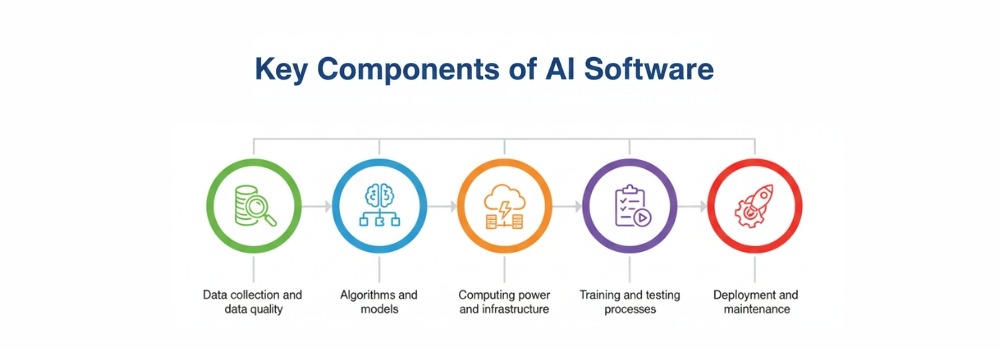
Key Components of AI Software
Building a high-performing application requires more than just a clever algorithm. To successfully develop an AI software product, you must balance several interconnected layers. If one component is weak, the entire system’s accuracy and reliability will suffer.
Data Collection and Data Quality
Data is the lifeblood of any intelligent system. However, the adage “garbage in, garbage out” has never been more relevant. High-quality data is the primary differentiator between a prototype and a market-ready solution.
- Sourcing: Finding diverse and representative datasets.
- Cleaning: Removing noise, bias, and inconsistencies.
- Volume vs. Variety: While having a large volume of data is helpful, having a wide variety of data points ensures the AI can handle edge cases and real-world unpredictability.
Algorithms and Models
The algorithm is the mathematical engine that processes your data. Depending on your goals, you might choose a simple linear regression or a complex deep-learning neural network. The “model” is what you get after the algorithm has been trained on your specific data.
Computing Power and Infrastructure
AI is resource-intensive. To make an AI software that responds in real-time, you need a robust infrastructure. This often involves:
- GPUs (Graphics Processing Units): Essential for the heavy parallel processing required in deep learning.
- Cloud Scalability: Services like AWS, Azure, or Google Cloud allow you to scale your computing power up or down based on the training load.
- Edge Computing: Processing data locally on devices (like smartphones or IoT sensors) to reduce latency.
Training and Testing Processes
This is the “learning” phase. Training involves feeding data into the model so it can adjust its internal logic.
Testing (or validation) happens on a separate dataset to verify that the model actually understands the concepts rather than just memorizing the training inputs.
- Overfitting: A common trap where the model performs perfectly on training data but fails in the real world.
- Hyperparameter Tuning: Fine-tuning the settings of the algorithm to achieve the highest possible accuracy.
Deployment and Maintenance
The work doesn’t stop once the code is live. Deploying AI involves integrating the model into your existing software ecosystem via APIs or microservices.
Maintenance is a continuous cycle:
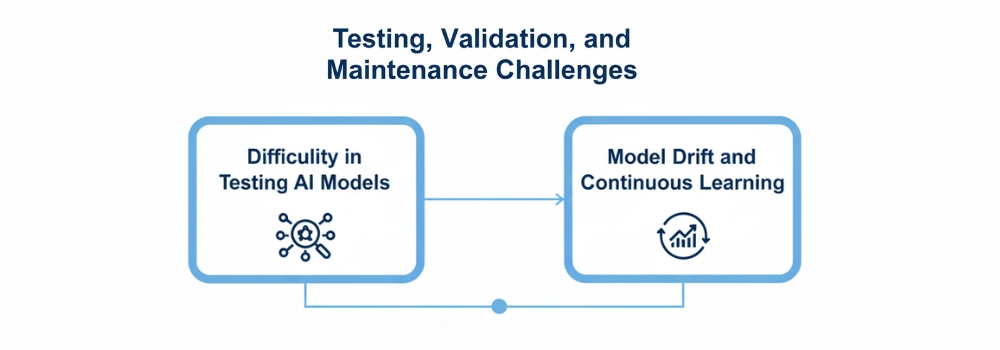
- Model Drift: Real-world data changes over time (e.g., consumer habits shift), causing the AI to become less accurate.
- Monitoring: Tracking performance metrics to ensure the system remains fast and reliable.
- Retraining: Periodically feeding the system new data to keep its knowledge “fresh.”
Understanding these components is the secret to knowing how to use AI in software development effectively.
It’s a move away from static code toward a living system that requires ongoing care.
Step-by-Step Process to Develop AI Software
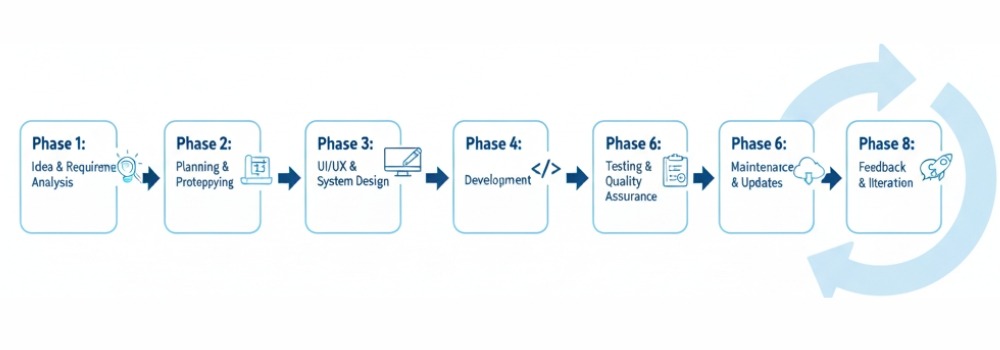
Building intelligence into an application is a structured journey. To develop an AI software solution that provides real ROI, you must move beyond experimentation and follow a rigorous engineering lifecycle.
Each stage builds on the previous one, ensuring the final product is both technically sound and business-aligned.
1. Define the Problem and Business Goals
Success starts with a question, not a piece of code. You must identify exactly what you want the AI to achieve. Are you looking to reduce customer support response times, or do you need to predict equipment failure before it happens?
Setting clear Key Performance Indicators (KPIs) at this stage, such as a target accuracy rate or a specific percentage of automation, prevents “scope creep” and keeps the project focused on delivering value.
2. Collect and Prepare Data
Data is the foundation of your entire project. To make an AI software that performs reliably, you need data that is both high-quality and high-volume.
- Data Sourcing: Pulling information from CRM systems, public datasets, or IoT sensors.
- Data Preprocessing: This is the most time-consuming step, involving the removal of outliers, handling missing values, and formatting data so the algorithm can read it.
- Feature Engineering: Selecting the most important variables that will actually help the model make a decision.
3. Choose the Right AI Model
Not every problem requires a complex neural network. Depending on your goals, you might select:
- Linear Models: Great for simple predictions and forecasting.
- Decision Trees: Excellent for classification tasks.
- Deep Neural Networks: Necessary for complex tasks like image or speech recognition.
Matching the model complexity to the problem ensures you don’t over-engineer the solution, which saves on both development time and computing costs.
4. Train the AI Model
This is the “learning” phase, where you use AI for software development in practice. You feed your prepared data into the chosen algorithm.
The system looks for patterns and adjusts its internal weights to minimize the difference between its predictions and the actual results.
Training requires significant computational power, often utilizing GPUs to process millions of data points simultaneously, enabling organizations to fully realize the benefits of custom software development through intelligent and scalable AI solutions.
5. Test and Validate the Model
Before going live, you must prove the model works on data it has never seen before. This prevents “overfitting,” where a model is great at predicting the past but fails to predict the future. Use a dedicated validation dataset to check for:
- Precision: How often the AI is correct when it makes a positive prediction.
- Recall: How many of the actual positive cases did the AI manage to find?
- F1 Score: A balance between precision and recall.
6. Deploy the AI Software
Deployment involves moving the model from a local environment to a production server where users can interact with it. Most teams integrate the AI model into their existing application via a REST API or a microservices architecture. This allows the front-end of your software to send data to the AI and receive an intelligent response in milliseconds.
7. Monitor, Update, and Maintain the System
An AI model is never truly “finished.” Because the world changes, your data will change too, a phenomenon known as Model Drift.
- Continuous Monitoring: Tracking the model’s accuracy in the real world.
- Feedback Loops: Collecting user interactions to help retrain the model.
- Scheduled Retraining: Regularly updating the AI with fresh data to ensure its predictions remain sharp and relevant.
By following these steps, you transform a complex technological challenge into a manageable, repeatable process.
This structured approach is how the most successful companies use AI in software development to dominate their industries.

Tools and Technologies for AI Software Development
Choosing the right tech stack is what separates a successful AI product from an experimental prototype. In 2026, the ecosystem has matured, offering specialized tools for every stage of the lifecycle from data ingestion to high-speed inference.
| Category | Top Tools & Technologies | Key Features & Strengths |
| Programming Languages | Python, Julia, R, C++, Java | Python remains the king for its vast library support (TensorFlow, PyTorch). Julia is favored for high-performance numerical analysis. |
| AI Frameworks | PyTorch, TensorFlow, Keras, Scikit-learn | PyTorch is the go-to for research and generative AI. TensorFlow excels in production-scale enterprise deployments. |
| Cloud Platforms | AWS (SageMaker), Google Cloud (Vertex AI), Microsoft Azure AI | These provide scalable GPUs/TPUs, managed MLOps pipelines, and pre-trained model APIs to accelerate development. |
| Data Management | Snowflake, Apache Kafka, Databricks, MongoDB | Essential for handling the “Big Data” requirements of AI, ensuring low-latency data streaming and structured storage. |
| NLP & LLM Tools | Hugging Face, LangChain, OpenAI API | Hugging Face provides the industry-standard “Model Hub” for transformer models used in chatbots and translation. |
Skills Required to Develop AI Software
While the tools are important, the real power behind any application is the expertise of the people building it.
To make an AI software that is both accurate and scalable, a unique blend of technical mastery and high-level critical thinking is required.
As we move through 2026, the demand has shifted from pure coding to “AI orchestration,” the ability to make various intelligent systems work together.
Programming Skills
You don’t need to know every language, but you must be proficient in the ones that power the AI ecosystem.
- Python: The undisputed leader due to its simple syntax and massive library support (TensorFlow, PyTorch).
- C++ & Java: Crucial for building the “engine” of high-performance AI or integrating models into large-scale enterprise environments.
- API Development: Since most AI models are deployed as services, knowing how to build and consume RESTful APIs is a mandatory skill for any modern developer.
Data Science and Statistics Knowledge
AI is applied statistics. Without a solid grasp of data science, you won’t be able to interpret why a model is succeeding or failing.
- Probability & Statistics: Essential for understanding model confidence, risk, and uncertainty.
- Linear Algebra: The math behind how neural networks process information in multidimensional arrays (tensors).
- Data Wrangling: The ability to clean, transform, and prepare messy real-world data into a format an algorithm can actually use.
Machine Learning Concepts
To develop an AI software strategy, you must understand the different “ways” a machine learns. You don’t need a PhD, but you should be fluent in:
- Supervised vs. Unsupervised Learning: Knowing when to use labeled data versus letting the machine find its own patterns.
- Neural Networks: Understanding the layers of “neurons” that allow deep learning applications to recognize faces or translate languages.
- Reinforcement Learning: Teaching an AI through a system of rewards and penalties, commonly used in robotics and gaming.
Problem-Solving and Analytical Thinking
This is perhaps the most underrated skill. AI is non-deterministic, meaning the same input might not always result in the same output.
- Critical Evaluation: You must be able to look at an AI’s output and ask, “Does this make sense, or is the model hallucinating?”
- Algorithmic Logic: Breaking down a complex business problem into a series of logical steps that an AI can solve.
- Ethical Oversight: Identifying and mitigating bias in data to ensure the software makes fair and responsible decisions.
Mastering these skills allows you to move beyond just using existing tools to actually innovating. When you understand the why behind the code, you can build systems that don’t just follow instructions but actively solve problems.
Challenges in AI Software Development
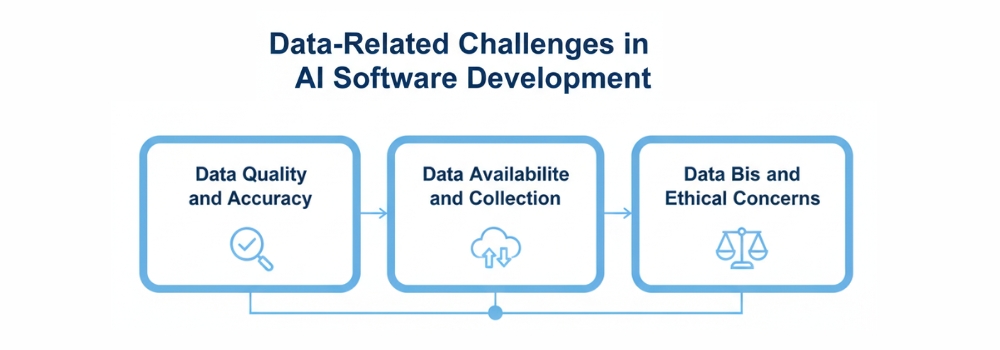
While the innovation potential is limitless, the road to a production-ready AI application is paved with significant hurdles. These challenges of ai software development often become more visible as organizations move from experimentation to real-world deployment.
In 2026, the focus has shifted from “can we build it?” to “can we build it responsibly and cost-effectively?” Understanding these challenges early is the only way to develop an AI software solution that stands the test of time.
Core Development Challenges
| Challenge | Impact on Development | How to Address It |
| Data Quality & Availability | Poor data leads to “garbage in, garbage out,” resulting in unreliable predictions. | Implement automated data validation frameworks (like Great Expectations) and diversify your data sources. |
| High Development Costs | Custom models require expensive, specialized talent and high-end hardware (like NVIDIA H100 GPUs). | Start with open-source models (Meta’s Llama or DeepSeek) to reduce costs by up to 6x compared to proprietary systems. |
| Ethical & Privacy Concerns | Data leaks or misuse of personal info can lead to massive fines under GDPR or the EU AI Act. | Use “Privacy-Preserving” techniques like Federated Learning or Differential Privacy to keep raw data decentralized. |
| Model Bias & Transparency | AI can accidentally learn societal prejudices, leading to unfair lending or hiring decisions. | Conduct regular “Bias Audits” and use Explainable AI (XAI) tools to make the model’s “Black Box” logic understandable to humans. |
Cost and Time Required to Develop AI Software
In 2026, building AI is no longer a “shot in the dark” regarding budgeting and scheduling. While costs have stabilized as technology matures, the investment required is still significantly higher than traditional software due to the specialized talent and high-performance computing power involved. This is especially true when considering the cost of AI agent development, which often requires advanced models, large datasets, and scalable infrastructure.
Factors Affecting Development Cost
The price tag of your AI project isn’t just about the lines of code. It is a combination of data, compute, and expertise, all of which directly influence the overall App development cost.
- Model Complexity: A simple chatbot using a pre-trained Large Language Model (LLM) wrapper might cost $50,000–$150,000. However, a custom-built computer vision system or an enterprise-grade predictive engine can easily range from $500,000 to over $2 million.
- Data Preparation: This is often the “hidden” cost, accounting for 40%–60% of the total budget. Sourcing, cleaning, and labeling thousands of data points requires significant human and technical resources.
- Infrastructure & Compute: Training advanced models requires GPUs (like the NVIDIA H100). Cloud rental for these resources ranges from $2 to $30+ per hour, and a single training run can cost thousands of dollars.
- Regulatory Compliance: In industries like healthcare or finance, meeting safety and privacy standards (like the EU AI Act) can add a 25%–40% premium to your development costs.
Actual costs vary significantly depending on scope, region, and infrastructure requirements.
Typical Development Timelines
AI development is an iterative process. You aren’t just building a product; you are conducting a series of experiments until the model achieves the desired accuracy.
| Project Stage | Duration (Estimated) |
| Discovery & Planning | 2–4 Weeks |
| Data Collection & Cleaning | 4–8 Weeks |
| Model Training & Iteration | 6–12 Weeks |
| Testing & Security Hardening | 3–6 Weeks |
| Deployment & Integration | 2–4 Weeks |
In-House vs. Outsourced AI Development
Deciding who builds your software is just as critical as the technology itself. To develop an AI software product that lasts, you must weigh your internal capabilities against your speed-to-market goals.
In 2026, the scarcity of high-level AI talent makes this decision a central part of any project’s business strategy.
Comparison: In-House vs. Outsourcing
| Feature | In-House Development | Outsourcing / Agency Partner |
| Control | Full control over IP and internal data security. | Shared oversight; relies on strong contracts. |
| Culture Fit | High; the team understands your business goals. | Moderate; requires intensive onboarding. |
| Talent Costs | Very high (AI Architects earn $180k–$300k+). | Predictable project-based or retainer fees. |
| Launch Speed | Slow; requires months of hiring and setup. | Fast; uses pre-built frameworks and MLOps. |
| Long-Term ROI | Higher for core, proprietary IP. | Better for non-core features or rapid MVPs. |
| Recruitment | Major hurdle: high turnover in the AI market. | None; the agency manages all staffing. |
Best Practices for AI Software Development
In 2026, the benchmark for successful AI isn’t just a working model; it’s a system that is resilient, ethical, and deeply integrated into the business fabric. As AI moves from a “novelty” to the core “operating system” of modern enterprise, following these industry-standard best practices is what separates high-ROI products from failed experiments.
Start with a Clear Use Case
The most common cause of AI project failure is “technology looking for a problem.” High-performing teams start with a specific business pain point.
- Identify High-Impact, Low-Complexity Tasks: Begin with areas like automated customer support or predictive maintenance where the ROI is easily measurable.
- Define “Done” with KPIs: Success should be measured by specific metrics, such as a 20% reduction in processing time or a 15% increase in lead conversion, rather than vague goals like “improving efficiency.”
- Prioritize “Agentic” Workflows: In 2026, the trend is moving toward AI agents that don’t just answer questions but execute multi-step tasks independently (e.g., an agent that processes a refund and updates the inventory).
Use High-Quality Data
If your data is flawed, your AI will be too, no matter how advanced the algorithm. High-quality data is the single most important asset when you make an AI software product.
- Audit for Bias and Accuracy: Proactively scan your data for historical biases to ensure your AI provides fair outcomes across all demographics.
- Implement Continuous Validation: Data in the real world is messy and changes over time. Use automated pipelines to “clean” and validate incoming data before it hits your model.
- Focus on Small, Specific Models: A 2026 trend is moving away from massive, general models toward smaller, “application-specific” models trained on high-quality, niche data for better precision.
Focus on Scalability
An AI model that works for 10 users might crash when hit with 10,000. To use AI in software development effectively at scale, you must:
- Adopt a Cloud-Native, Modular Design: Use microservices and containerization (like Docker or Kubernetes) so your AI inference engine can scale independently from the rest of your app.
- Plan for “Inference Costs”: Scaling AI is expensive. Optimize your model’s architecture to reduce the “compute” required for each request, ensuring your profit margins stay healthy as your user base grows.
- Design for Interoperability: Ensure your AI can easily “talk” to your existing CRM, ERP, and legacy databases via standardized APIs.
Ensure Data Security and Compliance
As of 2026, “Privacy by Design” is no longer optional; it’s a legal and business requirement.
- Compliance with Global Standards: Ensure your software adheres to the EU AI Act, GDPR, and local sovereignty laws. This often means implementing “Federated Learning” where the AI learns from data without the data ever leaving its secure local server.
- Establish “Human-in-the-loop” (HITL) Paths: For high-stakes decisions (like medical or financial approvals), always have a human sign-off path. This provides a safety net and maintains user trust.
- Regular Security Audits: AI systems introduce new vulnerabilities, such as “prompt injection.” Regular penetration testing specifically for your AI endpoints is essential.
Future Trends in AI Software Development
As we move through 2026, the focus of development has shifted from basic automation to “autonomous intelligence.”
AI is no longer a separate feature; it has become the underlying architecture of modern software. To stay competitive, developers must look toward these four pillars of innovation that are redefining the industry.
Generative AI
Generative AI has developed far beyond simple text and image generation. In 2026, the trend has shifted toward Agentic AI systems that don’t just answer prompts but autonomously execute multi-step workflows.
These “AI Agents” can plan a project, write the code, run tests, and deploy updates with minimal human intervention. Furthermore, Multimodal models are now the standard, allowing software to seamlessly process and generate text, high-fidelity video, and natively generated audio in a single stream.
Automated Machine Learning (AutoML 3.0)
The barrier to entry for AI development has vanished thanks to AutoML 3.0. This new generation of tools automates the entire machine learning pipeline from synthetic data generation and feature engineering to model selection and deployment.
In 2026, these platforms are “context-aware,” meaning they can automatically adjust a model to meet the specific regulatory or performance standards of industries like healthcare or finance without a data scientist needing to manually tune every parameter.
AI-Powered Business Automation
We have moved from rigid “if-then” Robotic Process Automation (RPA) to Thinking Systems. In 2026, business software is self-optimizing.
ERP platforms now use autonomous forecasting to manage supply chains in real-time, while CRM systems act as predictive intelligence engines that anticipate customer needs before they are voiced.
This “Unified Intelligent Layer” allows different enterprise tools to talk to each other, creating end-to-end workflows that learn and improve with every transaction.
Responsible and Ethical AI
Ethics is no longer a “nice-to-have” but a core engineering requirement. Driven by global regulations like the EU AI Act, 2026 has seen the rise of Explainable AI (XAI). Developers are now building “Transparent by Design” systems that provide human-readable logic for every decision the AI makes.
This trend includes a massive shift toward Privacy-Preserving AI, such as federated learning, which allows models to be trained on sensitive data without that data ever leaving the user’s local device.
Finding the Right Consultant for Your AI Project
Finding the right consultant is the bridge between a conceptual idea and a high-performance market reality. To ensure your investment yields measurable ROI, look for a partner that prioritizes business outcomes over technical jargon and demonstrates a clear methodology for data governance and model scalability.
Hudasoft stands out as a premier choice in this space, offering comprehensive AI software development services that combine deep technical expertise with a product-centric approach.
By choosing a consultant that understands your specific industry delays, whether in healthcare, e-commerce, or logistics, you can move beyond simple automation to create a truly intelligent enterprise ecosystem.
Conclusion
Developing AI software is a transformative journey that begins with a well-defined business problem and relies on the pillars of high-quality data, scalable infrastructure, and continuous model maintenance.
By understanding the critical distinctions between traditional programming and machine learning, and by staying ahead of 2026 trends like agentic AI and ethical transparency, you can build systems that don’t just automate tasks but actively drive innovation.
Whether you decide to cultivate an in-house team or partner with specialized experts to accelerate your launch, the key is to start with a focused use case and remain iterative.
As artificial intelligence becomes the core architecture of the modern enterprise, now is the time to transition from observation to execution, turning your raw data into a powerful, intelligent asset that scales with your ambition.\
FAQS
Why is explainability becoming critical in AI software development?
The demand for explainability is increasing rapidly, particularly in regulated industries like finance, healthcare, and public services. Organizations must be able to justify how AI systems reach decisions, especially when those decisions impact customers or business operations. Explainable AI (XAI) improves transparency, builds stakeholder trust, and helps ensure compliance with emerging regulatory frameworks and data protection laws.
What is the biggest technical challenge in AI software development?
One of the biggest technical challenges is managing model drift and maintaining performance at scale. AI systems operate in dynamic environments where data patterns change over time. Without continuous monitoring, retraining pipelines, and structured MLOps practices, model accuracy can gradually decline, leading to unreliable or inconsistent outputs.
Why do many AI projects fail to scale beyond the pilot stage?
Many AI initiatives struggle to move beyond proof-of-concept due to poor data quality, unclear ROI measurement, infrastructure limitations, and a lack of cross-functional expertise. Successfully scaling AI requires strong data governance, reliable computing infrastructure, domain knowledge, and automation through mature MLOps frameworks.
What are the main security risks in AI systems?
AI systems face unique security risks such as data poisoning, prompt injection attacks, adversarial manipulation, and potential privacy leakage. As AI becomes more integrated with enterprise systems, organizations must adopt privacy-by-design principles, robust access controls, and continuous monitoring to protect both sensitive data and model integrity.