A Full, Data-Driven Analysis for Landlords, Property Managers, and Builders
With growing property portfolios and increasing tenant expectations, tried-and-tested ways of handling properties spreadsheets, emails, and sticky notes become a thing of the past.
Therefore, property management software (PMS) has emerged as a quintessential investment for real estate owners and property managers across the globe.
Nevertheless, one main question looms over the debate:
How much does property management software cost?
This post offers in-depth analysis of real estate software pricing structures, feature sets, industry trends, and strategic advice to assist you in making the best decision.
You could be a landlord overseeing ten single-family homes, a property management company with 500 units, or a start-up looking into real estate app development, this guide has all angles considered.
What is Property Management Software?
Before addressing pricing considerations, one must first grasp the fundamental aspects of property management software. A property management solution functions as a digital platform to oversee everyday rental property operations which encompass tenant communications, lease administration, rent collection, maintenance requests, financial tracking, and reporting.
Software platforms span from simple tools with limited functions to complex enterprise systems that provide CRM capabilities along with trust accounting features and marketing automation powered by AI analytics.
Average Property Management Software Pricing in 2025
So, how much is property management software really?
The average monthly pricing varies across the market, but here’s a breakdown:
Tier
Monthly Price Range
Common Use Case
Basic
$0 – $50
Individual landlords with <10 units
Mid-Level
$100 – $250
Growing portfolios, 20–200 units
Advanced
$400 – $1,200+
Commercial, mixed-use, and custom integrations
The majority of property management software platforms use a hybrid pricing model combining:
A base monthly fee
A per-unit cost (ranging from $1 to $2.50/unit)
For example, if your PMS charges $40 base + $2/unit, and you manage 100 units, your monthly cost would be $240.
Key Factors That Influence Property Management Software Cost
The property management software pricing you encounter is not arbitrary. Several variables impact the final cost, including:
a. Property Type
Residential: More straightforward needs; lease automation, rent tracking, and communication tools suffice.
Commercial: Requires features like CAM reconciliation, lease abstractions, and rent escalations.
Short-Term Rentals: Demands a PMS booking system, guest communication tools, dynamic pricing, and cleaning schedule integration.
Property management software for short term rentals is often more expensive due to the breadth of automation required.
b. Portfolio Size
Software must scale with your operations. As your unit count increases, so does the cost—not just from per-unit fees but also from upgraded service tiers that unlock enterprise features.
c. User Access & Roles
Team-based systems with multiple admin or agent logins may require higher pricing tiers. Best property management software for small business usually limits this, while enterprise tools support large user hierarchies.
d. Add-ons and Integrations
From QuickBooks and Xero integrations to calendar syncing with Airbnb or Muse booking system, the more integrations you require, the higher the cost.
Pricing Models Explained
Understanding how different property management software systems charge helps you avoid overpaying or missing out on critical features.
1. Per-Unit + Flat Fee Model
This is common in platforms like Buildium or AppFolio. You pay a base fee and a small fee per active unit.
Best for: Scalable portfolios, mixed properties, or growing teams.
2. Tiered Subscription Model
Offered by platforms like Hemlane, where functionality is bundled based on tier: Starter, Essentials, Growth, Pro, etc.
Best for: Owners who want clarity and predictable billing.
3. Freemium Model
Great for trialing services or managing a very small number of units.
Best for: New landlords or testing before scaling.
4. Custom Pricing or One-Time Development
Custom-built systems, such as in-house tools or outsourced platforms, offer complete control but involve significant investment.
Real estate app development cost for PMS tools typically starts at $50,000 and can exceed $250,000 for enterprise-grade platforms. These costs vary depending on whether you work with a specialized real estate software team or a broader agency offering end-to-end custom application development services, which often includes UI/UX, backend architecture, automation, and long-term maintenance.
Feature Checklist: What You Get at Each Pricing Level
Let’s look at what a landlord or manager gets at each price point. This breakdown helps you determine which plan gives the best value, not just the lowest cost.
Feature
Basic ($0–$50)
Mid ($100–$250)
Advanced ($400+)
Online Rent Payments
Limited
Included
Included
Tenant Screening
Not included
Optional
Included
Maintenance Tracking
Manual
Integrated
Automated
Lease Generation
Manual
Partial
E-signatures
Accounting Integration
Basic export
Integrated
Full trust accounting
Custom Dashboards
No
Limited
Yes
CRM Tools
No
Limited
Yes
Document Storage
Low
Medium
Unlimited
Mobile Access
Partial
Full
Branded Apps
Owner Portals
No
Limited
Yes
Reporting Tools
Basic
Pre-built
Custom reports
This table demonstrates the importance of aligning your tech stack with your operational complexity.
Custom vs. Off-the-Shelf: What You’re Really Paying For
Many companies consider whether to buy property management software or build their own.
Custom Software (Build from Scratch)
Ideal for: Real estate companies with unique processes or specific tech stack integration needs.
Requires: A development team, maintenance contracts, testing, and security audits.
Cost: $40,000–$250,000+
Timeline: 3–9 months
Off-the-Shelf Software
Ideal for: 90% of landlords and managers
Benefits: Faster implementation, ongoing updates, community support
Risks: Limited customization, vendor lock-in
Real estate investment management software pricing for custom builds can be far greater than recurring SaaS fees. But with control comes opportunity especially if you’re developing a niche platform, such as a property rental management solution for smart communities or vertical real estate brands. In such cases, partnering with a real estate app development company can help you build a scalable, tailored platform that meets your specific business goals.
Cost Over Time: Annualized ROI from Property Management Software
Software is not an expense, it’s a long-term asset.
Over one year, here’s how the value stacks up:
Administrative time saved: 20–40 hours/month = 240–480 hours/year
Average vacancy reduced: 1–2 weeks faster leasing per unit
Improved rent collection: 5–10% fewer late or missed payments
Better decisions: Real-time dashboards and data summaries
If your staff’s hourly rate is $25/hour and you save 300 hours annually, that’s $7,500 in reclaimed labor alone, well above the average property management software cost.
Use Cases and Recommendations by Business Type
Individual Owners
Use residential property management software with built-in accounting and rent tracking
Look for mobile apps to manage rentals remotely
Tools like Avail, TenantCloud, or Rentec Direct offer low-cost entry
Small Property Management Firms
Go for the best property management software for small business that supports up to 200 units
Require property management software commercial with support for NNN leases, occupancy analytics, and building automation
Tools like Yardi Breeze or MRI Software are suited for this
Short-Term Rental Managers
Must integrate with booking platforms and support dynamic pricing
The best short-term rental management software includes Hostaway, Guesty, or Hospitable
Common Hidden Costs and Mistakes to Avoid
Underestimating Support Needs: Basic plans may not include customer service.
Ignoring Data Portability: Ensure you can export data if you migrate.
Over-customizing Too Soon: New managers often pay for features they don’t use.
Not Calculating Total Cost of Ownership: Include onboarding, support, and payment processing fees in your evaluation.
A structured property management software comparison spreadsheet can help forecast these expenses over time.
Conclusion: Cost Is Only Part of the Equation
Property management software is no longer optional it’s foundational to running an efficient, scalable, and profitable real estate operation.
When evaluating the cost of property management software, consider:
The type of properties you manage
How many units you oversee
The level of automation you require
Future growth plans
The internal resources available for onboarding and usage
Software for property management can be a low-cost solution or a six-figure digital transformation project. The best choice is one that aligns with your workflow, not just your wallet.
If you’re starting small, begin with platforms offering flexibility and growth paths. If you’re operating at scale, consider the long-term ROI from advanced integrations, automation, and custom builds. For teams seeking tailored, future-ready solutions, Hudasoft provides scalable property management software designed to support growth at every stage.
Frequently Asked Questions
Q1: How much does property management software cost for a 100-unit portfolio?
Expect to pay between $150 and $300/month, depending on the platform, features used, and user seats needed.
Q2: What is the best real estate property management software for growth?
Choose platforms offering automation, reporting, and integration flexibility like AppFolio or Buildium.
Q3: Can I use simple software for just rental tracking?
Yes. Some rental property tracking software focuses purely on income and expense monitoring and lease reminders.
Q4: What is a PMS booking system?
It’s a property management system that manages reservations for short-term or vacation rentals—integrating booking engines, calendars, and guest communication tools.
Managing properties today requires more than manual rent collection cleaning schedules and document filing. From finances to resident communication every aspect must flow systematically.
That is why modern property managers rely on property management software. Whether you manage rentals, gated communities or mixed use developments the right system improves efficiency, transparency and resident satisfaction.
This blog outlines the seven most important property management software features your platform should offer. These features are mission critical for scaling your operations, reducing errors and delivering a better experience to residents, owners and staff.
Why Property Management Software Matters
Property management entails overseeing leases rent invoicing maintenance repairs resident requests financial records compliance and communication on a daily basis. When managed manually these tasks lead to error delays frustrated residents and owners lacking visibility.
Property management software integrates these workflows in one centralized dashboard. It enables reliable online rent collection, fast maintenance resolution, secure documentation, transparent communication and financial accountability across your portfolio.
Top Seven Property Management Software Features
1. Online Rent Collection
Manual rent tracking is inefficient, error prone and often leads to late payments. Look for online rent collection features that allow tenants to pay via credit or debit cards, bank transfers or mobile wallets. Automated reminders and late fee enforcement ensure revenue comes in on time.
Key capabilities include: • Multiple payment methods and secure processing • Recurring payment setup and history tracking • Automated reminders and late fee calculations • Real time ledger updates for admins and tenants • Digital receipts and reporting
Solution Example
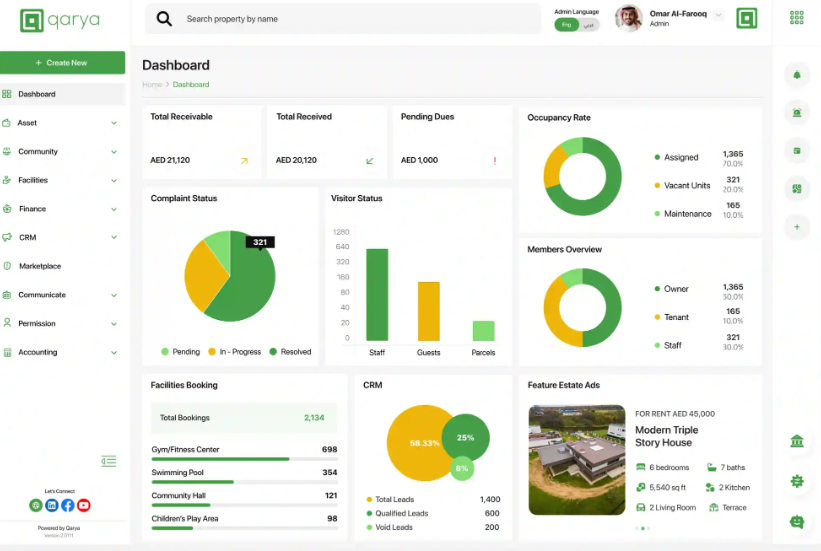
Qarya: Enables automated rent billing and real-time ledger tracking.
Buildium: Handles rent roll, owner reports, and payment tracking.
Zillow Rental Manager: Supports ACH rent payments with email reminders.
2. Automated Maintenance Management
Maintenance requests can pile up and go unresolved without proper tracking. A robust system enables residents to submit requests with photos or videos while admins assign tasks to in‑house staff or vendors with priority settings. Progress tracking and timelines keep everyone informed.
Look for: • Resident submitted tickets with attachments • Task assignment by urgency or location • SLA management and escalation rules • Completion logs with resident notifications • Maintenance status dashboards
Solution Example Haasib: Automates maintenance and facility requests with routing, tracking, and resolution workflows.
AppFolio: Lets residents submit maintenance requests with photos and receive real-time updates.
TenantCloud: Tracks repair requests, vendor assignments, and service history by unit.
3. Built in Accounting and Financial Reporting
Accurate accounting is essential for landlords and property managers. A built-in financial module should track income expenses, deposit vendor payments and generate owner statements, rent rolls and cash flow reports all without relying on external spreadsheets.
Essential functionality: • Chart of accounts with income and expense entries • Owner reporting and rent roll analysis • Cash flow tracking and bank reconciliation • Vendor payment logs and transaction audit trails • Exportable reports in PDF or spreadsheet formats
Buildium: Provides full accounting with rent roll, reports, vendor payments, and reconciliation tools.
Rentec Direct: Delivers automated owner reports, bank syncing, and detailed transaction tracking.
4. Digital Lease and Document Management
Paper lease documents are difficult to maintain and audit. Platforms must offer secure centralized digital storage for leases identification and compliance documents. E‑signature support and renewal alerts simplify administration.
Features to include: • Secure document uploads tagged by unit or resident • Electronic signature integration • Expiry alerts and renewal workflows • Resident ID and compliance file storage • Permission‑based access control
Solution Example Imlaak: Manages digital lease files with tagging, ID verification, and automated renewal alerts.
TenantCloud: Offers e-signatures, lease templates, and expiration alerts to streamline lease compliance.
AppFolio: Provides digital lease management with secure storage, signing workflows, and renewal tracking.
5. Resident and Owner Portals
Portals reduce administrative support by empowering users to self‑serve. Tenants can view dues, receive announcements, submit feedback and track service requests. Owners access financial snapshots, property performance and statements.
Portal expectations: • Tenant interface for invoices history complaints and documents • Owner dashboard with financial metrics and performance tracking • Role based access control for staff residents and owners • Secure login with data visibility controls • Communication history and activity logs
Solution Example Ciyaha: Offers secure, mobile-friendly portals with access control and real-time visibility for residents and owners.
TenantCloud: Provides self-service dashboards for tenants and landlords to manage payments, documents, and messages.
Rentec Direct: Enables branded portals with access to balances, maintenance updates, and owner financial reports.
6. Facility Booking and Visitor Management
Managing shared facilities and guest access is critical in gated communities and multi unit buildings. Systems should let residents book amenities and generate digital guest passes while security can monitor entries in real time.
Important capabilities: • Calendar based facility booking with time slot rules • Resident driven booking requests and approvals • Digital visitor pass generation with QR or PIN codes • Timestamped visitor logs visible to security staff • Emergency alerts for unauthorized access
Solution Example AppFolio: Enables residents to book amenities, issue guest passes, and provides visitor access logs for managers.
Qarya: Lets residents reserve shared facilities and manage guest entries with real-time gate pass tracking.
Buildium: Supports amenity scheduling and tracks visitor access through integrated community calendars.
7. Communication and Announcements
Clear communication prevents confusion and builds trust. A property management system should include channels for sending announcements, resident polls surveys and urgent notifications via SMS email or in app messages.
Must have features: • Multi-channel messaging via SMS email or notifications • Scheduled announcements for future dates • Emergency alert pinning and visibility controls • Polls surveys and feedback tools • Read receipt tracking and logging
Solution Example Aradhi: Enables admins to send announcements, schedule notifications, and run polls with engagement tracking.
TenantCloud: Supports email, SMS, and in-app messaging with read receipts and automated alerts.
AppFolio: Offers multi-channel resident messaging, emergency alerts, and scheduled announcements.
Benefits of These Core Features in Property Management Software
Implementing these seven property management software features delivers measurable value:
Efficiency boosts: Automate billing reminders documentation and maintenance tracking to cut manual workload by up to 60 percent.
Improved revenue assurance: Online rent collection with alerts and ledger tracking reduces missed payments.
Faster maintenance and response: Residents track requests in real time while staff follow structured SLA workflows.
Transparent financial reporting: Owners receive statements and dashboards improving trust and oversight.
Higher resident satisfaction: Self service portals communication tools and proactive support strengthen loyalty.
Scalability: Platforms handle anything from single buildings to gated societies without additional overhead.
Compliance and audit readiness: Digital lease storage expiry alerts and document logs reduce legal and administrative risk.
Who Can Benefit from Property Management Software
These features, when well integrated, serve the needs of many stakeholders:
• Real estate developers managing leasing compliance and operations • Landlords with multiple rental units or residential buildings • Housing associations and homeowner societies overseeing shared amenities • Community managers in gated complexes needing access control and service tracking • Property consultants and facility management firms supporting diverse portfolios
If you manage residential, commercial, or mixed-use spaces, these tools bring efficiency, transparency, and professionalism to your operations. And if your needs go beyond off-the-shelf tools, partnering with a real estate app development company can help you build a customized platform tailored to your specific workflows and tenant engagement models.
Final Thoughts on Choosing the Best Property Management System
A best property management system does more than just collect rent or store documents. It transforms how your team operates by automating workflows, improving resident and owner experience and giving you control through reporting and communication.
When assessing property management software costs, make sure the platform delivers strong performance across these seven essential areas:
When evaluating software be sure it excels in these seven essential areas:
Online rent collection
Automated maintenance management
Built in accounting and financial reporting
Digital lease and document management
Resident and owner portals
Facility booking and visitor management
Communication and announcement tools
Platforms that are modular and integrated such as Qarya Haasib Imlaak Ciyaha and Aradhi by Hudasoft offer functional depth and customization. Competitor examples like Buildium AppFolio Zillow Rental Manager illustrate alternative capabilities for financial and booking functionalities.
Choosing the right software means choosing systems designed to grow with you to manage resident satisfaction property performance and financial clarity.
In the fast-moving, face-to-face world of real estate, safety risks are often underestimated. Agents regularly meet unknown individuals in empty homes, during off-hours, and sometimes in isolated neighborhoods. While the focus tends to be on closing deals and client service, the reality is that personal safety is a growing concern in the real estate sector.
According to the National Association of Realtors (NAR) 2024 Member Safety Report:
As the industry continues to digitize, tools designed specifically for safety have become not only more accessible but also smarter. The rise of purpose-built real estate agent safety apps has transformed how professionals protect themselves on the job.
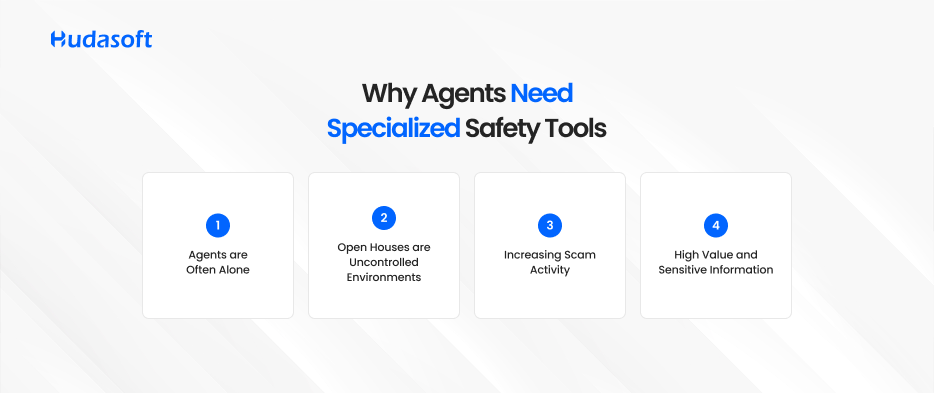
The New Landscape: Why Agents Need Specialized Safety Tools
Generic safety apps might help in emergencies, but real estate agents need much more than an SOS button. Here’s why:
1. Agents are Often Alone
The job requires frequent solo interactions with clients, sometimes in unfamiliar or vacant properties.
2. Open Houses are Uncontrolled Environments
Even with sign-in sheets and security cameras, open houses are hard to monitor fully. Anyone can walk in, and agents can’t always verify identities.
Agents may carry keys, contracts, ID documents, or handle cash transactions for rentals making them potential targets.
A real estate agent safety app addresses these vulnerabilities by adding automation, real-time monitoring, lead verification, and streamlined emergency alerts all within a mobile device.
What Makes a Good Real Estate Agent Safety App?
Before jumping into the top apps for protection of real estate agents, let’s define what makes these tools effective:
Background checks on leads using phone numbers or emails
GPS location tracking and real-time sharing
Emergency SOS alerts with customizable contacts
Geo-fencing to notify if an agent exits a safe zone
Photo or ID verification at showings
Check-in/check-out timers to track appointments
Smart lockbox integration to tie access with safety monitoring
Silent alerts or codewords to request help without escalating a situation
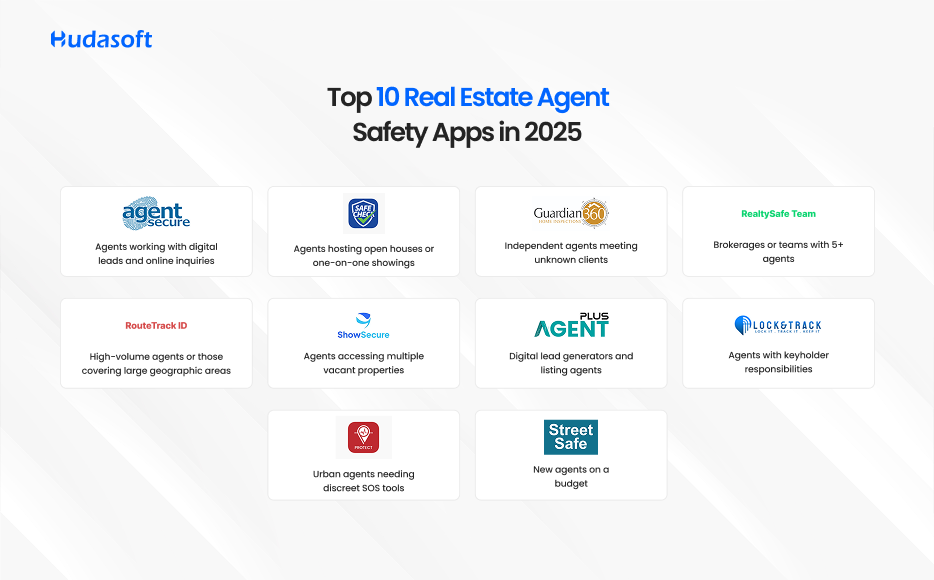
Top 10 Real Estate Agent Safety Apps in 2025
Each app below meets key safety criteria and is purpose-built (or widely adopted) by real estate professionals. No competitor names are used.
1. AgentSecure Pro
Features
Lead background verification via phone and email
Live ID scanning before property visits
Flags suspicious leads using machine learning
Platforms: iOS, Android Pricing: Premium Best For: Agents working with digital leads and online inquiries
A trusted tool among tech-savvy agents, AgentSecure Pro performs automated due diligence before meetings, helping you avoid high-risk appointments.
2. SafeCheck Mobile
Features
GPS location tracking and auto-check-ins
Captures visitor photos at showings
Instant alerts sent to emergency contacts
Platforms: iOS, Android Pricing: Subscription-based Best For: Agents hosting open houses or one-on-one showings
A favorite for busy agents, SafeCheck Mobile works in the background and sends alerts if a scheduled check-in is missed.
3. Qarya
Features
Property member verification with secure onboarding to prevent unauthorized access
Real-time SOS alerts and two-way communication within gated communities
Integrated visitor management for safer property showings and deliveries
Built-in Property Management System for handling maintenance requests, rent collection, and amenity bookings
Automated incident logging with photo, video, and location evidence
Access control integration with smart gates, locks, and RFID-based entry systems
Centralized dashboard for agents, property managers, and community security teams
In-app scheduling for property showings, facility reservations, and service provider visits
Broadcast announcements for community-wide safety alerts or updates
Multi-language support tailored for diverse communities and international residents
Platforms: iOS, Android, Web Pricing: Subscription-based Best For: Agents, property managers, and brokers operating in managed or gated communities
Qarya is more than just an agent safety tool; it’s a platform that combines community safety with operational efficiency.
This property management solution enables agents to verify visitors before entry, send and receive instant SOS alerts, and coordinate seamlessly with on-site security teams.
Its integrated property management features simplify everyday tasks such as rent collection, maintenance tracking, and amenity booking, while the visitor management module enhances security during property showings.
Whether it’s a high-end gated community or a large residential complex, Qarya ensures safety, streamlines management, and keeps communication centralized in one secure platform.
4. RealtySafe Team
Features
Peer alert system with real-time broadcasting
Office-wide dashboard for team tracking
Emergency codeword system
Platforms: iOS, Android, Web Pricing: Team license Best For: Brokerages or teams with 5+ agents
Teams using RealtySafe Team report 25% higher agent confidence levels during field operations, according to a 2023 PropTech survey.
5. RouteTrack ID
Features
Full appointment route tracking
Time-based check-ins and AI-predictive alerts
Integration with Google Calendar and CRM
Platforms: iOS, Android Pricing: Freemium Best For: High-volume agents or those covering large geographic areas
Agents using RouteTrack ID saved 22 hours per month by automating location logs and travel summaries.
6. ShowSecure One
Features
Showroom access control tied to safety timers
Motion-based incident recording
Real-time push notifications for missed check-outs
Data shows 92% of incidents during showings happen within the first 15 minutes. ShowSecure One’s real-time check-in alerts offer critical protection.
7. VerifyPlus Agent
Features
Multi-channel lead authentication
Alerts for disposable or virtual numbers
CRM plugin available for lead scoring
Platforms: Web-based, Android plugin Pricing: Subscription Best For: Digital lead generators and listing agents
Over 3,500 agents use VerifyPlus Agent to vet buyer leads before in-person contact, reducing exposure to scams.
8. LockTrack Safety
Features
Smart lockbox access with ID verification
Safety countdown activated on entry
Escalates alert if exit check-in is missed
Platforms: iOS, Android Pricing: Freemium with premium tier Best For: Agents with keyholder responsibilities
Reports show a 17% decrease in after-hours lockbox incidents among agents using LockTrack Safety in 2024.
9. PulseProtect
Features
Works with smartwatches and wearables
Silent alert via wrist-tap or biometric trigger
Tracks biometrics under stress (heart rate, etc.)
Platforms: Wearables, iOS, Android Pricing: Premium Best For: Urban agents needing discreet SOS tools
PulseProtect is trusted by thousands of female agents in metropolitan areas where subtlety and immediacy matter most.
10. StreetSafe Agent
Features
Voice-activated distress signal
Power-efficient background tracking
Custom emergency scripts for contacts
Platforms: iOS, Android Pricing: Free basic plan Best For: New agents on a budget
Ideal for beginners, StreetSafe Agent focuses on core safety functions without expensive subscriptions.
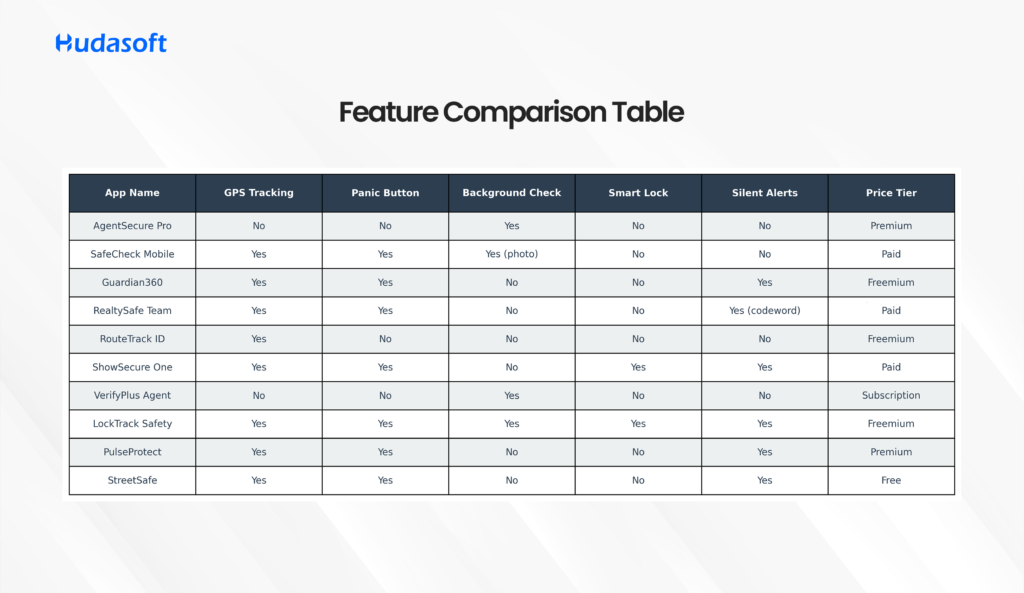
Feature Comparison Table
App Name
GPS Tracking
Panic Button
Background Check
Smart Lock
Silent Alerts
Price Tier
AgentSecure Pro
No
No
Yes
No
No
Premium
SafeCheck Mobile
Yes
Yes
Yes (photo)
No
No
Paid
Guardian360
Yes
Yes
No
No
Yes
Freemium
RealtySafe Team
Yes
Yes
No
No
Yes (codeword)
Paid
RouteTrack ID
Yes
No
No
No
No
Freemium
ShowSecure One
Yes
Yes
No
Yes
Yes
Paid
VerifyPlus Agent
No
No
Yes
No
No
Subscription
LockTrack Safety
Yes
Yes
Yes
Yes
Yes
Freemium
PulseProtect
Yes
Yes
No
No
Yes
Premium
StreetSafe Agent
Yes
Yes
No
No
Yes
Free
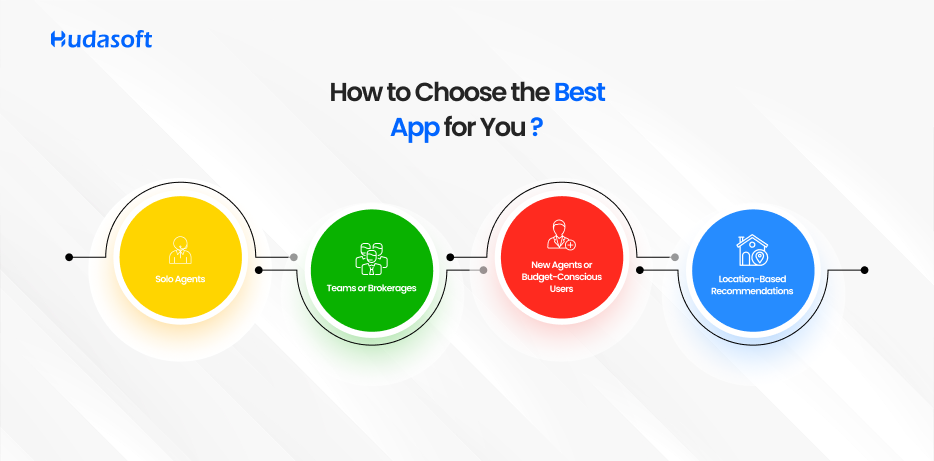
How to Choose the Best App for You
1. Solo Agents
Focus on apps that include lead verification, GPS tracking, and one-touch alerts. Silent SOS features are a bonus.
2. Teams or Brokerages
Choose platforms with dashboards, peer alerts, and route tracking to ensure visibility across your workforce.
3. New Agents or Budget-Conscious Users
Start with freemium tools that offer panic buttons and live location. Upgrade later as your operation grows.
4. Location-Based Recommendations
Urban agents: Need silent alerts, smartwatch compatibility, and voice activation
Rural agents: Should choose apps with geofencing and low-bandwidth functionality
The Business Case for Safety Apps: Qarya in Action
Safety is more than a compliance measure — it is a competitive advantage. Qarya, a smart community management platform, integrated real estate agent safety protocols directly into its mobile app for on-site managers, leasing agents, and field staff.
Case Study: Qarya’s Agent Safety Integration
Challenge: Agents visiting units across large community zones were reporting discomfort due to lack of visibility, unverified tenants, and poor emergency protocols. Solution:
Qarya deployed in-app safety tools including live check-ins, geofenced alerts, and an integrated panic button.
Admins and supervisors received real-time status updates, while agents had access to pre-screened visit records and secure access control.
Results:
Agent turnover dropped by 38% due to higher workplace satisfaction and reduced incident anxiety.
Lead-to-showing conversion increased by 57%, as agents were more confident conducting tours.
Incident reporting improved 3X, creating a safer, data-informed environment across the community.
By embedding safety into its smart operations, Qarya not only protected its agents it enhanced performance and trust at every level of the leasing process.
Conclusion
The real estate industry is transforming, and agent safety must evolve with it. In 2025, a real estate agent safety app is not just a good-to-have—it is essential to operate securely and confidently.
By integrating advanced real estate app development services, agencies can create safety solutions tailored to the unique challenges of property viewings, client interactions, and on-the-go operations, ensuring agents work smarter and safer in an increasingly dynamic market.
From GPS tracking and smart alerts to lead verification and team oversight, today’s apps for protection of real estate agents provide a safety net that lets agents focus on what they do best: closing deals and building relationships.
If you’re not already using one of these safety tools, now is the time to act. Protecting your life is the best investment you’ll ever make.
FAQs
Q1: Are real estate safety apps mandatory? No, but many brokerages now require them as part of agent onboarding.
Q2: Do safety apps track my location all the time? Most apps offer customizable tracking, only sharing your location during showings or active alerts.
Q3: Can I use general safety apps instead? You can, but purpose-built apps offer real estate-specific features like client vetting, property access integration, and team-wide alerts.
Q4: What is the most affordable safety app? StreetSafe Agent offers a free tier with GPS and panic button. RouteTrack ID is also a strong freemium option.
Q5: Do these apps integrate with showing tools or CRMs? Some advanced platforms offer API access or direct plugins to CRMs like FollowUpBoss or showing services.
No longer a catchphrase only used in Silicon Valley, artificial intelligence (AI) is now one of the most important instruments in the real estate business. In 2025, AI will become essential for start-ups and industry leaders alike. From identifying the ideal purchasers to building immersive property experiences, AI is doing what would formerly take hours usually in seconds by scanning through contracts, managing data, and enhancing client experiences.
This is more than just a convenience for real estate agents. It’s a competitive advantage. If you’re not using AI solutions for real estate brokers, chances are your rivals are and they’re gaining more leads, closing faster, and spending less while doing it.
In this piece, we’ll explore why using artificial intelligence is no longer optional. Additionally, you will find the best artificial intelligence tools for real estate agents, arranged by application from lead generation to virtual tours, document automation, and smart marketing. We’ll also share several free AI tools for real estate agents, so you can start without breaking the bank.
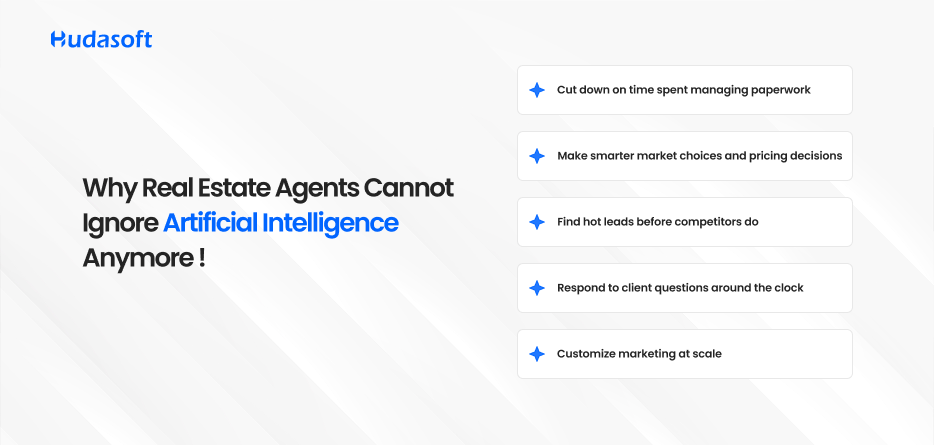
Why Real Estate Agents Cannot Ignore Artificial Intelligence Anymore
Real estate is fast-moving, highly competitive, and heavily driven by relationships. In such an environment, timing and personalization are everything. Artificial intelligence enables real estate professionals to:
Find hot leads before competitors do
Respond to client questions around the clock
Customize marketing at scale
Cut down on time spent managing paperwork
Make smarter market choices and pricing decisions
This is not just a tech trend. According to a recent McKinsey study, AI adoption in real estate can boost productivity by 30–40% in key areas such as marketing, research, and customer service. For both independent agents and major firms, AI levels the playing field—allowing small teams to perform like large ones, and large organizations to run leaner.
What This Guide Will Cover
We have divided this post into key functions where real estate AI tools deliver the most value. For each function, we’ll cover:
What the AI does
Why it matters
Top tools (including free and paid options)
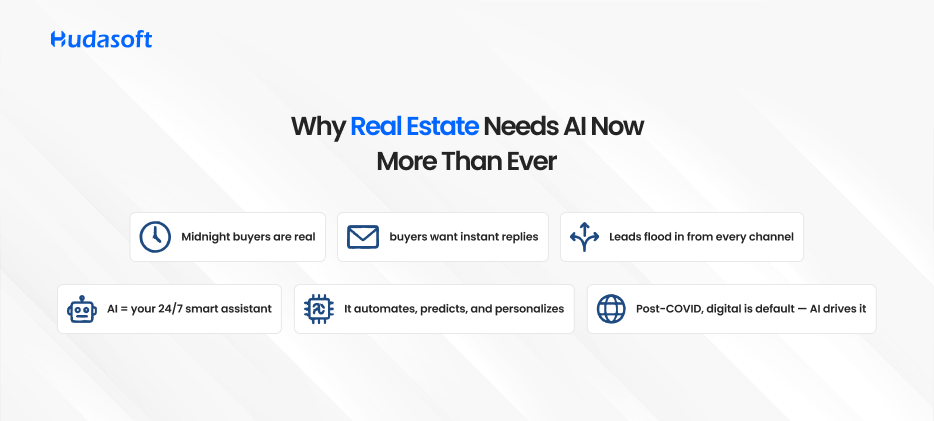
Why Real Estate Needs AI Now More Than Ever
Let’s face it buyers are browsing Zillow at midnight. Sellers want instant responses. And leads are coming from email, social media, referral platforms, and text.
AI operates as your always-on assistant. It reduces human delay, automates routine activities, and makes complex decisions like pricing and ad targeting smarter. Especially after COVID, digital interactions have become the new norm, and artificial intelligence accelerates that shift.
For brokerages and agencies investing in real estate app development services, AI integration is no longer optional it’s the foundation for creating seamless, always-available client experiences.
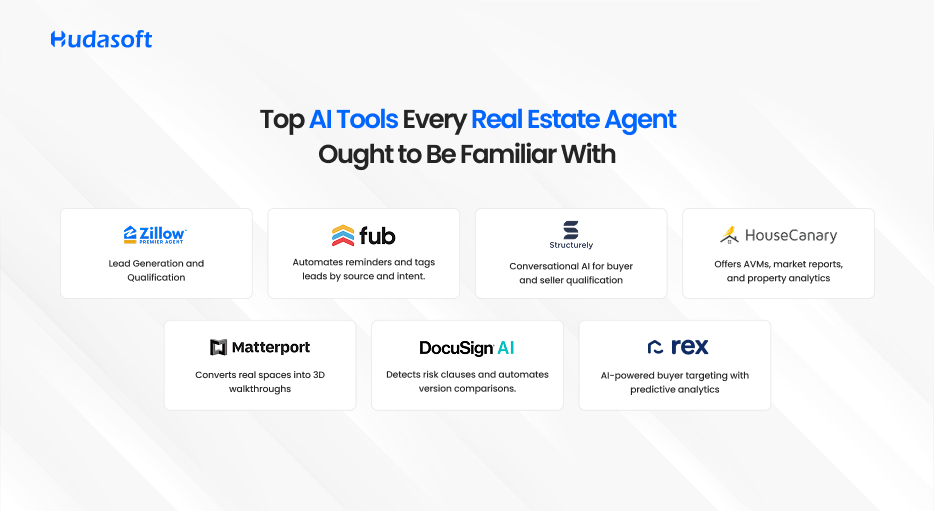
Top AI Tools Every Real Estate Agent Ought to Be Familiar With
1. Lead Generation and Qualification
Turning website visitors or email clicks into real clients takes work. AI helps filter out noise and prioritize those most likely to convert.
Tools:
Zillow Premier Agent: Uses behavioral signals and historical data to route hot leads to top-performing agents.
SmartZip: A predictive analytics solution that identifies homeowners likely to sell soon.
Revaluate: Scores your contact list based on who is most likely to move within the next 6 months.
How AI Helps:
Analyzes online behavior and demographic data
Scores leads by likelihood to transact
Sends alerts when someone becomes active again
Why It Matters:
Chasing cold leads is exhausting. AI cuts out wasted time, allowing agents to focus on people already in the market.
2. AI-Supported CRMs
Customer Relationship Management (CRM) platforms are central to any agent’s success. With built-in artificial intelligence, these tools do much more than store contact information.
Tools:
Follow Up Boss: Automates reminders and tags leads by source and intent.
kvCORE: Offers behavioral automation, emailing or texting leads based on actions (e.g., viewing a home three times).
How AI Supports:
Provides suggestions for the next-best actions for every lead
Auto-schedules follow-ups and task reminders
Syncs calls, texts, and emails across all devices
3. Chatbots and Virtual Assistants
Your website and social channels never sleep. AI chatbots help engage leads 24/7, even when you’re offline.
Tools:
Structurely: Conversational AI for buyer and seller qualification
Tidio: Simple live chat AI that works on websites and Facebook Messenger
Roof AI: Designed specifically for real estate, automating common questions and booking appointments
Features:
Instant answers to FAQs
Automated scheduling of showings
Lead qualification and routing
Why It Matters:
You won’t lose leads due to delayed responses. AI bots provide consistent engagement and free up your time.
4. Property Valuation & Market Analysis
AI eliminates the guesswork in pricing properties by analyzing large volumes of market data quickly.
Tools:
HouseCanary: Offers AVMs, market reports, and property analytics
Quantarium: AI-powered valuation tools backed by real-time datasets
Features:
Accurate pricing models
Local and national trend analysis
Comparative market insights
Why It Matters:
Sellers expect you to price their home right the first time. AI-powered data gives you the confidence and credibility to do so.
5. Virtual Tours and Staging
Property tours have gone digital. AI now makes it easy to create immersive, interactive experiences.
Tools:
Matterport: Converts real spaces into 3D walkthroughs
RoOomy: Allows buyers to visualize furnished interiors based on their style preferences
Benefits:
Reduces need for in-person showings
Increases engagement on listings
Provides tools for remote and international buyers
6. AI for Document & Contract Management
Managing real estate contracts is time-consuming and risky. AI helps review, flag, and organize legal paperwork.
Tools:
DocuSign Insight (AI-powered): Detects risk clauses and automates version comparisons
Evisort: AI contract intelligence with tracking, flagging, and search capabilities
Benefits:
Ensures compliance
Reduces legal oversight risk
Speeds up document processing
7. AI-Driven Marketing Platforms
Marketing is more than ads; it’s smart targeting, personalization, and measuring performance.
Tools:
REX: AI-powered buyer targeting with predictive analytics
Adfenix: Personalized ad campaigns based on user behavior
Realtyna AI: Creates SEO-rich content and syndicates listings across portals
Features:
Precision targeting of high-intent audiences
Automated campaign optimization
Performance reporting dashboards
Its Action:
Determines the most effective channels for advertising campaigns.
Adjusts budgets and creatives based on performance.
Provides campaign statistics and analysis.
Why It Matters:
Marketing without data is guesswork. Artificial intelligence removes that uncertainty, enabling agents to achieve smarter reach and higher ROI.
Last Notes: The Future Is Already Here
AI is not replacing agents, it’s empowering them. The tools outlined here are not just passing trends; they’ve become the new standard for performance, personalization, and productivity.
The best AI tools for real estate agents whether for sales, marketing, or as part of a broader property management solution simplify operations, automate repetitive tasks, and provide competitive insights in a fast-evolving market. Whether you’re an independent agent or working under a brokerage, adopting these tools can increase your close rate, reduce busywork, and keep clients more engaged.
And the best part? Many of the free AI tools for real estate agents offer enough functionality to test drive automation before investing in paid plans.
Start small. Automate your follow-ups. Add a chatbot. Use valuation AI to back your pricing strategy. Once you see the time you save, scaling up becomes an easy decision.
Frequently Asked Questions
What is the best artificial intelligence tool for solo agents?
For those just getting started, tools like kvCORE or Structurely are extremely valuable. They help with lead follow-ups, messaging, and CRM—key functions for independent agents.
Can AI tools really help generate more leads?
Absolutely. Predictive analytics tools like SmartZip and Revaluate identify people most likely to move. AI-powered chatbots and CRMs help capture and nurture those leads more effectively than traditional methods.
Are AI tools expensive for solo or independent real estate agents?
Not necessarily. Many platforms offer freemium models or free trials. Tools like Tidio, Revaluate (with contact limits), and even OpenAI-powered solutions provide early value without upfront costs.
How do AI tools help with virtual property tours?
AI platforms like Matterport use machine learning to generate 3D tours from just a few camera scans. Some tools also use AI to enhance lighting, remove clutter, or virtually stage empty rooms.
Real estate was once synonymous with paper-heavy transactions, face-to-face deals, and limited data insights. Brokers depended on handshakes, in-person property tours, and personal referrals. But the landscape is rapidly evolving.
The digital transformation in real estate marks a significant shift toward intelligent systems, data-driven operations, and seamless customer experiences. Whether it is property development, tenant management, or investment, technology is changing how the industry functions.
In this blog, we break down what digital transformation really means for the real estate industry. We explore key technologies, highlight trends, and provide real-world examples that demonstrate how real estate businesses are evolving with digital tools. Whether you are in the residential space or part of the commercial real estate sector, this guide will help you prepare for the future.
What Does Digital Transformation Mean for Real Estate
Digital transformation in real estate refers to the strategic integration of digital technologies into real estate processes.
This involves using artificial intelligence, Internet of Things devices, mobile platforms, cloud computing, and data analytics to improve customer service, optimize operations, and unlock new revenue streams.
The shift is driven by the rising expectations of clients, increasing competition from PropTech startups, and the impact of hybrid work. Firms are now focusing on innovation, automation, and digital scalability to maintain market relevance.
A recent 2023 report by Deloitte found that although 44 percent of U.S. organizations used digital transformation to radically change their business in 2023, only 18 percent reported achieving that level of digital maturity, highlighting a significant gap between ambition and execution
Key Aspects of Digital Transformation in Real Estate
1. Enhanced Customer Experience
Customers today expect quick, personalized, and mobile-first experiences. Digitally transformed companies use tools like:
Virtual walk-throughs and 3D tours
Chatbots for instant responses
AI-powered property suggestions
Self-service portals for renters and buyers
This results in higher conversion rates, faster sales cycles, and greater customer satisfaction.
A recent survey revealed that virtual tours increase the likelihood of a home being viewed by 95 percent, and buyers are 54 percent more likely to purchase a property if it includes a virtual tour.
2. Improved Operational Efficiency
Digital platforms reduce manual work, allowing real estate teams to:
Automate lease generation and digital signing
Track maintenance and service requests in real time
Use mobile apps for inspections and property updates
Integrate accounting, leasing, and CRM systems
This streamlines internal workflows and reduces overhead.
3. Data-Driven Decision Making
Digital transformation in the real estate industry gives firms access to real-time data for:
By combining internal and external data sources, real estate firms can:
Anticipate market trends
Personalize property recommendations
Benchmark against competitors
Track consumer behavior
These insights allow companies to reduce risk and increase agility.
4. Virtual and Augmented Reality
Virtual reality enables buyers and tenants to experience spaces remotely. Augmented reality can overlay furniture, renovation ideas, or floor plans onto a physical space using a smartphone or headset.
This is especially useful in digital transformation in commercial real estate, where high-value leases require precision and convenience.
5. Blockchain and Smart Contracts
Blockchain simplifies and secures real estate transactions. Smart contracts automatically:
Transfer ownership
Verify identities
Enforce lease terms
Automate escrow and payments
This reduces fraud and accelerates the closing process.
6. CRM and Marketing Automation
Modern real estate CRMs like HubSpot, Propertybase, and Salesforce integrate marketing, lead nurturing, and transaction management into one platform. Automation allows teams to:
Respond instantly to inquiries
Personalize communication at scale
Track lead behavior and intent
This significantly improves conversion rates.
Case Studies: Real Estate Firms That Went Digital
Qarya – Smart Community Management Transformation
Qarya, developed for residential communities, is a prime example of digital transformation in the real estate sector beyond traditional brokerage and commercial use cases
Challenge Property managers faced issues with fragmented communication, slow service ticket handling, weak visitor management, and low resident engagement.
Solution Qarya introduced a unified PropTech platform offering:
Centralized communication and announcements
Digital service and maintenance request workflows
Smart visitor access and security logging
Integrated payments and event management
A community marketplace for peer-to-peer interaction
Results (within six months):
40% faster maintenance turnaround
60% reduction in unauthorized access
75% boost in resident engagement
Lower admin workload and higher satisfaction
This case exemplifies how digital transformation isn’t limited to enterprises—it improves experiences for homeowners, residents, and service teams alike.
How Applications Help in Real Estate Digital Transformation
From property listings to tenant engagement, purpose-built applications are the backbone of digital transformation in real estate. They streamline workflows, enable real-time decision-making, and enhance user experiences across the board.
Today’s leading real estate platforms are powered by custom solutions that go beyond off-the-shelf software. Companies are increasingly turning to custom app development services to build tools that are aligned with their specific operational models whether they manage single properties, national portfolios, or smart communities.
Applications driving transformation include:
Real Estate CRM Applications – Manage leads, automate follow-ups, and analyze deal pipelines.
Property Listing Platforms – Centralize marketing across multiple channels with integrated IDX feeds and AI-based recommendations.
Tenant Management Portals – Provide self-service options for rent payment, maintenance requests, and lease access.
Project Management Apps – Coordinate contractors, timelines, and budgets with real-time updates.
Virtual Tour & AR/VR Apps – Enable immersive property experiences for buyers and renters without needing physical visits.
Together, these solutions deliver the agility, transparency, and efficiency needed to thrive in a digitally transformed real estate environment.
CRM and Lead Management Tools
Platforms like Salesforce and Propertybase help track:
Contact history
Deal stages
Follow-ups
Marketing ROI
Property Listing Platforms
Zillow, Realtor.com, and Redfin dominate listing distribution. They use AI to:
Rank properties
Suggest listings based on behavior
Provide market insights
Tenant and Lease Management Portals
Apps like AppFolio and Buildium allow tenants to:
Pay rent online
Request maintenance
Communicate with landlords
Access lease documents securely
Virtual Tour and AR Tools
Matterport and EyeSpy360 allow buyers to experience homes in 3D and VR environments. These are becoming standard across listings.
Project Management Software
Tools like Procore and PlanGrid allow developers to:
Manage construction schedules
Share blueprints and updates
Track budgets and compliance
Challenges of Digital Transformation in Real Estate
Resistance to Change
Many professionals still rely on legacy systems and resist new technologies. Change management and executive buy-in are essential to adoption.
Data Privacy and Cybersecurity
With more data being collected and stored, firms face risks around compliance, hacks, and leaks. Companies must invest in encryption, secure access controls, and regulatory compliance.
Digital Skills Gap
Many teams are not trained to use modern tools. Without upskilling, digital investments may go underutilized.
Cost of Implementation
While long-term ROI is strong, upfront costs can be high. This includes licensing fees, system integration, and staff training.
Digital Transformation in Real Estate Trends to Watch
Smart leasing and automated tenant screening
Blockchain-based title verification
Digital twins for design and operations
AI tools for investment and risk analysis
Fractional real estate investing through tokenization
The digital transformation in real estate trends point to a future where properties are as programmable as websites, and decision-making is powered by live data.
Conclusion
The digital transformation in the real estate industry is a powerful shift that is redefining how companies operate, serve clients, and grow. From smart buildings and AI valuations to tokenized investments and virtual leasing, the future of real estate is digital.
Embracing this shift leads to:
Smarter decision-making
Higher client satisfaction
Lower operational costs
Scalable, future-ready businesses
Whether you are a property manager, broker, investor, or developer, now is the time to adopt the tools and strategies that will shape the next decade of real estate success.
Frequently Asked Questions
How does AI help in real estate operations?
AI automates lead scoring, customer service, price prediction, and portfolio analytics. It reduces response times and improves efficiency.
Can digital transformation reduce real estate costs?
Yes. Automation, virtual tools, and predictive maintenance all reduce administrative, marketing, and operational costs.
What are the first steps to digitizing a real estate company?
Start with a CRM, digitize your document workflows, adopt cloud storage, train your team, and integrate virtual tour tools.
Are there risks to adopting PropTech solutions?
Risks include data breaches, reliance on third-party vendors, and employee resistance. These can be mitigated with strong IT policies and change management.
The real estate industry in 2025 is being redefined by one word: data.
Gone are the days of gut-based decisions and siloed spreadsheets. Today’s most successful developers, investors, and brokers are turning to real estate analytics tools that empower smarter, faster, and more accurate decision-making.
According to Deloitte’s 2024 Commercial Real Estate Outlook, 65% of executives now consider data analytics a critical part of their operations. These tools are no longer optional; they are the operating systems of the modern real estate enterprise.
From residential price forecasting to commercial asset performance modeling, this guide explores the top real estate analytics platforms shaping the future of property investment and development.
What is Real Estate Data Analytics Software?
At its core, real estate data analytics software is built to transform raw market and property data into actionable insights. These platforms streamline workflows across the entire property lifecycle acquisition, leasing, valuation, compliance, and operations.
Whether you’re evaluating zoning laws, modeling investment ROI, or monitoring tenant churn, the best real estate analytics platforms provide tools to:
Forecast pricing trends and rent growth
Analyze portfolio-level risk and performance
Identify underpriced or distressed assets
Benchmark against local comps
Ensure regulatory and ESG compliance
Improve operational decisions using live dashboards
These real estate investment analysis tools serve institutional investors, REITs, brokers, lenders, and even smart community operators managing resident experience.
Why Real Estate Analytics Matter in 2025
Let’s dive into the numbers:
$45 billion was invested globally in PropTech in 2024, a 19% year-over-year increase (Source: CREtech).
CoreLogic found that lenders using AVMs (automated valuation models) reduced risk exposure by 20%.
Redfin reports a 24% increase in buyer migration from California to Texas in 2024, underscoring the need for data-backed geographic insights.
Users of CREXi, a leading commercial real estate analytics software, closed deals 27% faster than industry averages.
Clearly, these tools are delivering tangible ROI not just reports.
The 10 Best Real Estate Analytics Tools in 2025
1. Zillow Data Dashboard
Best For: Residential pricing, Zestimate accuracy
Use Case: A first-time buyer in Atlanta compared zip codes and saved 4.5% targeting undervalued neighborhoods.
Zillow remains a leading real estate data analytics software for individuals and small firms analyzing price trends and home valuations.
2. Reonomy
Best For: Ownership data, commercial comps, off-market deals
Use Case: A NYC broker sourced a $12M industrial asset in 3 weeks using predictive filters.
Reonomy is considered one of the top commercial real estate analytics tools, offering vast ownership and debt databases.
3. CoreLogic
Best For: Risk modeling, flood maps, AVMs
Use Case: A Florida lender leveraged AVMs to comply with new FEMA flood zone changes.
Highly trusted by lenders, CoreLogic supports some of the most advanced investment analysis tools for risk.
4. PropStream
Best For: Investor lead generation and off-market deals
Use Case: A wholesaler in Phoenix closed 5 deals in 90 days using equity and foreclosure filters.
This real estate analytics platform is ideal for cash buyers and fix-and-flip pros.
5. Mashvisor
Best For: Airbnb income forecasting, rental ROI
Use Case: A property manager in Austin optimized pricing during SXSW, increasing occupancy by 27%.
Mashvisor bridges short-term and long-term rental analysis using smart investment modeling tools.
6. HouseCanary
Best For: Institutional-grade valuation APIs
Use Case: A PropTech startup delivered live price updates to 2,000+ users daily via HouseCanary APIs.
HouseCanary offers leading real estate data analytics for investment firms and fintech innovators.
7. Redfin Data Center
Best For: Buyer migration trends and regional activity
Use Case: A Texas developer redirected ad spend based on California outflow data, lowering CPL by 30%.
This is a crucial tool for developers and marketers seeking real estate analytics for location-based strategy.
8. Qarya Insights
Best For: Smart community analytics and gated societies
Use Case: A Riyadh community detected a hidden water pipe leak, saving thousands in utilities.
Qarya is redefining real estate analytics tools through custom app development for community management, combining resident sentiment, utilities data, and issue tracking in one intelligent platform.
9. Local Logic
Best For: Zoning, walkability, school access
Use Case: A Toronto builder used Local Logic data to win project approval based on transit and school proximity.
A favorite of urban planners, this platform merges municipal, census, and economic data seamlessly.
10. CREXi Intelligence
Best For: CRE lease comps, NOI analysis, team benchmarks
Use Case: A Chicago brokerage saved $540K in renegotiated leases using CREXi models.
CREXi stands out among commercial real estate analytics software with lease intelligence and deal cycle reduction.
Feature Comparison Summary
Platform
Best For
Feature
Impact
Zillow
Residential pricing
Zestimate forecasts
70M users, 1.9% median error
Reonomy
CRE data + ownership
Predictive filtering
35% faster deals
CoreLogic
Risk + insurance analytics
Flood, AVM models
$1.2B savings in 2023
PropStream
Off-market lead generation
Absentee owner filters
44% YoY investor growth
Mashvisor
Airbnb/long-term rental ROI
Heat maps, cash flow
1.8x Airbnb profits
HouseCanary
Institutional valuations
API-first delivery
$200B+ transaction volume
Redfin
Migration and buyer tracking
Market signals
24% CA to TX buyer movement
Local Logic
Urban planning and zoning
Transit and school analytics
140% growth among planners
CREXi
Commercial lease modeling
NOI and broker KPIs
27% faster leasing cycles
Qarya
Community management analytics
Resident + utility insights
22% faster complaint resolution
Final Thoughts
The shift from intuition to insight is irreversible. The best-performing firms in real estate now run on data-first decision-making, powered by the latest in real estate analytics platforms and AI tools.
As 2025 progresses, tools like Qarya, Reonomy, and CoreLogic will continue leading innovation, turning analytics into strategic advantage. Whether you’re evaluating a single duplex or managing a nationwide REIT, adopting the right real estate investment analysis tools isn’t just a competitive edge — it’s a business necessity.
FAQs
Q1: What is the best real estate analytics tool for residential pricing?
Zillow is ideal for price trends; Mashvisor is better for rental income projections.
Q2: Which tools are best for commercial real estate investment?
Reonomy and CREXi are top choices for ownership data, lease comps, and investment modeling.
Q3: Are there tools specifically for smart communities?
Yes, Qarya Insights is purpose-built for managing gated communities and smart societies.
Q4: Can these platforms be used for urban planning and zoning analysis?
Absolutely. Local Logic and Redfin offer zoning, school, and demographic datasets essential for urban developers.
In 2023, global residential real estate transactions exceeded $9 trillion—an industry bursting with opportunity, yet far too complex to rely on instinct alone. With shifting tenant behaviors, fluctuating market conditions, and growing data streams, staying ahead now demands more than just experience.
In fact, 87% of real estate leadersbelieve predictive analyticswill significantly shape their business decisions before 2028.
That’s what this blog is all about: how predictive analyticsis transforming real estate, from forecasting property value and tenant churn to optimizing lease pricing and reducing vacancies.
And to truly harness this power, off-the-shelf tools aren’t enough.
This is where custom real estate app development becomes essential built around your workflows, data, and strategy to deliver real-time insights and a serious competitive edge. Let’s explore how.
1. What Is Predictive Analytics in Real Estate?
At its core, predictive analytics harnesses historical and real-time data, statistical modeling, and machine learning to forecast future events notably property value, tenant turnover, vacancy rates, lease renewal probability, and demand trends.
According to McKinsey, companies deploying predictive models achieve 8–10 % higher profits and 10–15 % lower costs than their averages. In real estate, where margins can be razor-thin and timing is everything, these gains are transformational.
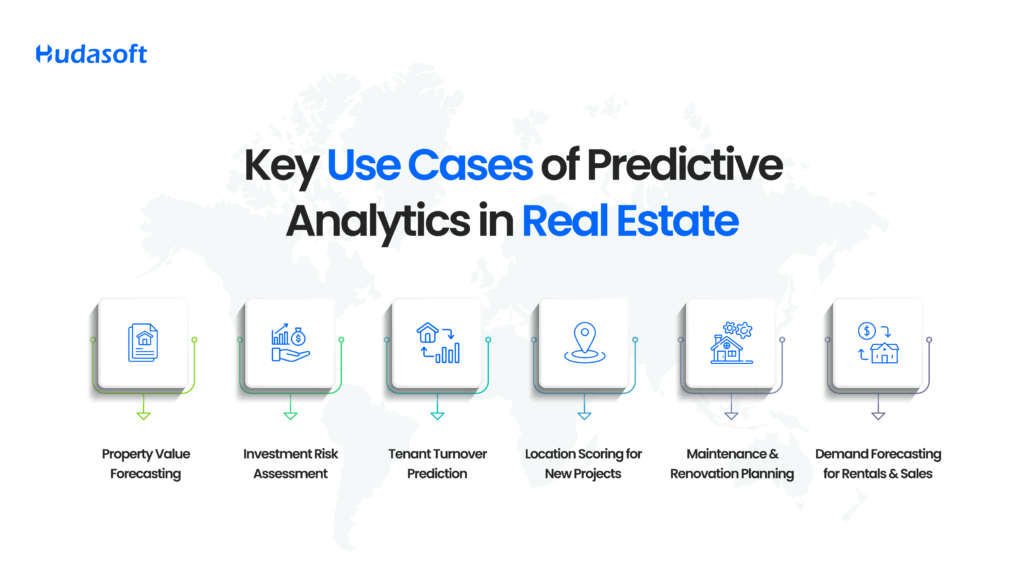
2. Key Use Cases of Predictive Analytics in Real Estate
A. Property Value Forecasting
Leveraging external variables like neighborhood trends, school quality, and infrastructure changes, models like Zillow’s Zestimate process 7.5 million data points daily to predict valuations across 100 million+ homes.
Custom apps take this further by ingesting your proprietary listing data, comparative sales, and local economic indicators delivering tailored forecasts that help you make smarter buy/sell decisions.
B. Investment Risk Assessment
Risk isn’t only about interest rates. Predictive risk includes property age, crime metrics, natural-disaster zones, and socio-economic shifts. GA‑SVM techniques (Genetic Algorithm‑Support Vector Machine) outperform traditional risk models notably in financial scenarios by offering higher accuracy and lower overfitting.
That means cleaner underwriting and more dependable returns.
C. Tenant Turnover Prediction
A single tenant turnover can cost up to $4,000, factoring in lost rent, marketing, repairs, and administration. Using tenant history, lease terms, and service requests, predictive tools identify “likely-to-leave” tenants well before notice is given, enabling proactive retention programs.
D. Location Scoring for New Projects
From foot-traffic heatmaps to demographic shifts and competitor storefront density, platforms like Placer.ai evaluate thousands of real estate attributes. The result? Quantified, data-driven “location scores” that guide optimal development and leasing decisions.
E. Maintenance & Renovation Planning
IoT sensors coupled with predictive models can lower maintenance expenses by 25 % and extend equipment lifespan by 30 % a conclusion backed by CBRE’s facilities management research. This data-backed approach shifts maintenance from reactive to predictive.
F. Demand Forecasting for Rentals & Sales
CoStar researchers revealed that multifamily demand forecasting reduced inventory mismatches by 18 % in major U.S. metros in 2024. Advanced forecasting enables better market timing, more strategic pricing, and reduced vacancy risk.
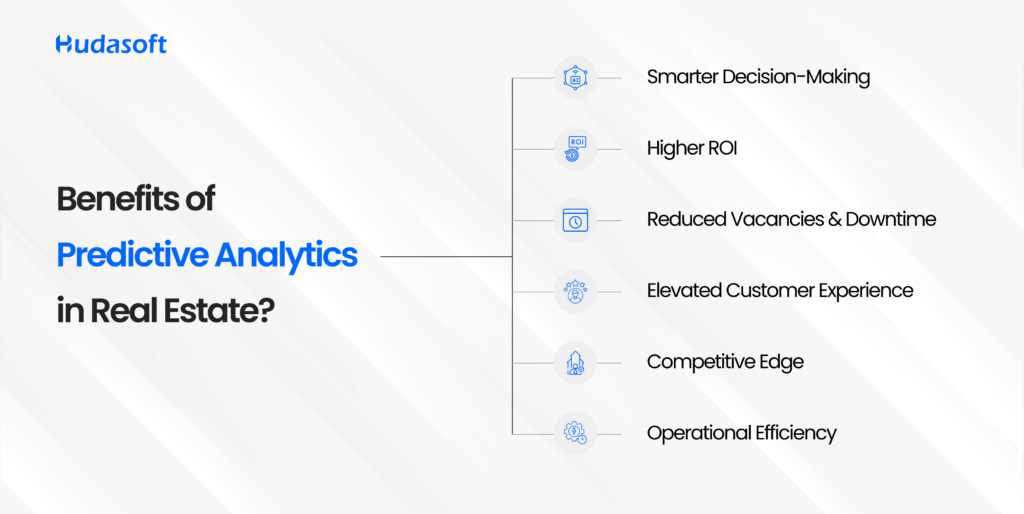
3. Benefits of Predictive Analytics in Real Estate
1. Smarter Decision-Making
Leverage hard data not intuition to forecast value, demand, and occupancy trends with confidence.
2. Higher ROI
McKinsey reports that analytics-led investors experienced up to 25 % ROI improvement in acquisitions and asset management .
3. Reduced Vacancies & Downtime
Targeting lease expirations and vacancy risk allows for proactive marketing and new tenant onboarding even before spaces go dark.
4. Elevated Customer Experience
Personalized recommendations (e.g., “This unit is 92 % likely to match you based on…”) and timely interventions (e.g., maintenance, renewal reminders) enhance satisfaction.
5. Competitive Edge
Model-based forecasting trades guesswork for early insights. That means being the first to capitalize on emerging hotspots or raise rents in ascending markets.
6. Operational Efficiency
Automate forecasting, reporting, maintenance alerts, and rent adjustments freeing your team to focus on high-impact strategy and growth.
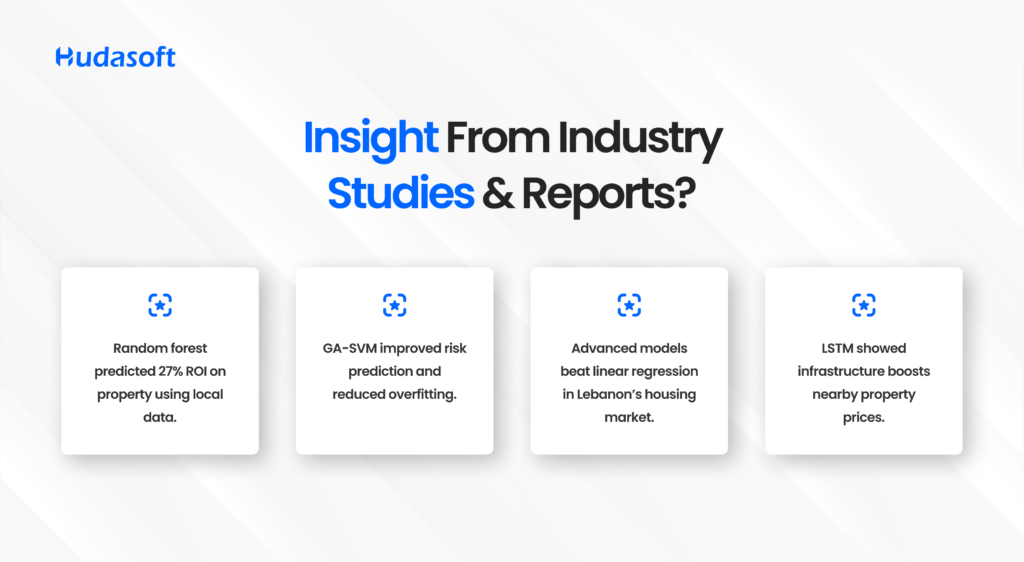
4. Insight From Industry Studies & Reports
A GA‑SVM financial risk model improved classification accuracy and reduced overfitting making it a strong candidate for loan underwriting and investor screening systems.
Comparative evaluations between LSTM, Random Forest, and Stacking Regressors in Lebanon show advanced models outperform linear regression in real-life market contexts.
A big-data-driven forecasting model analyzed how local infrastructure (like public housing) influences nearby prices using LSTM, aiding urban planning and pricing strategy.
Commercial lease forecasting tools (e.g., CoStar Risk Analytics) blend property characteristics, tenant behavior, and market conditions into forward-looking models essential for long-term planning and portfolio diversification.
6. Why Custom Real Estate Apps Are Essential
Off-the-shelf tools offer broad features, but Custom Real Estate App Development delivers a competitive advantage by aligning technology with your specific property goals and data ecosystem.
Data Integration
Connecting your ERP, CRM, listing databases, MLS feeds, IoT sensors, and external APIs into a unified data lake.
Predictive Engine & Dashboards
Tailored modules for vacancy forecasting, dynamic pricing, tenant risk modeling, and portfolio optimization all powered by ML models trained on your organization’s data.
Real-time Insight, Real-time Action
Forget static reports your tools respond to early warning signs: an at-risk tenant, an underperforming region, or rising vacancy rates. Automated alerts and proactive outreach become the norm.
Scalable, Extensible Architecture
Whether you’re a single-market developer or multi-city property manager, these tools grow with your business ready for new data, models, and features.
7. Unlocking Predictive Analytics Your Seven-Step Roadmap
Define Goals: Identify your business-critical decisions value estimation, lease forecasting, churn prediction, etc.
Audit Your Data: Map internal (CRM, listings, tenant) and external (market data, census, financial) sources.
Choose Models: Match business problems to methods RF for valuation, GA‑SVM for risk, LSTM for demand.
Train & Validate: Use real historical data with holdout testing to tune model accuracy.
Integrate: Deploy models within your CRM, dashboards, and workflows for real-time usage.
Automate: Trigger alerts and actions maintenance orders, tenant offers, rent adjustments—based on predictions.
Monitor & Iterate: Continuously evaluate accuracy; retrain with fresh data; refine features and user feedback.
Case Study: Qarya – Making Smart Communities Smarter
Challenge: Property managers using traditional tools struggled with rising tenant churn, delayed maintenance, and unpredictable amenity usage. They had data but no insight.
Solution: Hudasoft built Qarya with predictive analytics at its core. By analyzing lease patterns, app usage, service requests, and IoT sensor data, Qarya enabled:
Early detection of tenants likely to leave
Forecasting amenity demand like gym or pool usage
Predictive maintenance to prevent equipment breakdowns
Impact:
18% increase in lease renewals
22% reduction in maintenance issues
Faster decision-making with real-time dashboards
Qarya shows how predictive analytics turns residential data into proactive action making communities more efficient and resident-friendly through an intelligent property management solution.
Conclusion
Real estate, a trillion-dollar, high-stakes industry demands precision. Predictive analytics transforms your data into foresight:
Are your acquisitions undervalued or overhyped?
When is the next vacancy risk coming and who will fill it?
Where will rent spikes or funding gaps occur and how do you prepare?
Custom real estate apps make these questions actionable translating data into a confident, data-driven strategy.
FAQs
What exactly is predictive analytics in real estate?
Using ML models to process historical and real-time data such as listings, tenant behavior, lease terms, and economics to forecast future outcomes like price changes, occupancy risk, and maintenance needs.
Which “real estate analytics tools” are most effective today?
Top solutions include Zillow Zestimate for valuation, CoStar and Reonomy for market analytics, Placer.ai for location intelligence, Mashvisor for investment scoring, and custom AI models for tailored insights.
Can predictive analytics forecast commercial lease trends?
Absolutely. Tools integrate tenant data, market demand curves, and macro conditions to predict lease expirations, pricing changes, and vacancy timelines enabling strategic lease management.
Why choose custom software over off-the-shelf SaaS?
Custom platforms integrate deeply with your internal systems, offer real-time insight, data automation, tailored analytics, and adapt as your business evolves delivering ROI far beyond generic tools.
What ROI can predictive analytics bring?
Based on studies and industry benchmarks: • 25 %+ ROI uplift in cluster acquisition and management • Data‑driven valuation improvements, approx. 10–20 % better pricing accuracy • Up to 30 % reduction in maintenance costs and equipment downtime
Real estate has always been a high-stakes, high-hustle industry. Between leads, listings, contracts, agents, and rising client demands, operations can feel overwhelming. Before the rise of top rated real estate apps, most businesses relied on spreadsheets, phone calls, and constant coordination.
It worked, but it didn’t scale.
Today, real estate businesses are bridging that gap through custom app development. Done right, the app doesn’t just digitize operations, it becomes the core engine of the business. Faster deal cycles, smoother collaboration, and stronger client experiences are just the beginning.
Let’s explore 10 real-world examples where real estate apps didn’t just help they transformed the entire business model.
1. Zillow: From Listings to Full-Stack Engagement
Zillow is one of the most recognized names in real estate platforms. But it didn’t start that way.
Originally a listing aggregator, Zillow faced a major challenge: huge traffic, but low conversion. People were browsing, not buying.
That changed when Zillow introduced a mobile-first platform that included:
3D home tours
Mortgage calculators
Agent matching tools
The Premier Agent program
This transformed Zillow from a search engine into an end-to-end real estate platform.
Zillow now sees over 227 million monthly users and 2.4 billion visits per quarter. Its Q1 2025 revenue reached $598 million, validating the impact of this platform shift.
2. Redfin: Solving MLS Lag with Real-Time Data
Redfin’s mission was simple eliminate delays caused by outdated MLS (multiple listing service)data.
Traditional platforms often suffered from lag. Listings could take hours or days to appear across platforms, resulting in missed opportunities.
Redfin changed the game with:
Real-time MLS integration
Instant tour scheduling
Built-in mortgage tools
Redfin now attracts 46 million monthly users, and its loyalty sales increased 40 percent year-over-year. It stands as one of the most efficient examples of apps for real estate brokers.
3. Qarya: Building Smart Properties in the Digital Era
Community management in the Middle East was fragmented. Residents lacked visibility into services, payments, and events, while managers relied on outdated tools.
Qarya changed the game with:
Smart property management platform
Centralized booking, payments, and communication
Mobile-first design with AI-driven insights
The result: higher resident engagement, streamlined operations, and a scalable model that positioned Qarya as a leader in smart property living solutions. Today, it stands as a prime example of how a modern property management solution can transform real estate management and improve community life.
4. Trulia: Local Intelligence Drives Confident Buyers
Trulia realized that buyers don’t just want square footage they want context.
The app added:
Local reviews from residents
AR-based neighborhood insights
Crime data and school ratings
This focus on community transformed Trulia into one of the top rated real estate apps for buyers looking for lifestyle alignment, not just listings.
After its acquisition by Zillow, Trulia’s hyperlocal features remained a key reason why users stayed engaged longer.
5. StreetEasy: Built for the NYC Market
StreetEasy built its reputation by solving the unique needs of New York City renters and buyers.
With:
Building-specific searches
Real-time MLS sync
Filters like “doorman availability” and walk-up preferences
StreetEasy became the go-to app in NYC. With 180 million annual visits and over 80 percent of NYC seekers using it, StreetEasy shows how custom real estate app development works best when built for local dynamics.
6. Opendoor: Reinventing Real Estate Transactions
Opendoor didn’t just digitize buying and selling—it completely reimagined it.
With instant cash offers, app-based contracts, and fully digital closings, the platform offers speed, transparency, and simplicity.
Sellers close faster, buyers avoid delays, and agents skip repetitive paperwork. Opendoor remains one of the best real estate software platforms for end-to-end transaction automation.
7. Compass: Empowering Agents with AI
Compass took a different path by putting agents first.
Instead of focusing on public listings, it built:
Predictive analytics
AI-powered matching
Deal pipeline tracking
Everything lives inside the Compass agent app. This is one of the clearest examples of an app for real estate agents built to boost productivity and revenue per rep.
8. Roofstock: Making Remote Property Investment Easy
Roofstock focused on single-family rentals a sector growing rapidly among remote landlords.
Their app enables:
Property browsing
Document management
Financing
Rental income monitoring
With everything centralized, it removed the friction for non-local investors and simplified portfolio management.
9. Zillow Premier Agent: Monetizing Buyer Intent
Zillow already had massive traffic. The next challenge was improving lead quality.
Their Premier Agent program introduced:
Buyer intent scoring
Smart agent placement
Tiered lead delivery
This program became a monetization powerhouse and one of the best real estate apps for agent ROI.
10. Rocket + Redfin: The Real Estate Super App
In a bold move, Redfin partnered with Rocket Mortgage to create a single app that merges:
Property search
Financing
Closing services
This unified experience reduces app-hopping and improves closing rates. After the announcement, Rocket’s stock surged and the partnership is expected to generate over $200 million in synergy by 2027.
What the Best Real Estate Apps Have in Common
Across all ten examples, the most successful platforms shared key traits:
Mobile-first UX for on-the-go access
Real-time data integrations
Built-in automation tools
Local and personalized search experiences
Agent-centric features that increase efficiency
These aren’t just apps. They are business engines driving results from the first search to the final signature.
Final Thoughts
These stories prove that top-rated real estate apps are not optional they are the backbone of a competitive real estate business. In today’s fast-moving market, relying on outdated tools or fragmented systems limits your ability to scale, respond to client needs, and stay ahead of competitors.
If you’re serious about growth, your app should be more than just a feature it should be the central hub that powers daily operations, delivers data-driven insights, and facilitates seamless transactions from lead to closing. Working with an experienced real estate app consultant ensures your platform is designed with the right features, integrations, and user experience to support your long-term business goals and adapt to evolving market demands.
Build Your Real Estate Platform with Hudasoft
Hudasoft helps agencies, brokers, and property investors build powerful, scalable real estate platforms. From AI-powered tools to full-featured super apps—we turn your business challenges into digital solutions.
Real estate has long been perceived as a slow-moving, labour-intensive industry driven by manual site visits, paperwork, and human intuition. In the era of digital transformation, however, Artificial Intelligence (AI) is fundamentally changing the landscape.
Today, AI enhances everything from property searches assisted by computer vision to predictive analytics for investment decisions. Meanwhile, intelligent real estate apps are becoming essential tools for property businesses seeking speed, accuracy, and scalability.
In this post, we explore how AI and real estate intersect across multiple dimensions, highlighting strategic benefits for investors, agents, and developers, and examining the core components of automated real estate investing systems.
The Growing Role of AI in Real Estate
The adoption of AI in real estate is accelerating rapidly. The global AI in real estate market was valued at $222.6 billion in 2024and is projected to reach$303.1 billion in 2025, a 36.1 percent year-over-year increase. Over a longer horizon, some projections place market size close to $989 billion by 2029, with an average annual growth of 34.4 percent.
Improved conversion rates and 30–40 percent drop in wasted follow-ups
Slow document processing
Natural-language processing for lease and contract analysis
Auto-extraction accuracy up to 90 percent; saves hours per file
Manual listing creation
Auto-populate MLS listings via image/document AI
Reduces data entry time by 5–10 minutes per listing
1. AVMs for Precision Valuation
Traditional appraisals can require days and are subject to bias. AI-based AVMs use property history, neighbourhood data, and even satellite images to produce highly accurate valuations within minutes, typically within 3–5 percent of actual market values.
2. Lead Scoring and Segmentation
AI analyses buyer signals such as listing views and chat interactions to rank leads by intent. Firms using this technology report 30-40 percent fewer low-potential follow-ups and improved response efficiency.
3. Document Automation via NLP
AI tools with natural-language processing capabilities extract key lease terms, deadlines, and financial obligations with 80–90 percent accuracy, significantly reducing manual review time and risk of error.
4. Listing Auto-Fill
AI systems process listing documents and images to recommend features and auto-populate listings. This saves agents several minutes per entry and improves listing consistency and speed.
Real-World Applications of AI in Real Estate
Here is a deep dive into a high-impact use case:
1. Predictive Analytics for Developers and Investors
AI models integrate historical sales, demographics, infrastructure data, and economic indicators to identify promising investment opportunities. Automated alert systems notify users when a property meets specific ROI criteria.
AI-enhanced virtual tours now include dynamic features like virtual staging, background clean-up, and interactive furniture placement. These tours deliver a 20 to 30 percent increase in buyer engagement and lead qualification rates.
3. Smart City Dashboards
Developers and investors now use real-time, city-level dashboards powered by AI that integrate data on foot traffic, vacancy trends, permitting, and infrastructure changes. These dashboards support data-driven planning and optimization at scale.
Building AI into Real Estate Apps
To create an effective AI real estate system, key modules include intelligent search, predictive pricing, document automation, virtual assistants, and investment dashboards.
Display overlays of rent trends, days-on-market statistics, and investor interest to guide pricing and strategy.
4. Intelligent CRM Integration
Sync lead data, generate follow-up tasks, and trigger reminders based on AI insights.
5. Automated Notifications and Workflow Triggers
Automate alerts such as “Price dropped 5 percent” or “Lead inactive for 48 hours” to maintain client engagement and efficiency.
Together, these features establish a seamless AI-driven platform that automates repetitive tasks and delivers strategic insights.
Final Words
Hudasoft AI is fundamentally transforming every stage of the real estate lifecycle, from valuation and client engagement to prediction and property management. As adoption increases, real estate professionals will benefit from:
Faster, more accurate automated valuations
Smarter lead processes and higher conversion rates
Significant time savings on document and listing tasks
Enhanced investment decision-making based on data and forecasting
Elevated client experiences powered by virtual tours and intelligent interactions
For brokers, investors, and developers, adopting or building an AI-powered real estate app is no longer optional—it is critical to remain relevant and competitive in a fast-evolving market.
Frequently Asked Questions
How is AI used in real estate today?
AI supports tasks like instant valuations through AVMs, lead scoring, lease document analysis, virtual home staging, chat-based customer support, and predictive analytics for property performance.
What are the top AI features in real estate apps?
Key features include natural-language search, predictive lead scoring, AI-powered virtual tours, market heatmaps, chatbot assistance, and automated workflow triggers.
Can AI help in finding better property deals?
Yes, AI platforms can screen thousands of properties daily for ROI, rental yield, and market trends and alert investors to high-potential opportunities.
What is the cost of building an AI-powered real estate app?
Basic search and chatbot features start around $50,000 to $100,000. Advanced apps with AVMs, predictive analytics, and full CRM integration can range from $150,000 to $500,000 or more.
Is AI safe for client data in real estate?
Yes, when platforms adhere to data privacy frameworks like GDPR or CCPA and implement encryption for data at rest and in transit, AI tools can securely manage sensitive client information.
In today’s real estate market, a well-built app is more than just a search tool. Everyone wants to build the next Zillow, but most real estate apps don’t even survive the App Store.
Too many businesses rush into development without a clear plan. They end up with something flashy but broken with tools no one uses, and features that don’t fit. Not really made for growth.
According to Deloitte’s 2024 Commercial Real Estate Outlook, nearly 60% of firms are increasing their tech investments, but common mistakes, such as poor user experience (UX), disconnected systems, and limited scalability, often stand in the way.
Real estate tech should work like your best agent: fast, responsive, and always closing. But getting there requires more than just good code. It takes strategy, research, and a clear roadmap.
In this 10-step guide, we’ll walk you through how to build a real estate app that actually works, not just for users, but for your business. From defining your strategy to launching a high-performing app, here’s how top-performing platforms are doing it right.
Step 1 — Defining Your Real Estate App Strategy
Before you start looking for real estate app development services, take a step back. You need to know what you’re building and why. Otherwise, you’re just throwing tech at problems you haven’t defined.
Start with the basics.
What’s not working in your current setup?
Are agents wasting time juggling too many tools?
Are clients slipping away because scheduling is clunky or communication is slow?
Are deals getting delayed because documents live in five different places?
Knowing exactly who you’re building for is equally important. Every real estate app serves a slightly different audience, may it be agents, buyers, renters, or investors, their needs are not the same.
A platform designed for agents needs to focus on speed and deal management. A platform for clients may lean more toward search and user experience. Defining your core audience is key to building an app that works.
Now look outward. You’re not building in a vacuum.
Look at who’s leading. Zillow, Redfin, Trulia, and Compass are platforms with millions of users, huge datasets, and very polished features. But even at their scale, these platforms don’t solve everything for every real estate business. Your job isn’t to copy them. It’s to understand where their models don’t fit your business
Take note of where these platforms fall short:
* They’re built for general audiences, not your exact users.
* They don’t integrate easily with your CRM, franchise tools, or team workflows.
* They often miss features that would help your agents work faster.
This kind of market research isn’t about copying. It’s to spot where their models break down, and build something sharper and more specific to your business needs. That’s where your opportunity is.
Finally, this is where you decide what kind of real estate app you need: a focused solution to support internal operations and agent workflows, or a broader marketplace platform for client-facing engagement.
When you take the time to align your real estate app development strategy with your business goals, target users, and market insights, you’re in a much stronger position to build an app that actually delivers value, not just another product that adds to the noise.
Step 2 — Essential Features to Include
Once your real estate app development strategy is clear, it’s time to plan the features. The right features will make your app something people rely on every single day. A little extra thought here saves a lot of effort later.
Your priorities will depend on your business model and your users. But in most cases, these are the essential features that may be for your MVP, i.e., your starter features.
Buyer & Renter App Features
For buyers and renters, the experience needs to be fast and smooth so that they are kept engaged on your platform and don’t consider switching. Your operations should be streamlined, with no major gaps, helping them move from search to decision, with less friction.
• Property search with smart filters
Helps users narrow listings by location, price, amenities, and personal preferences, so they can find what matters most to them specifically, faster.
• Geolocation-based discovery
Lets users browse listings nearby or dive into neighborhoods they care about. This is perfect for clients who want to explore locally.
• Virtual tours and high-res galleries
Gives clients a real sense of the space without multiple in-person visits. This lets them make a quicker decision that they also have confidence in.
• Push notifications for new listings
Keeps users engaged with instant alerts, so they never miss a property that fits their wishlist.
• Favorites and comparison tools
Lets users easily save, compare, and revisit properties, letting them shortlist their options as they move through the buying process.
• In-app messaging with agents
Creates an instant line of communication. Helps buyers get questions answered and viewings scheduled without jumping between apps.
Agent & Seller Features
For agents and sellers, your real estate application should make it easier to manage listings, leads, and daily tasks, instead of posing a burden to manage their operations on the app as well as manually.
• Property management dashboard
Brings all listings into one place and makes it faster to update property details, pricing, and availability.
• Lead capture and CRM integration
Automatically collects leads and syncs with your CRM, helping agents respond faster and avoid missed opportunities.
• Scheduling for open houses & showings
Keeps calendars in sync so agents can easily manage appointments and keep clients in the loop. This bridges the communication gap that managing it manually creates.
• Real-time analytics & reports
Gives agents clear insights into what’s working — from listing performance to client engagement — so they can adjust their efforts where it counts.
Advanced Features
For businesses looking to build a stronger, more engaging real estate app, these advanced features add serious value.
• AI-powered recommendations
Learns from user behavior to surface better property suggestions. Helping clients discover homes they might otherwise miss.
• Chatbots for lead qualification
Handles initial lead conversations automatically. This saves a lot of agents’ time and helps them focus on qualified prospects.
• Mortgage & affordability calculators
Gives buyers a clear view of their options. They move from browsing to choosing swiftly.
• AR-based property visualization
Lets users explore properties in 3D, offering an immersive experience that keeps them engaged and satisfied.
Step 3 — Cost & Timeline Expectations
Before development starts, you need clarity on where your investment is going. You’re not paying for screens and features. You’re building the system that controls how leads flow, how data moves between systems, how agents work, and how your clients experience your business day to day.
That’s why your budget depends on how much you’re trying to centralize. The more disconnected processes you’re bringing into one place, the more it takes to get the foundation right.
For most real estate businesses, a lean MVP that covers core workflows starts around $50K–$ 80 K. A full real estate platform with CRM, AI, advanced search, and reporting usually ranges between $120K–$ 250 K+.
As for timelines, a basic MVP can usually launch in 4–6 months. A full build — especially if you’re replacing legacy systems — often takes closer to 8–12 months.
A few things will shape both the cost and how fast you get there:
• How much of your business are you trying to centralize? • How many systems need to talk to each other? • How much needs to be built from scratch vs. existing tools? • How available is your team to give feedback and make decisions during the build?
One mistake to avoid: trying to budget before you really know what your platform needs to do. That’s when you see projects rebuilt — what looked affordable upfront can’t support operations six months later.
Your focus should be long-term stability, not short-term savings. The right system pays itself back through cleaner workflows, fewer errors, and faster deals, and helps you avoid the much bigger expense of rebuilding to fix your inconsistencies.
Step 4 — Choosing the Right Tech Stack
Once your features and scope are clear, the next decision is your tech stack — what your real estate app is actually built on. This matters more than most people think. The right stack gives you speed, flexibility, and room to grow. The wrong one can slow everything down six months in.
First, there’s the question of platform:
• Native apps (built separately for iOS and Android) give you the best performance, but also the highest development and maintenance effort. • Hybrid or cross-platform frameworks like Flutter or React Native can get you to market faster, with one codebase across both platforms. For most real estate apps, this is often the more practical route.
Next is your backend. A real estate app moves a lot of data like properties, leads, users, content, and needs to handle growth without lag. A cloud-based, scalable architecture is the key here.
AWS, Firebase, or Azure are common choices; secure, reliable, and built to scale. Choose a stack that lets your app grow with your business, not hold it back.
Your platform will also need to talk to other tools — no app works in isolation. Plan for seamless API integrations with:
• MLS databases • CRM systems • Payment gateways • Marketing tools and other internal platforms
Finally, you need to think about compliance. Your real estate app will be handling personal data, client info, lead details, other communications. Hence, building in data privacy and meeting GDPR and local regulations from the start is a must.
Choosing the right tech stack lets you build something solid that supports your business now, and gives you room to evolve as your needs grow.
Step 5 — Build Your Data and Integration Foundation
Every successful real estate app rests on one thing most businesses overlook early: the data foundation.
You can have great design, perfect features, but if your data is messy or your systems don’t talk to each other, it all breaks down sooner or later.
Without a strong foundation, even the best real estate app development projects hit walls. Frustrated users, disconnected workflows, and mounting costs trying to patch things together is what you may see if your foundation isn’t strong.
Here’s what your real estate platform needs to get right from day one:
• Verified property data Your listings need to sync cleanly with trusted sources — MLS feeds, ATTOM, DataTree, Regrid — so every property shows accurate ownership records, pricing, status, and location.
• Seamless CRM integration Your client records, agent pipelines, and lead flows should stay fully updated in real time — no more chasing missing data between platforms.
• Automated document handling Contracts, e-signatures, and compliance workflowsools like DocuSign or HelloSign help you manage the paperwork side, without obstacles.
• KYC and identity verification Fraud prevention and compliance with growing security rules, automated identity verification keeps your platform protected.
If you don’t map these integrations early, you’ll find yourself constantly patching systems later. Getting the data foundation right upfront sets your real estate app up to scale smoothly as the business grows.
Step 6 — Designing User Experience for Real Estate Apps
Real estate app development fails when it focuses on features instead of actual workflows. Don’t build just another property search tool, instead build a system your business can rely on.
That’s why UX matters. A good real estate app makes complex tasks feel simple. Whether someone is searching for the right property, managing leads, or handling documents on the go.
Here’s what to focus on
• Intuitive search experience Your app will handle complex searches like price, location, features, financing, and more. The key is making those options easy to use, not overwhelming. If clients can’t find what they want quickly, they’re quick to become uninterested.
• Building trust through design Design isn’t just about looks. Clean, polished design builds credibility especially when users are making major financial decisions. Every screen in your real estate app should feel professional and reliable.
• Onboarding that drives engagement First impressions count. A smooth onboarding flow helps users understand the app and start getting value right away which keeps them coming back.
• Speed and responsiveness Fast load times matter, especially on mobile. If your real estate platform lags when loading listings, images, or reports, users won’t wait around. The app needs to feel quick, no matter how much data is moving behind the scenes.
A real estate app with strong UX becomes something people want to use — not just another tool they have to fight with.
Step 7 — Architect Your Platform for Scalability, Not Just Launch
Too many real estate apps work fine — until they don’t. They’re built to launch fast, but not built to scale. That’s why so many businesses find themselves rebuilding or re-platforming a year or two in.
Real estate app development done right starts with two things: a scalable architecture, and a smart MVP phase.
You don’t need every feature on day one. What you do need is a Minimum Viable Product (MVP) that locks down your core workflows and gives your team something stable to build on. For most real estate businesses, that looks like this:
• Lead capture and automated CRM routing • Calendar scheduling for property viewings • In-app messaging and push notifications • Contract generation with e-signature integration • Secure payments and deposit processing • Basic CRM and MLS data integrations
Launching with this core lets you get live faster, engage early users, and — more importantly — lets real-world feedback guide what comes next.
But while your MVP can start lean, your architecture can’t. The system behind it needs to assume you’re going to scale — more agents, more listings, more clients, more integrations, more data.
That’s why your platform should be cloud-native from day one, with scalable microservices where each piece including, CRM sync, MLS feeds, payments, and messaging can run and scale independently.
A good MVP stabilizes your launch. The right architecture future-proofs your growth so your real estate app runs just as smoothly at 50 users as it will at 5,000.
Step 8 — Development Process: From Idea to Launch
By this stage of real estate app development, your platform is no longer just a list of features — it’s a working system. But it’s not ready for launch until it’s been tested against the real-world conditions your business will run on.
Basic QA or device testing isn’t enough here. You need operational testing that mimics real business usage — where workflows, integrations, and edge cases are all validated under real pressure.
The process should look something like this:
• Discovery and scoping Upfront, your project team should work with you to map exactly what needs to happen — not just what screens need to be built, but how the entire system should run day-to-day.
• Agile sprints and iterative releases Rather than waiting six months for a big launch, development should run in agile cycles — shipping small releases regularly so your team can test and give feedback early.
• User testing & QA This is where real progress is made. Every integration — MLS feeds, CRM syncs, payment gateways, document handling, AI models — needs to be tested under actual usage. Think:
• Launching on app stores Once your platform is stable, it’s time to prep for launch — with proper store approvals, final production QA, and the operational readiness to support your team and users from day one.
The goal here isn’t just to check that every feature works. The goal is to confirm that the entire real estate platform behaves the way your business needs it to — under real-world conditions — so when you launch, everything flows.
Step 9 — Integrate AI the Right Way
Most real estate businesses aren’t struggling because they don’t have enough listings or filters. They’re struggling because agents spend too much time qualifying cold leads, buyers drop off when pricing feels off, and contracts get delayed by manual errors.
That’s where AI-powered real estate app development creates real business value, by removing friction at key deal stages and freeing up your team to focus where it counts.
Here’s exactly where AI belongs inside your real estate app:
• Lead Scoring AI models connected to your CRM can automatically score and prioritize incoming leads based on behavior, profile data, and engagement helping agents focus on the right opportunities.
• Property Recommendations AI-driven recommendation engines surface listings personalized to each user’s search patterns, saved preferences, and activity
• Dynamic Pricing Pricing algorithms analyze MLS data, neighborhood trends, and past sales giving agents real-time insights on where to price competitively.
• Contract Review AI document intelligence can scan contracts as they’re generated, flagging missing fields, compliance gaps, or risky clauses before they cause problems.
• Fraud Detection AI tied into KYC and identity verification helps catch fraud attempts early. This protects both your clients and your business.
• Predictive Analytics AI can analyze your pipeline and agent activity, helping managers forecast deals, spot bottlenecks, and optimize team performance.
AI in real estate app development isn’t about adding flashy tech. it’s about cutting manual friction, speeding up deals, and giving your team better insight to work smarter.
Step 10 – Post-Launch Growth
A real estate app launch isn’t just flipping a switch. You’re rolling out a full operational system that will change how your agents, managers, and clients work daily. Agents need clear workflows for lead management, scheduling, communication, and contracts, all running inside the platform. Managers must be trained on dashboards, reporting, and compliance tracking from day one. Clients need simple, fully digital onboarding that makes adoption easy.
Behind the scenes, your MLS feeds, CRM syncs, payment gateways, and document flows should be fully live and monitored as real activity picks up. AI models should start learning from early user behavior while running on pre-trained data.
But real estate app development doesn’t stop at launch — that’s when the real growth happens.
As your team and clients use the platform daily, you’ll start collecting valuable data:
• User feedback
Direct input from agents and clients about what’s working and what isn’t.
• Usage patterns
Helps identify which features drive engagement, where drop-offs happen, what workflows feel clunky.
• AI model tuning
Lead scoring gets smarter, pricing adjusts with market shifts, search recommendations improve.
• Back-office insights
Clarifies areas where automation can be improved or added.
Regulations, MLS rules, and compliance standards will evolve too. Your real estate platform should be built for this so updates can roll out in small, steady improvements, without full rebuilds.
Post-launch, growth comes from listening to real users and letting data guide the roadmap. This is how your real estate app keeps getting better, faster, and more valuable to your business.
Final Words
The difference between apps that scale and apps that fail comes down to how they’re built.
Real estate app development is about building a system that integrates your business operations, automates complexity, and creates long-term stability for growth.
Done right, your app becomes your operating system. Simplifying agent workloads, improving client experiences, and driving faster deals at scale.
Frequently Asked Questions
How to develop a real estate app?
Hire a development team to build a custom app with listing, search, and CRM features based on your business goals.
How do I start building a real estate app?
Start by defining your target users, required features, and budget, then consult with a real estate app developer.
How much does it cost to develop a real estate app?
A real estate app can cost between $50,000 and $300,000+ depending on features, platforms, and complexity.
How long does it take to build a real estate app?
Development typically takes 4 to 9 months depending on the app’s scope and feature set.