Property management is getting smarter every year. Today, over 65% of property managers are exploring or already using AI tools to simplify their work. From rent collection to tenant communication, AI is transforming the way properties are managed. With AI-powered property management software, managers can save time, cut costs, and boost tenant satisfaction.
In this blog, we’ll look at the 6 best AI property management solutions in 2026 that bring automation, insights, and efficiency to the table. Whether you’re curious about property management AI Adoption Challenges, property management automation, or a full automated property management system, these tools are leading the way.
What Is AI in Property Management?
AI in property management means using smart technology to handle tasks that were once done manually. Instead of managers spending hours on rent collection, tenant communication, or maintenance scheduling, property management AI can do these jobs automatically.
At its core, AI property management software uses data and automation to make daily work easier. It can:
Send rent reminders to tenants
Track maintenance requests
Predict when a property might need repairs
Provide insights into tenant behavior
This kind of property management automation helps reduce errors, save time, and improve tenant satisfaction. With an automated property management system, managers can focus more on growing their business instead of being stuck in routine tasks.
6 AI Property Management Software You Can Try Out in 2026
If you are looking for the best AI property management tools this year, here are six options that stand out. Each one brings unique features to help with property management automation and make daily tasks easier.
Qarya, developed by Hudasoft, is an AI property management software built for modern communities. It automates tenant communication, lease renewals, payments, and compliance tasks through a centralized platform. With faster service responses, secure online payments, and improved resident engagement, it delivers a complete automated property management system that saves time, reduces errors, and boosts tenant satisfaction.
STAN.AI is an AI assistant built for property managers. It works like a chatbot that can reply to tenant questions, draft emails, and even handle service requests. This AI property management software helps reduce inbox chaos and gives residents instant answers through SMS, email, or apps like WhatsApp.
AppFolio has introduced Realm‑X, a generative AI tool designed to automate complex workflows. It helps managers improve occupancy rates and streamline operations. Realm‑X focuses on outcome‑driven processes, making it one of the best AI property management solutions for large portfolios.
Showdigs uses AI to simplify tenant placement and property tours. It offers smart scheduling, tenant screening, and rent pricing tools. This property management AI platform helps managers attract tenants faster and reduce vacancies.
Proper.AI is focused on property accounting. It uses AI to cut bookkeeping costs by up to 30% while keeping accuracy high. Instead of just software, Proper.AI provides an AI‑powered accounting team, making it a unique automated property management system for financial tasks.
RealPage offers AI screening that goes beyond credit scores. It predicts both the ability and willingness of tenants to pay rent. By analyzing over 30 million lease records, this tool reduces bad debt and financial loss, making it a powerful property management automation solution.
Benefits of AI in Property Management
Using AI for property management brings many advantages for both managers and tenants. By automating routine tasks and providing smart insights, AI makes property management faster, easier, and more reliable.
1. Time Savings
With property management automation, tasks like rent reminders, maintenance requests, and lease renewals are handled automatically. This frees managers to focus on bigger goals instead of daily paperwork.
2. Better Accuracy
An automated property management system reduces human errors in billing, accounting, and tenant communication. This means fewer mistakes and smoother operations.
3. Improved Tenant Experience
AI property management software can respond quickly to tenant questions, schedule repairs faster, and send updates in real time. Happier tenants lead to longer leases and fewer vacancies.
4. Cost Efficiency
By cutting down on manual work and reducing the need for extra staff, property management AI helps save money. It also prevents costly errors in rent collection or maintenance scheduling.
5. Smart Insights
AI can analyze data to predict tenant behavior, spot risks, and suggest improvements. These insights help managers make better decisions and grow their business.
Challenges and Limitations of AI in Property Management
While AI for property management offers many benefits, it also comes with Property Managers challenges should consider.
1. High Initial Cost
Setting up AI property management software can be expensive. Smaller landlords may find it difficult to invest in advanced systems due to the high Property Management Software Cost.
2. Data Privacy Concerns
Since property management AI relies on tenant data, there are risks around privacy and security. Managers must ensure compliance with data protection laws.
3. Dependence on Technology
An automated property management system works well when everything runs smoothly, but technical issues or downtime can disrupt operations.
4. Limited Human Touch
Property management automation can handle routine tasks, but tenants may still prefer personal interaction for sensitive issues. Over‑reliance on AI may reduce customer satisfaction in some cases.
5. Training and Adoption
Staff and tenants need time to learn new systems. Without proper training, the full benefits of AI tools may not be realized.
Conclusion
The rise of AI for property management is reshaping how landlords and managers run their businesses. From automating rent collection to improving tenant communication, the tools we explored, STAN.AI, AppFolio’s Realm‑X, Showdigs, Proper.AI, RealPage’s Resident AI Screening, and Qarya, show how technology is making property management smarter and more efficient.
By using the best AI property management software, managers can save time, reduce costs, and deliver a better tenant experience. While challenges like cost and training remain, the benefits of property management AI far outweigh the limitations. With features like property management automation and automated property management systems, these solutions are not just trends; they are the future of the industry.
If you are ready to modernize your workflow, explore these six tools and see which one fits your needs. The sooner you adopt AI, the faster you’ll enjoy smoother operations, happier tenants, and stronger business growth.
FAQs
What is AI in property management in UAE?
AI in property management means using smart software to handle tasks like rent collection, tenant communication, and maintenance scheduling. Instead of doing everything manually, AI property management software in UAE automates these jobs to save time and reduce errors.
Is AI property management software expensive in UAE?
The cost depends on the size of your property portfolio and the features you need. Some automated property management systems in UAE are affordable for small landlords, while advanced tools for large companies may cost more.
Can AI replace human property managers in UAE?
No, AI cannot fully replace human managers in the UAE. Property management AI is best used to handle routine tasks and provide insights. Human managers are still needed for personal communication, decision‑making, and solving complex issues.
What are the main benefits of property management automation in UAE?
The biggest benefits are time savings, better accuracy, and improved tenant satisfaction. With property management automation in UAE, rent reminders, service requests, and lease renewals happen automatically in UAE. This makes operations smoother and tenants happier.
Building a high-performing AI application isn’t just about writing code; it’s about teaching a system to think, adapt, and solve problems at scale. Whether you are looking to automate complex workflows or deliver hyper-personalized user experiences, the right development strategy turns raw data into your company’s most valuable asset.
This guide cuts through the noise to show you exactly how to build AI software that works. From choosing the right architecture to refining your models, we’ll walk through the essential stages of development that ensure your product is scalable, accurate, and ready for the real world.
What Is AI Software Development?
AI software development is the process of building computer systems capable of performing tasks that typically require human intelligence. Unlike standard programming, which relies on a developer writing every specific instruction, this field focuses on creating algorithms that can “learn” from data.
In this development model, the goal isn’t just to execute a command, but to build a system that can recognize patterns, make predictions, and improve its own performance over time. It sits at the intersection of data science, software engineering, and mathematical modeling.
How AI Software Differs from Traditional Software
The fundamental difference lies in logic versus learning. Understanding these distinctions is crucial for anyone looking to develop an AI software solution.
Feature
Traditional Software
AI Software
Logic Source
Hard-coded rules (If-Then statements)
Learned from data patterns
Output
Deterministic (Same input = same output)
Probabilistic (Based on confidence scores)
Updates
Manual code changes by developers
Retraining the model with new data
Handling Data
Processes data based on set rules
Extracts insights and “evolves” from data
In traditional development, the programmer provides the rules and the data to get an answer. In AI development, the programmer provides the data and the desired answers, and the system creates the rules.
Common Examples of AI Software
To better understand how to use AI for software development, it helps to look at how these systems function in our daily lives. Most modern applications use one or more of the following AI categories:
Intelligent Chatbots & Virtual Assistants: Using Natural Language Processing (NLP), these systems understand human intent, context, and sentiment to provide helpful responses or automate customer service.
Recommendation Engines: Seen on platforms like Netflix or Amazon, these algorithms analyze your past behavior to predict what you’ll want to see or buy next.
Image & Speech Recognition: This tech allows software to “see” and “hear.” It powers everything from facial recognition on smartphones to automated transcription services.
Predictive Analytics: Used heavily in finance and logistics, this software analyzes historical data to forecast future trends, such as stock market fluctuations or supply chain bottlenecks.
Autonomous Systems: Beyond self-driving cars, this includes warehouse robots and drones that guide environments and make real-time safety decisions without human intervention.
Each of these examples represents a shift in how we make an AI software product, moving away from rigid tools and toward fluid, adaptive systems.
Types of AI Software
To truly understand how to develop AI software, you must first identify which category of artificial intelligence best fits your business goals. Not all AI is built the same; different architectures solve different problems.
By selecting the right type, you ensure your development resources are spent on the most effective solution.
Machine Learning–Based Software
Machine Learning (ML) is the most common foundation for modern AI. This software uses statistical techniques to give computer systems the ability to “learn” from data without being explicitly programmed for every task. As the system processes more information, its accuracy improves.
Primary Use: Predictive analytics, fraud detection, and customer churn modeling.
Key Value: It excels at finding hidden patterns in massive datasets that would be impossible for a human to guide.
Deep Learning Applications
Deep Learning is a specialized subset of machine learning inspired by the structure of the human brain. It uses multi-layered “neural networks” to process data in sophisticated ways. This is the technology behind the most advanced AI breakthroughs of the last decade.
Primary Use: Voice assistants, autonomous driving, and advanced medical diagnostics.
Key Value: It can handle “unstructured” data like raw text, audio, and video with incredible precision.
Natural Language Processing (NLP) Software
NLP is the bridge between human communication and computer understanding. When you make an AI software that can read, decipher, and make sense of human languages, you are using NLP.
It goes beyond simple keyword matching to understand context, sentiment, and intent.
Primary Use: Sentiment analysis, automated translation, and intelligent document summarization.
Key Value: It allows businesses to automate communication and extract insights from emails, reviews, and social media at scale.
Computer Vision Systems
Computer Vision gives software the ability to “see” and interpret the visual world. These systems analyze digital images or videos to identify and classify objects, then react to what they observe.
Primary Use: Quality control in manufacturing, facial recognition for security, and gesture-based interfaces.
Key Value: It automates visual inspection tasks that were previously prone to human fatigue and error.
Rule-Based AI Systems
Often called “Expert Systems,” these are the most straightforward type of AI. They operate on a predefined set of “if-then” rules created by human experts.
While they don’t “learn” on their own like machine learning, they are incredibly reliable for specific, logic-heavy tasks.
Primary Use: Simple tax preparation software, basic medical triage systems, and loan approval workflows.
Key Value: They provide high transparency and consistency in highly regulated environments where you need to know exactly why a decision was made.
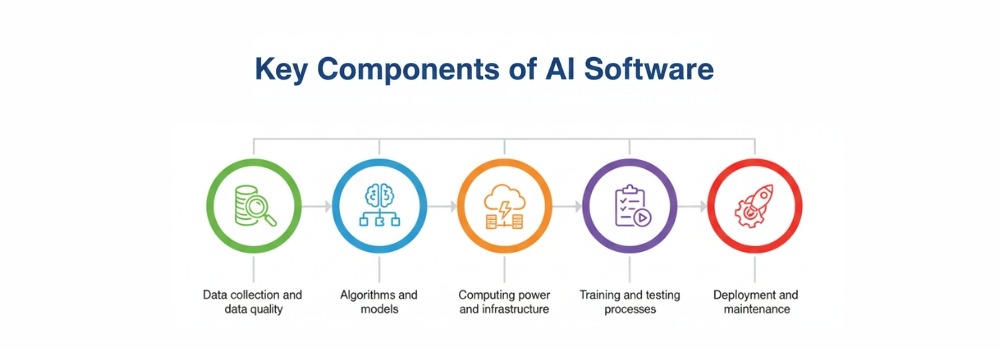
Key Components of AI Software
Building a high-performing application requires more than just a clever algorithm. To successfully develop an AI software product, you must balance several interconnected layers. If one component is weak, the entire system’s accuracy and reliability will suffer.
Data Collection and Data Quality
Data is the lifeblood of any intelligent system. However, the adage “garbage in, garbage out” has never been more relevant. High-quality data is the primary differentiator between a prototype and a market-ready solution.
Sourcing: Finding diverse and representative datasets.
Cleaning: Removing noise, bias, and inconsistencies.
Volume vs. Variety: While having a large volume of data is helpful, having a wide variety of data points ensures the AI can handle edge cases and real-world unpredictability.
Algorithms and Models
The algorithm is the mathematical engine that processes your data. Depending on your goals, you might choose a simple linear regression or a complex deep-learning neural network. The “model” is what you get after the algorithm has been trained on your specific data.
Computing Power and Infrastructure
AI is resource-intensive. To make an AI software that responds in real-time, you need a robust infrastructure. This often involves:
GPUs (Graphics Processing Units): Essential for the heavy parallel processing required in deep learning.
Cloud Scalability: Services like AWS, Azure, or Google Cloud allow you to scale your computing power up or down based on the training load.
Edge Computing: Processing data locally on devices (like smartphones or IoT sensors) to reduce latency.
Training and Testing Processes
This is the “learning” phase. Training involves feeding data into the model so it can adjust its internal logic.
Testing (or validation) happens on a separate dataset to verify that the model actually understands the concepts rather than just memorizing the training inputs.
Overfitting: A common trap where the model performs perfectly on training data but fails in the real world.
Hyperparameter Tuning: Fine-tuning the settings of the algorithm to achieve the highest possible accuracy.
Deployment and Maintenance
The work doesn’t stop once the code is live. Deploying AI involves integrating the model into your existing software ecosystem via APIs or microservices.
Maintenance is a continuous cycle:
Model Drift: Real-world data changes over time (e.g., consumer habits shift), causing the AI to become less accurate.
Monitoring: Tracking performance metrics to ensure the system remains fast and reliable.
Retraining: Periodically feeding the system new data to keep its knowledge “fresh.”
Understanding these components is the secret to knowing how to use AI in software development effectively. It’s a move away from static code toward a living system that requires ongoing care.
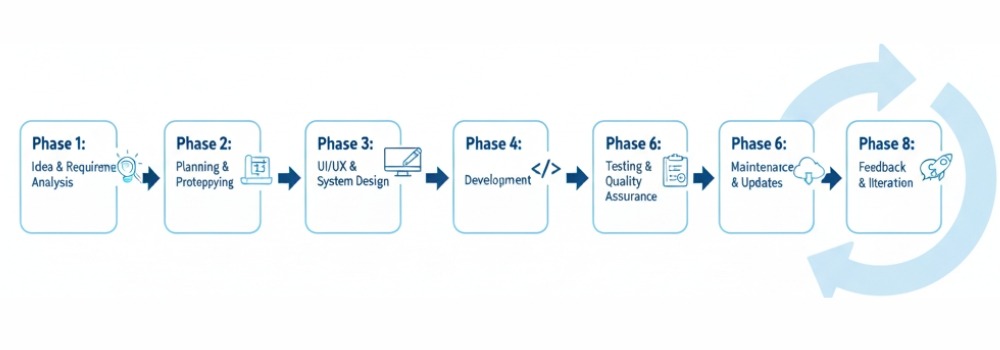
Step-by-Step Process to Develop AI Software
Building intelligence into an application is a structured journey. To develop an AI software solution that provides real ROI, you must move beyond experimentation and follow a rigorous engineering lifecycle.
Each stage builds on the previous one, ensuring the final product is both technically sound and business-aligned.
1. Define the Problem and Business Goals
Success starts with a question, not a piece of code. You must identify exactly what you want the AI to achieve. Are you looking to reduce customer support response times, or do you need to predict equipment failure before it happens?
Setting clear Key Performance Indicators (KPIs) at this stage, such as a target accuracy rate or a specific percentage of automation, prevents “scope creep” and keeps the project focused on delivering value.
2. Collect and Prepare Data
Data is the foundation of your entire project. To make an AI software that performs reliably, you need data that is both high-quality and high-volume.
Data Sourcing: Pulling information from CRM systems, public datasets, or IoT sensors.
Data Preprocessing: This is the most time-consuming step, involving the removal of outliers, handling missing values, and formatting data so the algorithm can read it.
Feature Engineering: Selecting the most important variables that will actually help the model make a decision.
3. Choose the Right AI Model
Not every problem requires a complex neural network. Depending on your goals, you might select:
Linear Models: Great for simple predictions and forecasting.
Decision Trees: Excellent for classification tasks.
Deep Neural Networks: Necessary for complex tasks like image or speech recognition.
Matching the model complexity to the problem ensures you don’t over-engineer the solution, which saves on both development time and computing costs.
4. Train the AI Model
This is the “learning” phase, where you use AI for software development in practice. You feed your prepared data into the chosen algorithm.
The system looks for patterns and adjusts its internal weights to minimize the difference between its predictions and the actual results.
Training requires significant computational power, often utilizing GPUs to process millions of data points simultaneously, enabling organizations to fully realize the benefits of custom software development through intelligent and scalable AI solutions.
5. Test and Validate the Model
Before going live, you must prove the model works on data it has never seen before. This prevents “overfitting,” where a model is great at predicting the past but fails to predict the future. Use a dedicated validation dataset to check for:
Precision: How often the AI is correct when it makes a positive prediction.
Recall: How many of the actual positive cases did the AI manage to find?
F1 Score: A balance between precision and recall.
6. Deploy the AI Software
Deployment involves moving the model from a local environment to a production server where users can interact with it. Most teams integrate the AI model into their existing application via a REST API or a microservices architecture. This allows the front-end of your software to send data to the AI and receive an intelligent response in milliseconds.
7. Monitor, Update, and Maintain the System
An AI model is never truly “finished.” Because the world changes, your data will change too, a phenomenon known as Model Drift.
Continuous Monitoring: Tracking the model’s accuracy in the real world.
Feedback Loops: Collecting user interactions to help retrain the model.
Scheduled Retraining: Regularly updating the AI with fresh data to ensure its predictions remain sharp and relevant.
By following these steps, you transform a complex technological challenge into a manageable, repeatable process.
This structured approach is how the most successful companies use AI in software development to dominate their industries.
Tools and Technologies for AI Software Development
Choosing the right tech stack is what separates a successful AI product from an experimental prototype. In 2026, the ecosystem has matured, offering specialized tools for every stage of the lifecycle from data ingestion to high-speed inference.
Category
Top Tools & Technologies
Key Features & Strengths
Programming Languages
Python, Julia, R, C++, Java
Python remains the king for its vast library support (TensorFlow, PyTorch). Julia is favored for high-performance numerical analysis.
AI Frameworks
PyTorch, TensorFlow, Keras, Scikit-learn
PyTorch is the go-to for research and generative AI. TensorFlow excels in production-scale enterprise deployments.
Cloud Platforms
AWS (SageMaker), Google Cloud (Vertex AI), Microsoft Azure AI
These provide scalable GPUs/TPUs, managed MLOps pipelines, and pre-trained model APIs to accelerate development.
Data Management
Snowflake, Apache Kafka, Databricks, MongoDB
Essential for handling the “Big Data” requirements of AI, ensuring low-latency data streaming and structured storage.
NLP & LLM Tools
Hugging Face, LangChain, OpenAI API
Hugging Face provides the industry-standard “Model Hub” for transformer models used in chatbots and translation.
Skills Required to Develop AI Software
While the tools are important, the real power behind any application is the expertise of the people building it.
To make an AI software that is both accurate and scalable, a unique blend of technical mastery and high-level critical thinking is required.
As we move through 2026, the demand has shifted from pure coding to “AI orchestration,” the ability to make various intelligent systems work together.
Programming Skills
You don’t need to know every language, but you must be proficient in the ones that power the AI ecosystem.
Python: The undisputed leader due to its simple syntax and massive library support (TensorFlow, PyTorch).
C++ & Java: Crucial for building the “engine” of high-performance AI or integrating models into large-scale enterprise environments.
API Development: Since most AI models are deployed as services, knowing how to build and consume RESTful APIs is a mandatory skill for any modern developer.
Data Science and Statistics Knowledge
AI is applied statistics. Without a solid grasp of data science, you won’t be able to interpret why a model is succeeding or failing.
Probability & Statistics: Essential for understanding model confidence, risk, and uncertainty.
Linear Algebra: The math behind how neural networks process information in multidimensional arrays (tensors).
Data Wrangling: The ability to clean, transform, and prepare messy real-world data into a format an algorithm can actually use.
Machine Learning Concepts
To develop an AI software strategy, you must understand the different “ways” a machine learns. You don’t need a PhD, but you should be fluent in:
Supervised vs. Unsupervised Learning: Knowing when to use labeled data versus letting the machine find its own patterns.
Neural Networks: Understanding the layers of “neurons” that allow deep learning applications to recognize faces or translate languages.
Reinforcement Learning: Teaching an AI through a system of rewards and penalties, commonly used in robotics and gaming.
Problem-Solving and Analytical Thinking
This is perhaps the most underrated skill. AI is non-deterministic, meaning the same input might not always result in the same output.
Critical Evaluation: You must be able to look at an AI’s output and ask, “Does this make sense, or is the model hallucinating?”
Algorithmic Logic: Breaking down a complex business problem into a series of logical steps that an AI can solve.
Ethical Oversight: Identifying and mitigating bias in data to ensure the software makes fair and responsible decisions.
Mastering these skills allows you to move beyond just using existing tools to actually innovating. When you understand the why behind the code, you can build systems that don’t just follow instructions but actively solve problems.
Challenges in AI Software Development
While the innovation potential is limitless, the road to a production-ready AI application is paved with significant hurdles. These challenges of ai software development often become more visible as organizations move from experimentation to real-world deployment.
In 2026, the focus has shifted from “can we build it?” to “can we build it responsibly and cost-effectively?” Understanding these challenges early is the only way to develop an AI software solution that stands the test of time.
Core Development Challenges
Challenge
Impact on Development
How to Address It
Data Quality & Availability
Poor data leads to “garbage in, garbage out,” resulting in unreliable predictions.
Implement automated data validation frameworks (like Great Expectations) and diversify your data sources.
Start with open-source models (Meta’s Llama or DeepSeek) to reduce costs by up to 6x compared to proprietary systems.
Ethical & Privacy Concerns
Data leaks or misuse of personal info can lead to massive fines under GDPR or the EU AI Act.
Use “Privacy-Preserving” techniques like Federated Learning or Differential Privacy to keep raw data decentralized.
Model Bias & Transparency
AI can accidentally learn societal prejudices, leading to unfair lending or hiring decisions.
Conduct regular “Bias Audits” and use Explainable AI (XAI) tools to make the model’s “Black Box” logic understandable to humans.
Cost and Time Required to Develop AI Software
In 2026, building AI is no longer a “shot in the dark” regarding budgeting and scheduling. While costs have stabilized as technology matures, the investment required is still significantly higher than traditional software due to the specialized talent and high-performance computing power involved. This is especially true when considering the cost of AI agent development, which often requires advanced models, large datasets, and scalable infrastructure.
Factors Affecting Development Cost
The price tag of your AI project isn’t just about the lines of code. It is a combination of data, compute, and expertise, all of which directly influence the overall App development cost.
Model Complexity: A simple chatbot using a pre-trained Large Language Model (LLM) wrapper might cost $50,000–$150,000. However, a custom-built computer vision system or an enterprise-grade predictive engine can easily range from $500,000 to over $2 million.
Data Preparation: This is often the “hidden” cost, accounting for 40%–60% of the total budget. Sourcing, cleaning, and labeling thousands of data points requires significant human and technical resources.
Infrastructure & Compute: Training advanced models requires GPUs (like the NVIDIA H100). Cloud rental for these resources ranges from $2 to $30+ per hour, and a single training run can cost thousands of dollars.
Regulatory Compliance: In industries like healthcare or finance, meeting safety and privacy standards (like the EU AI Act) can add a 25%–40% premium to your development costs.
Actual costs vary significantly depending on scope, region, and infrastructure requirements.
Typical Development Timelines
AI development is an iterative process. You aren’t just building a product; you are conducting a series of experiments until the model achieves the desired accuracy.
Project Stage
Duration (Estimated)
Discovery & Planning
2–4 Weeks
Data Collection & Cleaning
4–8 Weeks
Model Training & Iteration
6–12 Weeks
Testing & Security Hardening
3–6 Weeks
Deployment & Integration
2–4 Weeks
In-House vs. Outsourced AI Development
Deciding who builds your software is just as critical as the technology itself. To develop an AI software product that lasts, you must weigh your internal capabilities against your speed-to-market goals.
In 2026, the scarcity of high-level AI talent makes this decision a central part of any project’s business strategy.
Comparison: In-House vs. Outsourcing
Feature
In-House Development
Outsourcing / Agency Partner
Control
Full control over IP and internal data security.
Shared oversight; relies on strong contracts.
Culture Fit
High; the team understands your business goals.
Moderate; requires intensive onboarding.
Talent Costs
Very high (AI Architects earn $180k–$300k+).
Predictable project-based or retainer fees.
Launch Speed
Slow; requires months of hiring and setup.
Fast; uses pre-built frameworks and MLOps.
Long-Term ROI
Higher for core, proprietary IP.
Better for non-core features or rapid MVPs.
Recruitment
Major hurdle: high turnover in the AI market.
None; the agency manages all staffing.
Best Practices for AI Software Development
In 2026, the benchmark for successful AI isn’t just a working model; it’s a system that is resilient, ethical, and deeply integrated into the business fabric. As AI moves from a “novelty” to the core “operating system” of modern enterprise, following these industry-standard best practices is what separates high-ROI products from failed experiments.
Start with a Clear Use Case
The most common cause of AI project failure is “technology looking for a problem.” High-performing teams start with a specific business pain point.
Identify High-Impact, Low-Complexity Tasks: Begin with areas like automated customer support or predictive maintenance where the ROI is easily measurable.
Define “Done” with KPIs: Success should be measured by specific metrics, such as a 20% reduction in processing time or a 15% increase in lead conversion, rather than vague goals like “improving efficiency.”
Prioritize “Agentic” Workflows: In 2026, the trend is moving toward AI agents that don’t just answer questions but execute multi-step tasks independently (e.g., an agent that processes a refund and updates the inventory).
Use High-Quality Data
If your data is flawed, your AI will be too, no matter how advanced the algorithm. High-quality data is the single most important asset when you make an AI software product.
Audit for Bias and Accuracy: Proactively scan your data for historical biases to ensure your AI provides fair outcomes across all demographics.
Implement Continuous Validation: Data in the real world is messy and changes over time. Use automated pipelines to “clean” and validate incoming data before it hits your model.
Focus on Small, Specific Models: A 2026 trend is moving away from massive, general models toward smaller, “application-specific” models trained on high-quality, niche data for better precision.
Focus on Scalability
An AI model that works for 10 users might crash when hit with 10,000. To use AI in software development effectively at scale, you must:
Adopt a Cloud-Native, Modular Design: Use microservices and containerization (like Docker or Kubernetes) so your AI inference engine can scale independently from the rest of your app.
Plan for “Inference Costs”: Scaling AI is expensive. Optimize your model’s architecture to reduce the “compute” required for each request, ensuring your profit margins stay healthy as your user base grows.
Design for Interoperability: Ensure your AI can easily “talk” to your existing CRM, ERP, and legacy databases via standardized APIs.
Ensure Data Security and Compliance
As of 2026, “Privacy by Design” is no longer optional; it’s a legal and business requirement.
Compliance with Global Standards: Ensure your software adheres to the EU AI Act, GDPR, and local sovereignty laws. This often means implementing “Federated Learning” where the AI learns from data without the data ever leaving its secure local server.
Establish “Human-in-the-loop” (HITL) Paths: For high-stakes decisions (like medical or financial approvals), always have a human sign-off path. This provides a safety net and maintains user trust.
Regular Security Audits: AI systems introduce new vulnerabilities, such as “prompt injection.” Regular penetration testing specifically for your AI endpoints is essential.
Future Trends in AI Software Development
As we move through 2026, the focus of development has shifted from basic automation to “autonomous intelligence.”
AI is no longer a separate feature; it has become the underlying architecture of modern software. To stay competitive, developers must look toward these four pillars of innovation that are redefining the industry.
Generative AI
Generative AI has developed far beyond simple text and image generation. In 2026, the trend has shifted toward Agentic AI systems that don’t just answer prompts but autonomously execute multi-step workflows.
These “AI Agents” can plan a project, write the code, run tests, and deploy updates with minimal human intervention. Furthermore, Multimodal models are now the standard, allowing software to seamlessly process and generate text, high-fidelity video, and natively generated audio in a single stream.
Automated Machine Learning (AutoML 3.0)
The barrier to entry for AI development has vanished thanks to AutoML 3.0. This new generation of tools automates the entire machine learning pipeline from synthetic data generation and feature engineering to model selection and deployment.
In 2026, these platforms are “context-aware,” meaning they can automatically adjust a model to meet the specific regulatory or performance standards of industries like healthcare or finance without a data scientist needing to manually tune every parameter.
AI-Powered Business Automation
We have moved from rigid “if-then” Robotic Process Automation (RPA) to Thinking Systems. In 2026, business software is self-optimizing.
ERP platforms now use autonomous forecasting to manage supply chains in real-time, while CRM systems act as predictive intelligence engines that anticipate customer needs before they are voiced.
This “Unified Intelligent Layer” allows different enterprise tools to talk to each other, creating end-to-end workflows that learn and improve with every transaction.
Responsible and Ethical AI
Ethics is no longer a “nice-to-have” but a core engineering requirement. Driven by global regulations like the EU AI Act, 2026 has seen the rise of Explainable AI (XAI). Developers are now building “Transparent by Design” systems that provide human-readable logic for every decision the AI makes.
This trend includes a massive shift toward Privacy-Preserving AI, such as federated learning, which allows models to be trained on sensitive data without that data ever leaving the user’s local device.
Finding the Right Consultant for Your AI Project
Finding the right consultant is the bridge between a conceptual idea and a high-performance market reality. To ensure your investment yields measurable ROI, look for a partner that prioritizes business outcomes over technical jargon and demonstrates a clear methodology for data governance and model scalability.
Hudasoft stands out as a premier choice in this space, offering comprehensive AI software development services that combine deep technical expertise with a product-centric approach.
By choosing a consultant that understands your specific industry delays, whether in healthcare, e-commerce, or logistics, you can move beyond simple automation to create a truly intelligent enterprise ecosystem.
Conclusion
Developing AI software is a transformative journey that begins with a well-defined business problem and relies on the pillars of high-quality data, scalable infrastructure, and continuous model maintenance.
By understanding the critical distinctions between traditional programming and machine learning, and by staying ahead of 2026 trends like agentic AI and ethical transparency, you can build systems that don’t just automate tasks but actively drive innovation.
Whether you decide to cultivate an in-house team or partner with specialized experts to accelerate your launch, the key is to start with a focused use case and remain iterative.
As artificial intelligence becomes the core architecture of the modern enterprise, now is the time to transition from observation to execution, turning your raw data into a powerful, intelligent asset that scales with your ambition.
FAQS
Why is explainability becoming critical in AI software development?
The demand for explainability is increasing rapidly, particularly in regulated industries like finance, healthcare, and public services. Organizations must be able to justify how AI systems reach decisions, especially when those decisions impact customers or business operations. Explainable AI (XAI) improves transparency, builds stakeholder trust, and helps ensure compliance with emerging regulatory frameworks and data protection laws.
What is the biggest technical challenge in AI software development?
One of the biggest technical challenges is managing model drift and maintaining performance at scale. AI systems operate in dynamic environments where data patterns change over time. Without continuous monitoring, retraining pipelines, and structured MLOps practices, model accuracy can gradually decline, leading to unreliable or inconsistent outputs.
Why do many AI projects fail to scale beyond the pilot stage?
Many AI initiatives struggle to move beyond proof-of-concept due to poor data quality, unclear ROI measurement, infrastructure limitations, and a lack of cross-functional expertise. Successfully scaling AI requires strong data governance, reliable computing infrastructure, domain knowledge, and automation through mature MLOps frameworks.
What are the main security risks in AI systems?
AI systems face unique security risks such as data poisoning, prompt injection attacks, adversarial manipulation, and potential privacy leakage. As AI becomes more integrated with enterprise systems, organizations must adopt privacy-by-design principles, robust access controls, and continuous monitoring to protect both sensitive data and model integrity.
Building software used to be about logic, loops, and predictable outcomes. You wrote a command, and the machine followed it. However, the shift toward AI software development has rewritten the rulebook.
Nowadays, developers aren’t just writing code; they are cultivating systems that learn, adapt, and occasionally hallucinate. This transition from deterministic programming to probabilistic learning has turned the development lifecycle into a high-stakes balancing act of data science and traditional engineering.
The reality is that AI software development challenges run much deeper than standard debugging. Unlike traditional apps, AI systems are hungry for massive, high-quality datasets and require specialized infrastructure that can handle intense computational loads.
If you don’t address these challenges of artificial intelligence implementation during the architectural phase, you risk building a “black box” that is impossible to maintain, audit, or scale. Success in this field requires a shift in mindset: you must move from simply writing instructions to managing the complex, often unpredictable behavior of evolving models.
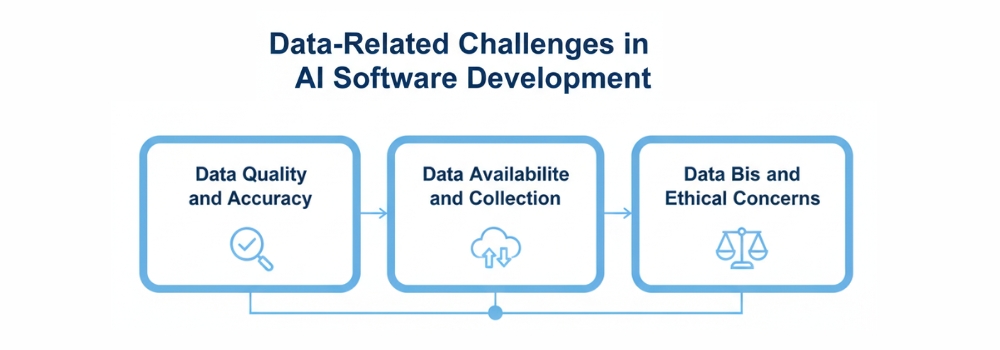
Data-Related Challenges in AI Software Development
Why are so many organizations watching their AI investments vanish into a “black hole” of failed pilots? According to multiple industry surveys, many organizations struggle to scale AI projects beyond proof-of-concept due to gaps in governance, infrastructure, and talent.
The culprit isn’t usually the algorithm; it’s the foundation. In AI software development, your results are only as intelligent as the data you provide. If you aren’t addressing the specific data-related challenges of artificial intelligence, you aren’t building a solution; you’re building a liability.
1. Data Quality and Accuracy: The “Silent Failure” Risk
In traditional software, a bug causes a crash. In AI software development, poor data quality causes a “silent failure,” a model that appears to work perfectly but provides confidently wrong or hallucinatory outputs.
The Hallucination Trap: As we’ve seen in 2026, even enterprise-grade agents struggle with “data poisoning” or “synthetic feedback loops,” where AI-generated data is accidentally fed back into training sets, degrading the model’s logic over time.
Accuracy vs. Precision: In high-stakes fields like finance or healthcare, the tolerance for error is zero. Flawed datasets increase the risk of “model drift,” where an AI’s accuracy slowly erodes as real-world conditions diverge from its training data.
The Integrity Differentiator: The industry has shifted its focus from the volume of data to the integrity of data. Success today requires rigorous “freshness checks” and automated schema-change alerts to catch errors before they infect the model.
2. Data Availability and Collection
The most persistent AI software development problem is the gap between the massive data requirements of modern models and the fragmented reality of corporate storage.
The Silo Standoff: Critical data is often trapped in legacy systems or “black box” departments that don’t share information. Breaking these silos is a prerequisite for any AI software development project.
Edge Case Scarcity: AI needs to see what rarely happens to be robust. Collecting enough high-quality, verified data for these “edge cases” remains a massive hurdle, leading many firms to pivot toward synthetic data, artificially created information that mimics real patterns without the privacy risks of raw data.
Manual Labeling Delays: While AI can process data at lightning speed, the human-in-the-loop process of labeling that data remains slow, expensive, and prone to error, often becoming the primary bottleneck for project timelines.
3. Data Bias and Ethical Concerns
We have entered an era of “Radical Transparency.” With the phased enforcement of the EU AI Act beginning in 2025 and evolving AI governance frameworks emerging globally, addressing the challenges of artificial intelligence regarding ethics is now a legal mandate, not just a corporate social responsibility.
Embedded Prejudices: AI models are mirrors. If your historical data reflects past hiring biases or demographic imbalances, your AI will not just repeat those mistakes; it will automate them at scale.
The Proxy Problem: Even if you remove sensitive markers like “gender” or “race,” AI can often identify “proxies” like a postcode or a specific extracurricular activity that allow it to discriminate unintentionally.
Explainable AI (XAI): The “Black Box” era is ending. Stakeholders now demand to know why an AI made a specific decision. Implementing XAI tools is the only way to build the trust necessary for widespread adoption.
Technical Challenges in AI Software Development
Why do so many AI initiatives look brilliant in a demo but crumble the moment they face a real production workload? In 2026, the industry has realized that “making it work” and “making it work at scale” are two entirely different problems.and this gap represents one of the biggest challenges to AI adoption for many organizations.
If you’ve ever wondered why your engineering team is debating model parameters for weeks or why your cloud bill spiked 300% after a minor update, you’ve hit the wall of technical challenges in AI software development. Moving beyond the hype requires solving three major structural hurdles.
1. Model Selection and Algorithm Complexity
Are you choosing the most powerful model available, or the one that actually fits your use case? In 2026, “bigger” is no longer synonymous with “better.”
The sheer variety of LLMs, SLMs (Small Language Models), and domain-specific architectures has turned model selection into a high-stakes strategic decision.
The Overkill Trap: Using a massive, multi-billion parameter model for a simple classification task is like using a rocket ship to go to the grocery store. It’s expensive, slow, and unnecessarily complex.
Context Window Management: With models now supporting millions of tokens in context, engineers face a new AI software development problem: “context poisoning.” Too much information can lead the AI to lose focus on the core instruction.
The Black Box Dilemma: As algorithms grow more complex, they become harder to debug. Teams are now forced to implement “Explainable AI” (XAI) frameworks just to understand why a model made a specific prediction, adding another layer of complexity to the development stack.
2. Scalability and Performance Issues
Can your AI handle 10,000 concurrent users without the latency making the app unusable? Scalability and performance issues are often where the most promising AI software development challenges reside.
The Latency War: In 2026, users expect instant responses. However, deep learning models are computationally “heavy.” Balancing model accuracy with “Inference Speed” is a constant tug-of-war.
Resource Orchestration: AI requires specialized hardware (GPUs and TPUs). Managing these resources effectivelyusing techniques like quantization to shrink models or “Model Sharding” to spread the load is now a core requirement for any AI software development project.
The Cost of Scaling: Cloud compute cost of AI agent development can spiral out of control. Without strict “Rate Limiting” and “Token Budgeting,” a successful product can quickly become a financial liability.
3. Integration with Existing Systems
One of the Powerful Benefits Of AI In Software Development is its ability to enhance and modernize existing systems. However, integrating modern AI with legacy infrastructure remains a significant challenge. How do you plug a 2026 AI into a 2010 database? This “Brownfield” development problem is one of the most common obstacles organizations face when adopting AI in enterprise environments.
Legacy Architecture Friction: Most existing systems were built for “Batch Processing,” but AI thrives on “Real-Time Data Streams.” Forcing these two worlds together often requires building complex “Middle-Ware” or “Connectors.”
API Instability: Many AI solutions rely on external APIs. If the model provider changes their API version or adjusts their weights, it can break your entire downstream workflow.
Security & Data Silos: Integrating AI often requires breaking down internal data silos. However, doing so without violating privacy laws or exposing sensitive IP is a significant hurdle that requires “Agentic Legacy Modernization” using AI itself to bridge the gap between old and new systems.
Infrastructure and Resource Challenges
Is your current infrastructure ready for the heavy lifting that AI demands? Transitioning from the traditional application development process to AI software development isn’t just a software update; it’s a total hardware overhaul.
Many organizations find that their existing servers are simply not built for the non-linear, high-intensity processing required to keep a modern model running smoothly.
High Computing Power Requirements
The most immediate AI software development problem is the hunger for specialized computing power. Unlike standard apps that run on CPUs, AI thrives on GPUs and TPUs capable of performing millions of simultaneous calculations.
The GPU Scarcity: In 2026, securing reliable, high-performance compute cycles remains a logistical hurdle, often leading to fluctuating costs and deployment delays.
Energy Consumption: Beyond the hardware itself, the electricity required to train and run large-scale models is a significant operational expense that can quickly erode a project’s ROI if not managed through “model quantization” and efficient architecture.
Storage and Data Management
If compute power is the engine, data is the fuel, and you need a massive tank to store it. Managing the sheer volume of information required for AI software development challenges even the most robust data centers.
Latency vs. Volume: You don’t just need to store petabytes of data; you need to access it at lightning speed. Traditional “Cold Storage” won’t work for real-time training, requiring expensive “High-IOPS” (Input/Output Operations Per Second) storage solutions.
Data Lifecycle Complexity: From raw collection to cleaned datasets and versioned model weights, the “Data Footprint” of an AI project expands exponentially, requiring automated tiered storage strategies to keep costs under control.
Talent and Skill Gaps in AI Development
Building an AI solution requires a specialized workforce that often feels non-existent. While there are millions of traditional software engineers, the pool of professionals who can architect, fine-tune, and secure an AI model is remarkably shallow.
This shortage is the primary reason many companies find themselves stuck in prolonged pilot phases,” where promising demos never quite make it to full-scale production.
Shortage of Skilled AI Professionals
The demand for high-level AI talent has drastically outpaced the supply provided by traditional education. Companies are no longer just looking for people who can write code; they need experts in “LLMOps,” “Agentic Orchestration,” and specialized model optimization.
This scarcity has led to a highly competitive market where securing a single senior AI architect can be as difficult and expensive as hiring an entire team of standard web developers.
Cross-Disciplinary Knowledge Requirements
AI development isn’t just a technical task; it’s a cross-disciplinary challenge that requires engineers to think like domain experts and ethicists. For instance, a developer building an AI for the legal or medical field must understand complex regulatory frameworks and industry-specific nuances to ensure the model’s output is actually useful.
Without this marriage of technical skill and industry knowledge, businesses risk deploying models that are technically sound but practically irrelevant or even legally non-compliant.
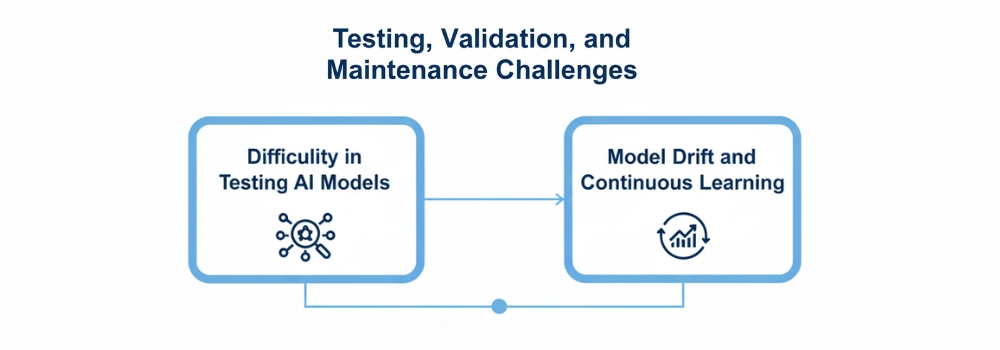
Testing, Validation, and Maintenance Challenges
How do you test a system that doesn’t follow a fixed set of rules? In traditional software, you provide an input and expect a specific, pre-defined output. AI flips this script.
Because AI models are probabilistic rather than deterministic, testing becomes a moving target. You aren’t just looking for “broken” code; you are looking for subtle shifts in logic and accuracy that can’t always be caught with a simple unit test.
Difficulty in Testing AI Models
The most significant AI software development problem in quality assurance is the lack of “ground truth.” Since an AI can generate thousands of unique responses, creating a comprehensive test suite is nearly impossible.
The Non-Deterministic Barrier: You can run the same test twice and get two slightly different results. This makes “flaky tests” a common headache, requiring teams to shift from binary pass/fail grades to statistical confidence scores.
Explainability and the “Black Box”: When an AI fails, it rarely leaves a trail of breadcrumbs. Validating why a model reached a wrong conclusion requires specialized “Explainable AI” (XAI) tools that can deconstruct the neural pathways of a decision.
Model Drift and Continuous Learning
Unlike traditional software, which remains static until you update it, an AI model begins to “decay” the moment it is deployed. This phenomenon, known as Model Drift, occurs when the real-world data starts to diverge from the data the model was originally trained on.
The Silent Decay: Your code might be running perfectly, but if user behavior changes or a new market trend emerges, your AI’s predictions will slowly lose their value. This is a “silent failure” that standard monitoring tools often miss.
The Continuous Learning Loop: To combat drift, you can’t just set it and forget it. Maintenance in the AI world requires a “Continuous Learning Loop,” where fresh production data is constantly fed back into the system to retrain and realign the model. This creates a permanent maintenance cycle that is far more resource-intensive than traditional bug-fixing.
Ethical, Legal, and Compliance Challenges
As AI systems move from experimental tools to core business drivers, they are facing a new level of scrutiny from both the public and global regulators. It is no longer enough for a model to be fast or accurate; it must also be justifiable.
For many organizations, the biggest hurdle in AI software development isn’t the technology itself, but the complex web of ethics and law that governs how that technology interacts with human lives.
Explainability and Transparency
The era of the “Black Box” is officially over. Stakeholders and customers are increasingly demanding to know exactly how an AI reached a specific conclusion, especially in sensitive areas like lending, hiring, or healthcare.
This demand for Explainability and Transparency creates a massive technical challenge, as the most powerful neural networks are often the hardest to interpret. Developers are now tasked with building “interpretable layers” into their systems to ensure that every automated decision can be audited, explained, and defended in plain language.
Regulatory and Compliance Issues
Navigating the legal landscape has become a primary AI software development problem as governments worldwide introduce strict frameworks to govern machine learning.
From the comprehensive requirements of the EU AI Act to evolving data privacy mandates, businesses must ensure their systems are compliant by design rather than as an afterthought.
Failing to meet these standards doesn’t just result in technical debt; it carries the risk of massive fines and permanent damage to a company’s reputation. Staying ahead requires a proactive approach to “Compliance-as-Code,” where legal boundaries are baked directly into the development lifecycle.
Cost and Time Constraints
While the promise of AI is often framed as a way to save money, the reality of the development phase can be a significant financial shock. Unlike traditional software, where costs are relatively predictable once the requirements are set, AI projects involve a high level of experimentation and resource consumption.
Organizations frequently find that the “sticker price” of an AI pilot is just the tip of the iceberg, with long-term operational costs often exceeding initial estimates by several hundred percent.
High Development and Deployment Costs
The financial burden of AI starts with the specialized hardware and talent required to bring a model to life. High-performance GPUs are not only expensive to purchase but also costly to rent through cloud providers, especially as global demand continues to rise.
Beyond hardware, the specialized expertise needed to manage these systems commands premium salaries, often making the human capital the most expensive part of the budget.
Additionally, once a model is deployed, the ongoing costs of “inference,” the energy and compute power used every time the AI answers a query, can quickly escalate into a massive recurring expenditure that requires strict cost-governance to remain sustainable.
Longer Development Timelines
One of the most common misconceptions is that AI can be “plugged in” overnight. In reality, the development lifecycle is often significantly longer than traditional software due to the intensive “Data-First” requirements.
Engineering teams must spend months sourcing, cleaning, and labeling data before the first round of training even begins. Furthermore, the iterative nature of model training, where a system must be tested, refined, and retrained multiple times to reach acceptable accuracy, means that timelines are often measured in months or even years rather than weeks.
This unpredictability makes it difficult for businesses to align AI launches with quarterly goals, requiring a more patient and long-term strategic approach.
Security Challenges in AI Software Development
Could your most sophisticated AI model be tricked by a single pixel or a hidden sentence in a text file? As we’ve seen throughout early 2026, the shift toward “Agentic AI,” where models have the power to execute code and access databases, has turned the traditional security landscape upside down.
Protecting these systems is no longer just about firewalls and encryption; it’s about defending the very logic of the machine.
Data Privacy Risks
The race for more capable models has created a “Data Minimization” crisis that many firms are struggling to resolve. In an environment where personal data is ingested at a massive scale from customer transcripts to biometric signals, the risk of “Privacy Leakage” is a constant threat.
New operational rules under frameworks like the DPDP and the EU AI Act now demand that privacy be built into the core architecture of the system.
Failing to implement “Privacy-by-Design” doesn’t just invite a breach; it can lead to massive penalties and a permanent loss of digital trust.
Adversarial Attacks on AI Models
Perhaps the most alarming development in 2026 is the industrialization of adversarial attacks. Unlike a standard hack, these attacks exploit the mathematical vulnerabilities of a model.
Indirect Prompt Injection: A single malicious instruction hidden in a retrieved document can hijack an LLM’s behavior, leading it to exfiltrate data or perform unauthorized actions.
Data Poisoning: Subtle distortions fed into the training pipeline can “teach” a model to misclassify threats or create hidden backdoors that attackers can trigger months after deployment.
Adversarial Distillation: Competitors and bad actors are increasingly using automated scripts to “query and copy” proprietary model logic, essentially stealing intellectual property without ever touching a company’s server code.
How to Overcome AI Development Challenges
The conversation around AI is shifting from “What can it do?” to “How do we make it last?” As we move through 2026, the businesses finding the most success are those that have stopped treating AI as a standalone experiment and started treating it as a core operational discipline.
Overcoming the inherent hurdles of this technology requires a move away from manual, “one-off” projects toward a structured, automated, and ethical framework.
Best Practices for Reducing AI Risks
Reducing risk in AI development starts with moving beyond the “black box” approach. High-performing teams are now adopting Explainable AI (XAI) frameworks to ensure that every output can be audited and understood by human stakeholders.
By implementing rigorous data governance, including regular bias audits and automated quality checks, organizations can catch “silent failures” before they impact the end-user.
Additionally, the use of Transfer Learning and Synthetic Data is becoming a standard practice to mitigate data scarcity and protect user privacy, allowing for robust model training without the legal liabilities of raw data ingestion.
The Role of MLOps and Automation
If you want to scale AI without exploding your budget or your timeline, MLOps (Machine Learning Operations) is no longer optional. MLOps brings the discipline of DevOps to the world of AI, automating the most tedious parts of the lifecycle from data cleaning and model versioning to deployment and real-time monitoring.
By using automated retraining pipelines, businesses can combat “Model Drift” instantly, ensuring that the AI adapts to new data patterns without manual intervention.
This hyper-automation not only reduces human error but also allows small teams to manage thousands of models simultaneously, turning a technical bottleneck into a scalable engine for growth.
Importance of Responsible AI Development
In the 2026 regulatory environment, Responsible AI is your greatest strategic advantage. Trust has become the primary currency of the digital economy; customers are only willing to share their data with systems they believe are fair and transparent.
Building with a “Responsible-by-Design” mindset focusing on fairness, accountability, and environmental sustainability ensures that your innovation doesn’t invite a sudden legal shutdown or a reputational crisis.
Where to Get Reliable Software Development Consultation
Finding a partner who can bridge the gap between complex algorithms and commercial viability is the final, most crucial step in your digital transformation. To navigate the high-stakes world of machine learning without falling into the “80% failure” trap, you need more than just a vendor; you need a strategic advisor who understands the intersection of data integrity and scalable architecture. Hudasoft stands out in this landscape as a premier choice, offering specialized AI services that prioritize transparency, security, and measurable ROI to ensure your vision successfully transitions from a laboratory experiment to a market-leading product.
Conclusion
Ultimately, the path to a successful AI deployment is paved with more than just high-performance code; it is built on a foundation of strategic foresight and rigorous data discipline. While the challenges of artificial intelligence, from technical “model drift” to complex ethical and legal hurdles, can seem daunting, they are far from insurmountable for those who prioritize a structured, “data-first” approach.
By moving away from isolated experiments and toward a culture of automated MLOps and transparent governance, you transform these technical roadblocks into a sustainable competitive edge. Success in this field doesn’t belong to those who rush to follow the hype, but to the leaders who plan for the long term, ensuring their AI systems are as resilient and ethical as they are intelligent.
FAQS
What is a challenge of using AI in software development?
A major challenge is non-determinism, meaning the AI can produce different outputs for the same input. This makes traditional testing difficult because developers cannot rely on fixed “pass/fail” results, requiring a shift toward statistical validation and constant human oversight to catch potential “hallucinations.”
What problems do AI developers currently face?
Developers are primarily struggling with Model Drift and data quality. Even a perfectly built model will lose accuracy as real-world trends change, forcing teams to build expensive, automated pipelines to constantly clean data and retrain systems to keep them relevant and reliable.
What is the major problem in AI development?
The “Black Box” nature of complex algorithms remains the biggest hurdle. Because it is difficult to explain exactly how a model reaches a specific conclusion, businesses face massive transparency and trust issues, especially in regulated industries where every automated decision must be auditable and justifiable.
What are the risks of AI in software development?
The most pressing risks are security vulnerabilities and intellectual property leaks. AI tools can inadvertently suggest insecure code or expose sensitive training data through “privacy leakage,” while adversarial attacks like prompt injection can trick the system into bypassing its own safety guardrails.
Ever feel like you’re juggling flaming torches while riding a unicycle? That is a typical Tuesday for most real estate agents. Between property showings, late-night contract edits, and a phone that never stops buzzing, it’s incredibly easy for a new lead to slip through the cracks.
If you’ve ever realized three days too late that you forgot to call back a hot prospect, you know exactly how much that mistake costs your commission.
This is exactly why CRM (Customer Relationship Management) tools are no longer just a “nice to have”; they are the secret weapon for top-performing agents. A CRM for real estate agents is more than a digital address book; it’s a central hub that tracks every conversation, appointment, and follow-up in one place.
Whether you are an independent broker or running a large agency, these tools are built to handle the heavy lifting so you can focus on what you do best: closing deals and building relationships.
What Is a Real Estate CRM?
A Real Estate CRM is a specialized AI tool for real estate designed to manage the unique lifecycle of a property transaction. While a standard CRM might just track names and numbers, a real estate data analytics tool-specific system tracks the “vibe” of a lead, their property preferences, and where they sit in the complex journey from “just browsing” to “closing day.”
What Makes It Different?
Think of a general CRM like a generic Swiss Army knife; it’s useful for everyone, but not perfect for anyone. A real estate CRM, however, is a custom-built toolkit.
Feature
General CRM
Real Estate CRM
Property Integration
You have to manually type in every home detail.
Direct MLS sync lets you send live listings instantly.
Transaction Tracking
Generic sales stages (Lead, Contact, Won).
Built-in steps for inspections, appraisals, and titles.
Lead Sources
Basic website contact forms.
Auto-pulls from Zillow, Realtor.com, and IDX.
Client Insights
Tracks basic contact info and notes.
Tracks “vibes” like budget, neighborhood, and “must-haves.”
Who Is Using It?
It isn’t just for the “big players.” Anyone handling property can benefit:
Professional
Primary Pain Point
How the CRM Solves It
Solo Agents
Overwhelmed by “busy work.”
Acts as a 24/7 personal assistant to manage schedules and follow-ups.
Real Estate Teams
Lead confusion and messy splits.
Assigns leads to the right person and tracks team commissions automatically.
Brokers
Lack of visibility into growth.
Provides a “big picture” view of the sales pipeline to forecast revenue.
Property Managers
Endless paperwork and requests.
Tracks tenant communication, maintenance, and lease renewals in one spot.
Key Benefits of CRM in Real Estate in UAE
If you’re still managing your business with a mix of memory and manual entries, you’re essentially leaving money on the table. A dedicated CRM isn’t just about storage; it’s about performance.
Here are the heavy-hitting benefits that turn a struggling agent into a market leader, using AI in real estate to drive smarter decisions and better results.
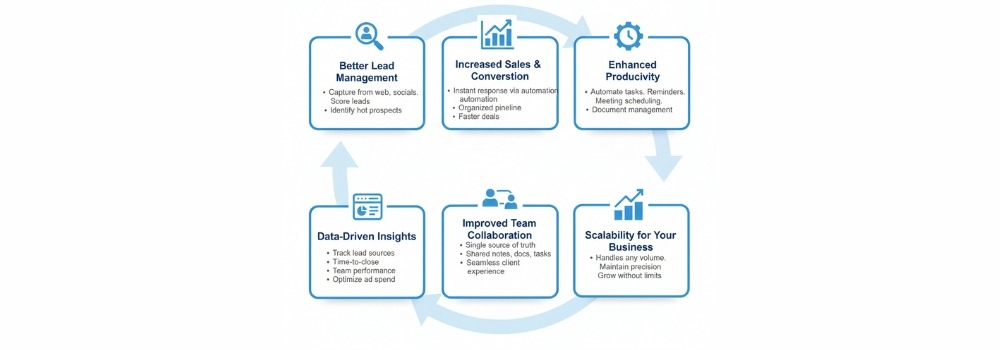
1. Better Lead Management
In real estate, a lead can go cold in minutes. A CRM acts as a safety net, capturing leads from your website, social media, and property portals (like Zillow or Realtor.com) the second they arrive.
It scores them based on their activity, so you know exactly who is ready to sign and who is just “window shopping.”
2. Increased Sales and Conversion Rates
Speed kills the competition, that is. When you respond to a query instantly via automated text or email, your chances of conversion skyrocket. By keeping your pipeline organized, you can move prospects from “initial inquiry” to “closed deal” significantly faster.
3. Enhanced Productivity and Time Management
Stop doing the “grunt work.” One of the best benefits of real estate CRM is the ability to automate repetitive tasks.
Automatic Reminders: Never forget a lease renewal or a closing anniversary.
Meeting Scheduling: Sync your calendar so clients can book viewings without the back-and-forth emails.
Document Management: Store contracts and deeds in one secure, digital cloud.
4. Data-Driven Insights and Reporting
Do you know which of your ad campaigns actually paid for themselves? CRMs provide “crunchy” data. You can see at a glance where your leads are coming from, your average time-to-close, and which team members are hitting their targets. This allows you to stop guessing and start investing in what works.
With predictive analytics in real estate, you can forecast trends, identify high-converting lead sources, and make smarter investment decisions. This allows you to stop guessing and start investing in what works.
5. Improved Team Collaboration
If you run an agency, a CRM is your “single source of truth.” No more two agents calling the same lead by mistake.
Team members can see notes from previous conversations, share documents, and assign tasks to one another in real-time. This creates a seamless experience for the client, regardless of who picks up the phone.
6. Scalability for Your Business
As you grow, your “brainpower” stays the same, but your data explodes. A CRM is built to scale. Whether you have 10 clients or 10,000, the system handles the volume with the same level of precision, ensuring your boutique feel remains intact even as you become a powerhouse.
How CRM Benefits Different Real Estate Professionals in the UAE
A CRM isn’t a “one size fits all” tool; it adapts to your specific seat at the table. Whether you’re a solo hustler or the head of a massive firm, the benefits of a real estate CRM change to meet your specific pressure points.
As part of the ongoing digital transformation in real estate, modern CRMs help professionals streamline operations, automate workflows, and stay competitive in a fast-evolving market.
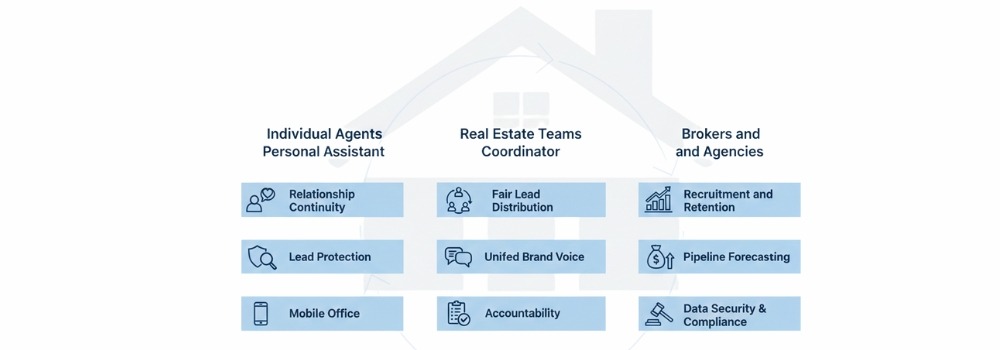
1. For Individual Agents: Your Digital Personal Assistant
As a solo agent, you are the CEO, the marketing department, and the secretary all at once. It’s exhausting. A CRM takes the “busy work” off your plate so you can focus on being a “people person.”
Relationship Continuity: It remembers that a client has a dog named Barnaby and an anniversary in June. Mentioning these small details makes you the agent they’ll never forget.
Lead Protection: When you’re out showing a house, your CRM is busy responding to new inquiries, ensuring no one feels ignored.
Mobile Office: Most modern systems allow you to update client notes or send contracts right from your phone while sitting in your car between viewings.
2. For Real Estate Teams: The Ultimate Coordinator
When you have multiple people working together, communication usually breaks down. A CRM acts as the “brain” for the whole team.
Fair Lead Distribution: You can set up “Round Robin” rules so new leads are automatically and fairly assigned to team members.
Unified Brand Voice: Use shared templates so every email sent by every team member looks polished and professional.
Accountability: Team leaders can see who is following up and who is letting their leads go cold, making coaching sessions much more effective.
3. For Brokers and Agencies: The Big Picture
For those running the show, the real estate CRM benefits are all about the bottom line and long-term growth.
Recruitment and Retention: Offering a high-end CRM is a huge “perk” that attracts top-tier talent to your brokerage.
Pipeline Forecasting: See exactly how many deals are expected to close next month. This helps you manage cash flow and set realistic office goals.
Data Security: If an agent leaves your agency, their lead data stays with the firm. You don’t lose years of contact history just because a desk changes hands.
Compliance: Keep all your legal documents and disclosures organized in one place, making audit season a breeze instead of a nightmare.
Common Challenges Without a CRM in UAE
Trying to run a modern real estate business without a CRM is like trying to build a house with a spoon. It’s slow, painful, and eventually, things are going to fall apart. Without a dedicated system, you aren’t just disorganized; you are actively losing money.
Here are the most common “nightmare scenarios” that happen when you don’t have a CRM in your corner:
1. The “Black Hole” of Missed Follow-Ups
In real estate, timing is everything. Studies show that if you don’t respond to a lead within five minutes, your chances of qualifying them drop by 400%. Without a CRM, leads sit in your email inbox until you finish your lunch or get home from a showing.
By then? They’ve already called the next agent on the list. One of the biggest real estate crm benefits is ensuring that no lead ever falls into that “black hole” again.
2. The “Sticky Note” Data Disaster
We’ve all been there: scribbling a client’s budget and “must-haves” on the back of a receipt or a random notebook.
But what happens when you lose that paper? Or when you can’t remember if “John” wanted a three-car garage or a pool? Disorganized data makes you look unprofessional. A CRM keeps every detail from birthdays to floorplan preferences safe and searchable in seconds.
3. Inefficient, “Broken Phone” Communication
When you don’t have a centralized system, communication becomes a mess of “Did I text them back?” and “Did my assistant send that contract?” You end up sending duplicate emails or, worse, completely ignoring a client’s question. This friction slows down deals and frustrates your buyers.
4. Flying Blind Without Performance Data
Without a CRM, you have zero visibility into your sales performance. You might feel “busy,” but are you actually “profitable”?
You don’t know your conversion rate.
You don’t know which marketing channels are wasting your money.
You can’t predict your income for next month.
Living in the dark makes it impossible to grow. You’re just reacting to the day instead of building a future.
How to Choose the Right CRM for Real Estate in UAE
Choosing the right CRM is like choosing a home: it has to fit your current lifestyle but also have enough “square footage” for you to grow into. With so many options on the market, it’s easy to get distracted by flashy features you’ll never actually use.
As Real Estate AI implementation is transforming the industry, many modern real estate CRM platforms now offer intelligent automation, predictive insights, and smart lead scoring — so choosing a system that supports AI-driven growth is becoming increasingly important.
To get the most benefits of a real estate CRM, you need to focus on the tools that actually move the needle for your business.
Must-Have Features Checklist
Feature Type
What to Look For
Why It Matters
Lead Capture
Automatic syncing with Zillow, Facebook, and your website.
Prevents “lead leakage” and ensures instant follow-up.
IDX/MLS Sync
Real-time property listing integration.
Allows you to send property alerts based on client favorites.
Automation
Drip email/SMS campaigns and task reminders.
Keeps you top-of-mind without manual effort.
Mobile Access
A high-quality, fully functional mobile app.
Real estate happens in the field, not just at a desk.
Reporting
Dashboards for lead sources and conversion rates.
Shows you exactly which marketing dollars are working.
Why Choose Hudasoft for Real Estate CRM
When you’re ready to stop fighting with generic software and start scaling your business, Hudasoft stands out as the ultimate partner. Unlike “one-size-fits-all” platforms, Hudasoft is built specifically for the real estate industry, offering advanced lead management and automation in real estate that handles your follow-ups while you’re out closing deals.
It’s a remarkably user-friendly and customizable platform that adapts to your unique workflow, backed by reliable support and scalable solutions that grow right along with your agency.
Conclusion
So, are you ready to stop chasing your tail and start closing more deals? The benefits of using CRM in real estate go far beyond just staying organized; they are about giving you your time back and making sure no commission ever slips through your fingers again.
By letting a system handle the “boring stuff” like data entry and follow-up reminders, you can finally focus on the parts of the job you actually love, meeting clients and shaking hands on new deals.
Investing in a CRM is the smartest move you can make for your long-term growth, turning your messy piles of notes into a streamlined, profit-making machine.
FAQ’s
What is a CRM, and how does it help real estate agents?
A CRM (Customer Relationship Management) system is software that helps agents organize all client data, interactions, property listings, and leads in one place. It automates follow-ups, tracks communication, and improves how agents manage and convert leads — saving time and reducing manual work.
How does a real estate CRM improve lead management?
A CRM captures leads from your website, social media, and other channels instantly and stores them centrally. It allows agents to score and prioritize prospects, track follow-ups, and ensure no opportunity is missed which increases chances of closing deals.
Can a CRM help increase sales and conversions?
Yes, by automating responses and follow-ups, tracking where each prospect is in the sales process, and providing insights into client preferences, a CRM helps agents respond quickly and provide personalized service, which boosts conversion rates.
Is CRM useful only for big real estate agencies?
No. CRMs benefit solo agents, small teams, and large brokerages alike. Even independent agents can save time, stay organized, improve customer relationships, and scale their operations as they grow
Ever feel like building an app is a bit like trying to assemble a 1,000-piece puzzle without the picture on the box? You have a brilliant idea, but the gap between “brainstorm” and “App Store” feels like a giant, confusing void.
If you’ve ever worried about wasting time on features nobody wants or blowing your budget before the app even launches, you aren’t alone. The truth is, a great app isn’t just about cool code; it’s about a rock-solid application development process that keeps everything on track.
Let’s go through the blog to see how you can turn your vision into a reality without the headaches.
Planning and Requirement Analysis
Before a single line of code is written, you need a game plan. This is the “look before you leap” phase, where you define exactly what success looks like. Skipping this is like starting a road trip without a map; you’ll burn fuel and get nowhere fast.
Understanding Project Goals: What is the “big win” here? Whether it’s automating a manual task or launching the next big social platform, you need a clear “Why” to keep the team focused.
Identifying Target Users: Who are you building this for? A Gen Z gamer has very different needs than a corporate accountant. Knowing your audience helps you build features they actually care about.
Requirement Gathering: This is where we get specific. We look at functional requirements (what the app does, like “users can log in”) and non-functional requirements (how it performs, like “the page must load in under 2 seconds”).
Feasibility Study: Can we actually do this? We check the technical side (do we have the right tools?), the financial side (does the budget fit?), and the operational side (will people actually use it once it’s built?).
The Complete Application Development Process
Building an app is a journey. To get from a “lightbulb moment” to a polished product in the hands of users, you need a clear path. Let’s break down the application development lifecycle process into eight simple, manageable phases.
Phase 1: Idea & Requirement Analysis
Every great app starts with a question: What problem are we solving? In this stage, you dig deep into the process of application development by defining your goals. You’ll identify your target users and gather “functional requirements” (what the app does) and “non-functional requirements” (how it performs). Finally, a feasibility study ensures the project is technically and financially doable.
Phase 2: Planning & Prototyping
Now, we build the skeleton. This is where you map out the application development process flow. You’ll create a basic roadmap and a low-fidelity prototype, a rough sketch of the app to make sure the logic holds up before investing in expensive coding.
Phase 3: UI/UX & System Design
This is where the app gets its “soul.” UI (User Interface) is how it looks, while UX (User Experience) is how it feels. Designers create high-fidelity mockups and the system architecture, ensuring the app is intuitive, beautiful, and ready for the cloud application development process if you’re hosting it online.
Phase 4: Development
It’s time to bring the designs to life. Developers write the actual code that powers your features. If you want to ensure this stage is handled by pros who know the latest tech stacks, you can check out these application development services to get the job done right.
Phase 5: Testing & Quality Assurance
Before the world sees your app, you have to try to break it. Quality Assurance (QA) teams run tests to find bugs, check security, and ensure the app doesn’t crash when thousands of people use it at once.
Phase 6: Deployment
Launch day! This is the moment your app moves from a private server to the public. Whether it’s hitting the Apple App Store, Google Play, or a live web URL, deployment is the official “birth” of your software.
Phase 7: Maintenance & Updates
A successful app is never truly “finished.” Technology changes, and so do user needs. This phase involves fixing any post-launch bugs, updating the app to work with new phone software, and keeping the security tight.
Phase 8: Feedback & Iteration
What do your users think? By looking at reviews and data, you learn what’s working and what isn’t. This feedback fuels the next round of the application development process, allowing you to add new features and keep your audience coming back for more.
Different Types of Application Development
Not all apps are created equal. Depending on where your users spend their time, whether they are on their phones, at a desk, or working in a massive data center,r the application development process changes to fit the platform.
Here is a quick look at the most common types of development:
Web Application Development
These apps live in your web browser (like Chrome or Safari). You don’t need to download anything; you just type in a URL and go. Think of tools like Gmail or Canva. They are great because they work on almost any device with an internet connection.
Mobile Application Development
This is all about smartphones and tablets. Whether it’s an iPhone (iOS) or an Android device, these apps are built to take advantage of phone features like the camera, GPS, and push notifications. If you want to stay in your customer’s pocket, this is the way to go. Custom Mobile App Development allows businesses to create apps tailored to their specific needs and features, ensuring a unique user experience.
Desktop Application Development
While web apps are popular, some software needs the raw power of a computer. Desktop apps are installed directly on Windows, macOS, or Linux. They are perfect for heavy-duty tasks like video editing (Adobe Premiere) or high-end gaming.
Enterprise Application Development
These are the “heavy lifters” of the business world. Enterprise apps are designed for big organizations to handle complex tasks like payroll, supply chain management, or internal communication (like Slack or Salesforce).
The application development lifecycle process for these is usually much more intense because security is a top priority.
Cloud-Based Application Development
Instead of sitting on one server, these apps live in the “cloud” (like AWS or Azure). A cloud application development process allows the app to be incredibly fast and scale up instantly. If a million people suddenly join your app, the cloud makes sure it doesn’t crash.
Main Application Development Methodologies
Choosing a methodology is like picking a strategy for a game. It dictates how your team moves, how you handle changes, and how fast you cross the finish line. Each one changes the application development process flow to suit different project needs.
1. Waterfall (The Traditional Way)
Think of this like a literal waterfall: the water only flows down. You finish one phase completely before moving to the next. It’s simple and disciplined, but it’s tough to go back if you realize you made a mistake in the planning stage.
Best for: Projects with a fixed budget and very clear, unchanging requirements.
2. Iterative (The “Draft” Method)
Instead of trying to build the whole thing at once, you build a small version, review it, and then add more. Each “iteration” makes the app better. It’s great for getting a version of the app into users’ hands quickly to see what they think.
Best for: Large projects where you need to show progress fast.
3. V-Model (The Verification Way)
The V-Model is like Waterfall’s more careful sibling. For every development stage, there is a corresponding testing stage. It forms a “V” shape because you plan your tests at the same time you plan your features.
Best for: Mission-critical apps (like medical or flight software) where errors aren’t an option.
4. Agile (The Flexible Way)
Agile is the most popular choice for modern teams. It breaks the project into small “sprints” (usually 2-4 weeks). It’s all about collaboration and being able to change direction quickly if the market shifts. It makes the process of application development feel fast and responsive.
Best for: Startups and projects where requirements might change as you go.
5. Spiral (The Risk-Managed Way)
Imagine a spiral that gets bigger with every loop. Each loop involves planning, risk analysis, engineering, and evaluation. It’s specifically designed to catch high-risk problems early before they become expensive disasters.
Best for: Very large, expensive, or high-risk projects.
Security and Compliance: Keeping Your App (and Users) Safe
Ever wonder what happens to all that data users trust you with? One small leak is all it takes to lose a customer’s trust forever.
That’s why security shouldn’t be an afterthought. It needs to be part of your application development process from day one.
Data Security
How do you keep hackers out? It’s all about layers. You need to protect Data at Rest (the stuff stored on your servers) and Data in Transit (the info moving between the user and your app).
Using strong encryption is like putting your users’ info in a high-tech vault that only you have the key to.
Regulatory Compliance (GDPR, HIPAA, etc.)
Did you know that where your users live changes how you have to build your app? Depending on your industry, you’ll need to follow specific sets of rules:
GDPR: The gold standard for privacy if you have users in Europe.
HIPAA: A must-have for any app handling healthcare data in the U.S.
PCI DSS: What you need to follow if you plan on taking credit card payments.
Following these isn’t just about avoiding big fines; it’s about showing your users you respect their privacy.
Secure Coding Practices
Think of this as “defensive driving” for programmers. Instead of just writing code that works, developers write code that resists attacks.
This includes things like Input Validation (making sure a user doesn’t type something malicious into a form) and regular security audits during the application development lifecycle process.
Choosing the Right Application Development Partner in the UAE
Finding the right team to build your app in the UAE is about more than just finding someone who can code. You need a partner who understands the local landscape, from the high expectations of users in Dubai to the specific regulatory requirements of the region.
When vetting potential partners, look for these three essentials:
Expertise in Modern Tech: Ensure they are masters of the latest stack, including Java, .NET, React, and AI. A partner that stays ahead of trends will build an app that doesn’t feel outdated by next year.
Local Market Knowledge: The UAE is a unique hub for innovation. A team that understands local user behavior and compliance standards (like the UAE Data Law) will save you months of rework.
Proven Portfolio: Don’t just take their word for it; look at their past wins. Check for testimonials from local businesses and see if they have experience in your specific industry.
One standout name in the region is Hudasoft, an expert software house that combines deep technical mastery in AI and cloud-native engineering with a strong presence in the UAE market, helping businesses turn complex requirements into high-performing digital products.
Conclusion
Wrapping up, a solid application development process is the secret sauce that turns a messy idea into a polished, high-performing app. By following a structured workflow from the first brainstorming session to post-launch updates, you reduce risks, keep your budget under control, and ensure your users actually get what they need.
As we look ahead, the process of application development is only getting more exciting with trends like AI-driven coding, low-code approach platforms, and cross-platform tools making it faster than ever to innovate. Stick to the plan, pick the right partners, and you’ll be well on your way to digital success.
FAQS
What are the main phases of the application development lifecycle?
The application development lifecycle process usually includes eight key stages: Idea & Analysis, Planning, Design (UI/UX), Development, Testing, Deployment, Maintenance, and Feedback. Following these steps ensures your project stays on track and meets user needs.
What tools are best for managing the app development process?
For a smooth application development process flow, most teams use project management tools like Jira, Trello, or Asana. For version control and collaboration, GitHub or GitLab are industry standards, while Figma is the go-to for designing prototypes.
What are common mistakes in app development?
The biggest pitfalls include skipping the discovery phase, ignoring user feedback, and failing to test the app on different devices. Many people also underestimate the importance of the cloud application development process, leading to apps that crash when they try to scale.
What does an application developer do?
An application developer is the architect and builder of the digital world. They translate requirements into code, build the front-end (what you see) and back-end (the logic), fix bugs, and ensure the process of application development results in a secure, functional product.
Generative AI in the Automotive is emerging as the next powerful force accelerating this transformation.
From vehicle design and manufacturing optimization to dealership intelligence and customer experience, Generative AI is redefining how automotive businesses operate, innovate, and scale. For OEMs, Tier-1 suppliers, dealerships, and mobility startups, Generative AI is no longer an experiment—it is becoming a strategic necessity.
This blog explores how Generative AI is transforming the automotive industry, its key use cases, business benefits, challenges, and what the future holds for AI-driven mobility.
What Is Generative AI? (Automotive Perspective)
Generative AI refers to advanced artificial intelligence models capable of creating new content, predictions, simulations, and insights rather than just analyzing historical data. These models can generate:
Design concepts
Synthetic data for simulations
Predictive scenarios
Automated responses and recommendations
Intelligent workflows and decisions
In the automotive context, Generative AI goes beyond dashboards and reports. It creates possibilities, helping organizations:
Design better vehicles faster
Predict failures before they happen
Optimize supply chains dynamically
Personalize customer journeys at scale
Unlike traditional AI, which focuses on pattern recognition, Generative AI actively produces solutions, making it a powerful tool for innovation-heavy industries like automotive.
Why the Automotive Industry Is Adopting Generative AI Rapidly
Several industry pressures are driving the adoption of Generative AI:
Increasing competition and shrinking margins
Complex global supply chains
Rising customer expectations for personalization
Demand for faster product development cycles
High costs associated with recalls and quality issues
Generative AI helps automotive businesses respond to these challenges by enabling speed, accuracy, intelligence, and automation, all at enterprise scale.
Key Use Cases of Generative AI in the Automotive Industry
Generative AI is redefining how the automotive industry designs vehicles, runs factories, engages customers, and plans for the future. Organizations that embrace this shift early will gain a significant competitive advantage in efficiency, innovation, and customer experience.
At Hudasoft, we help automotive businesses strategically implement Generative AI solutions—from intelligent manufacturing and dealership systems to AI-powered analytics and automation—ensuring measurable business impact and long-term scalability.
The road ahead is intelligent, connected, and AI-driven. The question is no longer if Generative AI will transform automotive—but how fast companies choose to lead that Auto Dealership Digital Transformation.
FAQ’s
1. What is Generative AI in the automotive industry? Generative AI is a type of artificial intelligence that creates new designs, simulations, and solutions. In the automotive industry, it helps design vehicles, improve manufacturing, and enhance driver experiences. It enables faster innovation and smarter decision-making.
2. How does Generative AI improve vehicle design and production? Generative AI creates optimized vehicle designs based on performance and safety data. It helps engineers test multiple design variations quickly through simulations.
3. What are the benefits of Generative AI for automotive companies? It improves efficiency across design, manufacturing, and supply chain operations. Companies can reduce costs and enhance product quality. It also enables personalized customer experiences and predictive maintenance.
4. What challenges come with adopting Generative AI in automotive? Companies may face data security and privacy concerns. Integration with existing systems can be complex and costly. Skilled talent and regulatory compliance are also major considerations.
In 2026, enterprises are increasingly moving towards AI to automate knowledge work, improve decision-making, and enhance customer engagement. However, one critical architectural decision can define the success of your AI deployment: whether to rely on Retrieval-Augmented Generation (RAG), fine-tuning, or a hybrid approach.
This guide explores when RAG vs. Fine is sufficient, when fine-tuning is necessary, and how to balance cost, performance, and scalability.
What Is Retrieval-Augmented Generation (RAG)?
RAG combines the strengths of large language models (LLMs) with external knowledge sources. Instead of embedding all information in the model weights, RAG allows the model to dynamically query databases, documents, or knowledge graphs to generate accurate, context-aware responses.
When RAG Is Enough:
Your AI application primarily needs up-to-date or changing knowledge.
Accuracy is critical, but the knowledge base is external and structured.
Quick deployment is a priority without extensive model training.
You want to minimize infrastructure costs by leveraging pre-trained LLMs.
RAG is ideal for enterprise FAQ systems, internal knowledge search, and customer support solutions where information evolves frequently.
RAG in Generative AI in Automotive
RAG has proven to be highly effective in Generative AI in Automotive applications. Automotive companies generate massive amounts of technical documentation, sensor data, and operational logs, which need to be accessed quickly and accurately by engineers, technicians, and support teams. By integrating RAG, automotive software Development for enterprises can enable AI systems to retrieve relevant vehicle data, maintenance histories, and design specifications in real time. This ensures that AI-powered diagnostics, service recommendations, and engineering insights are always grounded in the most current and authoritative information, improving operational efficiency and decision-making across the organization.
Understanding Fine-Tuning
Fine-tuning involves retraining a pre-existing LLM with domain-specific data to adapt its responses. Unlike RAG, which retrieves external information at runtime, fine-tuning embeds the knowledge directly into the model weights.
When Fine-Tuning Makes Sense:
Your AI requires deep domain expertise that must be integrated directly into the model.
Low-latency responses are critical, and external retrieval may introduce delays.
The dataset is relatively static, allowing you to control knowledge updates through retraining.
You need a consistent brand voice, compliance alignment, or proprietary knowledge encoded in the model.
Fine-tuning is optimal for legal document analysis, financial advisory bots, or specialized AI Agent Frameworks.
For many enterprises, RAG provides a cost-efficient and flexible solution. Fine-tuning is justified when precision, brand alignment, or embedded expertise is critical.
Hybrid Approaches for Enterprises
Enterprises often benefit from a hybrid approach, combining RAG and fine-tuning:
Fine-tune the LLM with core domain knowledge.
Use RAG to dynamically retrieve updated data or FAQs.
Implement monitoring and feedback loops to continuously improve performance.
This approach balances accuracy, cost, and flexibility, ensuring your AI solution remains robust as the knowledge base evolves.
Hudasoft’s Approach to Custom AI Solutions
Hudasoft designs AI architectures tailored to enterprise needs. We help organizations:
Evaluate whether RAG, fine-tuning, or hybrid approaches best suit business objectives.
Optimize cost, latency, and scalability for production-grade deployments.
Ensure secure, compliant, and maintainable AI systems.
Whether your goal is customer support, knowledge management, or specialized industrial AI, our expertise in custom AI Development Servicesensures maximum business value.
Conclusion: Choosing the Right AI Path
RAG, fine-tuning, and hybrid strategies each have unique advantages. The right choice depends on data dynamics, domain specificity, latency requirements, and budget.
Enterprises should avoid one-size-fits-all decisions. By evaluating the trade-offs and leveraging expert guidance, you can implement AI applications that are accurate, scalable, and aligned with your business strategy.
As the UAE marches toward the ambitious goals of “We the UAE 2031,” the nation’s economic landscape is shifting from a resource-based economy to a global digital powerhouse. In cities like Dubai and Abu Dhabi, the pace of business is relentless. For C-level executives and SME owners, staying competitive no longer depends solely on the quality of your product, but on the agility of your operations.
Traditional, fragmented legacy systems are increasingly becoming a bottleneck in this fast-paced market. To scale rapidly, businesses are turning to Microsoft Dynamics 365 UAE—not just as an ERP or CRM, but as a strategic engine for regional expansion.
Why Choose Microsoft Dynamics 365 UAE for Rapid Scaling?
Before diving into the features, it is vital to understand that Microsoft Dynamics 365 UAE is designed to handle the unique high-growth environment of the Middle East. From real estate to retail, the platform provides the infrastructure needed to compete globally while staying locally relevant.
1. Next-Gen Copilot & “Agentic AI” Integration
Innovation is the currency of the UAE. Microsoft has integrated Copilot (AI) across the entire Dynamics 365 suite, introducing “Agentic AI” capabilities. Instead of just answering questions, these agents proactively automate complex workflows in Sales and Finance.
The Growth Factor: In the UAE’s competitive retail sectors, Copilot can draft personalized customer responses or predict budget overruns before they happen.
2. Localized UAE Tax & Compliance (FTA Ready)
Navigating the regulatory landscape is a top priority for any Microsoft Dynamics 365 Business Central implementation. The platform offers built-in localization specifically designed for the Emirates, ensuring compliance with the Federal Tax Authority (FTA).
Key Capability: Automated VAT handling and the generation of FTA audit files (FAF) ensure your business remains 100% compliant.
3. Unified ERP & CRM Ecosystem in Microsoft Dynamics 365 UAE
Growth is often stifled by “data silos.” By unifying Dynamics 365 CRM UAE with ERP implementation functions, businesses can see a 360-degree view of the customer journey—from the first marketing touchpoint in a Dubai mall to the final invoice delivery.
4. Real-Time Business Intelligence (Power BI)
In sectors like Construction and Oil & Gas, Dynamics 365 business intelligence UAE leverages Power BI to provide live dashboards that track critical KPIs.
Visual Insight: Management can monitor project profitability in real-time, allowing for instant pivots if costs begin to escalate.
5. WhatsApp-First Customer Engagement
The UAE has one of the highest WhatsApp penetration rates globally. This feature allows for direct WhatsApp integration, ensuring your Microsoft Dynamics 365 Business Central UAE environment matches the preferred communication style of your local clients.
6. Advanced Supply Chain Visibility
Global shipping disruptions often impact the UAE’s role as a trade hub. Microsoft Dynamics 365 UAE provides AI services, demand forecasting, and inventory optimization to ensure seamless “last-mile delivery” during peak seasons.
7. Cloud-Native Scalability (Azure UAE Regions)
Data residency is a critical concern. Microsoft’s investment in Data Centers in Dubai and Abu Dhabi ensures that your Microsoft Dynamics 365 UAE data stays within the country, adhering to local data sovereignty laws.
8. Automated Workflow Management
Manual processes are a “hidden tax.” Using Dynamics 365 automation UAE, businesses can automate everything from purchase order approvals to lead scoring, reducing manual data entry by up to 80%.
9. Mobile-First Workforce Empowerment
The UAE workforce is highly mobile. Microsoft Dynamics 365 UAE provides a seamless mobile experience with full offline capabilities, whether a technician is at a remote oil rig or a consultant is in DIFC.
10. Seamless Microsoft 365 Integration
Most UAE businesses run on Outlook, Teams, and Excel. Microsoft Dynamics 365 UAE lives within these apps, leading to faster user adoption and a higher ROI.
Special Focus: Dynamics 365 for SMEs UAE
Many small-to-medium enterprises believe that Tier-1 ERPs are only for conglomerates. However, Dynamics 365 Business Central serves as a cost-effective gateway for the growing Dynamics 365 for SMEs UAE market.
Start Small, Scale Fast: SMEs can start with core financial modules and add features as they grow.
Low Entry Barrier: Monthly subscription models eliminate heavy upfront capital expenditure (CAPEX).
The ROI of Implementing Microsoft Dynamics 365 UAE
Investing in digital transformation must lead to a measurable return. Typical outcomes include:
Faster Lead-to-Cash: Streamlined sales pipelines mean faster invoicing.
Enhanced Retention: Personalized AI insights help retain high-net-worth individuals in competitive markets.
Final Thoughts: Mastering Microsoft Dynamics 365 UAE
The Microsoft Dynamics 365 benefits UAE extend far beyond simple record-keeping. It is a comprehensive ecosystem designed for the unique needs of the Middle East. To unlock these features, choosing the right implementation partner is essential.
AI for Dealership Management in UAE is changing how automotive businesses operate, compete, and grow. From intelligent inventory forecasting to personalized customer experiences, AI dealership management systems are helping UAE dealerships replace manual processes with predictive intelligence.
With the UAE automotive market becoming increasingly competitive, adopting AI dealership management software is no longer optional it is a strategic requirement.
Why AI for Dealership Management in the UAE Is a Business Necessity
This allows dealerships to maintain optimal stock levels, reduce excess inventory, and avoid stockouts. AI Dealership Inventory Management in the UAE directly improves cash flow and profitability.
AI Sales Forecasting for Dealerships
AI sales forecasting for dealerships predicts:
Monthly sales demand
Vehicle variant preferences
Regional buying behavior
This helps UAE dealerships plan procurement, marketing, and staffing with confidence.
This enhances customer experience while reducing operational workload.
AI Workshop Management System
An AI workshop management system optimizes:
Technician scheduling
Service time estimation
Parts availability
Maintenance prediction
This improves service efficiency and customer satisfaction.
AI Predictive Maintenance Automotive
AI predictive maintenance automotive solutions analyze vehicle data to predict failures before they occur, reducing downtime and increasing vehicle reliability.
AI Pricing Optimization Automotive
AI pricing optimization for automotive systems adjusts vehicle prices based on market demand, competition, and customer behavior, ensuring maximum margin without losing competitiveness.
AI Dealership ERP UAE: Unified Business Intelligence
UAE automotive digital transformation is driven by AI adoption. Dealerships using AI automotive software UAE gain a competitive advantage through smarter operations and better customer experiences.
AI for Dealership Management in the UAE is reshaping automotive retail. Dealerships that invest in AI dealership management systems today will lead the UAE automotive market tomorrow.
Hudasoft is your trusted partner for intelligent, scalable, and future-ready AI dealership solutions in the UAE.
FAQs
1. What is the best AI for car dealerships? The best AI for car dealerships is one designed specifically for automotive CRM and sales automation. It helps manage leads, customer interactions, and marketing campaigns efficiently.
2. How can AI benefit a Dealership Management System? AI improves a Dealership Management System by automating data analysis, inventory tracking, and customer insights. It helps increase sales performance and streamline daily operations.
3. Will AI replace human employees at my dealership? AI will not replace human employees but will support them. It enhances productivity, improves decision-making, and allows staff to focus on building customer relationships.
The automotive industry is moving faster than ever. With the market projected to hit nearly $7.44 billion by 2032, competition in hubs like Dubai and Abu Dhabi is at an all-time high. But as sales grow, so do the headaches.
If you are running a dealership or a service center, you know the drill. Managing multi-location operations feels like a balancing act. One branch has too many brake pads, while another is turning away customers because they’re out of stock.
Tracking spare parts inventory across different warehouses often leads to manual errors, and staying on top of after-sales service schedules can become a nightmare without the right tools. Plus, with the UAE’s advancing tax landscape, ensuring VAT compliance is no longer just a “nice-to-have”; it’s a legal necessity.
To stay ahead, local leaders are moving away from disconnected spreadsheets and embracing automotive business solutions in the UAE that actually talk to each other.
Key Challenges for Automotive Businesses in the UAE
Scaling a car brand in the Emirates is an exciting goal, but it often reveals deep gaps in traditional manual processes. Without a powerful automotive ERP software in the UAE, many businesses run into the same four major roadblocks:
The Inventory Blind Spot:
Managing multi-location operations is a high-stakes balancing act. Without a clear view of your stock, you might have an oversupply of high-value parts in Sharjah while your Dubai branch is losing sales because it is out of stock. This leads to tied-up cash and missed deals.
Complex Supply Chains:
The journey from global manufacturers to local warehouses involves massive procurement and shipping hurdles. Managing these logistics manually often results in delays that frustrate your workshop teams and your customers.
Rising Customer Demands:
Modern UAE car buyers expect a personalized experience. If your team isn’t using an integrated car dealership ERP in the UAE, it is nearly impossible to track service histories or offer the quick, tailored follow-ups that turn a one-time buyer into a loyal client.
The Regulatory Squeeze:
With the region’s focus on transparency, staying on top of VAT compliance, multi-currency reporting, and audit-ready financial statements is non-negotiable. Trying to manage these through spreadsheets is a major risk that can lead to costly errors.
How Dynamics 365 Business Central Solves These Challenges
To overcome these hurdles, you need a system that works as hard as your team does. Microsoft Dynamics 365 Business Central is designed as a specialized ERP for the automotive industry, turning chaotic data into a smooth, organized workflow. Here is how it solves your biggest pain points:
Financial Management & Compliance
In the UAE, financial precision is everything. Business Central simplifies VAT compliance by automating tax calculations and ensuring every transaction is recorded correctly for the FTA.
If you deal with international manufacturers, the automotive finance software capabilities within the system handle multi-currency transactions and exchange rates effortlessly.
You get real-time reporting, so you always know your exact profit margins across every branch.
Smart Inventory & Supply Chain
Stock issues can kill your momentum. This software provides advanced inventory management in the UAE, allowing you to track spare parts across multiple warehouses in real time.
Instead of guessing what to order, the system uses demand forecasting to predict what will sell, helping you avoid expensive stockouts or having too much capital tied up in slow-moving parts.
Streamlined Operations & Workshops
For businesses involved in assembly or heavy maintenance, the production planning and capacity automative scheduling software are valuable players.
You can manage your workshop floor more effectively, ensuring that technicians are assigned to the right jobs and that vehicles move through service bays without delays.
This level of organization is what makes it a top-tier automotive business solution in the UAE.
Better Customer Experiences
Modern buyers want to feel recognized. With built-in CRM features, your team can access a customer’s full service history and preferences in seconds.
Whether they are visiting a showroom in Abu Dhabi or a service center in Dubai, you can provide a personalized experience that builds trust.
This integrated approach is why many are moving toward cloud ERP for automotive to keep their data accessible from anywhere.
Data-Driven Insights with Power BI
Stop making decisions based on “gut feelings.” With Power BI dashboards, you can visualize your entire operation from sales trends to technician efficiency on one screen.
These analytics help you spot problems before they grow, ensuring your UAE automotive digital transformation is backed by hard facts and clear data.
Cloud & Integration Benefits
In the modern UAE business landscape, being tied to a single physical server in one office is a major disadvantage.
Moving to a cloud ERP integration for automotive changes the way your team works, providing flexibility that traditional systems simply can’t match.
Anywhere Access for Multi-Branch Dealerships
Whether your team is at a showroom in Ras Al Khaimah, a warehouse in Jebel Ali, or a corporate office in Downtown Dubai, everyone stays connected.
Because the system lives in the cloud, managers can check real-time sales data or stock levels from their phones or laptops at any time.
This “anywhere access” is the backbone of a successful UAE automotive digital transformation, ensuring that your multi-location operations run as one single unit.
A Unified Microsoft Ecosystem
One of the biggest perks of using Business Central is how well it plays with the tools you already use. It integrates perfectly with Microsoft 365 (Outlook, Excel, and Teams).
Imagine sending a quote directly from your email or exporting a complex inventory management software UAE report into Excel with one click.
Furthermore, by using the Power Platform, you can build custom apps or automate repetitive tasks like sending service reminders to customers without needing a team of developers.
Scalability for Future Growth
The UAE market is ambitious, and your software should be too. As your business grows from two locations to ten, you don’t want to go through the pain of switching systems again.
This automotive business solution in the UAE is built to scale. You can start with the features you need today and add more users, branches, or advanced manufacturing modules as your company expands. It’s a long-term investment that grows alongside your success.
Who Is the Best Dynamics 365 Consultant for Automotive
When it comes to navigating the specific technical needs of the Gulf market, Hudasoft stands out as the premier partner for your business. With deep expertise in automotive ERP software in the UAE, they don’t just install a system; they build a foundation for long-term growth.
Their team specializes in tailoring Microsoft Dynamics 365 to handle the unique local challenges of the region from ensuring your finance department is fully ready for VAT compliance to optimizing your spare parts inventory across multiple Emirates.
By choosing this expert team, you are investing in a complete dealership management solution that turns complex data into a clear, competitive advantage. They understand the nuances of the local market, making them the go-to choice for any company ready to lead a successful UAE automotive digital transformation.
Conclusion
The automotive landscape in the Emirates is shifting toward a digital-first approach. To stay ahead, businesses must move away from slow, manual processes and embrace the power of integrated technology. Transitioning to a cloud ERP for automotive isn’t just about staying organized; it’s about gaining the speed and insight needed to thrive in a competitive market.
By implementing a specialized automotive business solution in the UAE, like Microsoft Dynamics 365 Business Central, you can solve your biggest headaches, from spare parts inventory gaps to complex VAT compliance, all within a single platform. This digital shift allows your team to focus less on paperwork and more on delivering the high-quality service your customers expect.
If you are ready to streamline your multi-location operations and future-proof your growth, now is the time to act. A successful UAE automotive digital transformation starts with the right tools and the right partner to guide the way.
FAQS
What is Dynamics 365 Business Central?
Microsoft Dynamics 365 Business Central is a cloud-based ERP (Enterprise Resource Planning) solution that helps businesses manage finances, operations, inventory, and customer relationships in one platform. For automotive companies in the UAE, it streamlines processes, ensures VAT compliance, and improves overall efficiency.
How does Dynamics 365 help car dealerships?
Dynamics 365 helps car dealerships manage sales, track vehicles and spare parts, monitor service histories, and improve customer engagement. It provides real-time insights into operations, enabling dealerships to make faster, smarter decisions and deliver better customer experiences.
Can Dynamics 365 manage automotive inventory?
Yes, Dynamics 365 Business Central offers advanced inventory management tools that track vehicles, spare parts, and components in real-time. It helps UAE automotive businesses avoid stockouts, reduce excess inventory, and forecast demand accurately for smooth operations.
Is Dynamics 365 suitable for small UAE automotive businesses?
Absolutely. Dynamics 365 Business Central is scalable and cloud-based, making it ideal for small and mid-sized automotive businesses in the UAE. It offers a cost-effective solution to manage finance, inventory, sales, and customer service without the need for complex IT infrastructure.