Table of Contents
The construction industry is increasingly reliant on digital technologies to keep projects on track. About 40-49% of construction companies report deploying specialized software for project management.
Among technologies favored by construction companies, construction scheduling software is one of the keystone ones. It helps track project timelines, delivers performance insights for management, and helps with budget projections. It is especially valuable for companies with multiple projects running simultaneously.
When it comes to specific names, there are several that deliver impact, which you can deploy readily in your company and start managing your projects better. And this list offers exactly that, the top construction scheduling software in the U.S.
What Does Construction Scheduling Software Do?
A standard construction scheduling software solves two main problems.
- It estimates the schedule of your construction project based on all available data.
- It centralizes all the project’s data and makes critical insights available to managers for decision-making.
How does it do that? Through a series of tasks as outlined below:
Critical Path Method (CPM) Scheduling
The critical path is the sequence of dependent tasks that determines the minimum possible project duration. Simply put, if any task on the critical path is delayed, the entire project’s finish date moves. That’s why it’s named ‘critical’ path.
So what CPM does is, it 1) calculates and 2) displays this path. The software alerts the relevant manager when a delay in, say, site grading is likely to result in delayed foundation work, delayed framing, and ultimately a missed completion date.
Resource Allocation and Conflict Detection
Another core function of scheduling software is assistance in resource allocation. This happens because this software centralizes data across all projects. So before one of your managers reports to you in a panicked voice that “subcontractor A and Piece of Equipment B are double-booked across two different sites on the same day”, the system sees such conflicts early and avoids them.
Real-Time Dependencies and Schedule Updates
On a live project, schedules change daily. A material delivery that arrives late, an inspection that gets pushed, a weather delay: each one creates a ripple effect. Scheduling platforms with live dependency tracking automatically adjust successor tasks when a predecessor shifts. This feature alone saves project managers hours of manual recalculation every week.
Field-to-Office Synchronization
The most technically sophisticated schedule in the world is useless if the superintendent in the field is working off last Tuesday’s version. Field-to-office sync ensures that updates entered on a tablet at the jobsite are immediately reflected in the platform, and that plan revisions made in the office are instantly visible to the crew. This bidirectional flow of information is what separates modern scheduling platforms from sophisticated PDF viewers.
Reporting and Forecasting
Owners and executives need to understand schedule health without reading every line item. Dashboards, earned value reports, and schedule performance indices (SPI) translate raw schedule data into the kind of summary-level insight that drives resource decisions and client communication.
Overview of the Best Scheduling Software for Construction in the US
| Tool | Category | Rating (G2/Capterra) | Market Presence | Primary Strength | Best For |
| Procore | Enterprise / Heavy Industrial | 4.6/5 | 23+ Years (~13% US Adoption) | All-in-one ecosystem linking schedules to RFIs and costs. | Mid-to-large General Contractors & Commercial Builders. |
| Autodesk Build | Enterprise / Heavy Industrial | 4.5/5 | 10+ Years (~29% US Adoption) | Deep BIM integration and 3D model-to-schedule connectivity. | Design-Build firms & AEC organizations in the Autodesk suite. |
| InEight | Enterprise / Heavy Industrial | 4.4/5 | 35+ Years (High Industrial Adoption) | Predictive analytics and real-time Earned Value Analysis (EVA). | Capital project owners & heavy civil/energy contractors ($50M+). |
| Houzz Pro | Residential / SMB | 4.5/5 | 4+ Years (Dedicated Pro Suite) | Client visualization (3D plans) and communication portals. | Residential remodelers, designers, & custom home builders. |
| Buildxact | Residential / SMB | 4.6/5 | 10+ Years (Emerging SMB leader) | Seamless transition from bid/estimate to active schedule. | Small residential builders & renovation contractors. |
| BuildOps | Specialty / Service | 4.8/5 | 8+ Years (Top MEP Choice) | Blending long-term project installs with urgent service dispatch. | Commercial HVAC, Electrical, Plumbing, & Mechanical firms. |
| Jobber | Specialty / Service | 4.7/5 | 14+ Years (Field Service Leader) | High-volume dispatching, route optimization, and mobile payments. | Residential service trades & high-volume/short-duration jobs. |
| Plaky | Flexible / Visual | 4.3/5 | 4+ Years (Entry-level) | Visual simplicity with Kanban and basic Gantt charts. | Small teams moving from paper/spreadsheets to digital. |
| Smartsheet | Flexible / Visual | 4.5/5 | 20+ Years (15%+ Market Share) | Spreadsheet-style interface with powerful backend automation. | PMs transitioning from Excel & cross-functional organizations. |
| Fieldwire | Specialty / Service | 4.5/5 | 12+ Years (~4% US Adoption) | Version control for blueprints and plan-based task pinning. | Field teams prioritizing drawing accuracy & mobile coordination. |
Note: Adoption rates based on 2026 Ramp vendor data and market share indices. Marketplace ratings reflect G2 and Capterra averages as of 2026.
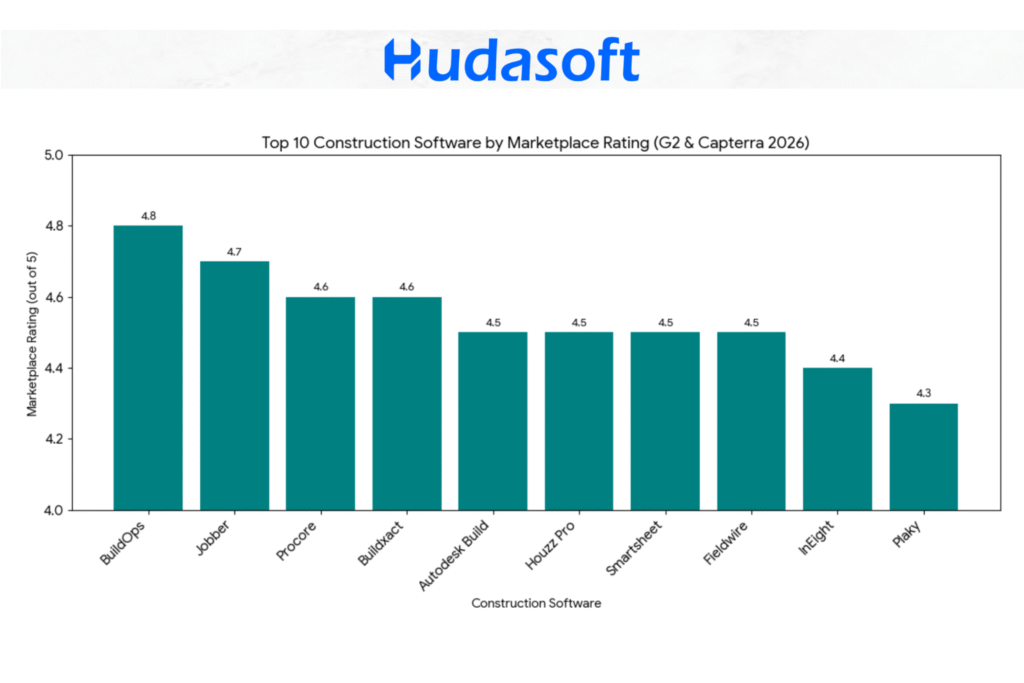
Most highly rated construction scheduling software on G2 and Capterra
This visualization shows that specialized niche tools like BuildOps ($4.8$) and Jobber ($4.7$) achieve the highest user satisfaction scores by solving specific workflow pain points for service and specialty contractors. In contrast, massive enterprise platforms and general-purpose tools maintain high but slightly lower scores due to their increased complexity or broader feature sets.
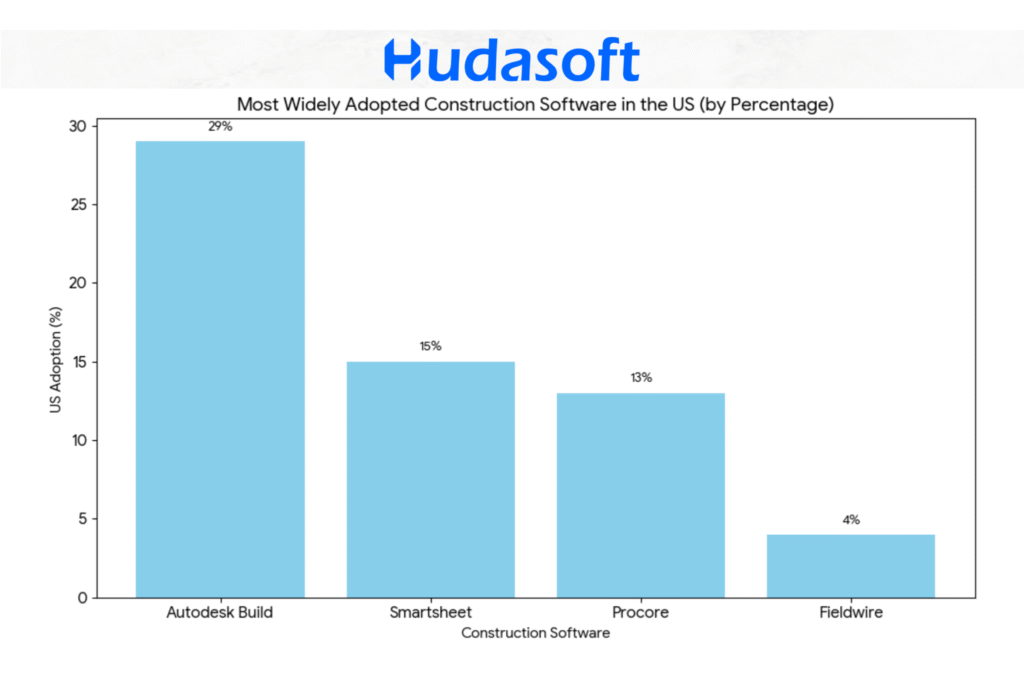
Most popular construction scheduling platforms based on adoption in the US
This chart illustrates the market dominance of Autodesk Build ($\sim 29\%$) within the AEC sector, followed by the high cross-industry adoption of Smartsheet ($15\%+$) and the strong specialized presence of Procore ($\sim 13\%$). It highlights how ecosystem integration and flexible “spreadsheet-style” logic are the primary drivers for widespread use.
What Matters When Choosing a Construction Scheduling Software?
Feature comparisons and ratings only tell part of the story. Before evaluating any specific platform, it’s worth understanding the practical criteria that separate a tool that works in theory from one that actually gets used on a jobsite.
Mobile Accessibility
Construction work happens in the field, not at a desk. A scheduling platform that works well on desktop but poorly on mobile is misaligned with how teams operate. Superintendents, foremen, and subcontractors need to view schedules, update tasks, access drawings, and log reports from wherever they are, often with limited connectivity.
Mobile access matters for a simple reason: if field teams can’t use the platform easily, they won’t use it. Data stops flowing, schedules drift from reality, and the tool loses value. Firms with the highest adoption rates almost always choose platforms with truly usable mobile interfaces, not ones added as an afterthought.
When evaluating, look beyond the presence of an app. Check for offline capability, photo capture and annotation, and automatic syncing once connectivity returns.
Ease of Use
Construction teams are not software professionals. A platform that takes weeks to learn or requires a dedicated administrator will face resistance, regardless of its power.
Ease of use matters because adoption is the real bottleneck. The most advanced tool is useless if teams rely on notebooks instead. A simpler platform that everyone uses daily will outperform a complex one used by only a few.
This doesn’t mean choosing the simplest option. It means matching the platform to your team’s technical comfort while pushing it slightly forward. Firms that involve field leadership in selection, rather than deciding purely at the executive level, consistently see better adoption.
Feature-Richness
For certain firms, depth of functionality is essential. A heavy industrial contractor managing large capital projects needs earned value analysis, resource-loaded scheduling, and cost system integration. A commercial contractor handling multiple projects needs subcontractor coordination, submittal tracking, and document control. For these cases, a simplified tool becomes a liability.
Feature depth matters because your platform should scale with project complexity. When a capability is missing, the workaround is always more expensive, whether in labor, errors, or delayed decisions.
The key question is not how many features exist, but whether the platform delivers the specific capabilities you need, with real depth. A superficial implementation is less valuable than a focused, well-executed one.
Security and Compliance
Construction projects involve sensitive data, from financials and contracts to proprietary designs and BIM models. As platforms move to the cloud, security has become a core procurement concern.
It matters for both legal and practical reasons. A breach can expose client data, create liability, and damage reputation long after a project ends. For firms in government, healthcare, or infrastructure, compliance with standards like SOC 2 Type II or FedRAMP may be mandatory.
When evaluating platforms, ask about encryption (in transit and at rest), role-based access controls, audit trails, and the vendor’s history of incident disclosure. Vague answers are a clear warning sign.
The Top 10 Construction Scheduling Tools in the USA
The tools below are organized by the type of firm they serve best. Ratings are sourced from 2026 G2 and Capterra marketplace data. Adoption figures are drawn from Ramp vendor data and market share indices.
Category 1: Scheduling Software for Enterprise and Heavy Industrial Construction Companies
Procore
Marketplace Rating: 4.6/5
23+ Years in Market
~13% US Construction Adoption
Procore is the dominant integrated construction management platform for mid-to-large general contractors. Its scheduling functionality is just one aspect of a broader ecosystem that also handles project financials, document management, quality control, safety logs, and owner reporting. This matters because, in Procore, a schedule delay doesn’t exist in isolation: it can be linked to an RFI, a cost code, and a change order request, all in the same platform.
The scheduling module supports Gantt chart views and integrates directly with Primavera P6 and Microsoft Project for firms that build their master schedules in those tools. Procore itself doesn’t replace P6 for heavy industrial scheduling, but it serves as the “central source of truth” where field teams, subcontractors, and owners all access current schedule information without needing a P6 license.
Procore’s strongest suit is lifecycle management. From preconstruction through closeout, every document, inspection, budget entry, and schedule revision lives in one place. For firms managing multiple simultaneous projects across different geographies, centralization has significant operational value.
Where Procore can feel heavy is for smaller firms. The platform is feature-rich, which means implementation takes time, training requires investment, and the monthly cost is substantial. Firms doing fewer than 10 projects per year or working in residential at smaller volumes often find that they’re paying for capabilities they don’t use.
Best for: Mid-to-large general contractors, commercial builders, and multi-trade firms managing complex project portfolios.
Autodesk Build
Marketplace Rating: 4.5/5
10+ Years (evolved from PlanGrid and BIM 360)
~29% US AEC Adoption
Autodesk Build carries the highest overall adoption rate among the tools in this guide, largely because it is a part of the Autodesk Construction Cloud ecosystem that architecture, engineering, and construction firms have used for decades. Its roots trace back to PlanGrid (acquired in 2018) and BIM 360 (now integrated), which means it has deep institutional penetration in firms that already work inside Autodesk’s design environment.
The critical differentiator is Building Information Modeling (BIM) integration. BIM is a process of creating and managing digital representations of a building’s physical and functional characteristics. When a 3D model changes because the structural engineer revised a beam size, that change propagates through to the connected construction documents and, in Autodesk Build, can be linked to the affected schedule tasks. For design-build firms or those working on complex commercial and institutional projects where design and construction overlap, this integration is genuinely valuable rather than a marketing claim.
Autodesk Build also handles document management, RFIs, submittals, and field reporting. Its scheduling module supports both Gantt and calendar views, with look-ahead scheduling features that help superintendents plan two- to four-week windows in detail without losing sight of the master schedule.
One practical consideration: getting the most out of Autodesk Build typically requires that your project team, including designers and engineers, also work within the Autodesk ecosystem. If your design partners use different tools, some of the integration value is lost.
Best for: Commercial general contractors, design-build firms, and AEC organizations already invested in Autodesk’s suite.
InEight
Marketplace Rating: 4.4/5
35+ Years in Market
High Adoption in Heavy Industrial and Capital Projects
InEight is not a household name in the residential or light commercial world, and it doesn’t try to be. It is purpose-built for high-stakes capital projects: oil and gas infrastructure, power generation facilities, large-scale civil works, and industrial manufacturing plants. These are environments where a one-day schedule slippage on a critical path item can cost hundreds of thousands of dollars and where schedule performance is scrutinized at the executive and board level.
The platform’s core strength is predictive analytics and schedule controls. InEight integrates the schedule with cost, so project controls teams can run earned value analysis in real time, comparing the budgeted cost of work scheduled (BCWS) against the earned value (BCWP) and actual cost (ACWP). These aren’t just academic metrics in industrial construction. They are the early warning signals that tell a project director whether they’re heading for an overrun before it’s too late to intervene.
InEight also supports quantity-based productivity tracking, which is particularly valuable in civil and industrial work where you’re measuring cubic yards of excavation per hour or linear feet of pipe installed per day rather than simply marking tasks complete or incomplete.
The platform requires dedicated project controls expertise to use effectively. It is not designed for self-service. For the type of work it targets, however, that depth is a feature, not a drawback.
Best for: Capital project owners, heavy civil contractors, energy and industrial firms managing projects above $50M.
Category 2: Scheduling Software for Small Builders
Houzz Pro
Marketplace Rating: 4.5/5
4+ Years (dedicated Pro suite)
Dominant in Residential and SME Remodeling
Houzz Pro is unusual in this list because it started as a consumer-facing home design platform before building a contractor-facing suite. That origin shapes its strongest feature: client communication and visualization tools. Remodelers and custom home builders can create 3D floor plans and room visualizations that help prospective clients see the finished product before signing a contract. In a market where homeowner hesitation is one of the biggest barriers to closing a sale, that capability has real business value.
On the scheduling side, Houzz Pro offers project timelines with task management and client-facing milestone tracking. Clients get a portal where they can see project status, approve selections, communicate with the team, and make payments. This transparency reduces the volume of “where are we?” phone calls that consume a remodeler’s afternoons.
The platform also includes estimate building, invoicing, and a lead management CRM, which means a small residential firm can run a substantial portion of its business inside a single tool without paying enterprise software prices.
The scheduling functionality is less robust than what you’d find in a platform like Procore. There’s no CPM scheduling engine, no resource conflict detection, and limited integration with external project management tools. For a remodeler running three to five jobs at a time, that’s fine. For a production builder managing 50 simultaneous starts, it would be a constraint.
Best for: Residential remodelers, custom home builders, interior designers, and renovation contractors with a strong client-relationship component.
Buildxact
Marketplace Rating: 4.6/5
10+ Years
Emerging Adoption Among Small-to-Mid Residential Builders
Buildxact addresses one of the most painful transitions in residential construction: the gap between winning a bid and actually running the job. Many small builders are skilled at estimating and closing work but struggle to convert a bid into a structured, actionable schedule without spending hours rebuilding information from scratch.
Buildxact is designed around this workflow. The estimating module and the scheduling module share the same data, so when a bid is won, the scope items, quantities, and subcontractor line items can be pulled forward into a project schedule without re-entry. The platform includes construction-specific cost libraries and supplier pricing integrations for Australian and US markets, which accelerate takeoff and reduce the risk of pricing errors.
The scheduling interface is straightforward, with Gantt views and task dependencies that are accessible to users who don’t have formal project management training. That’s intentional. Buildxact targets builders whose primary expertise is construction, not software.
The platform is more limited at the enterprise end. Multi-project portfolio views, advanced resource management, and deep integration with accounting platforms like Sage or Viewpoint are not Buildxact’s strengths. It fits firms doing under 50 units per year considerably better than larger production builders.
Best for: Small residential builders, custom home contractors, and renovation firms looking to bridge the gap between estimating and scheduling.
Category 3: Scheduling Software for Specialty and Service Contractors
BuildOps
Marketplace Rating: 4.8/5
8+ Years
High Adoption Among Commercial Service Contractors
BuildOps was built specifically for commercial specialty contractors: HVAC, electrical, plumbing, and mechanical (MEP) firms. What makes this segment operationally distinct is the dual scheduling challenge: these firms simultaneously manage long-running installation projects (a new commercial HVAC system over several months) and urgent service calls (a failed rooftop unit that needs same-day attention).
Most scheduling platforms handle one or the other well. BuildOps handles both. The dispatching module manages reactive service work, with drag-and-drop scheduling boards, technician skill matching, and real-time GPS tracking. The project scheduling module handles planned installation work with task dependencies and crew assignments. When an emergency service call pulls a technician off a scheduled installation task, the platform flags the impact so a supervisor can make an informed resource decision.
BuildOps also includes service agreement management, which is valuable for MEP firms with preventive maintenance contracts. Recurring service visits can be scheduled automatically based on contract terms, freeing dispatchers from manually creating appointments each cycle.
The platform’s ratings are the highest in this guide (4.8/5), reflecting its fit-for-purpose design. Firms outside the commercial service and MEP sector will find that the tool’s structure doesn’t match their workflows as well.
Best for: Commercial HVAC, electrical, plumbing, and mechanical contractors managing both service and installation work.
Jobber
Marketplace Rating: 4.7/5
14+ Years
Mainly Adopted in Field Service
Jobber is the field service management leader for small-to-medium specialty contractors. Its user base spans landscaping, pest control, cleaning services, HVAC residential service, and other trades where the primary scheduling challenge is managing a high volume of short-duration jobs across a dispersed field crew.
The platform’s scheduling core is built around dispatching efficiency. A drag-and-drop calendar lets office staff assign and reassign jobs, with route optimization that minimizes drive time between appointments. Field technicians receive job details, client notes, and directions through a mobile app, and they can update job status, collect payment, and request signatures from the field without calling the office.
Jobber’s accountability features are notably strong. GPS tracking confirms when technicians arrive and depart from job sites. Automated client notifications (appointment reminders, on-my-way messages, follow-up surveys) reduce no-shows and improve customer satisfaction scores. For firms competing on service reliability in a fragmented market, these touchpoints matter.
Where Jobber reaches its limits is on complex, multi-phase projects. There’s no CPM scheduling, no detailed project-level Gantt, and no sophisticated resource conflict management. It is a field service tool, not a project management platform, and it excels within that scope.
Best for: Residential service contractors, trades firms managing high-volume short-duration jobs, and small specialty contractors prioritizing dispatch efficiency and client communication.
Category 4: Accessible Scheduling Tools that Work in Construction
Plaky
Marketplace Rating: 4.3/5
4+ Years
Rising Adoption at Entry Level and Among Visual Thinkers
Plaky is a project management tool that construction teams have adopted because of its visual simplicity. It is not purpose-built for construction, but its Kanban and Gantt views are intuitive enough that crews and small project teams can get up and running without formal training or a lengthy onboarding process.
For firms that are making their first move away from paper and spreadsheets, Plaky lowers the barrier to entry considerably. Task cards can be assigned, color-coded, given due dates, and moved between status columns. Gantt chart views show task sequences and dependencies. Team members can comment on tasks and upload files directly within the platform.
What Plaky doesn’t offer is construction-specific functionality: no RFI management, no submittal tracking, no resource conflict detection, no integration with estimating tools, and no CPM scheduling engine. It is a general-purpose visual task manager that construction teams use rather than a construction management system.
That distinction matters. For a small subcontractor, a 10-person framing crew, or a firm managing a single renovation project, Plaky may be entirely sufficient. For anyone managing multi-phase commercial work or coordinating across multiple subcontractors, the limitations will become apparent quickly.
Best for: Small teams making their first move to digital scheduling, subcontractors, and firms that prioritize simplicity over depth.
Smartsheet
Marketplace Rating: 4.5/5
20+ Years
15%+ Cross-Industry Adoption Including Construction
Smartsheet occupies a specific and valuable niche: it is the platform for construction teams that are sophisticated enough to need dynamic scheduling but not ready to abandon the spreadsheet mental model that their project managers have used for years.
On the surface, Smartsheet looks like a spreadsheet. Rows and columns, familiar cell structure, formula logic that experienced Excel users will recognize. Beneath the surface, it functions as a project management platform. Dates in a Gantt chart update automatically when predecessors change. Rows can be linked across sheets, so a master schedule pulls live data from individual subcontractor sheets. Automation rules can send notifications, update status fields, and trigger approval workflows without manual intervention.
This hybrid nature is both Smartsheet’s strength and its ceiling. Teams that are deeply Excel-native adopt it faster than any purpose-built construction tool because the learning curve is shorter. But it lacks the construction-specific data model that platforms like Procore or InEight offer. There’s no built-in understanding of submittal logs, RFI workflows, or earned value accounting. Teams that need those functions build workarounds, which works up to a point before the maintenance burden becomes substantial.
Smartsheet is also widely used for executive-level dashboard reporting, where its ability to aggregate data from multiple project sheets into a single portfolio view is genuinely powerful without requiring a dedicated BI tool.
Best for: Project managers transitioning from Excel, firms that need flexible scheduling with automation, and organizations managing cross-functional projects where construction is one component.
Fieldwire
Marketplace Rating: 4.5/5
12+ Years
~4% US Construction Adoption (Rank #6 in Sector)
Fieldwire is built around a problem that sounds simple but causes real damage on construction sites: ensuring that the person doing the work is looking at the correct, current version of the drawings.
In construction, drawings go through multiple revisions. Sheet A-201 Rev 3 supersedes Rev 2, which superseded Rev 1. When a subcontractor is building from Rev 1 because that’s what’s saved on their phone from three weeks ago, you get rework. Fieldwire’s version control system ensures that every user accessing a drawing set always sees the current revision and that previous versions are archived but clearly marked as superseded.
Beyond document management, Fieldwire includes task management tied directly to plan locations. A punch list item or an RFI can be pinned to a specific location on a drawing, which makes field coordination more precise. The platform supports daily reports, inspection checklists, and BIM model viewing on mobile devices.
The scheduling capability in Fieldwire is more basic than what dedicated scheduling platforms offer. It supports task lists and workflows but does not include robust CPM scheduling or resource management. Many teams use Fieldwire alongside a scheduling platform rather than instead of one: Fieldwire handles drawings and field tasks while a tool like Procore or Autodesk Build manages the master schedule.
Best for: General contractors and subcontractors for whom drawing accuracy and version control is the primary pain point, and field teams that need a strong mobile-first platform.
Why Half of All Software Purchases Fail?
The statistics on construction software adoption aren’t optimistic.
Firms buy platforms, complete the initial setup, and then quietly revert to their old workflows within 60 to 90 days. The software continues to bill. The whiteboard comes back out. This pattern is so common it has a name in the industry: “shelfware.”
This primarily happens due to the steep learning curve and complex workflows these software have. So, in addition to evaluating the features, you must also assess the software’s ease of use and learning curve.
Getting Your Custom Scheduling Software
All of these solutions mentioned above are proven in the U.S. market and have been adopted by several construction companies. But if you want one that is compatible with your existing technologies, developed on your desired stack, with workflows that match your business practices and the pace of your business, then you can always avail custom real estate application development services. And when it comes to the question of who to partner with for your custom application development, you can choose a technology partner that is renowned in your market for delivering solutions.
Hudasoft has experts on their team. Additionally, the company has a collaborative approach and thorough discovery process to understand your requirements in depth and deliver exactly what you want. Their interfaces are intuitive, and their solutions are known to be easily adoptable. Hudasoft qualifies on every single criterion and delivers every time.
A Recap: When to Choose Which Scheduling Software?
If your primary challenge is scale and lifecycle management across multiple complex projects, Procore and Autodesk Build are the category leaders. The investment in implementation is real, but the return in operational visibility is proportionate.
If you operate in heavy industrial or capital project environments where schedule and cost controls are a professional discipline, InEight is purpose-built for your world in a way that generalist platforms are not.
If you’re a residential or small commercial builder trying to professionalize your operations without enterprise complexity, Buildxact and Houzz Pro address the specific workflows that cause friction at your scale.
If your firm is a specialty or service contractor in the MEP space, BuildOps is the most purpose-fit option available. If your work is higher-volume, shorter-duration field service, Jobber’s dispatch and accountability features are best in class.
If your team isn’t ready for a full platform transition, Smartsheet and Plaky offer genuine value as stepping stones. They won’t give you CPM scheduling or resource conflict detection, but they will get your team off paper and onto a shared digital record, which is the first step.
Conclusion
When choosing a construction scheduling software, you must know the top contenders in your region.
Most often, the construction scheduling softwares that are widely adopted in your market are adopted because they work, so adoption rates signal the competency of the software, but not directly. You also want to look at the feature stacks each software offers, the functionalities, the ease of use, your team’s actual tech savviness, and how likely they are to be able to use that software efficiently. If they are not very tech savvy, you want to make sure that the scheduling software you are choosing is easy to use.
You also want to make it practical so your field teams can access the software on mobile. Lastly, if you have adopted a construction scheduling software, you want to make sure that it is used as it should be, because only then are you going to see the real return on your investment. Otherwise, if you turn it into shelfware, then your investment is essentially wasted.
If none of the available software matches your specific requirements, you always have the option to develop a custom software with a reliable company.
اترك تعليقاً